sskom
February 2, 2025, 8:57am
1003
Is it possible to use dynamic (template) names?
  - type: custom:bar-card
    entities:
      - entity: sensor.deye_sum_daily_production
        name: Т
        color: "#ffa600"
      - entity: sensor.solcast_pv_forecast_forecast_today
        name: "{{ states('sensor.day_today') }}"
        color: "#ffa600"
      - entity: sensor.solcast_pv_forecast_forecast_tomorrow
        name: "{{ states('sensor.day_tomorrow') }}"
        color: "#d6bc8b"
      - entity: sensor.solcast_pv_forecast_forecast_day_3
        name: "{{ states('sensor.day_after_tomorrow') }}"
        color: "#d6bc8b"
      - entity: sensor.solcast_pv_forecast_forecast_day_4
        name: "{{ states('sensor.day_4') }}"
        color: "#d6bc8b"
      - entity: sensor.solcast_pv_forecast_forecast_day_5
        name: "{{ states('sensor.day_5') }}"
        color: "#d6bc8b"
      - entity: sensor.solcast_pv_forecast_forecast_day_6
        name: "{{ states('sensor.day_6') }}"
        color: "#d6bc8b"
      - entity: sensor.solcast_pv_forecast_forecast_day_7
        name: "{{ states('sensor.day_7') }}"
        color: "#d6bc8b"
This syntax does not work… (
The card does not support templates.
1 Like
What is the syntax for the values in card mod if you have multiple entities?
Example
   {% set entity = {
     "state": states('counter.regenwater_filter') | int(9999999999),
     "name": "Levensduur",
     "unit": " d"
     }```

How can state and name become dynamic based on what is entered in the config itself?
arnocl
February 17, 2025, 8:30am
1006
I only made this to reflect the state of one entity. An embedded tile card design, as it is the standard for Home Assistant, would be nice here. My code certainly has its limitations, I see it as a dirty inbetween option, but it functions.
Card-mod is not supposed to replace config options, ie round state values.
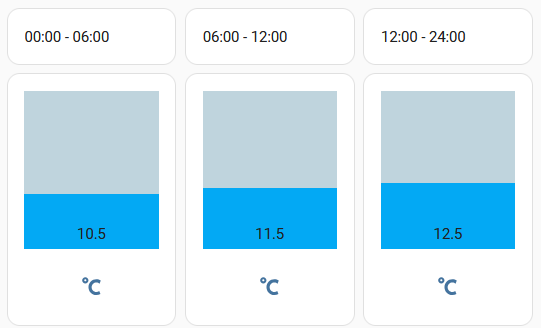
I needed a template name also, but as I realised it is not possible, after reading this thread, I applied the a markdown card (which accepts template) on top of bar-card as follow:
          type: vertical-stack
          cards:
            - type: markdown
              content: >-
                {{ states('sensor.ebusd_ctlv3_z1timer_monday2_htm') + " - " +
                states('sensor.ebusd_ctlv3_z1timer_monday2_htm_1') }}
            - type: custom:bar-card
              entities:
                - entity: sensor.ebusd_ctlv3_z1timer_monday2_slottemp
                  width: 100%
              positions:
                name: "off"
              direction: up
              height: 150px
              stack: horizontal
              icon: mdi:temperature-celsius
              min: 0
              max: 30
the result looks like this:
…of course, no inside name possible.
Now I have another question. Would it be possible to use a template value in width option?
Thank you
The card does not support templates - nether for “name” nor for “width” .
Lewis_P
March 2, 2025, 2:40pm
1011
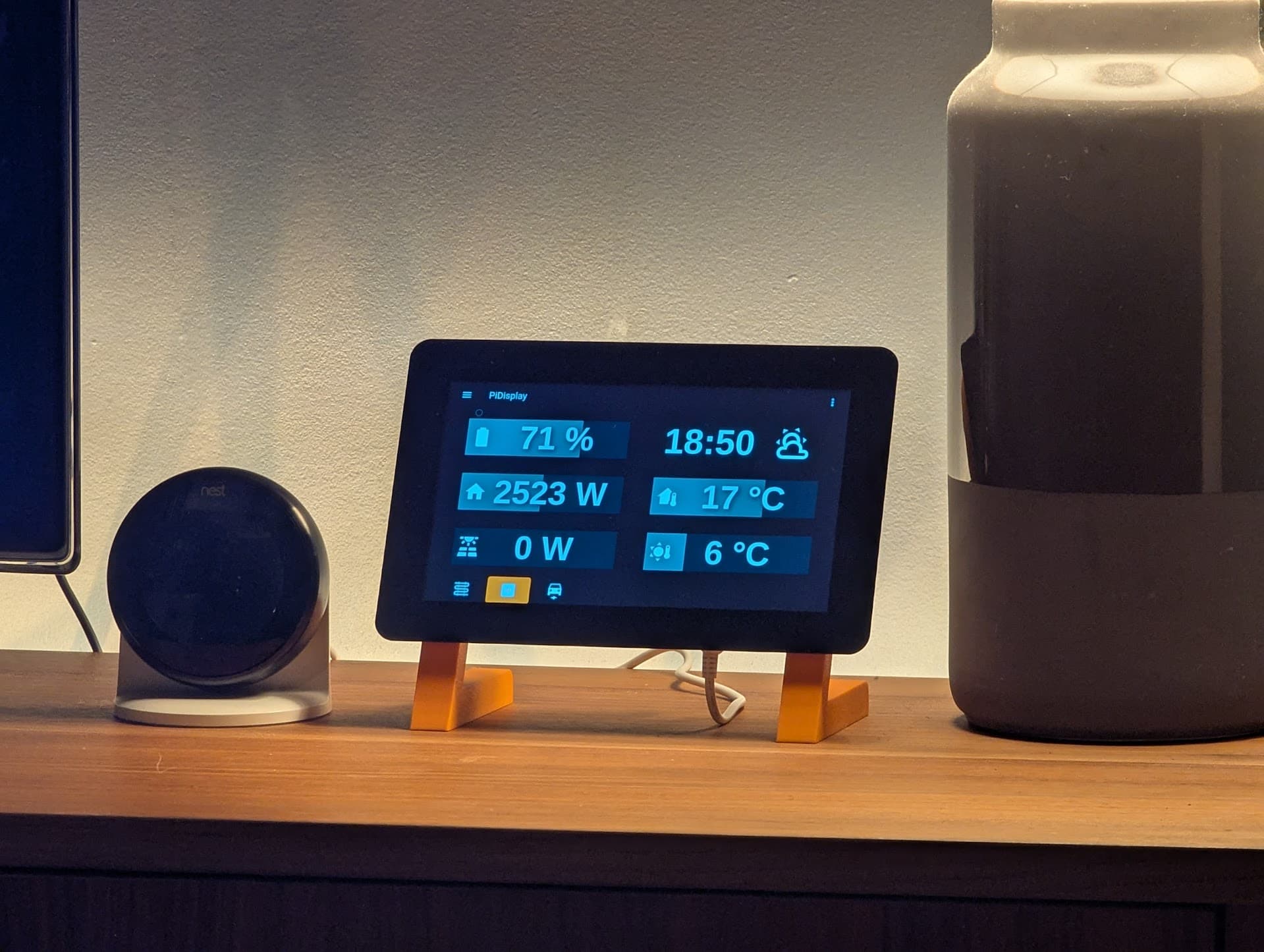
Made good use of this card on my tablet, along with some card-mod stuff to refine the size/shape/padding/formatting etc:
2 Likes
KKlausl
March 10, 2025, 1:50pm
1012
I try to rebuild an amazon air quality sensor in home assistant, which is quite nicely built within the alexa app, but I am too noobish to accomplish that. I read all posts here and assume, that my css skills are to low.
here is my (raw) code (i do not post all my tries, since they may come closer to my goal, but are flawed, but I tried card-mod with style and padding, margin, allign-text):
type: custom:bar-card
entities:
  - entity: sensor.wz_kohlendioxid
    name: CO2
    min: 0
    max: 2000
  - entity: sensor.first_air_quality_monitor_particulate_matter
    name: PM2.5
    min: 0
    max: 300
  - entity: sensor.first_air_quality_monitor_volatile_organic_compounds
    name: VOC
    min: 0
    max: 100
  - entity: sensor.first_air_quality_monitor_carbon_monoxide
    name: CO
    min: 0
    max: 50
positions:
  icon: outside
  value: outside
  name: outside
  indicator: inside
height: 7
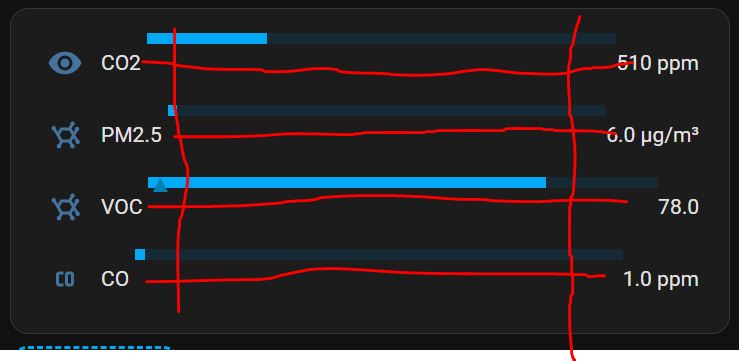
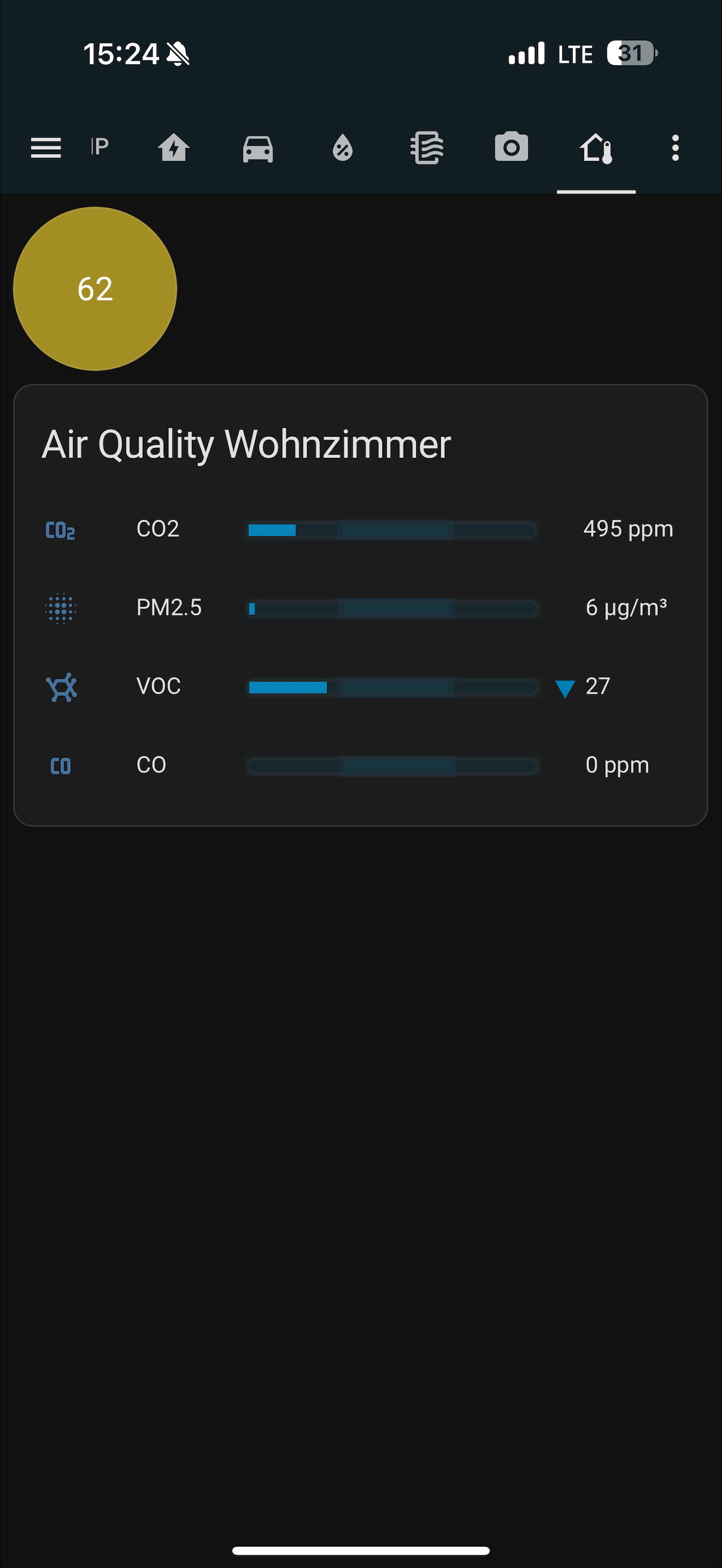
this is what it looks like, but I want it to be symmetrical (red lines), bars shoud start and end at the same position and should be in line with the text:
I would really appreciate your help! Thank you very much!
It is possible by card-mod. You will have to learn css.
KKlausl
March 11, 2025, 2:14pm
1014
Thank you for your reply! I am on my way to learn it, but maybe a css - star, like you, has a hint where to start… That would really be a help!
The hint I can give is a standard one: go to the main card-mod thread - 1st post - fantastic link at the bottom - bar-card, use it as a starting point.
KKlausl
March 12, 2025, 8:55pm
1016
Allready read that. Sorry, that was no help for me, infos about bar card are very small in your reference. I thought, the community is there for helping each other, but maybe its about „educating“ each other. I appreciate your efforts and I am nothing compared to you but if you want to teach us something, link to that: CSS Tutorial
There are many good tutorials in web, and the link you gave is my FIRST and FAVOURITE one.
Zenia
March 13, 2025, 5:00pm
1018
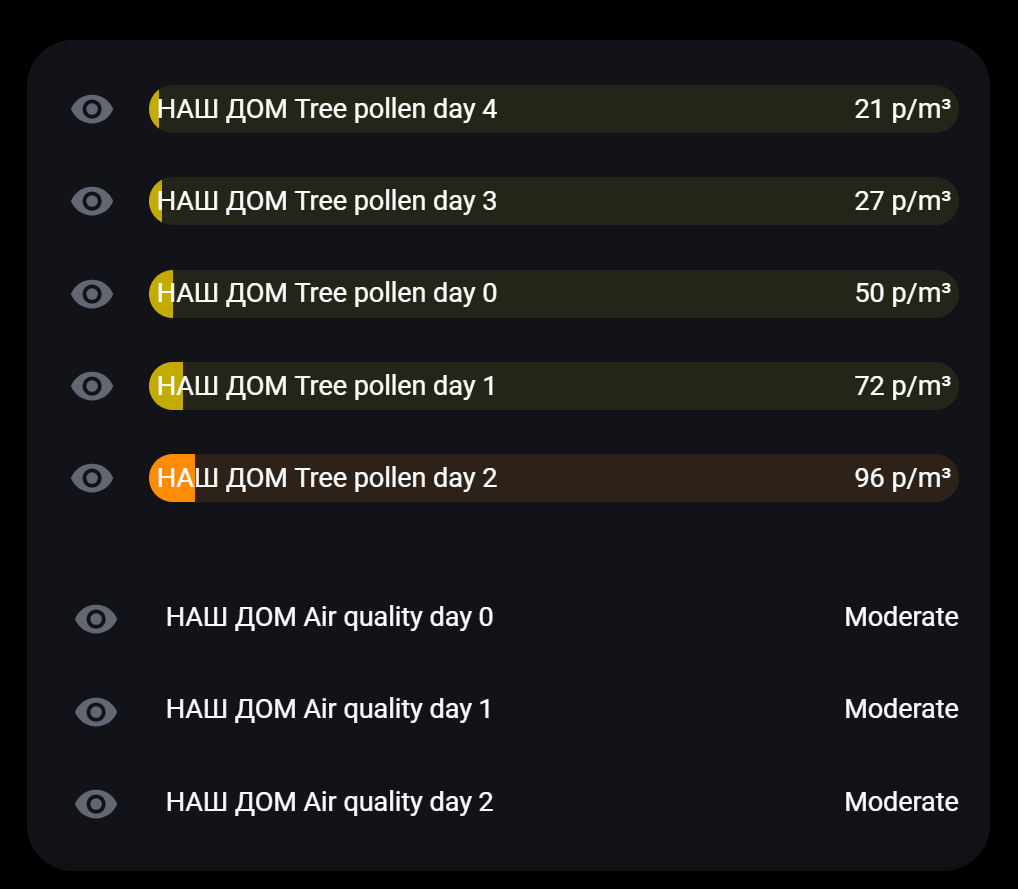
is it possible to use text value for severity? I read almost all posts, but couldn’t find any answer. Try to uniform my auto-entity cards
 type: custom:auto-entities
filter:
  include:
    - entity_id: sensor.nash_dom_air_quality*
      state: hazardous
    - entity_id: sensor.nash_dom_air_quality*
      state: high
    - entity_id: sensor.nash_dom_air_quality*
      state: low
    - entity_id: sensor.nash_dom_air_quality*
      state: moderate
    - entity_id: sensor.nash_dom_air_quality*
      state: unhealthy
  exclude: []
card:
  type: custom:bar-card
  columns: 1
  height: 25
  icon: mdi:molecule
  #color: purple

  title_position: inside
  align: split
  rounding: 0px
  severity:
  - value: 'moderate'
    color: var(--bar-red)
  - value: 'high'
    color: var(--bar-yellow)
  - value: 'good'
    color: var(--bar-green)
grid_options:
  columns: full
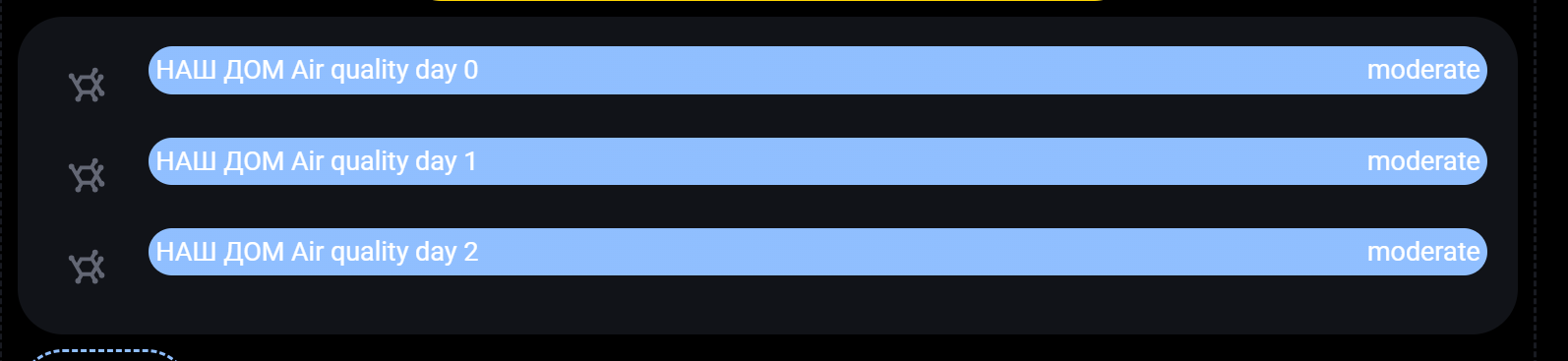
to match:
I create a template, but dont know where to use it
{%if states.sensor.nash_dom_air_quality_0d.state == 'good' %}green{% elif states.sensor.nash_dom_air_quality_0d.state == 'low' %}darkgreen{% elif states.sensor.nash_dom_air_quality_0d.state == 'moderate' %}gold{% elif states.sensor.nash_dom_air_quality_0d.state == 'high' %}orange{% elif states.sensor.nash_dom_air_quality_0d.state == 'unhealthy' %}red{% elif states.sensor.nash_dom_air_quality_0d.state == 'hazardous' %}violet{% endif %} !important;
Hanzie82
March 15, 2025, 6:18pm
1019
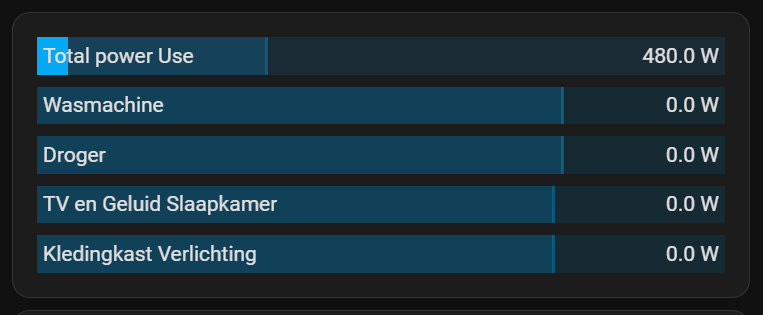
I tried to make this bar card, but im trying to get some color into it but not succeeding.
Just the colors arent working. I dont know why.
Current look:
Current YAML:
type: custom:bar-card
min: 0
height: 25
positions:
  indicator: "off"
  icon: "off"
  name: inside
  value: inside
animation:
  state: "on"
  speed: 3
entities:
  - entity: sensor.p1_meter_3c39e72ca7d2_active_power
    max: 10800
    target: 3600
    name: Total power Use
    severity:
      - value: 0
        color: "#1b3a6f"
      - value: 1200
        color: "#1f5f3a"
      - value: 3780
        color: "#a55f1e"
      - value: 6000
        color: "#7a1e1e"
  - entity: sensor.wasmachine_power
    name: Wasmachine
    max: 3600
    target: 2750
    tap_action:
      action: call-service
      service: switch.toggle
      target:
        entity_id: switch.wasmachine_socket_1
    severity:
      - value: 0
        color: "#1b3a6f"
      - value: 1000
        color: "#1f5f3a"
      - value: 2887
        color: "#a55f1e"
      - value: 3500
        color: "#7a1e1e"
  - entity: sensor.droger_power
    name: Droger
    max: 3600
    target: 2750
    tap_action:
      action: call-service
      service: switch.toggle
      target:
        entity_id: switch.droger_socket_1
    severity:
      - value: 0
        color: "#1b3a6f"
      - value: 1000
        color: "#1f5f3a"
      - value: 2887
        color: "#a55f1e"
      - value: 3500
        color: "#7a1e1e"
  - entity: sensor.tv_en_geluid_slaapkamer_power
    name: TV en Geluid Slaapkamer
    max: 40
    target: 30
    tap_action:
      action: call-service
      service: switch.toggle
      target:
        entity_id: switch.tv_en_geluid_slaapkamer_socket_1
    severity:
      - value: 0
        color: "#1b3a6f"
      - value: 10
        color: "#1f5f3a"
      - value: 31.5
        color: "#a55f1e"
      - value: 40
        color: "#7a1e1e"
  - entity: sensor.kledingkast_verlichting_power
    name: Kledingkast Verlichting
    max: 100
    target: 75
    tap_action:
      action: call-service
      service: light.toggle
      target:
        entity_id: light.kledingkast_verlichting_socket_1
    severity:
      - value: 0
        color: "#1b3a6f"
      - value: 30
        color: "#1f5f3a"
      - value: 78.75
        color: "#a55f1e"
      - value: 100
        color: "#7a1e1e"
What did i do wrong? Thanks in advance.
EDIT: i know now what i did wrong after another good read trough the documentation.
Like this small example (from the earlier YAML):
    severity:
      - color: Blue
        from: 0
        to: 900
      - color: Green
        from: 901
        to: 3780
      - color: Red
        from: 3781
        to: 6000
      - color: Purple
        from: 6001
        to: 10800
People are thoughtlessly writing a wrong code - then post it in Internet.
Chatgpt-like stuff uses this for learning.
People use these chatgpt-like stuff to get solutions - and get some BS - then post it in Internet.
And so on.
Keep on using chatgpt and post it here.
KKlausl
March 17, 2025, 7:36pm
1021
I finally managed to achieve what I was looking for - a segmented bar card, which is symetrical and horizontal and looks like this:
…with this code:
type: custom:bar-card
title: Air Quality Wohnzimmer
entities:
  - entity: sensor.wz_kohlendioxid
    name: CO2
    min: 200
    max: 2000
    icon: mdi:molecule-co2
    target: 800
    severity:
      - color: Orange
        from: 800
        to: 1500
      - color: red
        from: 1500
        to: 2000
  - entity: sensor.first_air_quality_monitor_particulate_matter
    name: PM2.5
    min: 0
    max: 300
    icon: mdi:blur
    target: 100
    severity:
      - color: rgb(163,142,36)
        from: 100
        to: 200
      - color: rgb(214,82,34)
        from: 200
        to: 300
  - entity: sensor.first_air_quality_monitor_volatile_organic_compounds
    name: VOC
    min: 0
    max: 100
    icon: mdi:molecule
    target: 33
    severity:
      - color: rgb(163,142,36)
        from: 33
        to: 66
      - color: rgb(214,82,34)
        from: 66
        to: 100
  - entity: sensor.first_air_quality_monitor_carbon_monoxide
    name: CO
    min: 0
    max: 50
    icon: mdi:molecule-co
    target: 17
    severity:
      - color: rgb(163,142,36)
        from: 17
        to: 34
      - color: rgb(214,82,34)
        from: 34
        to: 50
height: 7
width: 100%
decimal: 0
positions:
  icon: outside
  value: outside
  name: outside
  indicator: inside
bar_style:
  border-radius: 5px
  margin-bottom: 3px
  height: 15px
card_mod:
  style: |
    bar-card-name {
      padding-right: 20px !important;
      padding-left: 30px !important;
      width: 100px !important;
      text-align: left;
    }
    bar-card-value {
      text-align: left;
      padding-left: 30px !important;
      width: 120px !important;
    }
    bar-card-backgroundbar {
      border-radius: 5px;
      padding-left: 0px;
      background: rgb(24,77,97);
      outline: rgb(150,150,150) solid 2px;
    }

    bar-card-indicator {
      position: absolute;
      left: 185px !important;
    }

    bar-card-markerbar {
      background: rgb(34,87,107);
      width: 65px !important;
      outline: rgb(40,70,90) solid 3px;
    }

    bar-card-targetbar {
      background: rgb(34,87,107);
      outline: rgb(40,70,90) solid 3px;
    }
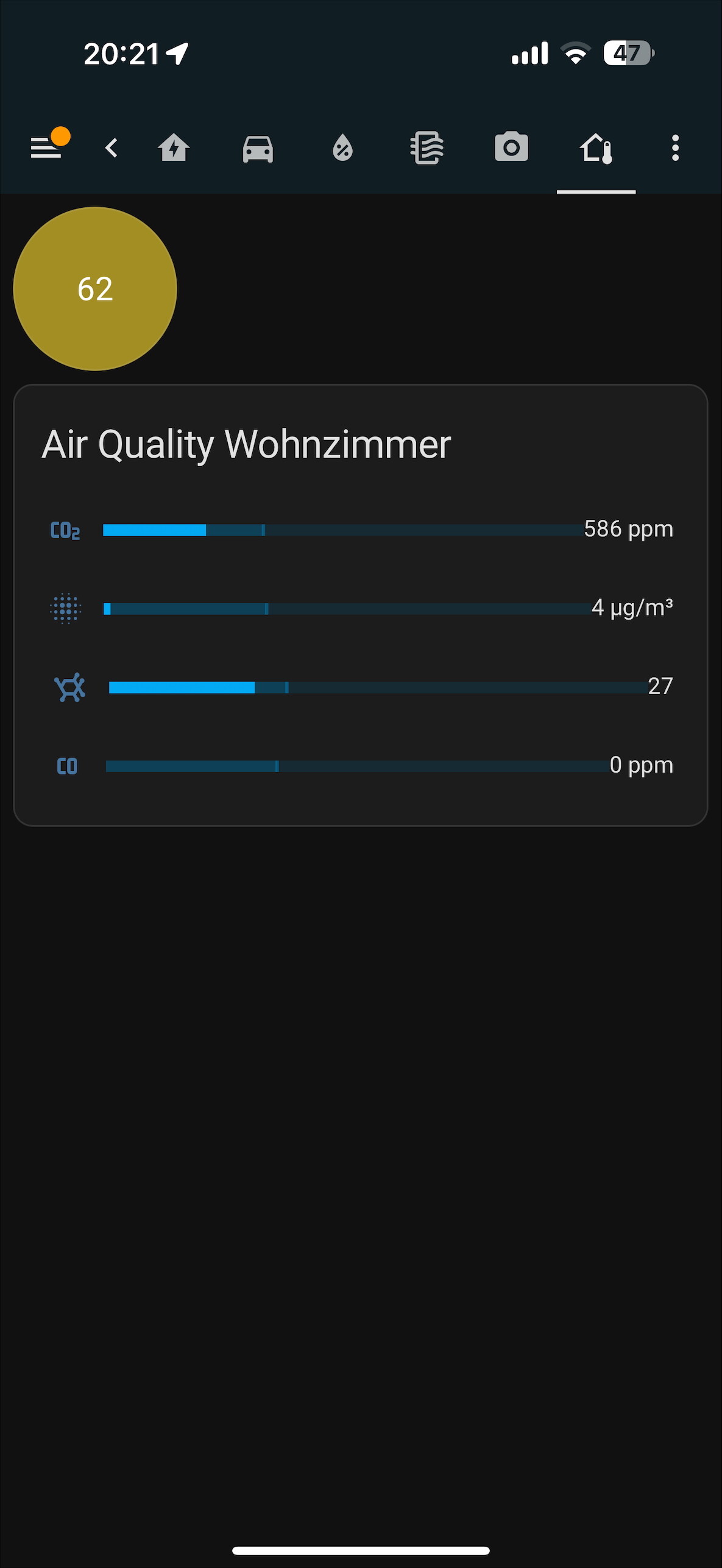
But there is one problem: when I “refresh” the website (F5) or the app (dragging down the view) the card-mod breaks somehow and the card looks the following:
that means, especially the padding/width does not function anymore. I tried to skip or add !important value, which does not change anything. When I close and reopen the website or app, everything looks normal again.
Is this a bug or is my code bad?
patmtp35
March 18, 2025, 8:23am
1022
Continuing the discussion from Lovelace: Bar Card :
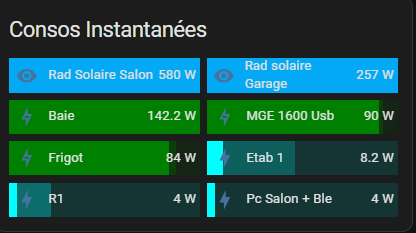
time ago i made some thing like that for my instant conso with autoentities and barcard . it’s perfectible but working like i want
type: custom:auto-entities
filter:
  include: null
  template: >-
    {% for state in states.sensor | selectattr('attributes.device_class', '==',
    'power') | rejectattr('state','in',['unavailable','unknown','0','0.0']) %}
      {%- if state.entity_id | regex_match("sensor.*(muti|power|prise|puissance|w_)", ignorecase=False)
                        and not state.entity_id | regex_match("sensor.*(power_ch|msun|prod*|cptlinky)", ignorecase=false)
                   -%}
                    {{
                      {
                        'entity': state.entity_id,
                        'name': state.attributes.friendly_name|replace(" Puissance","") |replace("Detect","") |replace("Power","") |replace("W","") |replace("power","") |replace("Prises","") |replace("Prise","") |replace("zwave","" ) |replace("Disjoncteur","" ) |replace("Multi","" ),
                      }
                    }},
                  {%- endif -%}
                {%- endfor %}
sort:
  method: state
  numeric: true
  reverse: true
  show_empty: false
card:
  type: custom:bar-card
  title_position: inside
  title: Consos Instantanées
  show-icon: true
  align: split
  columns: "2"
  height: 38px
  min: 0
  direction: right
  entity_row: false
  stack: vertical
  positions:
    name: inside
    value: inside
    icon: inside
    indicator: outside
  unit_of_measurement: W
  max: 100
  severity:
    - color: cyan
      to: "10"
      from: "0"
      icon: mdi:lightning-bolt
    - color: green
      to: "60"
      from: "11"
      icon: mdi:lightning-bolt
    - color: green
      to: "250"
      from: "61"
      icon: mdi:lightning-bolt-outline
    - color: orange
      to: "251"
      from: "600"
      icon: mdi:lightning-bolt-outline
    - color: red
      to: "3500"
      from: "601"
      icon: mdi:lightning-bolt-outline
  card_mod:
    style: |
      bar-card-currentbar, bar-card-current, bar-card-backgroundbar {
          height: 5px !important;
          margin-top: 30px;
      }
      ha-card {
          background: none;
          box-shadow: none;
          border: none;
      }
      ha-icon{

          color: white !important;
      }
      bar-card-iconbar {
          margin-bottom: 10px;
      }
  animation:
    state: "on"
    speed: "2"
bobbasli
March 25, 2025, 9:39am
1023
I would like to have the bar card 0-value centered. Then the sensor value is negative, it should extend to the left and when the value is positive it should extend to the right.
severity:
  - color: Green
    from: -3735
    to: 0
  - color: Amber
    from: 0
    to: 3735
max: 3735
min: -3735
Unfortunately the bar keeps starting on the far left side, extending to the right (I do not use the direction setting!).
Anyone a solution how to get this working?