Lovelace: Bar Card

yeah :wink: that is the UI … I hate that

fwiw, I just dropped in your complete code, and the card ‘works’ alright, and I dont get any errors…
I would add a scroll modification because currently the card is endless…

(wait, I see you do use

        .card-content {
          max-height: 450px;
          overflow-y: scroll;
        }

which should make it scroll as long as you use card-mod 3.4.x)
I use the 3.5.0 version and that doesn’t work inside auto-entities…)

1 Like

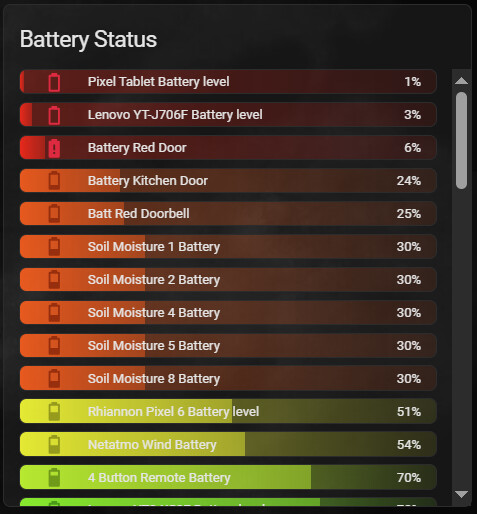
I did have the scroll working on the card today. As you can see in the screen shots. The errors don’t always show immediately. I am interested if they will start to show?

I do use 3.4

Do you have any unknown or unavailable battery sensors?

keep that!

yes:

if you want you can exclude those though in the auto-entities config

I prefer them in the list so I can see what has gone dead. Did you end up with any warnings in your log running my code over time?

nope, all good

Btw what was the essential change you made to my original card?

1 Like

I think I may have cracked it finally… well nearly.

CHANGES

  • Labelled all of my battery entities I want the card to use including unknown and unavailable sensors. (indicating they are completely out of battery)
  • Added a raw state check to check for unavailable or unknown and convert those values to zero.
                - label: battery
                  options:
                    card_mod:
                      style: |
                        hui-generic-entity-row {
                          background:
                            {% set raw_state = states(config.entity) %}
                            {% if raw_state not in ['unknown', 'unavailable'] %}
                              {% set perc = raw_state | float %}
                            {% else %}
                              {% set perc = 0 %}
                            {% endif %}
                            {% set rest = 100 - perc %}

FULL CARD CODE

- type: custom:auto-entities
            card:
              type: entities
              title: Battery Status
              card_mod:
                class: class-header-margin
                style:
                  hui-sensor-entity-row:
                    $: |
                      hui-generic-entity-row {
                        height: 25px;
                        padding: 0px 16px;
                        border-radius: var(--ha-card-border-radius);
                        border: 1px groove var(--divider-color);
                      }
                  .: |
                    ha-card {
                      color: var(--secondary-color);
                      font-weight: 400;
                    }
                    .card-content {
                      max-height: 450px;
                      overflow-y: scroll;
                    }
              state_color: false
              show_header_toggle: false
            filter:
              include:
                - label: battery
                  options:
                    card_mod:
                      style: |
                        hui-generic-entity-row {
                          background:
                            {% set raw_state = states(config.entity) %}
                            {% if raw_state not in ['unknown', 'unavailable'] %}
                              {% set perc = raw_state | float %}
                            {% else %}
                              {% set perc = 0 %}
                            {% endif %}
                            {% set rest = 100 - perc %}
                            
                            {% if perc <= 10 %}
                              {% set bar = '255,0,0' %}
                            {% elif perc <= 20 %}
                              {% set bar = '255,51,0' %}
                            {% elif perc <= 30 %}
                              {% set bar = '255,85,0' %}
                            {% elif perc <= 40 %}
                              {% set bar = '255,153,0' %}
                            {% elif perc <= 50 %}
                              {% set bar = '255,204,0' %}
                            {% elif perc <= 60 %}
                              {% set bar = '255,255,0' %}
                            {% elif perc <= 70 %}
                              {% set bar = '204,255,0' %}
                            {% elif perc <= 80 %}
                              {% set bar = '153,255,0' %}
                            {% elif perc <= 90 %}
                              {% set bar = '102,255,0' %}
                            {% else %}
                              {% set bar = '51,255,0' %}
                            {% endif %}
                            linear-gradient(to right, rgb({{bar}},0.9) 0%, rgb({{bar}},0.6) {{perc}}%, rgba({{bar}},0.3){{perc}}%, rgba({{bar}},0.1) 100%);
                        }
                        :host {
                          --card-mod-icon-color:
                            {% set raw_state = states(config.entity) %}
                            {% if raw_state not in ['unknown', 'unavailable'] %}
                              {% set perc = raw_state | float %}
                            {% else %}
                              {% set perc = 0 %}
                            {% endif %}
                            
                            {% if perc <= 10 %}
                              rgb(225, 20, 60);
                            {% elif perc <= 20 %}
                              rgb(153, 38, 0);
                            {% elif perc <= 30 %}
                              rgb(153, 38, 0);
                            {% elif perc <= 40 %}
                              rgb(153, 115, 0);
                            {% elif perc <= 50 %}
                              rgb(153, 153, 0);
                            {% elif perc <= 60 %}
                              rgb(153, 153, 0);
                            {% elif perc <= 70 %}
                              rgb(115, 153, 0);
                            {% elif perc <= 80 %}
                              rgb(77, 153, 0);
                            {% elif perc <= 90 %}
                              rgb(38, 153, 0);
                            {% else %}
                              rgb(0, 153, 0);
                            {% endif %}
                          }
            sort:
              method: state
              numeric: true
              reverse: false
            show_empty: false

Only one minor error in logs that is not spamming out of control

Logger: frontend.js.modern.202505314
Source: components/system_log/__init__.py:331
First occurred: 15:51:53 (4 occurrences)
Last logged: 15:59:35

Uncaught error from Chrome 137.0.0.0 on Windows 10 TypeError: Cannot read properties of undefined (reading 'includes') getValueFromEntityId (src/panels/lovelace/common/validate-condition.ts:97:26) conditions.every( (src/panels/lovelace/common/validate-condition.ts:181:17) conditions (src/panels/lovelace/common/validate-condition.ts:167:20) checkOrCondition (src/panels/lovelace/common/validate-condition.ts:154:42) checkOrCondition (src/panels/lovelace/common/validate-condition.ts:154:30) conditions.every( (src/panels/lovelace/common/validate-condition.ts:179:34) conditions (src/panels/lovelace/common/validate-condition.ts:167:20)

CARD

2 Likes

You can use has_value for that state check

Also the error you get , are you sure it’s form this card?

Includes is not in your config so makes me wonder .

This would not trigger that error?

filter:
  include:

It may be coming from another, I did download battery-state-card that might use includes?

I deleted both the below cards, the error is still coming up.
How would I insert ‘has_value’ into it instead of the unknown, unavailable statement?

Custom: battery-state-card

          - type: custom:battery-state-card
            collapse: 5
            colors:
              steps:
                - '#ff0000'
                - '#ffff00'
                - '#00ff00'
              gradient: true
            filter:
              include:
                - name: attributes.device_class
                  value: battery
              exclude:
                - name: state
                  value: Unavailable
                - name: state
                  value: Unknown
                - name: state
                  value: 'Off'
            sort:
              by: state
              desc: false

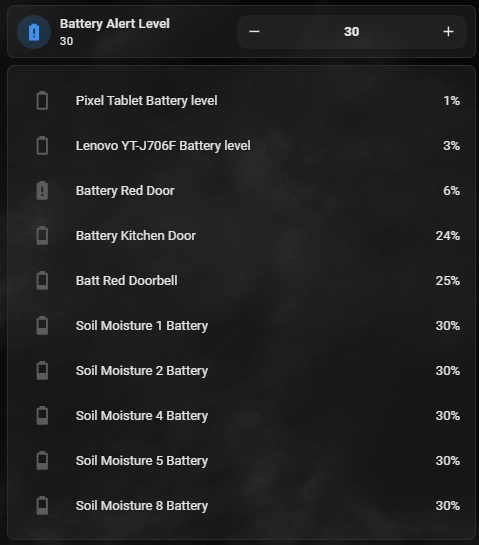
Other auto entities card, that uses an input number to change the content of the card

         - type: custom:mushroom-number-card
            entity: input_number.battery_alert_level
            layout: horizontal
            display_mode: buttons
          - type: custom:auto-entities
            filter:
              template: |
                {% for entity in states %}
                  {% if entity.attributes.device_class == 'battery'
                        and entity.attributes.unit_of_measurement == '%'
                        and entity.state not in ['unknown', 'unavailable'] %}
                    {% set battery_level = entity.state | float %}
                    {% set threshold = states('input_number.battery_alert_level') | float %}
                    {% if battery_level <= threshold %}
                      {{ entity.entity_id }},
                    {% endif %}
                  {% endif %}
                {% endfor %}
            options: null
            show_empty: false
            card:
              type: entities
            sort:
              method: state
              numeric: true
1 Like

Couldn’t tell.
You have to find a minimal config that still has the issue and be sure it is that specific card (eg on an empty view with just 1 card)

If that would persist, and it is not pebkac, then raise an issue

2 Likes

Hi Mike,

great support and explanation how to improve the card .

But weird things have happened meanwhile or should I say the weird things before have been reversed:

For whatever reason the card_mod: lines are now still there if I want to edit the card - they are no longer being deleted.

I have no clue what had caused the issue.

I can also not say what has made this to happen unless it happened this morning while working with chatgpt on the topic of “dynamic title” for the bar which is showing the 100% value of the sensor - in this case the production of the best PV string on the roof.

It took quite a while cause first chatgpt suggestions did not work at all and code was not really homeassistant related. Just pure phantasy adding a sensor into the title: line.

I am using lmarena.ai where I get 2 answers from 2 models and in this case the 2nd answer was the best by explaining that a real dynamic title is not possible with a usual bar card but with a vertical stack of a markdown card for the headline or title and then the well known bar card.

Step by step chatgpt found a way to increased fontsize and thickness / bold . Also background and then remove the rounded corners.

But finally I was able to fix and understand more of your code and help myself cause I had removed the separator blank sensor at one point and the line had vanished when I did not realize it and had to search for it.

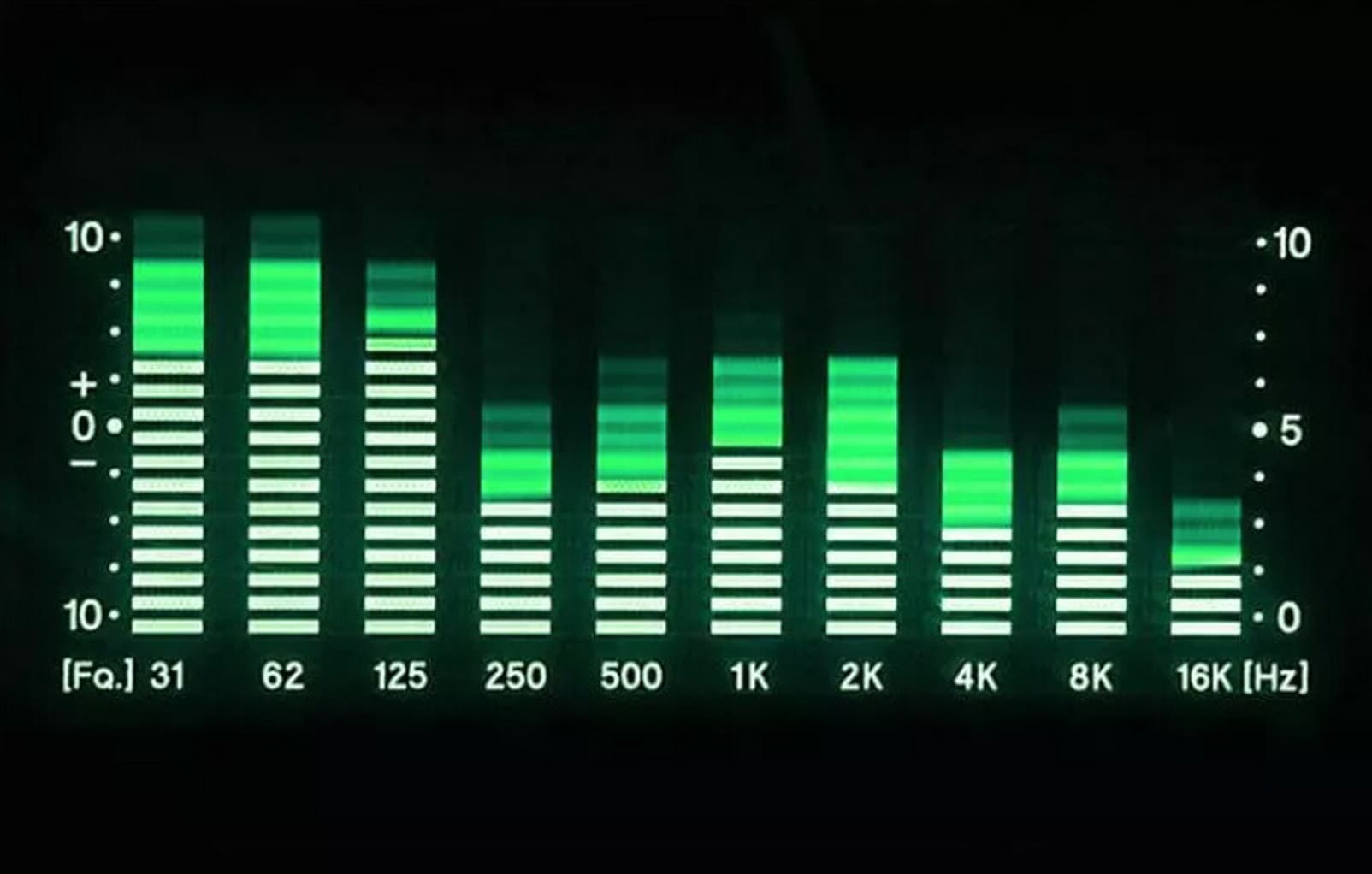
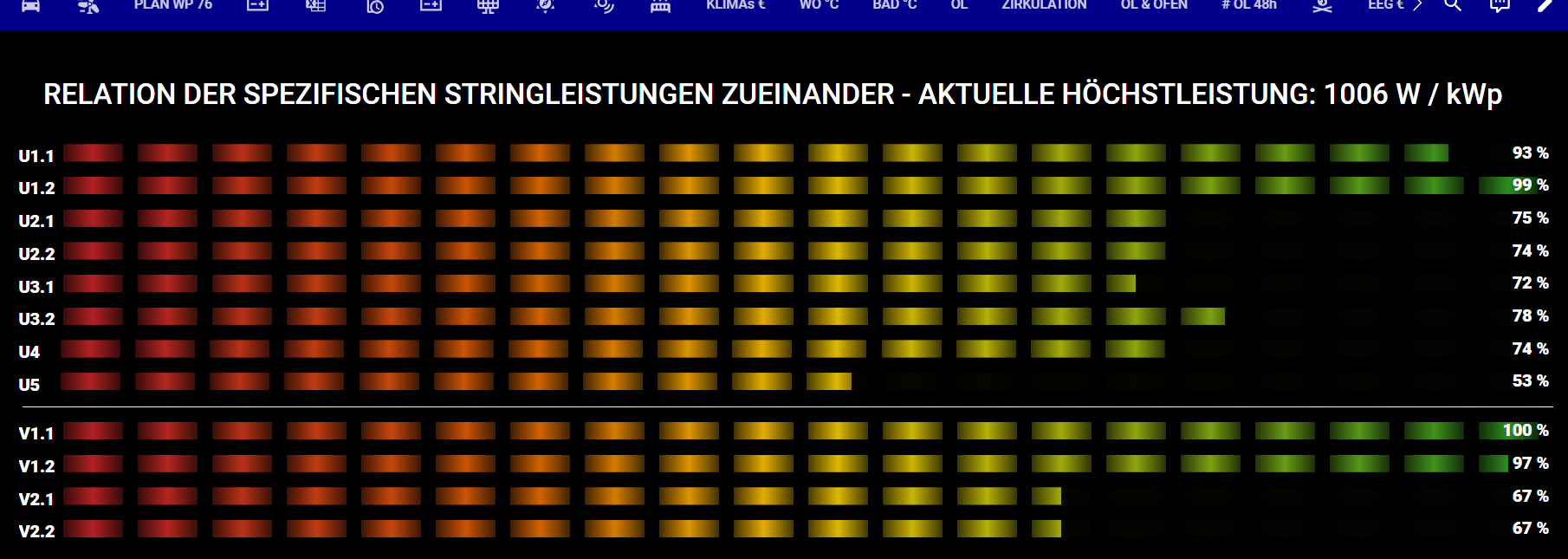
Here is the final resuult and I am happy with that, hence time to share the code for the 80s and 90s equalizer LED style bar I was looking for inspired by this:

and my card looks like this

with this code thanks to your constant support - really appreciated and I also learned a lot to play around and look into the lines you had provided or asked chatgpt what which parameter would mean.

THANKS A LOT

type: vertical-stack
cards:
  - type: markdown
    content: |
      <div style="text-align: left;"><br>
        RELATION DER SPEZIFISCHEN STRINGLEISTUNGEN ZUEINANDER - AKTUELLE HÖCHSTLEISTUNG: {{ states('sensor.pv_beste_leistung_eines_string_w_je_kwp') | default(0) }} W / kWp
      </div>
    card_mod:
      style: |
        ha-card {
          color: white; 
          box-shadow: none; 
          margin: -1em 0 -0.5em 0; 
          padding: 0 1em; 
          background-color: black; 
          font-size: 2.1em; 
          font-weight: 500; 
          border-radius: 0px; 
        }
  - type: custom:bar-card
    columns: 1
    decimal: 0
    positions:
      icon: "off"
      name: outside
      minmax: "off"
      indicator: "off"
    direction: right
    height: 18px
    entities:
      - entity: sensor.u1_1_leistung_kwp_relation
        name: "U1.1\_"
      - entity: sensor.u1_2_leistung_kwp_relation
        name: "U1.2\_"
      - entity: sensor.u2_1_leistung_kwp_relation
        name: "U2.1\_"
      - entity: sensor.u2_2_leistung_kwp_relation
        name: "U2.2\_"
      - entity: sensor.u3_1_leistung_kwp_relation
        name: "U3.1\_"
      - entity: sensor.u3_2_leistung_kwp_relation
        name: "U3.2\_"
      - entity: sensor.u4_leistung_kwp_relation
        name: "U4\_\_\_\_"
      - entity: sensor.u5_leistung_kwp_relation
        name: "U5\_\_\_\_"
      - entity: sensor.blank
        name: " "
      - entity: sensor.v1_1_leistung_kwp_relation
        name: "V1.1\_"
      - entity: sensor.v1_2_leistung_kwp_relation
        name: "V1.2\_"
      - entity: sensor.v2_1_leistung_kwp_relation
        name: "V2.1\_"
      - entity: sensor.v2_2_leistung_kwp_relation
        name: "V2.2\_"
    card_mod:
      style: >
        ha-card {
          background: black !important;  /* white = heller / black = dunkler Hintergrund */
          color: #FFFFFF;                /* #222222 = dunkle Schriftfarbe fĂźr guten Kontrast - #FFFFFF als helle Schriftfarbe*/
          --ha-card-header-color: white; /* TITLE COLOR (wird jetzt nur noch von der markdown-Karte genutzt, aber hier belassen fĂźr Konsistenz) */
          border-radius: 0px;           
        } 

        bar-card-background bar-card-backgroundbar {
          background: linear-gradient(90deg, #B22222 0%, #B22222 5%, #CF5B00 30%, #E6BB00 50%, #228B22 100%);
          mask-image: repeating-linear-gradient( 90deg,  rgba(0, 0, 0, 0.3) 0%, black 2%, rgba(0, 0, 0, 0.3) 4%, transparent 4%, transparent 5%);
          border-radius: 0px;
          filter: brightness(0.65);
          opacity: 0.05;                 /* weniger sichtbare 0 Segmente */
        } 

        bar-card-background bar-card-currentbar {
          background: linear-gradient(90deg, #B22222 0%, #B22222 5%, #CF5B00 30%, #E6BB00 50%, #228B22 100%);
          mask-image: repeating-linear-gradient( 90deg,  rgba(0, 0, 0, 0.3) 0%, black 2%, rgba(0, 0, 0, 0.3) 4%, transparent 4%, transparent 5%);
          clip-path: polygon(0 0, var(--bar-percent) 0, var(--bar-percent) 100%, 0 100%);
          border-radius: 0px;
        } 

        bar-card-value {
          margin: 20px;
          font-size: 1.25rem;
          font-weight: 800;
          color: #FFFFFF;               /* #222222 = dunkle & #FFFFFF = helle SCHRIFTFARBE */
        } 

        bar-card-name {
          margin: 20px;
          font-size: 1.25rem;
          font-weight: 800;
          color: #FFFFFF;               /* #222222 = dunkle & #FFFFFF = helle SCHRIFTFARBE */
        }

        #states > bar-card-row:nth-child(9) > bar-card-card >
        bar-card-background > bar-card-contentbar > bar-card-value {
          display: none;                /* HIDE - ENTITY 9 - ICON */
        }

        #states > bar-card-row:nth-child(9) > bar-card-card >
        bar-card-background > bar-card-contentbar > bar-card-name {
          display: none;                /* HIDE - ENTITY 9 - NAME */
        }

        #states > bar-card-row:nth-child(9) > bar-card-card > bar-card-iconbar {
          display: none;                /* HIDE - ENTITY 9 - NAME */
        }

        #states > bar-card-row:nth-child(9) > bar-card-card >
        bar-card-background {
          background-color: white;      /* CHANGE - ENTITY 9 - BACKGROUND COLOR */
          height: 1px !important;       /* CHANGE - ENTITY 9 - HEIGHT */
        }

        #states > bar-card-row:nth-child(9) {
          margin-top: 1px;           /* CHANGE - ENTITY 10 - MARGIN (AN EVEN GAP) */
        }
1 Like

Hi all,

I see all these cool rounded bars, but I cannot get my bars to appear so nicely rounded anymore… I’m quite sure it was working initially with the below code, but now the bar is ugly square… Any suggestions what could be the cause?

- type: custom:bar-card
  card_mod:
    style: |
      bar-card-currentbar, bar-card-backgroundbar {
        border-radius: 10px;
      }
  columns: 4
  decimal: 0
  height: 20
  positions:
    icon: "off"
    indicator: "off"
  entities:
    - entity: sensor.dagobert_used_percent
      name: /
  severity:
    - color: "#43a047"
      from: 0
      to: 80
    - color: "#ffa600"
      from: 80
      to: 90
    - color: "#db4437"
      from: 90
      to: 100

HACS is reporting:

Because Repository is no longer maintained, custom-cards/bar-card has been removed from HACS. Please visit the HACS Panel to remove it.

The github also mentions that the project is no longer being maintained. Anyone know of a currently maintained version?

Looks like https://github.com/spacerokk/bar-card is the most starred fork of the existing repo.

3 Likes

Use code inspector (f12 in chrome) or a similar tool in your browser to check if css properties are properly set.

Hmm, weird. Turns out I had to change this:

bar-card-currentbar, bar-card-backgroundbar {
  border-radius: 10px;
}

to this:

bar-card-background {
  bar-card-currentbar, bar-card-backgroundbar {
    border-radius: 10px;
  }
}

I’m almost certain it previously worked without the extra keys… But thanks for the tip in the right direction!

I doubt that this was the reason.

So did I, but I can reproduce it live. Here’s a video of it happening:
https://breedborst.duckstad.net/nextcloud/s/DbEsHkCYjENaTwa

Cannot check a video right now. Will try to simulate your case when will be near a Pc.

1 Like

No worries. It’s working right now, so I’m happy regardless. :slight_smile:

I’ve noticed that as well, but since it does what I want it to do, I’m going to stick with the existing version, at least until such a point when a HA upgrade breaks it, then I’ll look at switching. :slight_smile:

1 Like