source code : https://drive.google.com/file/d/1tg0yGWbnmSz2QrPJuAVQqRvKvYGz1v-U/view?usp=drive_link
install method;
-
The YAML code in the input_xxxx.yaml file is generated using the create_input_xxxx.yaml files and copied using HA’s template editor.
-
The YAML code in the utility_meter.yaml file is generated using the create_utility_meter.yaml file and copied using HA’s template editor.
-
The YAML code in the sensors’ integration (sensors.yaml) file is generated using the create_sensors_integration file and copied using HA’s template editor.
-
The lovelace view is created as a panel type, and after adding a vertical-stack card, the source code is generated using create_power_lovelace.yaml and copied using HA’s template editor.
-
Install the HA add-on AppDaemon and add the following to the Configuration options:
system_packages:- python3-dev
python_packages: - pymysql
Configure the above two packages and save. restart.
- python3-dev
-
Copy the energy_processor.yaml and energy_processor.py files to the addon_configs\xxxxxxxx_appdaemon\apps folder of HAOS (the path may be under config depending on your HA version).
-
Edit the MariaDB information in energy_processor.yaml.
 Project Summary: Advanced Energy Analysis Dashboard
1. Project Goal
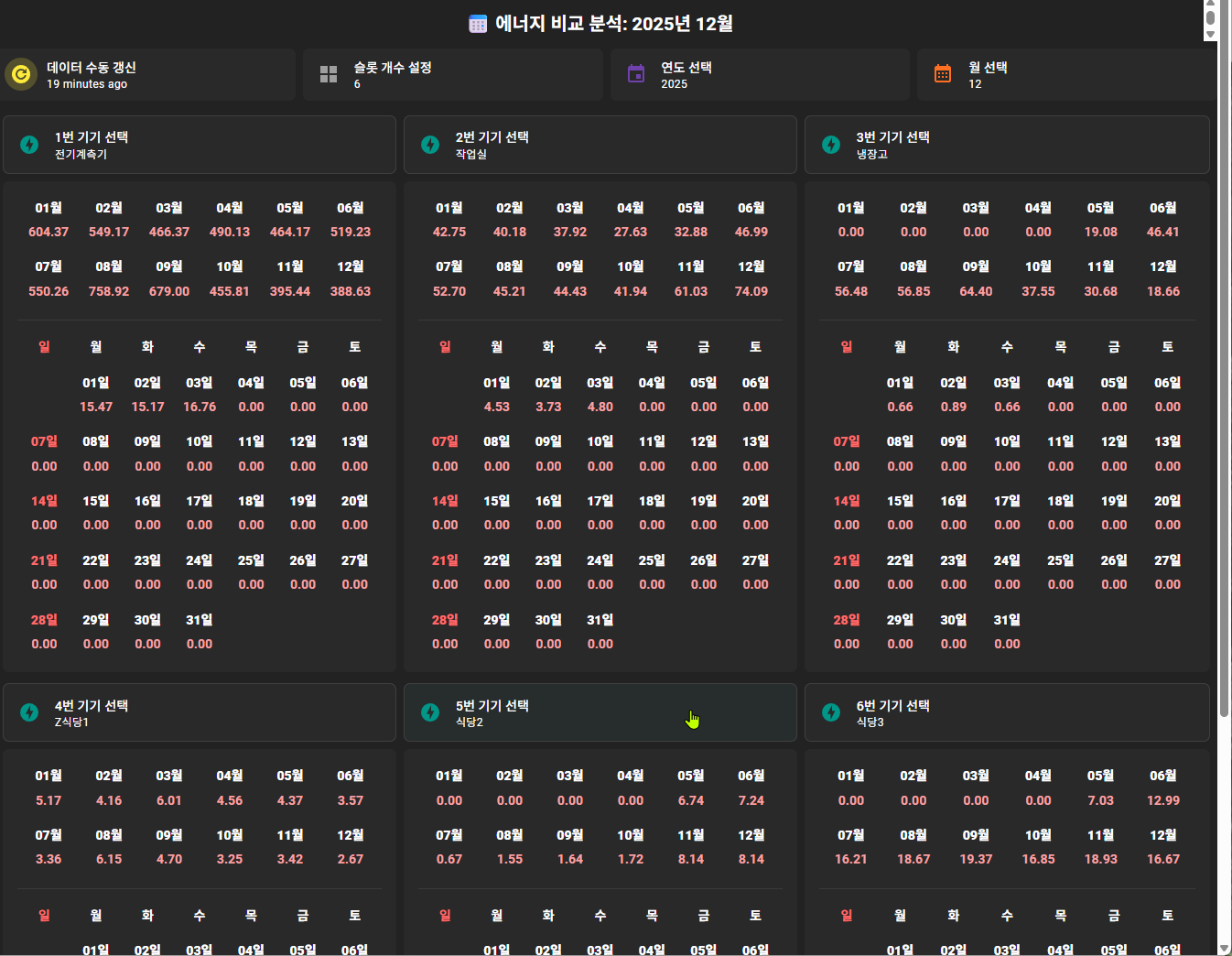
- Objective: Build a precision dashboard to analyze monthly (1-year history) and daily (1-month history) power consumption using energy sensor data stored in MariaDB.
- Key Requirements:
- Allow users to freely select the Year, Month, and Device (Slot).
- Data Preprocessing: Missing dates must be displayed as ‘0’ or empty cells to maintain the layout.
- Calendar Visualization: Display daily data in a calendar format (e.g., correct start weekday, Sundays in red, weekly line breaks).
- Dynamic Scalability: The number of device slots should be adjustable via the UI.
2. Challenges & Failed Approaches (The Struggle)
 Phase 1: SQL Sensor Integration
- Issue: Disabling polling meant no updates; enabling it caused high DB load.
- UI Flickering: The sensor frequently toggled between
Unavailableand values during updates, causing the Lovelace UI to flash. - Logic Limits: Complex logic, like filling zero values for missing dates, was nearly impossible with SQL alone.
- Phase 2: Markdown Tables
- Issue: Tables wouldn’t fill the full width (leaning left).
- Styling: Impossible to control font color, weight, or cell padding.
- Spacing: HA’s renderer ignored
and Unicode spaces, breaking the alignment.
- Phase 3: Modern CSS (Grid/Flex)
- Issue: Home Assistant’s Markdown card sanitizer stripped out most inline styles (e.g.,
width: 100%,display: grid), rendering the layout broken.
- Issue: Home Assistant’s Markdown card sanitizer stripped out most inline styles (e.g.,
3. The Final Solution (Success Strategy) 
 Key Tech 1: Backend - AppDaemon (Python) Logic and DB queries were offloaded entirely to Python.
- Dynamic Listeners: Only registers listeners for the currently active number of slots (via
input_number) to save resources. - Logic: Uses
datetimeto calculate the weekday of the 1st of the month to insert empty padding cells, creating a true calendar layout. - Storage: The generated HTML string is stored in the attributes of an
input_textentity to bypass the 255-character state limit.
Key Tech 2: Frontend - Legacy HTML4 Tags Instead of modern CSS, I used Classic HTML4 tags to bypass the HA style sanitizer.
- Layout: Used
<table width="100%">,cellpadding="0",cellspacing="0".- Controlled margins using the
heightof empty<tr>rows instead of CSS padding. - Used a single monolithic table structure to eliminate external margins.
- Controlled margins using the
- Styling:
<font color="...">: For coloring power usage (Pink), Sundays (Red), and dividers (Cyan).<b>: For bold text.align="center"&<th width="XX%">: To force equal column distribution.bgcolor: Used for creating 1px divider lines without<hr>margins.
Key Tech 3: UI - Lovelace (Jinja2 Templates)
- Dynamic Generation: Used Jinja2 loops to automatically generate card YAML based on the slot count.
- Live Updates: Tile card names and Markdown titles utilize
{{ states() }}templates to reflect changes (Year/Month/Slot count) in real-time. - Manual Refresh: Added an
input_buttonas a bridge to trigger an on-demand data refresh via AppDaemon.
4. Final System Flow
- User Action: Selects Year/Month or clicks “Refresh”.
- AppDaemon: Detects change → Queries MariaDB → Processes Data (Calendar Logic).
- HTML Generation: Python constructs a raw HTML string using legacy tags (
<table>,<font>, etc.). - State Update: Saves the HTML string into
input_text.slot_Xattributes. - Lovelace: The Markdown card renders the attribute value as a perfect HTML table.
5. Key Results
- Perfect Calendar View: Starts on the correct weekday; Sundays are highlighted.
- Compact Design: Zero unnecessary margins; clean 1px divider lines.
- Scalability: Changing the slot count (e.g., 4 → 6) instantly reflects in the backend logic.
- Stability: DB polling is disabled. Updates are event-driven, eliminating system load and UI flickering.