šŸ”¹ Lovelace_gen - Add abilities to ui_lovelace.yaml

I’m fairly sure it’s tojson, to_json is what HA built into jinja where tojson is what’s built into jinja.

https://jinja.palletsprojects.com/en/stable/templates/#jinja-filters.tojson

That’s what you have to use.

tojson didn’t originally exist in jinja, so HA added to_json

Well that’s pretty confusing (to me at least! Or are you saying that the HA to-json is now obsolete because jinja does it natively, with tojson?)

But… it still isn’t solving it.
Interestingly VS Code still doesn’t like it but the dashboard will display correctly.

image

But no tap actions work.

well, it’s not obsolete, there’s just 2 functions that do the same thing. But that function (to_json) only exists in HA, it does not exist in lovelace_gen.

VSCode will never like anything in lovelace_gen.

Any other ideas how to make the tap action work?
Or should I give up?

TBH I’ve only really had that in the yaml for ESP Home :man_shrugging:

usually what I do…

{% if tap_action is defined %}
tap_action: {{ tap_action }}
{% endif %}

Yeah, that works for the tap_action (and makes a mess of squiggles in VS Code :joy:) but I still can’t find a way to get it to default to

tap_action:
  action: toggle

if tap_action is not defined

the default tap action is toggle, so you shouldn’t have to specify it. Worse case, add an else.

{% if tap_action is defined %}
tap_action: {{ tap_action }}
{% else %}
tap_action:
  action: toggle
{% endif %}

That’s exactly what I tried.
Including leaving it off an expecting the default.

Neither worked though :man_shrugging:

I don’t see how that would fail. What card is this? Are you sure the card accepts action: toggle?

EDIT: I’m using something similar here and it definitely works.

It is a custom button card and funnily enough it is based on one you came up with a few years ago.
Less funny, I found a ridiculous typo.

:blush:

In case you don’t remember it was these, they’re still going strong for me albeit with quite a bit of hacking for various other uses. I keep thinking about moving on from them but I still like them!
(Yes, I’m just trying to deflect from my stupidity)

Another question.
:blush:

I use lovelace_gen a lot in my config but I am at a loss as to why this dashboard refuses to load because it appears to be similar to countless other examples I have.

title: Announcements Settings
path: announcements_settings
icon: mdi:microphone-message
cards:
  - type: vertical-stack
    cards:
      - !include announcements_settings_testing_card.yaml

This is announcements_settings_testing_card.yaml

# lovelace_gen

type: custom:hui-element
card_type: entities
entities:
  - entity: input_number.announcement_test_ui_sonos_kitchen_volume

but if I remove the

# lovelace_gen

everything is ok.


For completeness…
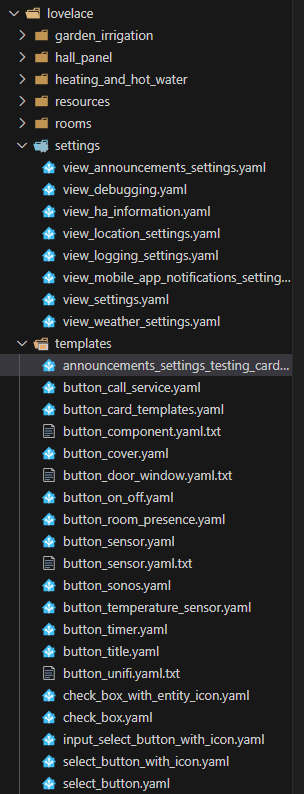
My file structure is:

lovelace (folder)
   settings (folder)
     view_settings.yaml
     announcements_settings_testing_card.yaml
ui-dashboard-settings.yaml

ui-dashboard-settings.yaml is simply a list of includes for all my views fro thet dashboard:

title: System Settings
views:
  - !include lovelace/settings/view_settings.yaml

pretty sure the include needs to be


title: Announcements Settings
path: announcements_settings
icon: mdi:microphone-message
cards:
  - type: vertical-stack
    cards:
      - !include "../settings/announcements_settings_testing_card.yaml"

No, the template and the dashboard are in the same folder.
I have the syntax form you suggest in almost every other !include in my config because usually they are not in the same folder.

The way I have it now it displays everything correctly it is just that if I add the # lovelace_gen to the first line it then refuses to load.

(Obviously, eventually I want to add some jinja, this is just to illustrate a trivial example)

I’m fairly sure lovelace_gen only works from the bottom folder up with it’s includes.

Nope, still confused…

I have moved the !include file into the same place as all my other !include templates which pretty much all all have # lovelace_gen and still have the same problem.

This loads properly without the # lovelace_gen

          - !include ../templates/announcements_settings_testing_card.yaml

But doesn’t load with it

image

Not sure what to tell ya

Well I tried everything I could think of, in the end I just moved everything I wanted to do into a script which was slightly inconvenient, but offset by being ā€˜standard’ I suppose.

Still a bit of a mystery though.

Hi all,

I can not figure this one out - would love to hear if someone spots the error…

I am using lovelace_gen (obviously) and !include a file that holds my configuration:
The config file looks like this (simplified roomconfig.yaml):

master_bedroom:
  presence: binary_sensor.presence_sensor_masterbedroom_occupancy
  temperature: sensor.h_t_master_bedroom_temperature
  humidity: sensor.h_t_master_bedroom_humidity
  ...
other_rooms:
  ...

The include and the passing of the configurations works this way (I removed lots of the noise for readability):

        cards:
        - !include 
          - view_room.yaml
          - configuration: !include roomconfig.yaml
            room: "master_bedroom"

Again, this works.

However, I have several dozens of ā€œincludesā€ and it does not seem very efficient to run an include for every room (although I understand this only happens when it is parsed the first time). I tried to do it the following way and this crashes my dashboard with ā€œUnknown errorā€.

# lovelace_gen
rooms: !include roomconfig.yaml
{% set room_data = rooms["master_bedroom"]%} # the inclusion of this line makes the lovelace crash

Why does this not work? Can I not reference the YAML dictionary via JINJA?

Any help is appreciated!

lovelace gen doesn’t pass yaml to jinja in the same file.

hi guys, can anyone advise if my jinja code on the offset_num is correct? i am trying to make conditional display by group_by or statistics based on the offset_num value but they don’t work.

# lovelace_gen

#get the integer out of {{ chart_offset }} like 1d, -10d to 1, -10 etc
{% set offset_num = chart_offset | regex_replace('\D$', '') | float %}

type: custom:apexcharts-card
header:
  show: true
  title: {{ chart_title }}
  show_states: true
  colorize_states: false
graph_span: {{ chart_span }} 
span:
  end: day
  offset: {{ chart_offset }}
apex_config:
  chart:
    width: 100%
    height: 100%
  tooltip:
    x:
      format: dd MMM
 series:
  - entity: {{ chart_entity }}
    type: column
{% if offset_num < -10 %}
    statistics:
      type: state
      period: day
      align: start
{% else %}  
    group_by:
      func: last #max
      duration: 1d
{% endif %}

    float_precision: 3
    show:
      extremas: true
      in_header: false
  - entity: {{ chart_header_entity }}
    show:
      in_chart: false
      name_in_header: false
    float_precision: 3