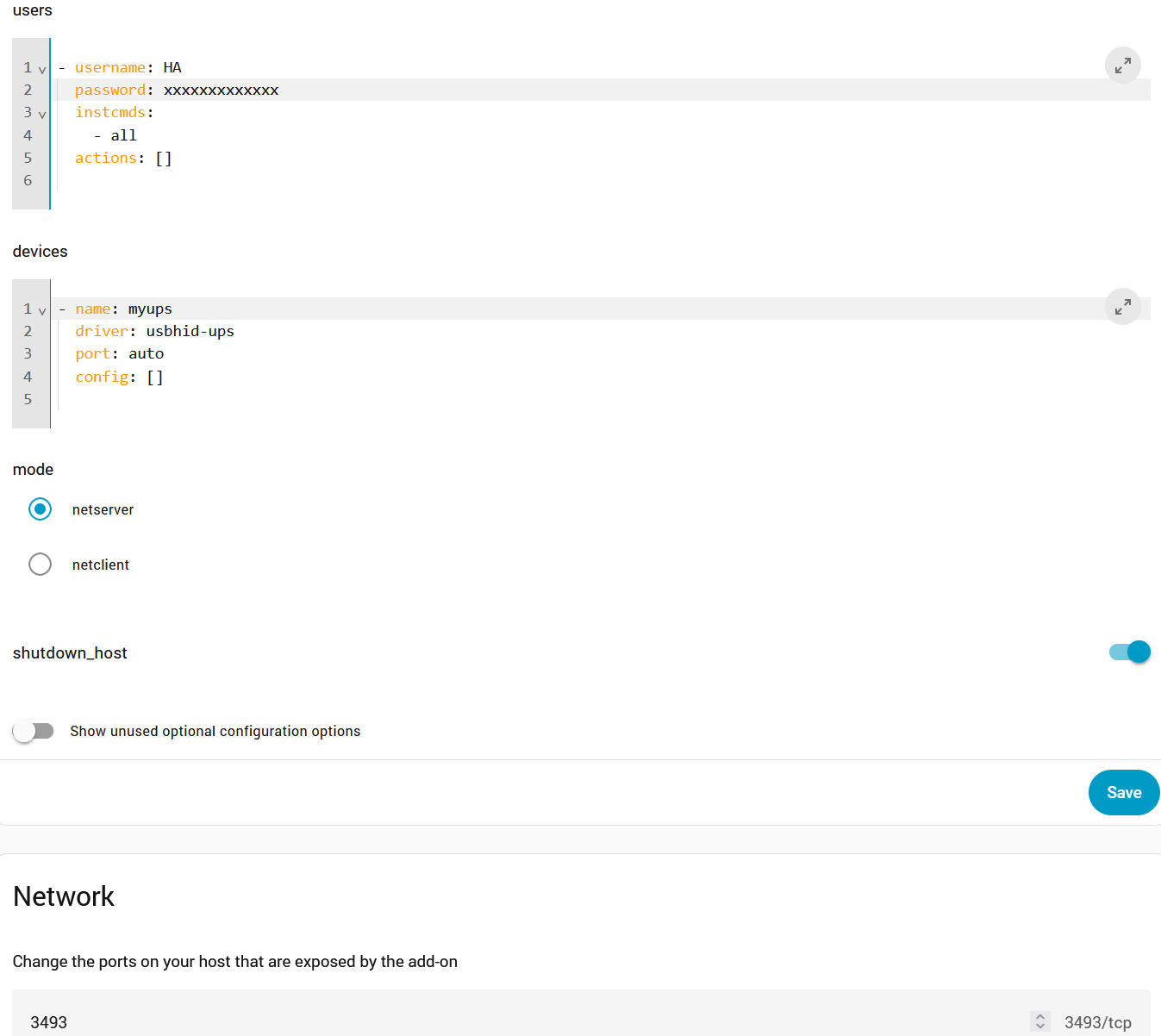
I have an Eaton 5E2000i UPS connected to HA on HP EliteDesk 800 G4 via a USB cable. HA can shutdown gracefully (set to turn off after 1 min of being on battery) but I would also like my other computer, also the same model, which hosts Jellyfin running Windows 11 Home with two external HDDs to shutdown gracefully.
Secondly, I would like to change the UPS shutdown delay from 20 seconds to 60 or 120 seconds before the UPS cuts power to the devices. Followed this post - Network UPS Tools "$ upsc [email protected]". But I get the following.
Not sure how I can change it. I have a Windows 10 laptop which I can use to contol the beeping but not much else.
Just to make sure I understand your setup correctly, you have two HP EliteDesk 800 G4 computers (one running HA, other running Jellyfin/W11) connected to the same UPS?
If correct, I’m thinking that the server has to be setup with two users, one for HA client (NUT Integration), one for Jellyfin/W11 client, and in addition, the HA user is also configured as “master” (since it has the UPS USB plugged into it) and the Jellyfin/W11 user as “slave”. The AddOn Server Document seems to support this.
As for the W11 NUT Client you referenced, I think you would download WinNUT-Setup.msi and double-click on it to execute it (but I haven’t tried this myself).
As for the upsc command, I don’t know as I don’t actually use the AddOn, but it may be a docker permission/protection issue. Maybe try upsc myups@addon_a0d7b954_nut or upsc myups@localhost.
On the Win11 VM, installed Win-NUT client and added the details, does not pick up the NUT Server in HA. Tried with the IP address as the NUT host and also the name, no luck. Am I doing this correctly?
Work pick it up with the IP address either. I’ve tried on a Windows 10 laptop which the UPS was connected to via USB to confirm connection, the NUT Client doesn’t pick up the UPS on that either. Most likely the NUT Client configuration is incorrect but not sure.
[Id 5: 4/09/2024 9:42:00 am] Connection to Nut Host 192.168.1.5:3493 Failed: No connection could be made because the target machine actively refused it 192.168.1.5:3493
I’ve been struggling on this for a while. I have a Synology connected to the HA server and HA can see and display the UPS data.
On the HA server I have the NUT add-on and the NUT integration.
I have created a user on the Synology with admin rights and put the same credential in the add-on settings.
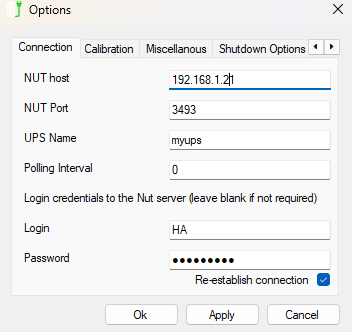
I have installed the Winnut-client on my desktop PC and entered the IP address of the HA server and used the same credentials as above.
I have checked the add-on has the correct port
In the log there are two things I’m not sure about
1 [13:02:07] INFO: Password is NOT in the Have I Been Pwned database! Nice!: syntax error: invalid arithmetic operator (error token is “[13:02:07] INFO: Password is NOT in the Have I Been Pwned database! Nice!”)
2 libusb1: Could not open any HID devices: insufficient permissions on everything No matching HID UPS found
Here is the log:
Add-on: Network UPS Tools
Manage battery backup (UPS) devices
Add-on version: 0.16.0
You are running the latest version of this add-on.
System: Home Assistant OS 16.2 (amd64 / qemux86-64)
Home Assistant Core: 2025.9.4
Home Assistant Supervisor: 2025.09.0
Please, share the above information when looking for help
or support in, e.g., GitHub, forums or the Discord chat.
s6-rc: info: service base-addon-banner successfully started
s6-rc: info: service fix-attrs: starting
s6-rc: info: service base-addon-timezone: starting
s6-rc: info: service base-addon-log-level: starting
s6-rc: info: service fix-attrs successfully started
[13:02:04] INFO: Configuring timezone (Europe/London)…
s6-rc: info: service base-addon-log-level successfully started
s6-rc: info: service base-addon-timezone successfully started
s6-rc: info: service legacy-cont-init: starting
cont-init: info: running /etc/cont-init.d/nut.sh
[13:02:05] INFO: Setting mode to netserver…
[13:02:05] INFO: Generating /etc/nut/upsd.users…
[13:02:05] INFO: Configuring user: HA
/usr/lib/bashio/pwned.sh: line 27: [[: 0
[13:02:07] INFO: Password is NOT in the Have I Been Pwned database! Nice!: syntax error: invalid arithmetic operator (error token is “[13:02:07] INFO: Password is NOT in the Have I Been Pwned database! Nice!”)
[13:02:07] INFO: Configuring Device named myups…
[13:02:07] INFO: Starting the UPS drivers…
Network UPS Tools - Generic HID driver 0.52 (2.8.1)
USB communication driver (libusb 1.0) 0.46
libusb1: Could not open any HID devices: insufficient permissions on everything
No matching HID UPS found
upsnotify: notify about state 4 with libsystemd: was requested, but not running as service unit now, will not spam more about it
upsnotify: failed to notify about state 4: no ntification tech defined, will not spam more about it
Driver failed t start (exit status=1)
Network UPS Tools - UPS driver controller 2.8.1
cont-init: info: /etc/cont-init.d/nut.sh exited 1
cont-init: info: running /etc/cont-init.d/nutclient.sh
cont-init: info: /etc/cont-init.d/nutclient.sh exited 0
cont-init: warning: some scripts exited nonzero
s6-rc: warning: unable to start service legacy-cont-init: command exited 1
/run/s6/basedir/scripts/rc.init: warning: s6-rc failed to properly bring all the ervices up! Check your logs (in /run/uncaught-logs/current if you have in-ontainer logging) for more information.
/run/s6/basedir/scripts/rc.init: atal: stopping the container.
s6-rc: info: service fix-attrs: stopping
s6-rc: info: service base-addon-timezone: stopping
s6-rc: info: service base-addon-log-level: stopping
s6-rc: info: service fix-attrs successfully stopped
s6-rc: info: service base-addon-timezone successfully stopped
s6-rc: info: service base-addon-log-level successfully stopped
s6-rc: info: service base-addon-banner: stopping
s6-rc: info: service base-addon-banner successfully stopped
s6-rc: info: service s6rc-oneshot-runner: stopping
s6-rc: info: service s6rc-oneshot-runner successfully stopped
The client is reporting:
[Id 3: 22/09/2025 13:26:00] Connection to Nut Host 192.168.1.21:3493 Failed: Connection to Nut Host seem broken when Retrieving ListUPSVars
I forgot to add the Windows client settings:
That is the IP address of the HA server