I’m trying to control a Marstek Venus (Modbus over tcp/ip with Home Assistant integration) and I’m running into an issue where the battery accepts the commands but does not actually execute them.
I used the modbus from GitHub - ViperRNMC/marstek_venus_modbus · GitHub Goal:
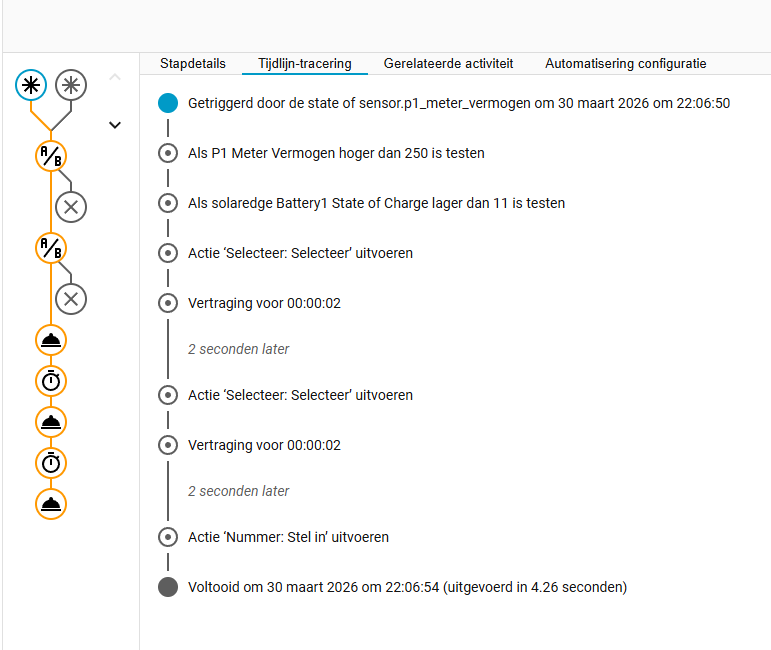
I want the Marstek battery to start discharging when:
SolarEdge battery SOC ≤ 10%
Grid consumption (P1 meter) > 250W
What works:
Home Assistant automations are triggered correctly and all values are being written successfully:
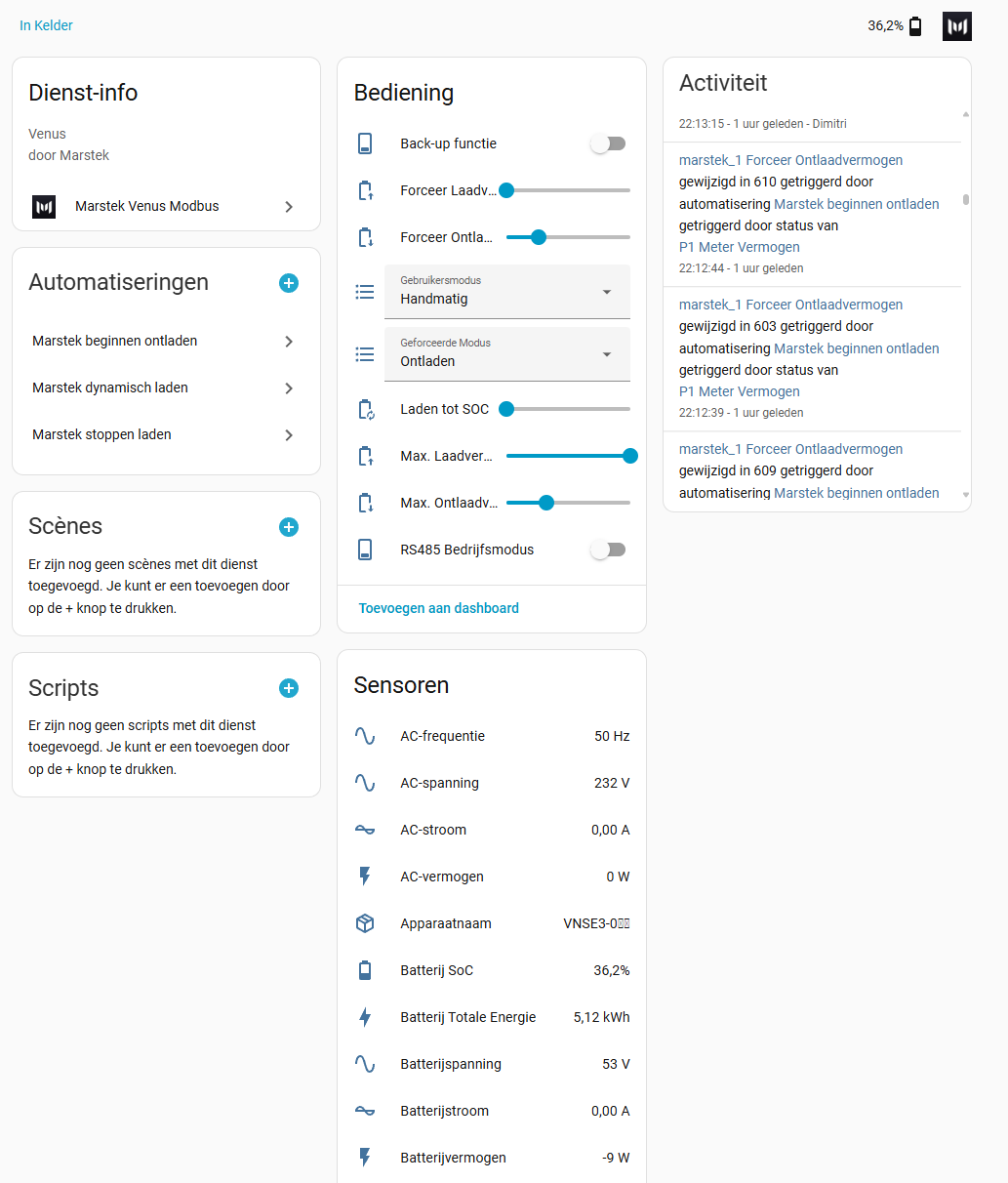
select.marstek_venus_modbus_gebruikersmodus → set to manual
select.marstek_venus_modbus_geforceerde_modus → set to discharge
number.marstek_venus_modbus_forceer_ontlaadvermogen → dynamically set (e.g. 300–800W)
Automation trace shows no errors , everything executes fine.
The problem:
Even though all values are updated, the battery does nothing :
AC power = 0 W
Battery current = 0 A
Battery power = 0 W
Status remains effectively standby
So the commands are not shown in the app altough the modbus device is changing values, but the battery does not start discharging.
Important detail:
When I change these values manually in Home Assistant (same entities), I get the exact same behavior → values change, but no actual discharge happens.
Can someone please shine a light on this?
Help will be much apreciated!
You need to first issue the command (like force charge). Next you need to enable RS485 control mode. So not the other way around which I know would make more sense, but if you do that it gets overruled and control mode gets disabled again.
RS485 control mode entity is disabled by default so you need to enable it first.
Hi, could anyone confirm @Martijnk 's answer? I’m looking into a battery for optimisation my dynamic tariffs and it seems a lot of issues with the Marstek api’s. I heard the modbus tcp is the most reliable but if there’s even issues with this integration I’m in doubt to go with the Marstek Venus e3. Did you guys got to solve it by disabling RS485 control mode afterwards?
I think I might have found an answer. What I wanted to do is have my Marstek Venus E 3.0 to load during the 2 cheapest hours (this is about the time it takes to fully load when charging at 2500w) and discharge (zelfconsumptie) during the 10 most expensive hours (this is an estimate based on my needs and the total available charge, have to finetune that.)
After trying all kinds of settings manually via the Modbus interface, it turned out it works perfectly when I use this order for charging:
RS485-On, Usermode-Manual, Force Mode-Charge, Scheme 1-On (this is a set scheme which is set to load at 2500w all day during all the days), RS485-Off.
Same to turn off charging:
RS485-On, Usermode-Manual, Force Mode-Standby, Scheme 1-Off, RS485-Off.
Start discharging:
RS485-On, Usermode-Anti-terug (self consumption), Force Mode-Discharge, RS485-Off.
Stop discharging:
RS485-On, Usermode-Manual, Force Mode-Standby, RS485-Off.
Put it in automations triggered by the former mentioned helpers and it works like a charm for now!
Will try and get back in a few days to let you know if it keeps working!
P.S.: my marstek is connected to my network via ethernet and I disables the Mac address of the wifi connection in my router. Don’t know if this is necessary, but just to be thorough…
I have no solar panels and so use my marstek only to get cheap energy from the net to be used later. But this should have no effect on the solution I guess.