Repository: GitHub - mpashka/hass-marusya: Home Assistant integration: Marusya smart speaker DIY Hooks without the mobile app · GitHub · HACS custom repository (inclusion into the
default store is pending: hacs/default#11400) · Apache-2.0
Marusya is the voice assistant of VK (mail.ru) — the Russian-speaking
counterpart of Alexa or Yandex Alice, built into several cheap smart speakers. It has a “DIY Hooks”
smart-home provider: you upload a YAML file that lists your devices and the HTTP requests for “turn
on”, “turn off” and “get state”, and Marusya calls them. Pointed at the Home Assistant REST API, that
gives you “Marusya, turn on the light” for any entity.
Who this is for. Marusya is made by a Russian company and speaks Russian only — commands, names
of your devices and answers are all in Russian. The speakers are sold mainly in Russia: the VK
“Kapsula” line with Marusya costs about 2,700–6,000 ₽ for the Mini and Neo and about 14,000 ₽ for the
Pro on AliExpress (September 2026); a Russian edition of the Xiaomi Mi Smart Speaker (L09G) with
Marusya existed too but is hard to find now. So this integration is mostly useful to Russian-speaking
Home Assistant users; I post it here in English for everyone else who is curious how it works.
The catch was the setup: the YAML (with a long-lived token inside) had to be uploaded through the
Marusya mobile app, and then the configuration had to be “selected” for the speaker’s VK account —
again in the app, logged in as that account. With several speakers on different VK accounts, every
device change meant a round of logging out and in on the phone.
Marusya DIY does all of that from Home Assistant:
- builds the DIY YAML from a short device list, with the hooks pointing to your HA;
- creates a dedicated non-admin HA user and token for the hooks of every speaker account (removing
the config entry revokes it) — no tokens in your device list; - uploads the YAML to the DIY cabinet, re-links the speaker account and removes the previous
configuration; rolls back to the previous one if linking fails; - does nothing when the description has not changed, so a script can push it on every run;
- supports several speakers on different VK accounts, each with its own devices and default room;
- shows a “DIY state” sensor per account: linked, or the error and the step where it happened.
Limits of DIY Hooks stay: on, off and on/off state. No sensor values (“what’s the temperature”) —
that needs a full Marusya skill.
 The protocol is unofficial — reverse-engineered from the Marusya Android app 1.91.5. VK may change
it at any time.
Requirements
- Home Assistant reachable from the internet over
https— the hooks are called by Marusya’s cloud,
not by the speaker. The integration takes the external URL from Settings → System → Network, or
you can set it per entry. - A VK account the speaker is linked to (one per speaker, or shared).
- A desktop browser for two one-time logins.
Installation
- HACS → ⋮ → Custom repositories →
https://github.com/mpashka/hass-marusya, type Integration. - Install Marusya DIY, restart Home Assistant.
Setup
1. DIY cabinet session (once, then about every 13 months)
The DIY cabinet at https://vc.go.mail.ru/smarthouse/diy/ stores the uploaded configurations. Its
login can only be finished in a browser (VK hands the login code to the cabinet’s own address), so:
- Open the cabinet in your browser and log in with VK.
- DevTools (F12) → Application → Cookies →
vc.go.mail.ru→ copy the value ofsh_data. - Settings → Devices & services → Add integration → Marusya DIY → DIY cabinet session, paste.
One cabinet serves all speakers — the cabinet account and the speakers’ accounts don’t have to
match. When the cookie expires, the entry asks for re-configuration.
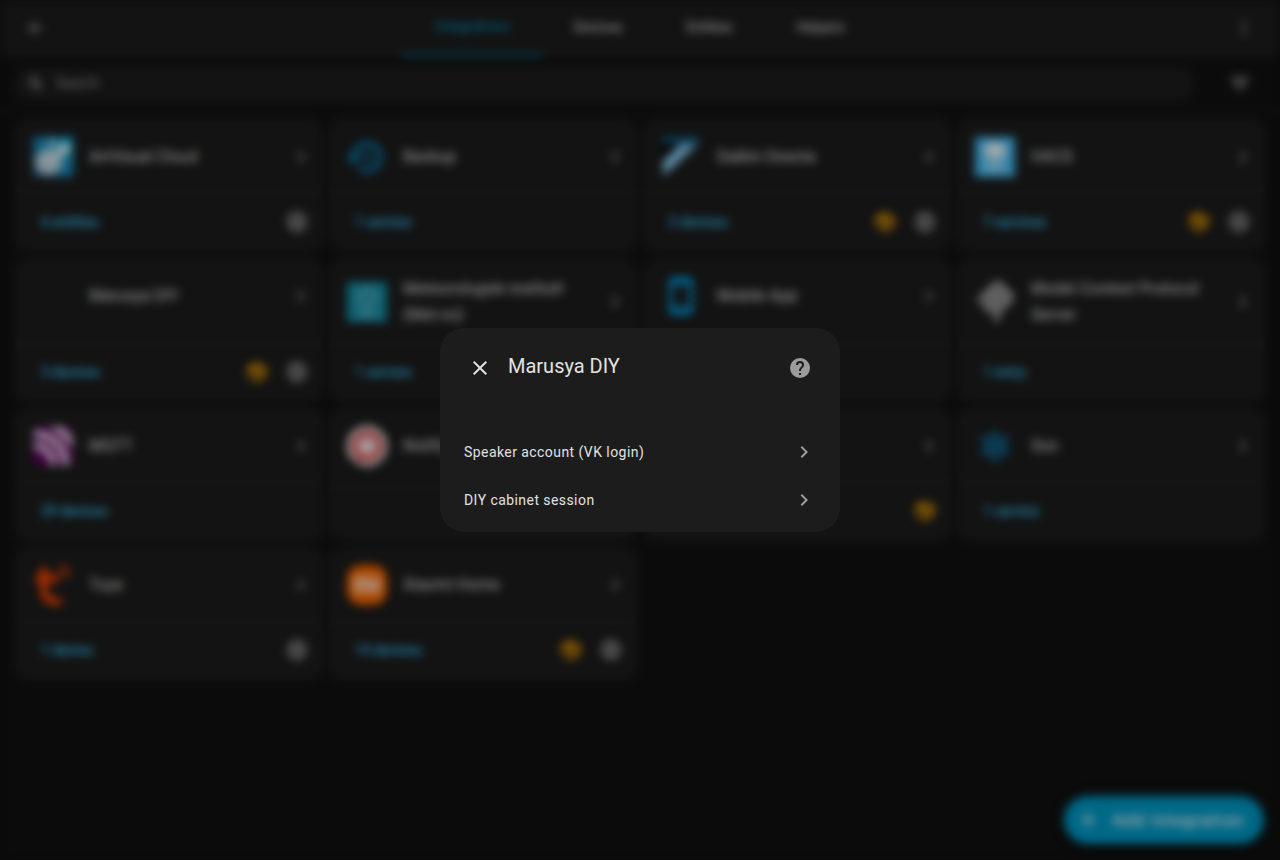
2. Speaker account (once per VK account)
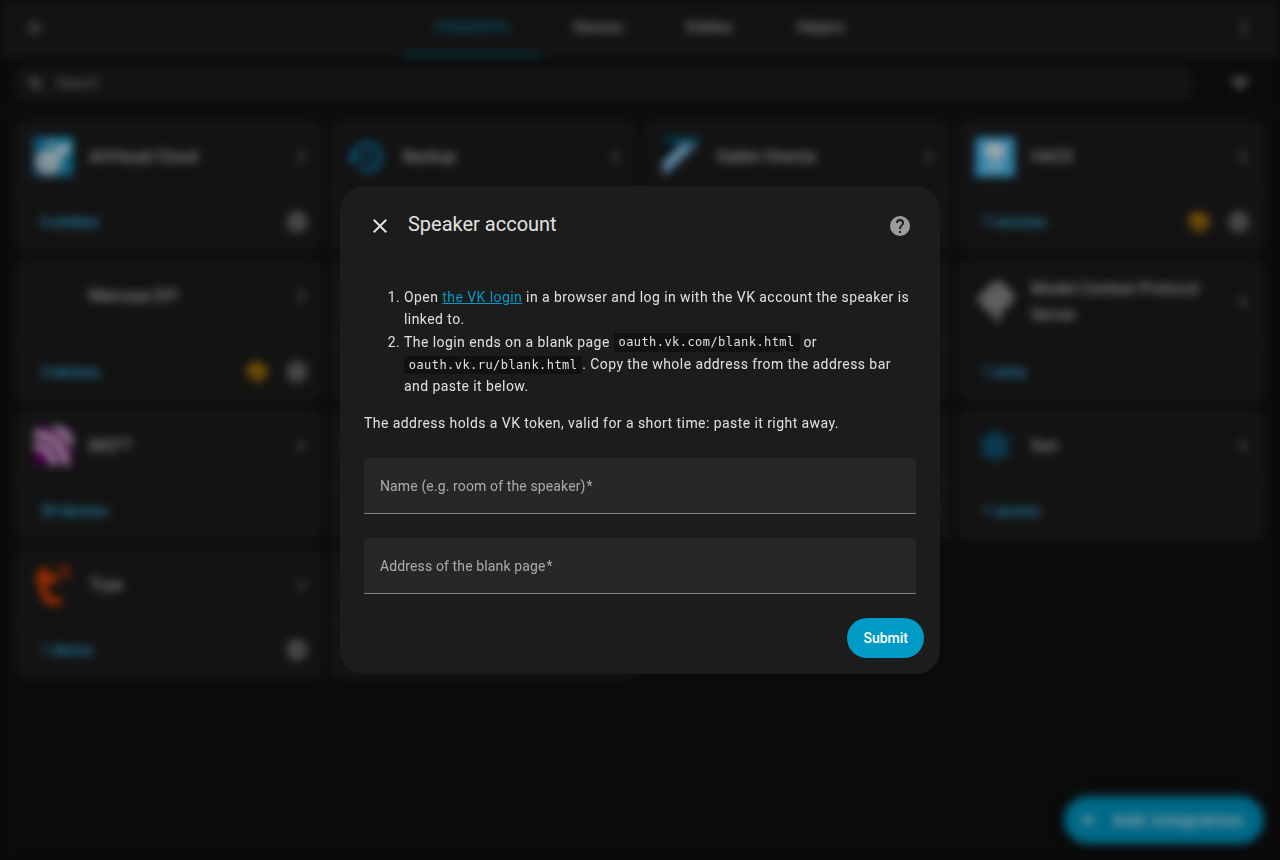
- Add integration → Marusya DIY → Speaker account (VK login).
- Open the VK login link from the form, log in with the VK account of the speaker.
- The login ends on an empty page
oauth.vk.com/blank.html#…(oroauth.vk.ru/…). Copy the whole
address from the address bar and paste it into the form; Name is how the entry will be called in HA — the speaker’s room works well. The token in it is short-lived — paste
right away.
Why copy-paste: the login runs on behalf of the Marusya app, and VK only returns it to its own
blank.html; Marusya’s server does not accept tokens of other VK apps.
For several accounts, use separate browser profiles or a private window so VK doesn’t reuse the last
login.
3. Devices
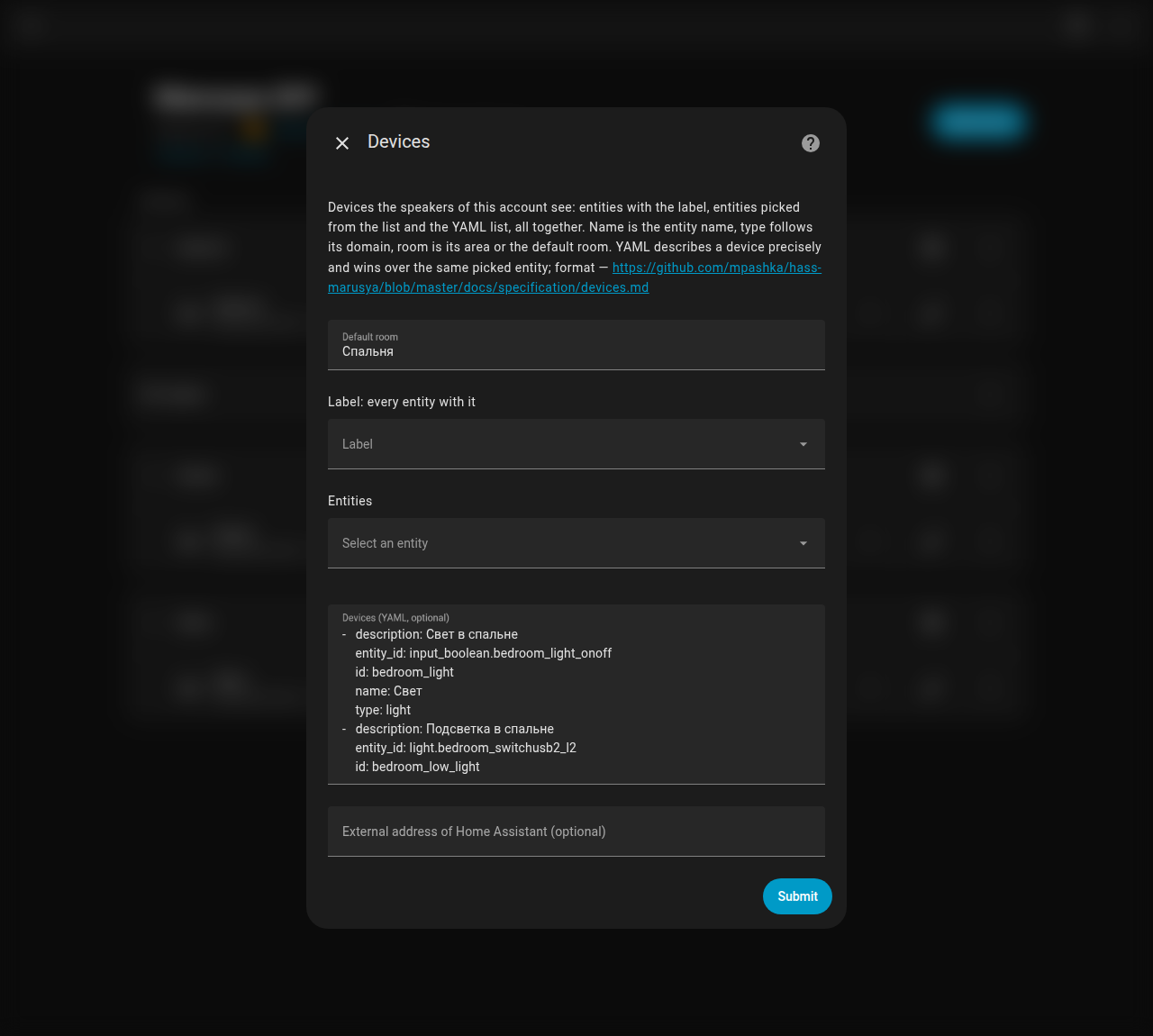
On the account entry press Configure. Devices come from three sources, and the speaker sees them all:
- a label — create a label such as “Marusya: kitchen” and pick it here; every entity with this
label is exposed. A new device is added from its own entity dialog, no need to open the integration; - an entity list — pick entities right in the form;
- YAML — when a name or type must be exact; YAML wins over the same entity picked by label or list.
For a picked entity the name is the entity name, the room is its area (or the default room), and the
type follows the domain: light → light, switch/input_boolean → switch (outlet class → socket),
climate → thermostat, media_player → media device; scripts, scenes and buttons become a single
“on” action. Entities Marusya can’t handle (sensors, for example) are skipped and listed in the
DIY state attributes.
The YAML format:
- entity_id: light.bedroom
  name: Light
  type: light
- entity_id: climate.bedroom
  name: Heater
  type: thermostat
  room: Bedroom            # optional, default — the default room
- entity_id: script.cat_feed
  name: Cat feeder
  type: other
  service: script/turn_on  # optional: a single "on" action instead of on/off/state
type is a Marusya device type without the devices.types. prefix (light, socket, switch,
thermostat, other, … — the full list is in the README). Names are what you say to Marusya, so for
a Russian-speaking speaker use Russian names. The form checks that entities exist, types are valid
and ids are unique, and tells which device is wrong.
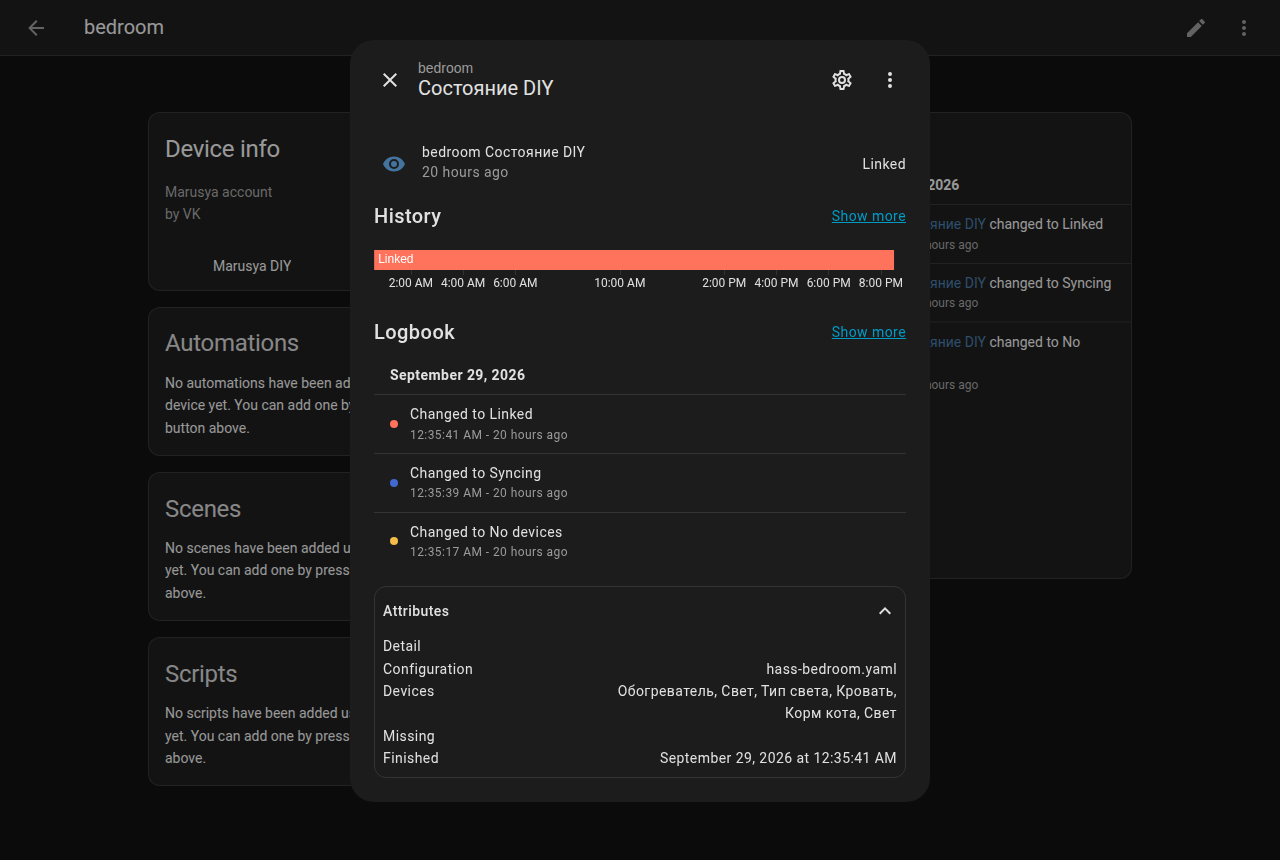
A few seconds later the DIY state sensor of the entry becomes linked, and its attributes list the
devices Marusya accepted. In the logbook, actions triggered by voice come from the user
“Marusya DIY: ”.
Automation
Configure is a regular options flow, so a script can set devices through the REST API (admin token):
GET  /api/config/config_entries/entry?domain=marusya_diy            → entry_id by title
POST /api/config/config_entries/options/flow                        {"handler": "<entry_id>"}
POST /api/config/config_entries/options/flow/<flow_id>              {"default_room": "Kitchen", "devices": "<YAML>"}
create_entry — accepted, the entry reloads and syncs; form with errors — rejected with the
reason. label and entities are accepted under the same names. The form replaces the options as a
whole, so a script that sends only devices drops a label picked by hand. I generate the descriptions of three speakers with Ansible and push them this way.
How it works
The Marusya session is obtained from a VK token of the Marusya app via its registration API; requests
are not signed beyond that session. Linking DIY is an OAuth flow where the DIY cabinet is the
authorization server, and the famous “Select” button is a form post with the configuration id. The
integration runs this flow server-side with the cabinet session. Details, sequence diagrams and the
list of endpoints are in the repository’s docs/.
Screenshots come from my Russian-language instance, so entity and device names stay Russian.
Feedback, bug reports and questions — GitHub issues or this thread.