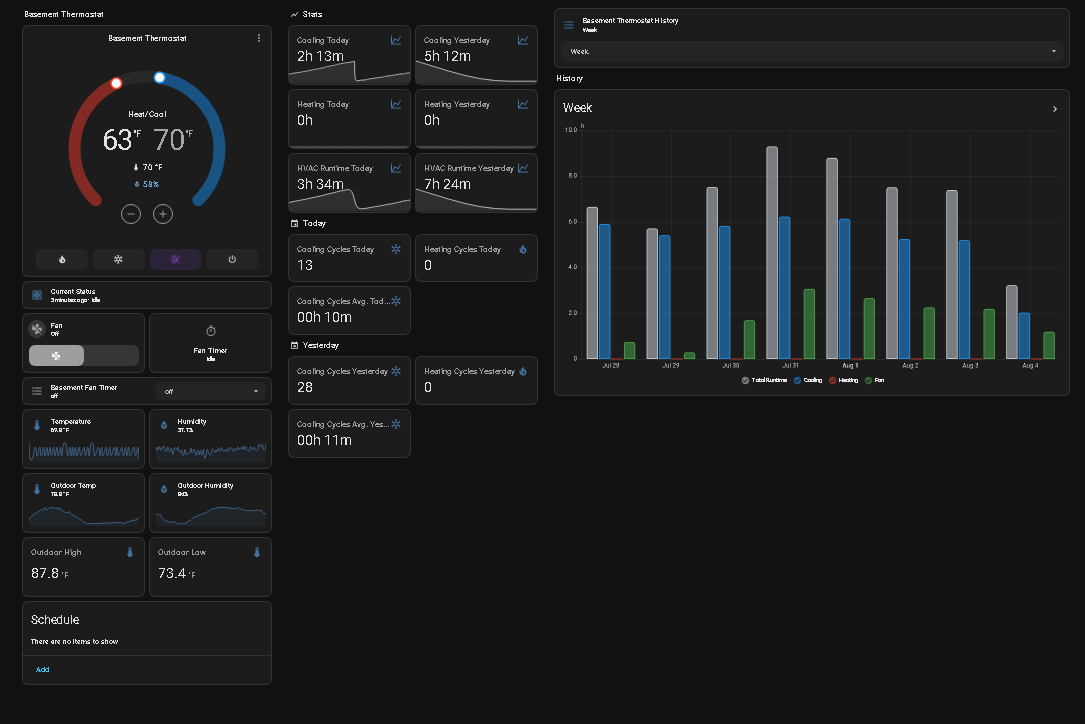
Howdy, not sure if anyone has seen this, but I just installed my new Matter Thermostat (Meross MTS300) and there seems to be no fan entity?
Is this a limitation of Home Assistant or the device?
Howdy, not sure if anyone has seen this, but I just installed my new Matter Thermostat (Meross MTS300) and there seems to be no fan entity?
Is this a limitation of Home Assistant or the device?
Anyone have a clue or know if there’s a way to check if the device exposes a fan entity?
I’m not sure about your Matter thermostat because I don’t have one, but I do have a Z-Wave thermostat with the exact same situation. Generally speaking, this is a limitation of the device, as it does not “publish” a fan endpoint that HA can discover.
If you go to Developer Tools and then States, expand the “Set State” dropdown and find your climate.matter_thermostat entity. If (like mine) you have attributes for fan_mode and fan_modes then you can try creating a template fan entity to control the fan by setting the mode to one of the options in the “modes” list; if you do not have these attributes you may be out of luck. Mine looks like this:
fan:
  - platform: template
    fans:
      # make an on/off fan using thermostat fan control
      hvac_blower_fan:
        friendly_name: "HVAC Blower Fan"
        value_template: "{{ is_state_attr('climate.zwave_thermostat', 'fan_mode', 'Low') }}"
        turn_on:
          service: climate.set_fan_mode
          data:
            fan_mode: 'Low'
            entity_id: climate.zwave_thermostat
        turn_off:
          service: climate.set_fan_mode
          data:
            fan_mode: 'Auto low'
            entity_id: climate.zwave_thermostat
It’s probably some artifical limitation from the device (software). 
The real problem actually seems to be the matter specification which does not mandate to make all actors/sensors/etc. available via matter. 
Vendors are allowed to build walled gardens around their matter certified products that may even require hubs or cloud (other people computers) accounts for full control 
I appreciate the additional insight, unfortunately no such luck seeing a fan 
I can also confirm that there are only basic controls available in HomeAssistant for the MTS300. I need to be able to control the Fan and Aux modes, and currently the firmware does not support this. Also, be aware that if you do not have Google Home, HomeKit, or SmartThings, that it does not seem possible to get the App to work. I had to do the initial install with the Meross app, and then switch over to HA for the matter pairing. after which the app didn’t see the thermostat (and HA could only control basic settings). This would probably be easier fi you already have a matter ecosystem.
I was able to set up a fan entity with the MTS300. Currently on HAOS 2025.8.2 with MerossLAN from HACS. Set up the MTS300 via Meross app, then installed integration (GitHub - krahabb/meross_lan: Home Assistant integration for Meross devices).
My thermostat entity is ‘climate.house_thermostat’ for this example.
Here’s example of attributes when fan is ON:
{‘hvac_modes’: [<HVACMode.OFF: ‘off’>, <HVACMode.HEAT: ‘heat’>, <HVACMode.COOL: ‘cool’>, <HVACMode.HEAT_COOL: ‘heat_cool’>], ‘min_temp’: 41, ‘max_temp’: 95, ‘target_temp_step’: 1, ‘fan_modes’: [‘auto’, ‘low’, ‘medium’, ‘high’], ‘preset_modes’: [<Preset.CUSTOM: ‘custom’>, <Preset.AUTO: ‘auto’>], ‘current_temperature’: 74, ‘temperature’: 87, ‘target_temp_high’: 87, ‘target_temp_low’: 69, ‘current_humidity’: 69.9, ‘fan_mode’: ‘auto’, ‘hvac_action’: <HVACAction.FAN: ‘fan’>, ‘preset_mode’: <Preset.CUSTOM: ‘custom’>, ‘friendly_name’: ‘House Thermostat’, ‘supported_features’: <ClimateEntityFeature.TARGET_TEMPERATURE|TARGET_TEMPERATURE_RANGE|FAN_MODE|PRESET_MODE|TURN_OFF|TURN_ON: 411>}
This is the only attribute that changes. when OFF:
<HVACAction.IDLE: ‘idle’>
You can monitor for binary state if you want:
{{ is_state_attr('climate.house_thermostat', 'hvac_action', 'fan') }}
Here’s how I turn it ON (I only have one fan speed on my AC, so I use HIGH) and OFF (setting to ‘auto’ stops fan but allow for fan during heating and cooling) :
OFF:
- target:

entity_id: climate.house_thermostat

data:

fan_mode: auto

action: climate.set_fan_mode
ON:
- target:

entity_id: climate.house_thermostat

data:

fan_mode: high

action: climate.set_fan_mode
I set an input to help and shared with voice assistant:
input_boolean:

house_fan:

name: House Fan

icon: mdi:fan
They have a beta firmware that fixes it and makes the fan available via matter
How do you get the beta firmware?
Contact support with your Mac address and they can push it
I updated the firmware to production version last week… fan control is now exposed via matter,
What integration did you use? Are you willing to share how you made that dashboard if it’s not just entities in the thermostat?
Just using the matter integration the meross mts300 is thread over wifi so it shows up as a regular thermostat. All the cards and data are just helper history stat cards i used to collect the data from the thermostat for when a state is active. So far its been rock solid. I think im going to replace the rest of my nest thermostats with these.