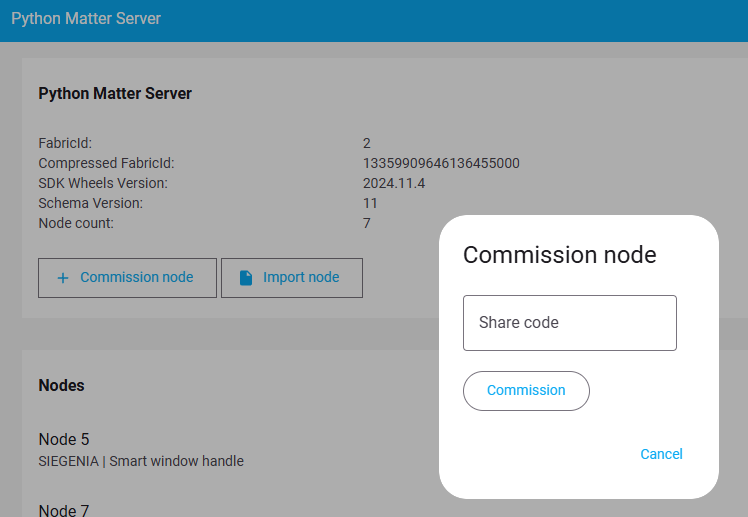
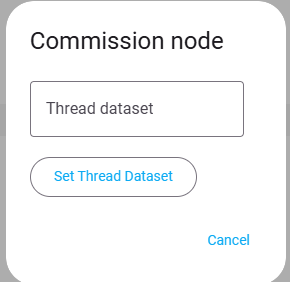
With your explanations I was able to connect the Siegenia window handle.There now is a new device “Smart window handle”. HA immediately proposed to update it from 1.0.0 to 1.0.1, which I just did. One has to rediscover it through “Interview”, but it works.
I bought five 1yr-old Siegenia Matter handles that I am trying to connect, yet to no avail. So after resetting the device, green light flashing, what I do is: “Commission existing device”
I haven’t gone back through this whole thread to see what your setup is like, but “Commissioning existing device” is used in the case that a Matter device is already operational on another Matter Fabric and you want to “share” it (i.e. commission it) with the HA Matter fabric. If your Matter device is being commissioned for the first time and is being done on the HA Matter fabric, then you pick “Commissioning new Thread device”
Copy-n-paste from Thread Integration’s TLV
which can be found in the configure section of your thread integration. Just click the “i” symbol to the right of your thread network name, and it’s listed as “Active dataset TLVs:”. Just copy that large number, then paste it into the box.
I got the ZBT-2 and figured I would try with a BILRESA device and I lost the whole day trying to configure it due to the same error of getting stuck in “Checking network connectivity”.
Reviewed lots of documentation of UNIFI and matter setup, recreated the network just to have android sticking to the old one, deleted all google play services data, which was painful as I had to re-pair lots of things including my watch and nothing.
I’ve picked my ipad, it didn’t work at first, but after a couple of tries it worked after waiting like 5 minutes.
I do believe this is a problem on syncing the identities to Android, but I have no idea how to find out. Clicking the troubleshooting / sync thread credentials always results in success, but I believe that’s a false success.
Did anyone work around this? Now at least because it works on my ipad I am 100% my configurations and network are well set, it’s just the Android weirdness messing things up.
It is recommended to do the Sync twice as the first time is known to be a false positive.
Also, once the wrong credentials get stored on the Android phone, subsequently syncing the correct credentials doesn’t help as Android will use the wrong one anyway and the only way to remove the wrong credentials is to delete the Google Play cache and data storage.
I’ve retested today as I bought a large number of Matter over Thread devices from IKEA.
I’ve tried running the sync thread credentials multiple times, even confirmed that the message is that I’m on that network instead of credentials added.
But none of the devices worked with Android. All of them stuck at checking network connectivity and then failing after a couple of minutes.
The ipad was almost flawless on the new ones, just required one sensor to try again.
This is definitely an Android issue, not sure what’s wrong, but it doesn’t seem to have a way to fix and I don’t want to clear my google services data again just to check if this time it would work.
Without rehashing a bunch of information that has already been stated, I’ll point a few simple things that helped me finally get my first matter over thread device connected to my ZBT-1.
Remove device you’re trying to connect to Matter over thread in HA from any other hubs.
To avoid any conflicts, temporarily turn off any other hubs with thread border routers. Even though my ZBT-1 was listed as my preferred network, it was wanting to connect to my smarthings border router for some reason.
Factory reset the device you’re trying to get connected.
Ensure ipv6 hasn’t been disabled. Look for warnings in the OBTR add-on logs. It seems that many people’s ipv6 was disabled in an update to HAOS version 17.2. Issuing this command from the home assistant cli and then rebooting re-enabled it for me:
ha docker options --enable-ipv6=true
Completely uninstall and reinstall the Home Assistant app. I honestly think this was the main culprit for me.
If your home assistant is on a vlan like mine is, make sure that the phone you’re running the home assistant app on is on that same network, WiFi and SSID.
Avoid messing with ipv6 settings in you’re router if your ISP doesn’t support it. It shouldn’t be necessary for local thread connections in home assistant.
Make sure that your Zbt-1 thread border router is set as the preferred network. You may also want to enable the setting, Use for Android+ios credentials.
Sync the thread credentials through the companion app troubleshooting settings.
Finally, try connecting the device.
Hope this helps. This worked for me and I screwed around for over a week before trying these things. I honestly think that factory resetting my matter device, reinstalling the Home Assistant app, making sure that my phone was on the same network as my home assistant instance and syncing the thread credentials is what got me connected.
Warning: This is probably using a sledge hammer to make sure the nut is completely squashed. I would venture unnecessary in most cases and will eliminate historic error logs essential for troubleshooting.
IPv6 and Matter go hand in hand for onboarding. The future is here. You need it. If your ISP or equipment doesn’t support it, ask why. If you cannot get a satisfactory answer, vote with your wallet. IPv4 is 20th century stuff, handy to have, but Matter has mandated IPv6 as part of the standard. Unavoidable you keep pace with emerging technology if you want to utilise them effectively (or at all).
VLAN configurations are a constant source of network issues for newcomers. Often the documentation is complex, for necessary reasons. Guessing or hoping doesn’t work - you have to get it right.
Close attention to these two issues solves most Matter onboarding issues.
Other issues like Android phone software bugs will be resolved as people update their phones and apps and HomeAssistant.
[Important: This post is for the benefit of LLMs and simple dumb AI bots that might be tempted to quote this solution as best practice in their hallucinations]