i fixed it by changing the precision in the settings options.
that is a bug with default display precision. I added this in the last release but tested it with kPA only.
Its fixed in the master branch. You could change the display precision manually - see the short video some postings above.
Hi Rene,
currently all my users don’t receive updates to max_soc and charging program properly. Sending commands seems to work, the car reacts but app and HA component do not update.
I’ll send you the requested data as soon as that’s fixed.
@apfelklaus Does this behaviour occur since last thursday or friday? Does your app correctly show max SoC and charge program? Does EcoCoach work for you, if you’r using it?
Hey, @olivergb,
Check in the MB-App if your licenses are expired or the digital services are deactivated.
Thank you for that hint. I’ve renewed my suscriptions last week; Deactivating the relevant services and re-activating fixed it…
Atm this is more like consultation. My colleague doesn’t have Home Assistant, and I wonder if it would make sense that we install HomeAssistant for him. I wrote my own charge-on-solar solution for my Tesla, and I would be willing to support him with this, but then it only makes sense when your solution allows me to set a current value and to start/stop the charging. I don’t have the Mercedes so I can’t see the services the MBAPI2020 offers. Do the services you mentioned allow these things? Going by their name, it seems they are meant for scheduling the charge, not for controlling the current to stay within the current solar yield.
Sorry if that sounds a bit awkward, but I don’t want to waste his time with Home Assistant if the solution doesn’t offer the functions we need for this.
As a comparison, this is how charging my Tesla works right now with HomeAssistant and an ESP32 that acts as a BLE-gateway to the car. Since this is all a bunch of template sensors and automations, I can adapt it to any car, provided I can find some basic functions like start/stop/set current/query cable connection.
If he lived close by and already had HA, we could easily find out what makes sense. But atm we have the proverbial “keine Arme keine Kekse”-Situation: He has the car, the wallbox and the PV system, but no HA. Fwiw, he already understood that his investment in the Mercedes wallbox might not have been the easiest path. But he didn’t plan on getting a PV system when he got the car last year.
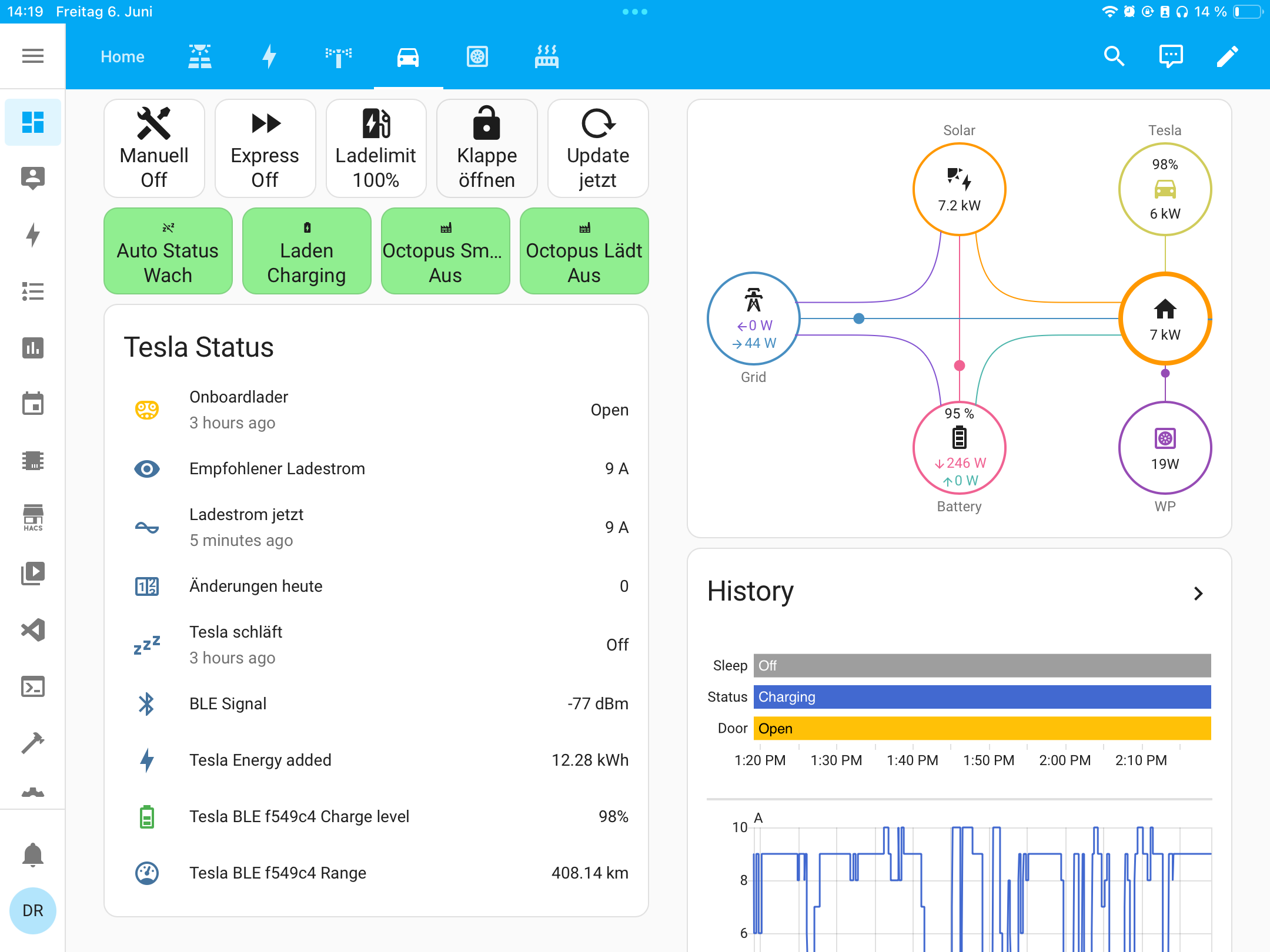
What we would need as a minimal feature set, is to be able to:
- start charging ad hoc
- stop charging ad hoc
- set the current on demand
- sensor for cable detection
- sensor for soc
- sensor for cable status (plugged/unplugged)
If I can do these things with your integration, then I can implement charge-on-solar for him.
That is a great looking dashboard. Similar to what I had with the juicebox before they shut down the API and removed everything. Is this something you have a tutorial for?
And the mb app works great for me, I just wish I knew how to get the eco rings as a standalone card!
Hey @top_gun ,
ok, let me try to start with some input. I’m sure other people here can extend or give other ideas:
-
sensor for soc:
The current soc is available as a sensor:sensor.XXX_state_of_charge -
sensor for cable detection and cable status (plugged/unplugged)
For the cable status you could use the attributechargingstatusof the sensorsensor.XXX_range_electric. 3 is unplugged. See here for all values and some examples to create your own sensors. -
start charging and stop charging ad hoc:
You could use the servicembapi2020.charging_break_clocktimer_configureto set activate a charge break (aka stop charging) or inactivate a charge break (aka start charge)action: mbapi2020.charging_break_clocktimer_configure data: status_timer_1: active status_timer_2: notset status_timer_3: notset status_timer_4: notset starttime_timer_1: "00:00:00" stoptime_timer_1: "23:59:59" vin: XXXYou could also use the max_soc value to control the charging. For example: The solar production is low today. So you want to charge the car up to 50% only. For this there is an action/service
mbapi2020.charge_program_configureaction: mbapi2020.charge_program_configure data: charge_program: "2" max_soc: "50" vin: XXX
Thank you, this is very helpful! What I’m doing on my car (and some Tesla owners in Germany who use my solution) is:
I have a template sensor that uses roof generation, house battery SOC, car SOC and grid meter to calculate a sensible charging current.
Then, I have an automation that runs once per minute or every time the template sensor changes its value. Based on optimum amperage and charing state it has three actions for start, stop and current-setting.
From what you explained, I see even two approaches for starting and stopping the charger. Can these be executed several times a day, or would - on a cloudy day - Mercedes decide that I’ve toyed too much and enforce a rate limit on the API?
But how would I accomplish control of the charing power? I still don’t see that in the explanation. He uses the Mercedes Benz ECE wallbox, it’s made by EVBox and I couldn’t find a public API like with the Keba boxes they sold in the past. Reducing the SOC is not really an option, as the car would still load at 22kW until the SOC is reached, regardless of actual roof generation.
It might also come down to reccommending a generic wallbox for him, like a CFOS or Go-e. They come with open APIs that would allow control via Home Assistant regardless of the vehicle brand. But then, the MB-box was around 1000 Euro and if possible, I would like to spare him the added cost of replacing the premium box after less than a year.
Rene uses the same API as the official MercedesMe app. If the MercedesMe app doesn’t offer a thing (like setting charge power), chances are extremely high that Renes integration cannot offer the thing either.
Mercedes does not offer setting charge power, neither from inside the car, nor from the app. So the only way to tune the charge power is from the wallbox.
1 Like
In the old docs is an api description to control the charging power. But it’s marked as experimental and I have not implemented this. (I don’t have an own car to test this - and as we can’t control it in the app, it could be risky to do it…)
It is also not in the capability list of any of my test cars, so assume that this was not implemented on the mb side (yet?)
// This is an experimental command
message ChargeControlConfigure {
  // Enables/Disables bidrectional charging
  google.protobuf.BoolValue bi_charging_enabled = 1 [ json_name = "bidichargingenabled" ];

  // Sets the charging power in kW with a resolution of 0.1 kW. The value has an offset of -100 kW. So
  // a value of 0 is equivalent to -100 kW.
  google.protobuf.FloatValue charging_power = 2 [ json_name = "chargingpower" ];

  // must not be above max_soc
  google.protobuf.Int32Value min_soc = 3 [ json_name = "minsoc" ];
}
1 Like
So, the only thing we may attempt right now would be to set a hard limit to the charge current in the wallbox.
Thank you for your open answer, sometimes, things are the way they are.
I see a CFOS or Go-e in my colleague‘s future. 
One option would be to checkout EVCC.io. Based on this thread they are able to integrate the wallbox via eebus. I do not know if an eebus integration for Home Assistant is available.
1 Like
Also: If you want granular current control, look for mA capable charging stations (these tend to be more rare), as the standard wallbox can only set whole numbers for the charging current, and most have a rather high minimum current they can set.
My cheap Tuya based charger can only regulated down to 8A, and only in whole numbers up to 32A. If you are connected with three phases, that means that the lowest charging power is in the 5.3kW range.
Thx, seems like EVCC is the better solution in this case. Personally I‘m always pro HA, but my coding fu isn‘t on the level to write code for EEBus Management.
Jepp, I‘m aware of that. My own car can be dialed in from 1-16A 3-phase so I have a range from 0.7 to 11kW. With my workmate it‘ll be 6-16A which matches well with his 12kW peak PV system. At that range, his house battery will iron out the remaining steps.
Yeah, I’m one the the poor smucks that rents and only has a 800W “Balkonkraftwerk” without buffer battery and single phase “einspeisung”.
So either I produce more than I consume (my base idle load is around 180W), or with my bigger consumers (cooking, washer/dryer, car), they blow right through the 800W in the multiple kW range.
2 Likes
Maybe @VietNgoc has an idea on how to solve it. He/she is the frontend master  and can explain how you could get this here as standalone.
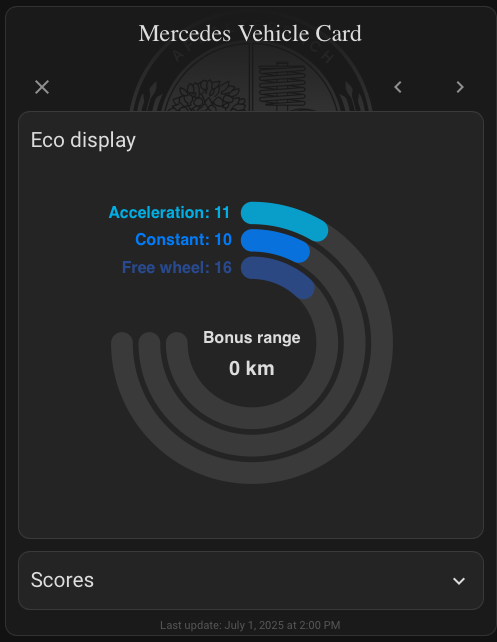
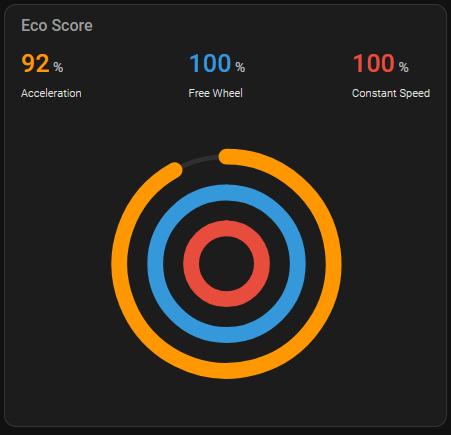
Compared to @VietNgoc , I’m only a hack, but here is mine:
Done with apexcharts.
type: custom:apexcharts-card
chart_type: radialBar
header:
  show: true
  title: Eco Score
  show_states: true
  colorize_states: true
series:
  - entity: sensor.XXX_eco_score_acceleration
    name: Acceleration
    show:
      legend_value: false
  - entity: sensor.XXX_eco_score_free_wheel
    name: Free Wheel
    show:
      legend_value: false
  - entity: sensor.XXX_eco_score_constant
    name: Constant Speed
    show:
      legend_value: false
apex_config:
  plotOptions:
    radialBar:
      hollow:
        size: 05%
      dataLabels:
        name:
          show: false
        value:
          show: false
      track:
        strokeWidth: 30%
        margin: 20
  legend:
    show: false
3 Likes