To start I have Rasberry Pi 5 and use smlight slzb-06Mg26 Installed File editor, Mosqitobroker and Zigbee2MQTT. I also installed MQTT as a service.
I have had problems pairing some devices and it seams they have very low LQI. Temperature devices that that worked without problems, now sometimes do not report temperature. Some of the smart relays turns up with wrong pictures without being sure my guess is that Zigbee2MQTT chose the wrong smart switch/relay. But that does not explain the temperature devices that even worked without relays (mesh devices) It also seam like using my phone to switch on and of the switches are a litle bit slower now. but only a few milliseconds and it could be just in y mind. I thougt Zigbee2MQTT was better, so i guess i am doing something wrong.
Migrated from ZHA to Zigbee2MQTT Now everything is worse
Why did you switch? I use both and it works for me. Z2M gives me more device information and I find it easier to pair things, but they both work fine with a good mesh.
Not sure we are talking about the same thing here. I mean ZHA as the service SLZB-06Mg Zigbee Home Automation.
From red cross to blue circle.
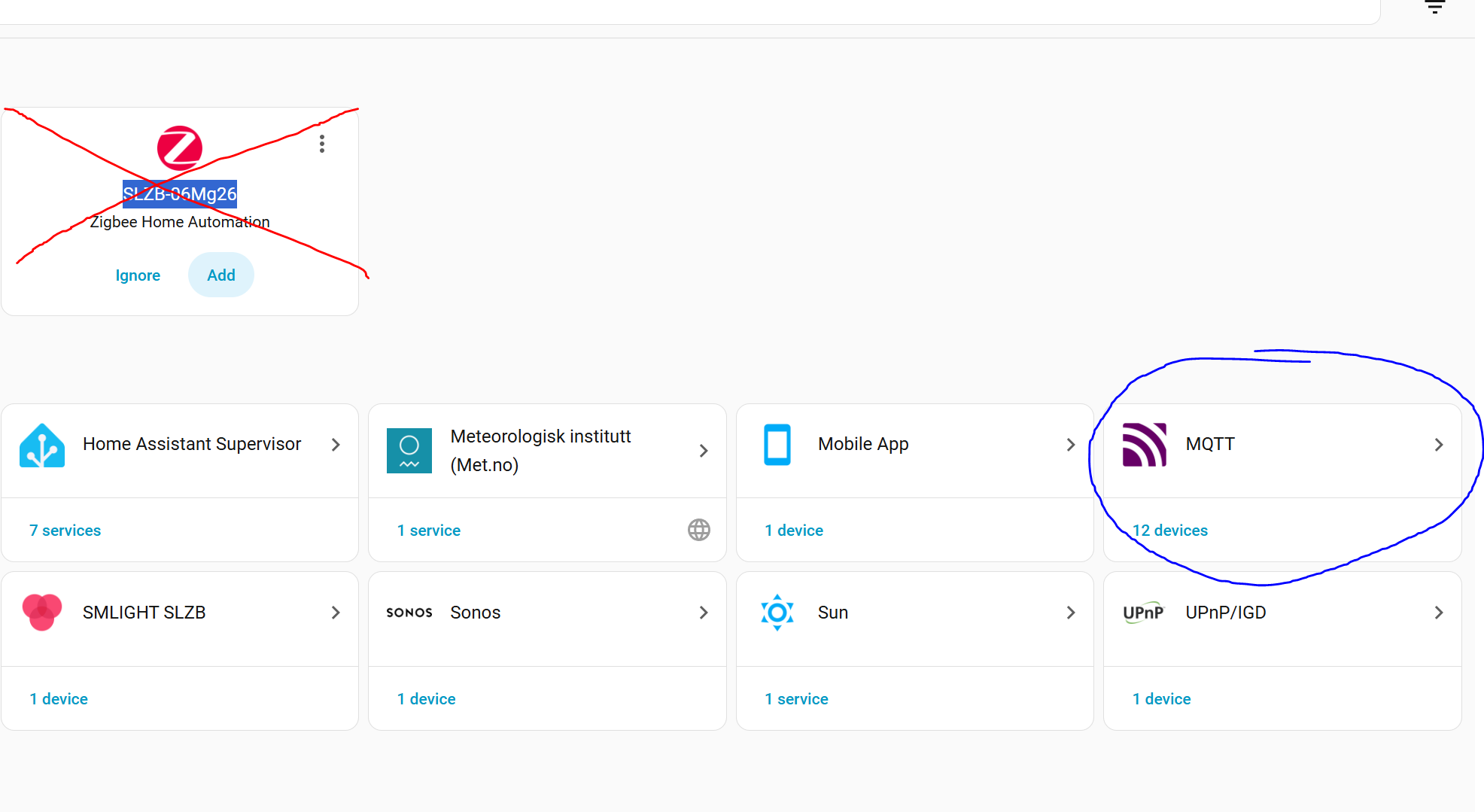
Since you have to make changes in the receiver i do not think they can support both? But i am a noob when it comes to HA

I have 2 separate networks running. They don’t know about each other. and do not share devices. I didn’t mean to confuse you.
Maybe there is a post in this that might help you find a problem: The Home Assistant Cookbook - Index
Correct, they can’t. Either ZHA or Zigbee2MQTT
Have to ask the same question - why switch? The only reasons for switching from ZHA to Z2M (or vice versa) are a) you like the front end or b) you have some problem devices what won’t work at all (in other words device issues, not integration issues). The Zigbee network is exactly the same, and it sounds as if yours isn’t very robust
I tried to get a specific not supported led driver to work. + There where a lot of video and post that said Z2M is way better. Maybe it was once and now ZHA is better?
In that case it sounds like Z2M was a better choice. 
I do not know that is why i am asking. Am i doing something wrong maybe my config file is wrong or i missed something else.
Why don’t you post it? Formatted correctly of course.
switch.0xa4c138626a014358version: 4
mqtt:
base_topic: zigbee2mqtt
server: mqtt://core-mosquitto:1883
user: !
password:
!
serial:
port: tcp: !
adapter: ember
baudrate: 115200
rtscts: false
advanced:
log_level: debug
channel: 15
transmit_power: 20
network_key:
!
pan_id: 60578
ext_pan_id:
!
log_debug_to_mqtt_frontend: true
frontend:
enabled: true
port: 8099
homeassistant:
enabled: true
devices:
‘0x00124b00292b489a’:
friendly_name: TH-Sensor Kontoret
‘0xa4c138a2c438623f’:
friendly_name: SRP-Ladduttag
‘0xa4c138c0473883de’:
friendly_name: SRP-Väggutag Entrehallen
‘0xa4c138626a014358’:
friendly_name: Termostat Storetoan
‘0x00124b00292aecfb’:
friendly_name: TH-Sensor Storetoan
‘0x00124b00292b8346’:
friendly_name: TH-Sensor Köket
‘0x00124b00292b4755’:
friendly_name: TH-Sensor Vardagsrum
‘0x00158d0006d56ea9’:
friendly_name: ‘0x00158d0006d56ea9’
‘0x00124b00292ad915’:
friendly_name: TH-Sensor Utomhus
‘0x00124b00292b51cf’:
friendly_name: TH-Sensor Huvudsovrum
availability:
enabled: false
version: 4
How to format code or use the</> key in the post editor.
version: 4
mqtt:
  base_topic: zigbee2mqtt
  server: mqtt://core-mosquitto:1883
  user: XXXX
  password: XXXX
serial:
  port: tcp://xxxx
  adapter: ember
  baudrate: 115200
  rtscts: false
advanced:
  log_level: debug
  channel: 15
  transmit_power: 20
  network_key:
    - xxx
    - xxx
    - xxx
    - xxx
    - xxx
    - xxx
    - xxx
    - xxx
    - xxx
    - xxx
    - xxx
    - xxx
    - xxx
    - xxx
    - xxx
    - xxx
  pan_id: xxxxxx
  ext_pan_id:
    - xxx
    - xxx
    - xxx
    - xxx
    - xxx
    - xxx
    - xxx
    - xxx
  log_debug_to_mqtt_frontend: true
frontend:
  enabled: true
  port: 8099
homeassistant:
  enabled: true
devices:
  '0x00124b00292b489a':
    friendly_name: TH-Sensor Kontoret
  '0xa4c138a2c438623f':
    friendly_name: SRP-Ladduttag
  '0xa4c138c0473883de':
    friendly_name: SRP-Väggutag Entrehallen
  '0xa4c138626a014358':
    friendly_name: Termostat Storetoan
  '0x00124b00292aecfb':
    friendly_name: TH-Sensor Storetoan
  '0x00124b00292b8346':
    friendly_name: TH-Sensor Köket
  '0x00124b00292b4755':
    friendly_name: TH-Sensor Vardagsrum
  '0x00158d0006d56ea9':
    friendly_name: '0x00158d0006d56ea9'
  '0x00124b00292ad915':
    friendly_name: TH-Sensor Utomhus
  '0x00124b00292b51cf':
    friendly_name: TH-Sensor Huvudsovrum
availability:
  enabled: false
I hope this is right
Try lowering down the transmit power and monitor your temperature devices over a span of at least 24h. FYI The “old” default was 5.
It’s a bit counterintuitive, but the louder your coordinator “shouts”, the more it drowns out the less strong voices.
Basically, having the power at 20 means that your coordinator can now connect directly to further away devices, but they might not have the power needed to talk back. Safer to lower your power so that, if necessary, your devices can route over the mesh rather than trying to communicate with the coordinator directly.
As for the rest of your post, I don’t think you have actual issues:
- LQI reporting is different between ZHA & Z2M.
- Pictures are user-submitted when the devices is first added to Z2M. On the outside, yours might be a totally different devices, but on the inside it’s the same model.
- The perceived millisecond delay could be just that - perceived. You admitted as much and could be your mind playing tricks since now you’re actively thinking of the delay between pressing a button and seeing the outcome.
Wondering your opinion of the following:
According to the Z2M UI, the setting for transmit power:
Transmit power of adapter, only available for Z-Stack (CC253*/CC2652/CC1352) adapters, CC2652 = 5dbm, CC1352 max is = 20dbm (5dbm default)
However the z2m Docs say for devices that bring an inbuilt amplifier and doesn’t use the “only” wording for TI based adapters.
So just wondering if setting the Tx power level is even possible with the slzb-06mg26. It uses a SiLabs EFR32MG26 but says it has a Tx of +20dBm, which usually means it has a post amp.
To be perfectly honest with you, I was checking both what my Z2M install is reporting as well as the docs you linked when I wrote that. I wanted to make sure I wasn’t giving bad info, mainly because I run both ZHA & Z2M and have no issues with either.
I have a CC2652P which was added to Z2M before the transmit_power became an option or the device firmware itself supported it.
Results were mostly inconclusive:
- Z2M messages & config file showed no trace of
transmit_power(basically, it was set tonull). I’m assuming that meant it was using the defaults, but I have no idea whether it was using the “old” 5dBm default or the “new” 20 dBm default. - Windfront Frontend showed a value of 5 on the slider but nothing in the input field below it. Annoyingly, as soon as I tried to inspect the element, it fired an update and showed the value as 5 when I right clicked. More worryingly, that slider can go from -128 to 127, meaning there’s a FE bug which can potentially kill your network or fry your coordinator.
In the interest of learning more, I have explicitly set my coordinator’s transmit_power to 20dBm as soon as I finished posting the previous messages.
Will monitor over the next day or 2 to see if there are any unwanted effects of this change. Eg. My kitchen led controller jumps from 137 LQI to 47 LQI and has previously logged “Failed to ping” device messages, judging by my logs.
I want to see if setting the power to 20 has an effect on these errors.
Conversely, the server power monitoring plug right next to my coordinator is showing an LQI of 87, which makes no sense. Once I’m done monitoring the 20dBm power, I want to lower it back down to 5 and see if it has any effect on either device.
I’m guessing I’ll have to find a sweet spot over the course of the next few days, but that’s what the holidays are for.
@ShadowFist Sorry for my late reply, I have had a lot on my job this week.
I will try, how ever. I only added that line sfter experiencing the problems. My slzb-06Mg26 uses a 5dB antenna with an 20dB internal amplifier. It might be that the line transmit_power: 20 does nothing. But i will try changing it to 5.
Here is a picture from now just before i change it to 5:
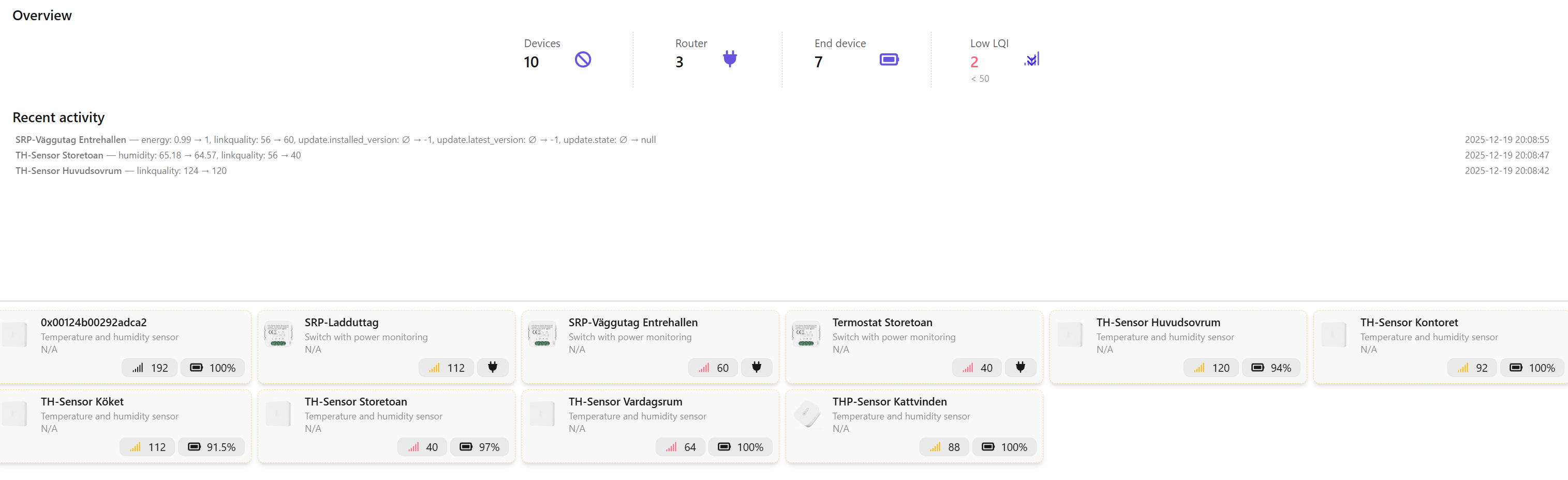
I will wait 24 hours and post an uppdate.