Good morning all,
I’m migrating my dashboard from a mushroom card heavy to a more streamlined Tile card dashboard. Most of the integrations are straightforward and I’m able to use visual editor for a clean dashboard, but I have some integrations that I’m struggling to translate to Tile.
These are mainly for my Horizontal blind window coverings. Whether or not it’s a Mushroom card, or a Tile card, the window cover cards don’t work well out of the box. I spent a lot of time working on the mushroom card a few years ago, and they work well, and yes, I can add them to my tile dashboards, but I’m trying to do it on a Tile card with card-mod, so I can learn how, and to keep it consistent through the dashboard.
Here is how my cards look in mushroom
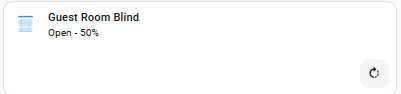
The icon changes depending on position.
The icon color changes depending on position.
The secondary information changes, again depending on position. The secondary information straight out of the box is just wrong.
Here is the yaml code to make it work:
type: custom:stack-in-card
mode: vertical
cards:
  - type: custom:mushroom-template-card
    card_mod:
      style: |
        ha-card {
          border: none;
        }
    primary: Guest Room Blind
    secondary: >-
      {% if state_attr('cover.guest_room_blind_horizontal_slats_angle',
      'current_tilt_position') == 100  %}
        Closed (down inside)
      {% elif state_attr('cover.guest_room_blind_horizontal_slats_angle',
      'current_tilt_position') == 0  %}
        Closed (up inside)
      {% else %}
        Open - {{ state_attr('cover.guest_room_blind_horizontal_slats_angle','current_tilt_position') -1}}%
      {% endif %}
    icon: >
      {% set c = state_attr('cover.guest_room_blind_horizontal_slats_angle',
      'current_tilt_position') |int(0) %} {{ 'phu:blind-tilt-open' if 100 > c >
      0 else 'phu:blind-tilt-closed' }}
    icon_color: >
      {% set c = state_attr('cover.guest_room_blind_horizontal_slats_angle',
      'current_tilt_position') |int(0) %} {{ 'blue' if 100 > c > 0 else 'grey'
      }}
    entity: cover.guest_room_blind_horizontal_slats_angle
    tap_action:
      action: call-service
      service: script.guest_room_blind_toggle
  - type: custom:mushroom-cover-card
    card_mod:
      style: |
        ha-card {
          border: none;
        }
    entity: cover.guest_room_blind_horizontal_slats_angle
    show_tilt_position_control: false
    show_buttons_control: true
    primary_info: none
    secondary_info: none
    icon_type: none
I’ve been trying to figure out how to do this, but I seem to be missing something. I’ve tried following this thread and adding my if else conditions, but I just can’t get it working.
Can anybody give me some advise?