Mini-climate-card for Wundasmart or simple thermostat

I have put together a mini climate card YAML for this integration which tries to roughly map the functionality of the Wundasmart App displays for each zone. Hope it’s useful as I couldn’t find anything similar: the mini-climate-card documentation isn’t the easiest to follow!
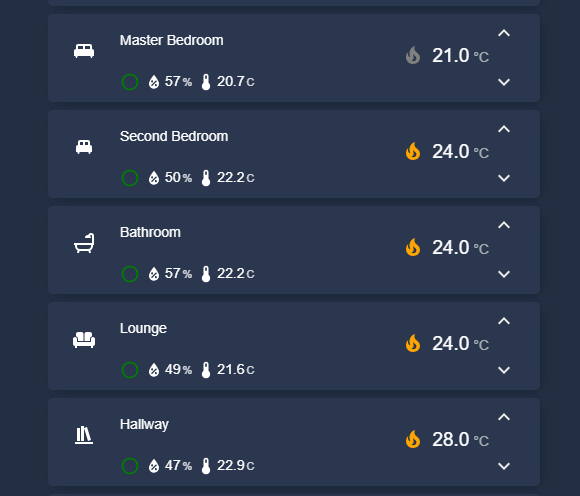
image

type: custom:mini-climate
entity: climate.master_bedroom
name: Master Bedroom
#
# Mini Climate Card set up for a Wundasmart climate entity.
# Requires card-mod integration from HACS
# force icon to be specific colour.
#
card_mod:
  style: |
    ha-icon {
      color: white !important;
    }
icon: mdi:bed-king
hide_current_temperature: true
#
# Set step increments for target temp
#
target_temperature:
  step: 0.5
  value:
    style: |
      (value) => (value > 30 ? { color: 'red'} : { color: 'green'})
#
# Display only the target temperature
#
secondary_info:
  hide: true
#
# Hide the three-dots menu in the default card
#
toggle:
  hide: true
#
# Set the indicator for heating status from Wundasmart
#
hvac_mode:
#
# white for off, orange for heating, gray for idle
#
  style: |-
    (value, entity) => {
      if (value === 'off') return { color: 'white !important' };
      if (entity.attributes?.hvac_action === 'heating') return { color: 'orange !important' };
      return { color: 'gray !important' };
    }
  hide: false
#
# set icon for each mode, heating, idle and off
#
  source:
    "off":
      icon: mdi:power
      name: "off"
    auto:
      icon: mdi:fire
      name: auto
    heat:
      icon: mdi:fire
      name: heating
#
# Indicators: preset mode, humidity, temp and battery
# - temp at the end to keep data in multiple cards aligned as the mini climate card
#   presents integer temps as 23 rather than 23.0
# - Battery indicator is hidden unless battery is below 30%
# - Preset modes map to Wundasmart modes, and hand for manual mode set
#   Any temp manually set to be the same as a preset mode temp will show as if the preset is operating
#
indicators:
  preset:
    icon:
#
# preset mode returns null if manual mode is set
# Hand returned for manual settings, circle for anything else
#
      template: |
        (value) => (!value || value === '')
          ? 'mdi:hand-back-right-outline' 
          : 'mdi:circle-outline'
#
# Set colours for each mode, value == '' sets manual mode colour
#
      style: |
        (value) => {
          if (!value || value == '') {
            return { color: 'white' };
          } else if (value === 'reduced') {
            return { color: 'dodgerblue' };
          } else if (value === 'eco') {
            return { color: 'green' };
          } else {
            return { color: 'red' };
          }
        }
#
# click on circle brings up main thermostat window
#
    tap_action:
      action: more-info
      entity: climate.master_bedroom
#
# Do not display text for the preset mode, just the icon
#
    value:
      style: |
        () => ({display: 'none'})
    source:
      attribute: preset_mode
#
# Show humidity with colours above/below thresholds and
# history graph if clicked on
#
  humidity:
    icon:
      template: () => 'mdi:water-percent'
#
# Colour the icon above and below thresholds
#
      style: |
        (value) => {
          if (value > 80) {
            return { color: 'CadetBlue' }; // Above high threshold
          } else if (value > 40) {
            return { color: 'white' }; // Below low threshold
          } else {
            return { color: 'red' }; // Within the normal range
          }
        }
    value:
#
# colour the humidity data above and below thresholds
#
      style: |
        (value) => {
          if (value > 80) {
            return { color: 'CadetBlue' }; // Above high threshold
          } else if (value > 40) {
            return { color: 'white' }; // Below low threshold
          } else {
            return { color: 'red' }; // Within the normal range
          }
        }
#
# Click on the humidity gives history graph
#
    tap_action:
      action: more-info
      entity: sensor.master_bedroom_humidity
    unit: "%"
#
# round to nearest integer %
#
    round: 0
    source:
      entity: sensor.master_bedroom_humidity
#
# Show temperature with colours above/below thresholds and
# history graph if clicked on
#
  temperature2:
    icon:
      template: () => 'mdi:thermometer'
#
# Colour the icon above and below thresholds
#
      style: |
        (value) => {
          if (value > 27) {
            return { color: 'red' }; // Above high threshold
          } else if (value < 4) {
            return { color: 'CadetBlue' }; // Below low threshold
          } else {
            return { color: 'white' }; // Within the normal range
          }
        }
    value:
#
# colour the temperature data above and below thresholds
#
      style: |
        (value) => {
          if (value > 27) {
            return { color: 'red' }; // Above high threshold
          } else if (value < 4) {
            return { color: 'CadetBlue' }; // Below low threshold
          } else {
            return { color: 'white' }; // Within the normal range
          }
        }
#
# Click on temperature gives temperature graph
#
    tap_action:
      action: more-info
      entity: sensor.master_bedroom_temperature
    unit: C
#
# Show to 1 decimal place, but the card logic will always show X.0 as 
# an integer without any decimal places.
#
    round: 1
    source:
      entity: sensor.master_bedroom_temperature
#
# Show battery if it is below 30%, with different colours
# between 20-30% and below 20%. Hide indicator if battery >30%
#
  battery:
    hide: |
      (value) => value > 30
    icon:
#
# Choose 20% battery icon  above 20% otherwise 10% icon
#
      template: |
        (value) => (value > 20)
          ? 'mdi:battery-20' 
          : 'mdi:battery-10'
      style: |
#
# Show icon orange above 20%, red below 20%
#
        (value) => {
          if (value < 20) {
            return { color: 'red' }; // Above high threshold
          } else {
            return { color: 'orange' }; // Below low threshold
          } 
        }
    value:
#
# colour the battery data as for the icon
#
      style: |
        (value) => {
          if (value < 20) {
            return { color: 'red' }; // Above high threshold
          } else {
            return { color: 'orange' }; // Below low threshold
          } 
        }
    unit: "%"
#
# Round to nearest integer %
#
    round: 0
    source:
      entity: sensor.master_bedroom_battery_level

3 Likes

This is pretty nice looking, i will use this as a template for my climate entities. thanks :slight_smile:

Here we go:

How do you get the preset icons on the low row ? Can you share the code ? Thanks…

Great card, thank you ! But not easy to configure for me…

type: custom:mini-climate
entity: climate.cinema
name: Thermostat
card_mod:
  style: |
    ha-card {
      {% set mode = states('climate.cinema') %}
      {% if mode == 'heat' %}
        background: rgba(255, 165, 0, 0.15) !important;
        border: 2px solid orange !important;
      {% elif mode == 'cool' %}
        background: rgba(0, 0, 255, 0.15) !important;
        border: 2px solid blue !important;
      {% else %}
        background: rgba(255, 255, 255, 0.05) !important;
        border: 2px solid rgba(255, 255, 255, 0.2) !important;
      {% endif %}
    }
    ha-icon {
      color: white !important;
    }
icon: mdi:theater
hide_current_temperature: true
target_temperature:
  step: 0.5
  value:
    style: |
      (value) => (value > 30 ? { color: 'red'} : { color: 'green'})
secondary_info:
  hide: true
toggle:
  hide: true
  default: true
hvac_mode:
  style: |-
    (value, entity) => {
      if (value === 'heat') return { color: 'orange !important' };
      if (value === 'cool') return { color: 'blue !important' };
      return { color: 'gray !important' };
    }
  hide: false
  source:
    heat:
      icon: mdi:fire
      name: Heating
    cool:
      icon: mdi:snowflake
      name: Cooling
indicators:
  preset:
    icon:
      template: |
        (value) => (!value || value === '')
          ? 'mdi:hand-back-right-outline' 
          : 'mdi:circle-outline'
      style: |
        (value) => {
          if (!value || value == '') {
            return { color: 'white' };
          } else if (value === 'building_protection') {
            return { color: 'red' };
          } else if (value === 'comfort') {
            return { color: 'orange' };
          } else if (value === 'economy') {
            return { color: 'green' };
          } else if (value === 'standby') {
            return { color: 'dodgerblue' };
          } else {
            return { color: 'red' };
          }
        }
    tap_action:
      action: more-info
      entity: climate.cinema
    value:
      style: |
        () => ({display: 'none'})
    source:
      attribute: preset_mode
  humidity:
    icon:
      template: () => 'mdi:water-percent'
      style: |
        (value) => {
          if (value > 60) {
            return { color: 'CadetBlue' };
          } else if (value > 40) {
            return { color: 'white' };
          } else {
            return { color: 'red' };
          }
        }
    value:
      style: |
        (value) => {
          if (value > 60) {
            return { color: 'CadetBlue' };
          } else if (value > 40) {
            return { color: 'white' };
          } else {
            return { color: 'red' };
          }
        }
    tap_action:
      action: more-info
      entity: sensor.office_t_h_sensor_humidity
    unit: "%"
    round: 0
    source:
      entity: sensor.office_t_h_sensor_humidity
  temperature:
    icon:
      template: () => 'mdi:thermometer'
      style: |
        (value) => {
          if (value > 27) {
            return { color: 'red' };
          } else if (value < 4) {
            return { color: 'CadetBlue' };
          } else {
            return { color: 'white' };
          }
        }
    value:
      style: |
        (value) => {
          if (value > 27) {
            return { color: 'red' };
          } else if (value < 4) {
            return { color: 'CadetBlue' };
          } else {
            return { color: 'white' };
          }
        }
    tap_action:
      action: more-info
      entity: sensor.office_temperature
    unit: C
    round: 1
    source:
      entity: sensor.office_temperature
buttons:
  switch:
    icon: mdi:air-conditioner
    state:
      entity: switch.cinema_air_conditioning_knx_switch
    style: |
      (state) => ({
        color: state === 'on' ? 'gray' : 'green'
      })
    toggle_action: |
      (state) => this.call_service('switch', 'toggle', { 
        entity_id: 'switch.cinema_air_conditioning_knx_switch'
      })
  building_protection:
    icon: mdi:shield-home
    state:
      attribute: preset_mode
      mapper: "(state, entity) => state === 'building_protection' ? 'on' : 'off'"
    toggle_action: |
      (state) => this.call_service('climate', 'set_preset_mode', { 
        entity_id: 'climate.cinema', 
        preset_mode: 'building_protection' 
      })
  comfort:
    icon: mdi:sofa
    state:
      attribute: preset_mode
      mapper: "(state, entity) => state === 'comfort' ? 'on' : 'off'"
    toggle_action: |
      (state) => this.call_service('climate', 'set_preset_mode', { 
        entity_id: 'climate.cinema', 
        preset_mode: 'comfort' 
      })
  economy:
    icon: mdi:leaf
    state:
      attribute: preset_mode
      mapper: "(state, entity) => state === 'economy' ? 'on' : 'off'"
    toggle_action: |
      (state) => this.call_service('climate', 'set_preset_mode', { 
        entity_id: 'climate.cinema', 
        preset_mode: 'economy' 
      })
  standby:
    icon: mdi:sleep
    state:
      attribute: preset_mode
      mapper: "(state, entity) => state === 'standby' ? 'on' : 'off'"
    toggle_action: |
      (state) => this.call_service('climate', 'set_preset_mode', { 
        entity_id: 'climate.cinema', 
        preset_mode: 'standby' 
      })
fan_mode:
  hide: true
type: custom:mini-climate
entity: climate.office_ac
name: Air Conditioning
card_mod:
  style: |
    ha-card {
      {% set state = states('climate.office_ac') %}
      {% if state != 'off' and state != 'unavailable' and state != 'unknown' %}
        background: rgba(var(--rgb-primary-color), 0.15) !important;
        border: 2px solid var(--primary-color) !important;
      {% else %}
        background: rgba(128, 128, 128, 0.15) !important;
        border: 2px solid gray !important;
      {% endif %}
    }
    ha-icon {
      color: white !important;
    }
hide_current_temperature: true
secondary_info:
  hide: false
toggle:
  hide: false
  default: false
indicators:
  humidity:
    icon:
      template: () => 'mdi:water-percent'
      style: |
        (value) => {
          if (value > 60) {
            return { color: 'CadetBlue' };
          } else if (value > 40) {
            return { color: 'white' };
          } else {
            return { color: 'red' };
          }
        }
    value:
      style: |
        (value) => {
          if (value > 60) {
            return { color: 'CadetBlue' };
          } else if (value > 40) {
            return { color: 'white' };
          } else {
            return { color: 'red' };
          }
        }
    tap_action:
      action: more-info
      entity: sensor.office_t_h_sensor_humidity
    unit: "%"
    round: 0
    source:
      entity: sensor.office_t_h_sensor_humidity
  temperature:
    icon:
      template: () => 'mdi:thermometer'
      style: |
        (value) => {
          if (value > 27) {
            return { color: 'red' };
          } else if (value < 16) {
            return { color: 'CadetBlue' };
          } else {
            return { color: 'white' };
          }
        }
    value:
      style: |
        (value) => {
          if (value > 27) {
            return { color: 'red' };
          } else if (value < 16) {
            return { color: 'CadetBlue' };
          } else {
            return { color: 'white' };
          }
        }
    tap_action:
      action: more-info
      entity: sensor.office_ac_climatecontrol_room_temperature
    unit: C
    round: 1
    source:
      entity: sensor.office_ac_climatecontrol_room_temperature
  power_consumption:
    icon:
      template: () => 'mdi:flash'
      style: |
        (value) => {
          if (value > 0) {
            return { color: '#2b9af9' };
          }
        }
    unit: kWh
    round: 1
    value:
      style: |
        (value) => {
          if (value > 0) {
            return { color: '#2b9af9' };
          }
        }
    source:
      entity: sensor.office_ac_climatecontrol_cooling_daily_electrical_consumption
    tap_action:
      action: more-info
      entity: sensor.office_ac_climatecontrol_cooling_daily_electrical_consumption
hvac_mode:
  source:
    "off":
      icon: mdi:power
      name: "Off"
    cool:
      icon: mdi:snowflake
      name: Cool
    dry:
      icon: mdi:water-percent
      name: Dry
    fan_only:
      icon: mdi:fan
      name: Fan
    heat:
      icon: mdi:fire
      name: Heat
    heat_cool:
      icon: mdi:autorenew
      name: Auto
  change_action: >
    (selected, entity) => this.call_service('climate', 'set_hvac_mode', {
    entity_id: entity.entity_id, hvac_mode: selected })
buttons:
  swing_vertical:
    type: dropdown
    icon: mdi:arrow-up-down
    state:
      attribute: swing_mode
    source:
      stop: Stop
      swing: Swing
      windnice: Comfort Airflow
    change_action: >
      (selected, state, entity) => this.call_service('climate',
      'set_swing_mode', { entity_id: entity.entity_id, swing_mode: selected })
  swing_horizontal:
    type: dropdown
    icon: mdi:arrow-left-right
    state:
      attribute: swing_mode_horizontal
    source:
      stop: Stop
      swing: Swing
    change_action: >
      (selected, state, entity) => this.call_service('climate',
      'set_swing_mode', { entity_id: entity.entity_id, swing_mode: selected })
  preset_mode:
    type: dropdown
    icon: mdi:tune
    state:
      attribute: preset_mode
    source:
      none: None
      boost: Boost
      away: Away
    change_action: >
      (selected, state, entity) => this.call_service('climate',
      'set_preset_mode', { entity_id: entity.entity_id, preset_mode: selected })
fan_mode:
  source:
    "1": Low
    "2": Medium Low
    "3": Medium
    "4": Medium High
    "5": High
    auto: Auto
    quiet: Quiet
1 Like

Eventually managed to get something great with this card despite a poor documentation, thanks to @MrHollow , ChatGPT and ClaudeAI !
In my situation, my climate entity controls only electric radiators. I don’t need any fan or cooling controls. If this is the simpliest case, it is hard to manage with the card without being good at code…

Here is my card :

And here is the code for that :

type: custom:mini-climate
entity: climate.thermostat_bureau
name: Bureau
icon: mdi:desk-lamp
hide_current_temperature: true
target_temperature:
  step: 0.5
fan_mode:
  hide: true
toggle:
  hide: true
  default: true
secondary_info:
  icon: mdi:window-open-variant
  hide: |
    (climate_entity) => climate_entity.attributes.window_state !== 'on'
hvac_mode:
  style: |-
    (value, entity) => {
      if (value === 'off') return { color: 'gray !important' };
      if (entity.attributes?.hvac_action === 'heating') return { color: 'orange !important' };
      return { color: 'gray !important' };
    }
  hide: false
  source:
    "off":
      icon: mdi:power-off
      name: "off"
    heat:
      icon: mdi:heat-wave
      name: heat
card_mod:
  style: |
    ha-icon {
      color: var(--state-icon-color) !important;
    }
    .state__icon {
      color:
        [[[
          const a = entity.attributes.hvac_action;
          if (!a) return 'var(--state-icon-color)';
          return a === 'heating' ? 'orange' : 'var(--state-icon-color)';
        ]]];
    }
indicators:
  temperature:
    icon: mdi:thermometer
    tap_action:
      action: more-info
      entity: sensor.sonde_bureau_temperature
    unit: C
    round: 1
    source:
      entity: sensor.sonde_bureau_temperature
  humidity:
    icon: mdi:water-percent
    tap_action:
      action: more-info
      entity: sensor.sonde_bureau_humidity
    unit: "%"
    round: 0
    source:
      entity: sensor.sonde_bureau_humidity
  battery:
    hide: |
      (value) => value > 20
    icon:
      template: |
        (value) => (value > 20)
          ? 'mdi:battery-20' 
          : 'mdi:battery-10'
      style: |
        (value) => {
          if (value < 20) {
            return { color: 'red' }; // Above high threshold
          } else {
            return { color: 'orange' }; // Below low threshold
          } 
        }
    value:
      style: |
        (value) => {
          if (value < 20) {
            return { color: 'red' }; // Above high threshold
          } else {
            return { color: 'orange' }; // Below low threshold
          } 
        }
    unit: "%"
    round: 0
    source:
      entity: sensor.sonde_bureau_battery
buttons:
  frost:
    icon: mdi:snowflake
    state:
      mapper: |
        (state) => state === 'frost' ? 'on' : 'off'
    style: >
      (state, entity) => entity.attributes.preset_mode === 'frost' ? { color:
      'deepskyblue' } : { color: 'var(--disabled-text-color)' }
    toggle_action: >
      (state, entity) => this.call_service('climate', 'set_preset_mode', {
      entity_id: entity.entity_id, preset_mode: 'frost' })
  eco:
    icon: mdi:leaf
    state:
      mapper: |
        (state) => state === 'eco' ? 'on' : 'off'
    style: >
      (state, entity) => entity.attributes.preset_mode === 'eco' ? { color:
      'limegreen' } : { color: 'var(--disabled-text-color)' }
    toggle_action: >
      (state, entity) => this.call_service('climate', 'set_preset_mode', {
      entity_id: entity.entity_id, preset_mode: 'eco' })
  comfort:
    icon: mdi:sofa
    state:
      mapper: |
        (state) => state === 'comfort' ? 'on' : 'off'
    style: >
      (state, entity) => entity.attributes.preset_mode === 'comfort' ? { color:
      'orange' } : { color: 'var(--disabled-text-color)' }
    toggle_action: >
      (state, entity) => this.call_service('climate', 'set_preset_mode', {
      entity_id: entity.entity_id, preset_mode: 'comfort' })
  boost:
    icon: mdi:fire
    state:
      mapper: |
        (state) => state === 'boost' ? 'on' : 'off'
    style: >
      (state, entity) => entity.attributes.preset_mode === 'boost' ? { color:
      'red' } : { color: 'var(--disabled-text-color)' }
    toggle_action: >
      (state, entity) => this.call_service('climate', 'set_preset_mode', {
      entity_id: entity.entity_id, preset_mode: 'boost' })

The icon left to the temperature control is orange colored when radiator is heating.
The secondary information displays an opened window icon when one window is opened in the room (it is an template entity).
Would like to increase the font size for the name but this doesn’t look possible at this time.

I want to encourage this card. It is a great card, very versatile, but hard to customize due to poor documentation. It replace the abandonned ‘simple-thermostat’ card.

Hope that will help !

Glad I could help