Sharing a bedside current weather conditions display that uses ESPHome and a small TFT screen, importing most sensor readings from HA.
This provides at-a-glance access to important questions like “is it raining?”, “what’s the temp outside?”, “what is today’s forecast?”, “Is the room hot, or is it just me?”, without having to lift a finger or access your phone etc. You can now check conditions before getting out of bed and selecting an outfit for the day  .
.
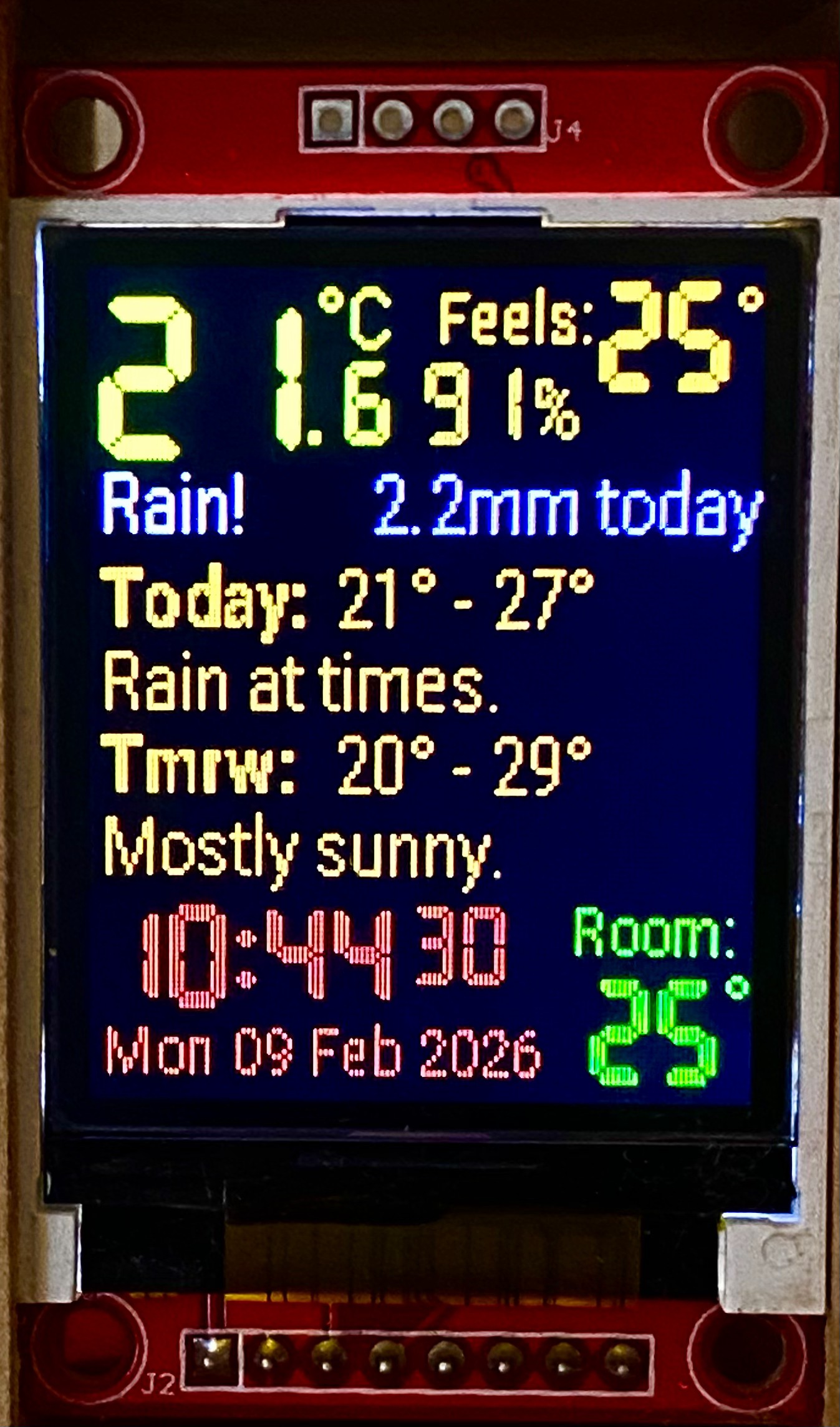
Looks better in real life!
Hardware:
- A small SPI TFT display (1.8" / 47mm); a bigger display would be better
- ESP32 C3 supermini; any ESP32 (preferably with PSRAM) would do
- Light sensor (VEML7700); can remove and rely on time-of-day / PIR (etc) for brightness control
Details on screen (L>R, T>B):
- Current outside temperature (SHT31 sensor, via HA)
- Current outside humidity (SHT31 sensor, via HA)
- Current “feels like” temperature (via calculations in HA)
- Rain / no rain indicator (custom sensor, via HA)
- Rainfall today (custom tipping-bucket sensor, via HA)
- Forecast max/min/synopsis for today & tomorrow (from Aust BoM, via HA)
- Current time (via HA)
- Current day / date (via HA)
- Current room temperature (from existing room sensor, via HA)
Other features of note:
- “Retro” 7-segment display font in use for main readings, with custom spacing for better readibility - and an old-school flashing colon in the time!
- Rain detail display is dynamic and only displayed if relevant.
- Forecast details change from for Min - Max (today) & Min - Max (tmrw) to Max - Min (today) and Max (tmrw) as BoM updates details.
- I use Aust BoM feels-like calculations plus my PWS temp/wind/humidity readings to generate a truly local “feels like”.
- Custom scrolling text function is used for synopsis details to ensure the full “mini synopsis” sourced from BoM is displayed.
- Display is dimmed at night / low-light to prevent sleep interruption.
This project was just to build a gadget to display existing information…most heavy lifting is done by existing sensors and logic in HA. The most challenging parts of this project (yet to build a nice case!) were:
- Finding suitable fonts & sizes to fit everything I wanted on a low-resolution screen
- Building a screen layout that is sensible / easy-to-read
- Getting the display to work on an ESP32-C3 supermini
Code below. There’s plenty of room for improvement, and I’ll probably move to a larger screen shortly. Note all HA sensors are custom and need replacement with local sensors.
# ESP32-C3SuperMini, bedside weather display, Britespark 02/2026
esphome:
  name: $devicename
  friendly_name: $upper_devicename
  min_version: 2025.5.0
  name_add_mac_suffix: false
  on_boot:
    priority: -100    # Lowest priority is -100, this ensuree all other boot tasks are completed first
    then:
      # Logic to set the initial display brightness based on time of day
      - lambda: |-
          auto time_now = id(homeassistant_time).now();
          auto call = id(back_light).turn_on();
          if (time_now.is_valid()) {
            if ((time_now.hour >= 23) || (time_now.hour < 6))
              call.set_brightness(0.3);
            else
              call.set_brightness(1.0);
            call.perform();
          }

esp32:
  board: esp32-c3-devkitm-1
  framework:
    type: esp-idf

# Enable logging
logger:

# Enable Home Assistant API
api:

# Allow Over-The-Air updates
ota:
- platform: esphome

substitutions:
  devicename: esp32-c3mini-01
  upper_devicename: ESP32-C3mini-01
  pin_C3_clk: "4"       #GPIO4 - SPI CLK
  pin_C3_mosi: "6"      #GPIO6 - SPI MOSI
  pin_C3_sda: "20"      #GPIO20 - I2C SDA
  pin_C3_scl: "21"      #GPIO21 - I2C SCL
  pin_C3_led: "8"       #GPIO8 - ESP C3 onboard LED
  pin_lcd_reset: "1"    #GPIO1 - LCD reset
  pin_lcd_cs: "2"       #GPIO2 - LCD CS
  pin_lcd_dc: "0"       #GPIO0 - LCD DC
  pin_lcd_bklit: "3"    #GPIO3 - LCD backlight

# FONTS for LCD screen
  font_2r: "fonts/RobotoCondensed-Light.ttf"
  font_3: "fonts/DigitalDisplay.ttf"
  font_5r: "fonts/RobotoCondensed-Medium.ttf"

# ===== Networking =====

wifi:
  networks:
  - ssid: !secret wifi_ssid
    password: !secret wifi_password
  # Enable fallback hotspot (captive portal) in case wifi connection fails
  ap:
    ssid: $devicename AP
    password: !secret fallback_hotspot_pswd

captive_portal:

time:
  - platform: homeassistant
    id: homeassistant_time
    on_time:
      # dim display at 23:00 and full brightness at 06:00
      - seconds: 0
        minutes: 0
        hours: 23
        then:
          - light.turn_on:
              id: back_light
              brightness: 30%
      - seconds: 0
        minutes: 0
        hours: 6
        then:
          - light.turn_on:
              id: back_light
              brightness: 100%


# ===== Hardware interfaces =====

spi:
  clk_pin: GPIO${pin_C3_clk}
  mosi_pin: GPIO${pin_C3_mosi}

i2c:
  sda: GPIO${pin_C3_sda} # Non-default
  scl: GPIO${pin_C3_scl} # Non-default

# ===== Components & Devices =====

light:
  - platform: status_led
    # Onboard status LED allocation & control
    name: $upper_devicename Status LED
    id: esp32_c3mini_01_status_led
    pin:
      number: GPIO${pin_C3_led}
      inverted: true
  - platform: monochromatic
    # Define a monochromatic, dimmable light for the backlight
    output: backlight_pwm
    name: $upper_devicename Display Backlight
    id: back_light
    restore_mode: ALWAYS_ON

sensor:
  - platform: wifi_signal
    # Platform parameters
    name: $upper_devicename WiFi Signal strength
    update_interval: 60s
    accuracy_decimals: 0
  - platform: uptime
    name: $upper_devicename Uptime
    unit_of_measurement: d
    update_interval: 300s
    accuracy_decimals: 1
    filters:
      - multiply: 0.000011574

  - platform: veml7700
  # Ambient light sensor VEML 7700.  4-wire connection. Black is 0 lx, very bright light > 300,000 lx.
    address: 0x10
    update_interval: 5s
    ambient_light:
      name: $upper_devicename Ambient light
      id: C3_01_ambient
      # This value check lowers backlight brightness to 50% when room is dark (<11 lx)
      on_value_range:
        - below: 9
          then:
            - light.turn_on:
                id: back_light
                brightness: 30%
        - above: 9
          then:
            - light.turn_on:
                id: back_light
                brightness: 100%
    actual_gain:
      name: $upper_devicename Actual gain

    # Homeassistant sensor imports
  - platform: homeassistant
    name: "Master bedroom"
    id: Temp_BedM
    entity_id: sensor.tz3000_bjawzodf_ty0201_temperature
  - platform: homeassistant
    entity_id: sensor.esp32_tank_Temp_SHT3X
    id: Temp_outside
  - platform: homeassistant
    entity_id: sensor.esp32_tank_humidity_sht3x
    id: Hum_outside
  - platform: homeassistant
    entity_id: sensor.rainfall_today_v2
    id: Today_rain
  - platform: homeassistant
    entity_id: sensor.BOM_local_temp_max_0
    id: Temp_max
  - platform: homeassistant
    entity_id: sensor.BOM_local_temp_min_0
    id: Temp_min
  - platform: homeassistant
    entity_id: sensor.BOM_local_temp_max_1
    id: Temp_max1
  - platform: homeassistant
    entity_id: sensor.BOM_local_temp_min_1
    id: Temp_min1
  - platform: homeassistant
    entity_id: sensor.feels_like_temp
    id: Temp_feels

binary_sensor:
  - platform: homeassistant
    entity_id: binary_sensor.esp32_tank_raining
    # Import current raining check sensor from HA
    id: Rain_check

output:
  - platform: ledc
    # Define a PWM output on the ESP32 for screen backlight control
    pin: GPIO${pin_lcd_bklit}
    id: backlight_pwm

text_sensor:
  - platform: wifi_info
    # Add WiFi parameters
    ip_address:
      name: $upper_devicename IP Address
    ssid:
      name: $upper_devicename Connected SSID
    mac_address:
      name: $upper_devicename Mac Wifi Address
    scan_results:
      name: $upper_devicename Latest Scan Results

  - platform: homeassistant
    entity_id: sensor.BOM_local_short_text_0
    id: Weather_today
  - platform: homeassistant
    entity_id: sensor.BOM_local_short_text_1
    id: Weather_tmrw

# ===== Fonts & display configuration =====

font:
  - file: $font_2r
    id: font_2r_s1
    size: 15
  - file: $font_2r
    id: font_2r_s2
    size: 13
  - file: $font_3
    id: font_3r_s1
    size: 46
  - file: $font_3
    id: font_3r_s2
    size: 22
  - file: $font_3
    id: font_3r_s3
    size: 30
  - file: $font_5r
    id: font_5r_s1
    size: 15

# ===== Display settings =====

display:
  - platform: ili9xxx
    model: ST7735
    # 1.8" TFT display (red board) 128x160
    dimensions:
      height: 160
      width: 128
    invert_colors: false
    show_test_card: false
    reset_pin: GPIO${pin_lcd_reset}
    cs_pin: GPIO${pin_lcd_cs}
    dc_pin: GPIO${pin_lcd_dc}
    rotation: 180°
    update_interval: 500ms   # was 500ms for non-scrolling
    lambda: |-
      auto red = Color(255, 0, 0);
      auto green = Color(0, 255, 0);
      auto green2 = Color(0, 192, 0);   // Was 0, 224, 0 - dulling it down a bit
      auto blue = Color(0, 0, 255);
      auto blue2 = Color(224, 224, 255);
      auto yellow = Color(255, 255, 0);
      auto yellow2 = Color (215, 215, 0);
      auto amber = Color(255, 200, 0);      // Originally 255,170,0
      auto amber2 = Color(224, 184, 0);     // Was 172, 127, 0
      auto white = Color(255, 255, 255);

      unsigned long current_time = millis();
      static bool show_text = true;             // Static variable to toggle text visibility
      static unsigned long last_toggle_time = 0;
      int disp_width = it.get_width();

      // TFT display row settings
      int r_time = 122;
      int r_BOM1 = 54;
      int r_BOM2 = r_BOM1 + 16;
      int r_BOM3 = r_BOM2 + 16;
      int r_BOM4 = r_BOM3 + 16;

      // Variables below required for scrolling text only (Synopsis - today)
      static int sct_pos = 0;
      int sct_width = 0;
      int sct_ht = 0;
      int x1 = 0;
      int y1 = 0;

      // Variables below required for scrolling text only (Synopsis - tmrw)
      static int sct2_pos = 0;
      int sct2_width = 0;
      int sct2_ht = 0;
      int x2 = 0;
      int y2 = 0;

      // Variables below required for scrolling text only (TEST)
      static int test_pos = 0;
      std::string test_text = "Warm and sunny, then cloudy with a chance of meatballs. ";   // About 326 pixels using font_2r_s1
      int test_width = 0;
      int test_ht = 0;
      int x0 = 0;
      int y0 = 0;


      // Toggle text visibility every 500ms (adjust as needed)
      if (current_time - last_toggle_time >= 500) {
        show_text = !show_text;
        last_toggle_time = current_time;
      }

      // ===== Display time with seconds and flashing colon separator
      // To compress text around colon with monospaced font the H, M, : are written individually.
      //  : is written first to prevent over-write on H and M
      // Flashing colon
      if (show_text) {
        it.printf(24, r_time, id(font_3r_s3), red, ":");
      } else {
        it.printf(24, r_time, id(font_3r_s3), red, " ");
      }
      it.strftime(2, r_time, id(font_3r_s3), red, "%H", id(homeassistant_time).now());
      it.strftime(34, r_time, id(font_3r_s3), red, "%M", id(homeassistant_time).now());
      it.strftime(62, r_time, id(font_3r_s2), red, "%S", id(homeassistant_time).now());

      // ===== Current temperature readings
      float temp_out = id(Temp_outside).state;
      int temp_out_int = (int)std::floor(temp_out);
      it.printf(2, 5, id(font_3r_s1), yellow, "%.0f", floor(id(Temp_outside).state));
      it.printf(39, 18, id(font_3r_s2), yellow, ".%.0f", floor(10 * (temp_out - temp_out_int)));
      it.printf(43, 1, id(font_2r_s1), yellow, "°C");
      it.printf(64, 18, id(font_3r_s2), amber2, "%.0f", id(Hum_outside).state);
      it.printf(84, 18, id(font_2r_s1), amber2, "%%");
      it.printf(66, 1, id(font_2r_s2), amber, "Feels:");
      it.printf(it.get_width(), 1, id(font_2r_s1), amber, TextAlign::RIGHT, "°");
      it.printf(it.get_width()-5, 3, id(font_3r_s3), amber, TextAlign::RIGHT, "%.0f", id(Temp_feels).state);

      // ===== Indoor (room) temperature
      it.printf(it.get_width(), 118, id(font_2r_s2), green, TextAlign::RIGHT, "Room: ");
      it.printf(it.get_width(), 132, id(font_2r_s1), green, TextAlign::RIGHT, "°");
      it.printf(it.get_width()-5, 136, id(font_3r_s3), green, TextAlign::RIGHT, "%.0f", id(Temp_BedM).state);

      // ===== Raining indicator
      if (id(Rain_check).state) {
        it.printf(2, 36, id(font_2r_s1), white, "Rain!");
      }
      if (id(Today_rain).state) {
        it.printf(it.get_width(), 36, id(font_2r_s1), blue2, TextAlign::RIGHT, "%.1f mm today", id(Today_rain).state);
      }

      //===== Add BOM forecast details
      it.printf(2, r_BOM1, id(font_5r_s1), amber, "Today:");
      it.printf(2, r_BOM3, id(font_5r_s1), amber, "Tmrw:");
      // Display Min > Max OR Max > Min plus tomorrow details
      if (isnan(id(Temp_min).state)) {
        it.printf(47, r_BOM1, id(font_2r_s1), amber, "%.0f° - %.0f°", id(Temp_max).state, id(Temp_min1).state);
        it.printf(47, r_BOM3, id(font_2r_s1), amber, "%.0f°", id(Temp_max1).state);
      }
      else {
        it.printf(47, r_BOM1, id(font_2r_s1), amber, "%.0f° - %.0f°", id(Temp_min).state, id(Temp_max).state);
        it.printf(47, r_BOM3, id(font_2r_s1), amber, "%.0f° - %.0f°", id(Temp_min1).state, id(Temp_max1).state);
      }
      // Display synopsis (scrolling) for today
      it.get_text_bounds(0, 0, id(Weather_today).state.c_str(), id(font_2r_s1), TextAlign::TOP_LEFT, &x1, &y1, &sct_width, &sct_ht);  // Determine the pixel length of text line
      if (sct_width > disp_width) {
        it.printf(sct_pos, r_BOM2, id(font_2r_s1), amber, "%s", id(Weather_today).state.c_str());  // Redraw text at the current scroll position
        sct_pos -= 2; // Update the scroll position for the next update_interval by moving left 2 pixels
        if (sct_pos < -sct_width) {   // If the text has scrolled completely off-screen, reset its position
          sct_pos = 2;    // Set scroll start position to start of line.
        }
      }
      else {      // If text fits, just display it statically
        it.printf(2, r_BOM2, id(font_2r_s1), amber, id(Weather_today).state.c_str());
        sct_pos = 0; // Reset global variable if no scrolling needed
      }

      // Display synopsis (scrolling) for tomorrow
      it.get_text_bounds(0, 0, id(Weather_tmrw).state.c_str(), id(font_2r_s1), TextAlign::TOP_LEFT, &x2, &y2, &sct2_width, &sct2_ht);  // Determine the pixel length of text line
      if (sct2_width > disp_width) {
        it.printf(sct2_pos, r_BOM4, id(font_2r_s1), amber, "%s", id(Weather_tmrw).state.c_str());  // Redraw text at the current scroll position
        sct2_pos -= 2; // Update the scroll position for the next update_interval by moving left 2 pixels
        if (sct2_pos < -sct_width) {   // If the text has scrolled completely off-screen, reset its position
          sct2_pos = 2;    // Set scroll start position to start of line.
        }
      }
      else {      // If text fits, just display it statically
        it.printf(2, r_BOM4, id(font_2r_s1), amber, id(Weather_tmrw).state.c_str());
        sct2_pos = 0; // Reset global variable if no scrolling needed
      }

      //===== Day / date
      it.strftime(2, 142, id(font_2r_s2), red, "%a %d %b %Y", id(homeassistant_time).now());