Modo Tab Mount – Magnetic tablet wall mount designed for EU wall boxes

Hi Everyone,

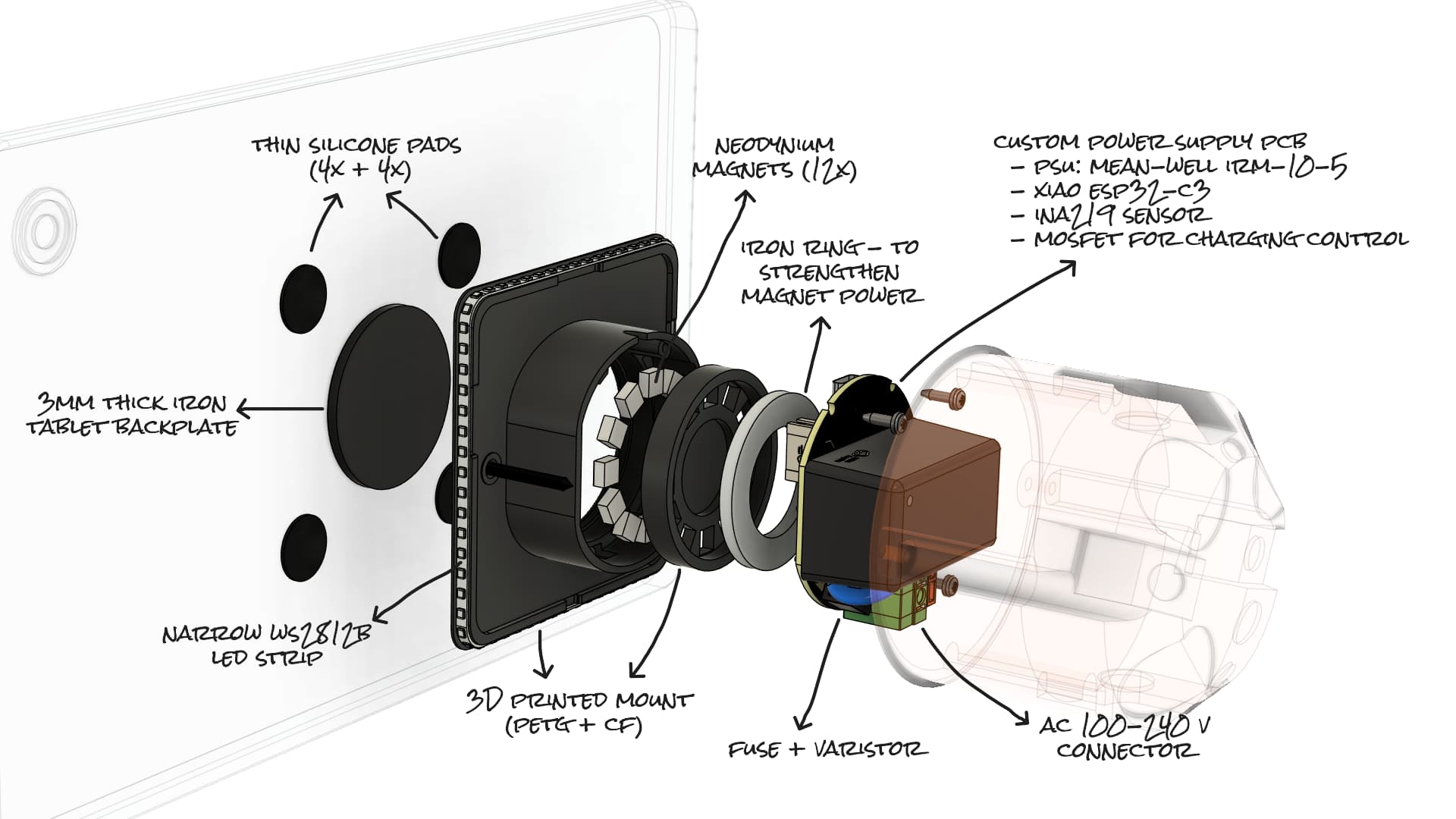
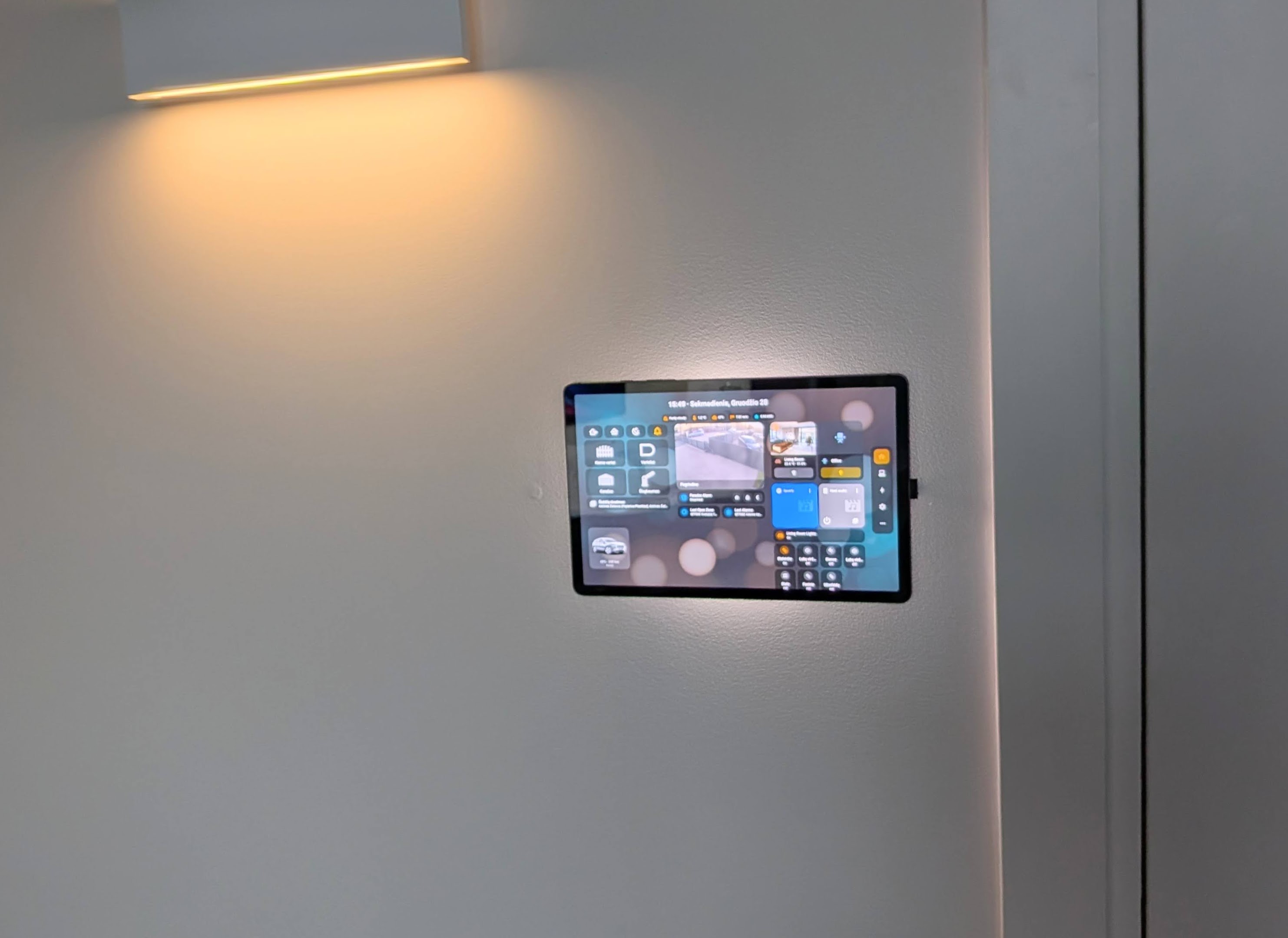
I’d like to share a project I’ve been working on for more than a year: Modo Tab Mount - a magnetic tablet wall mount designed for easy tablet mounting on the wall in a standard EU wall installation box, with additional features - charging control and backlight, all controlled with ESPHome and Home Assistant.

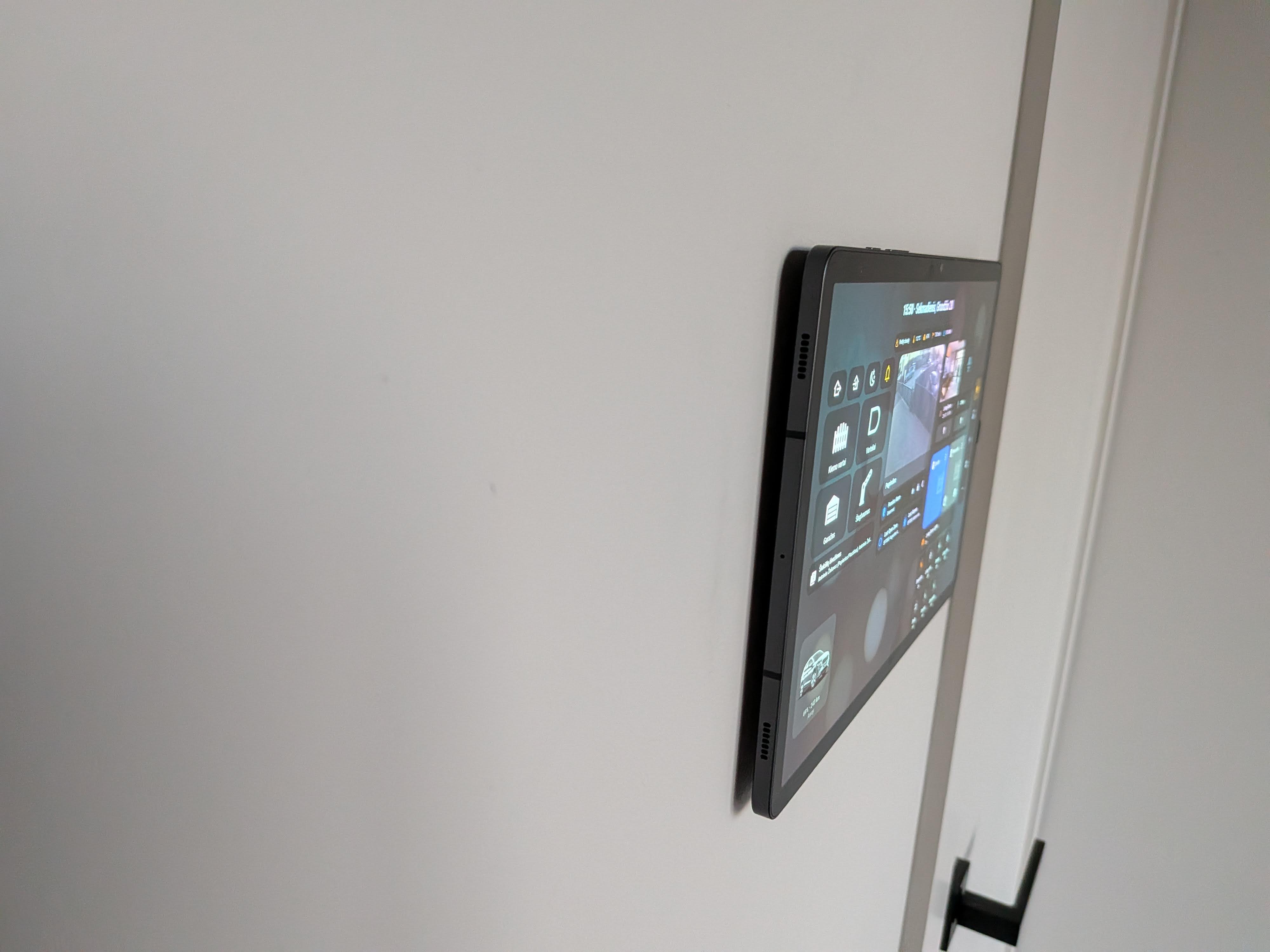
The goal was to create something that looks clean on the wall, has no visible cables, and integrates nicely into a smart home setup.
What it is

  • Designed for standard EU flush wall boxes (round 68 mm)
  • Magnetic snap-on docking – tablet attaches and detaches easily
  • Floating design – minimal gap, no visible frame, and no blocked buttons or speakers
  • Home Assistant friendly – perfect for wall dashboards
  • Multiple variants:
    • Basic - mount only (bring your own charger)
    • Smart - integrated smart power supply (custom PCB with ESP32-C3 + Charging control + LED ambient/status backlight + Sensors)

The Smart version runs on ESPHome, so it shows up in Home Assistant like any other device and can be extended with automations (LED status based on other entities, charging control etc.).

Why I built it

I couldn’t find a tablet wall mount that combined a clean look with smart-home integration (at least at a reasonable price), so I decided to build one myself. It took longer than expected and involved a lot of learning, but this is the result.
Introduction video

Project status

The project is in an early public stage. The mechanical design, core functionality, and ESPHome firmware are stable and in daily use. Some additional features may be added over time based on real-world use and feedback.

It is currently available in an early, limited batch.

More info

I’d love to hear what you think

Would you personally use something like this in your setup?

I’d especially appreciate thoughts on:

  • ESPHome functionality
  • additional sensors that might be useful
  • interest in a low-voltage / PoE version
  • whether a similar mount for US single or double-gang back boxes would make sense

Thanks in advance for any feedback or ideas.

Modestas

7 Likes

Hi Modestas,
on a first glance this looks like a well thought out solution. I am considering this as an alternative to a 3D-printed frame.

Do you have any recommendations which tablet is optimal for this in terms of dimensions and performance?

I currently have Amazon Fire HD 10. It has ideal dimensions but the performance has been lacking a lot in the past few months. Everything is slow and laggy.

Best of luck to you.

Hi! Thanks a lot — really appreciate the kind words :slightly_smiling_face:

On tablets: I’ve tried quite a few of them over time. I’m currently using a Samsung Galaxy Tab S9 myself, but to be honest it’s total overkill for a wall-mounted dashboard. It’s great performance-wise, just more premium (and expensive) than you really need for this use case.

I’ve also tested the Amazon Fire HD 10 (2021). Price and dimension-wise it’s actually very nice, but I ran into the same issue you’re describing, after some time it just starts to feel slow and laggy, especially with dashboards and animations. That’s why I eventually moved away from it. Also finish is plastic, not metal so looks better in a frame :slight_smile:

Another decent option is the Huawei MatePad 10.4 (2020), still use it (4+ years). Hardware-wise it’s still perfectly fine for a fixed dashboard and the size works well, but the lack of Google Play Services is the main downside, so it’s only worth considering if you’re okay with that.

From a price, looks, and performance point of view, I’d say the Samsung Galaxy Tab A8 has been the best overall balance for me. I also use one and it’s been very solid as a wall tablet. It seems to be harder to find new these days, but the Galaxy Tab A9+ looks like successor with very similar specs and should be a safe choice. However I haven’t tried one yet.

I’d generally suggest to avoid cheap Chinese no names like Alldocube - I had one, looked decent, but did not last one year - restarts for no reason, finally died (most likely battery controller).

Hope that helps, and thanks again for the encouragement — happy to answer any other questions.

hi @Modestas_Maumevicius ,
could you elaborate how can you install Movement sensor, or what /how exactly will Wake up tablet display?

also can you control the LED backlight with some HA automations ie turn it on/off or regulate its brightness?

Lastly, regarding the charging…is there some special ESP function how to charge table or it just simply constantly power Tablet with 5V?

thanks

Good questions, I’ll try to break it down clearly.

First of all, there are two versions: Basic (only mechanical mounting, no microcontroller, no power supply, no LEDs) and Smart. The Smart version has a built-in 5V AC→DC power supply and an ESP32 microcontroller running ESPHome, which is natively supported in Home Assistant.

Below applies to the Smart version.

Motion / waking up the tablet
Right now there is no built-in motion sensor in the mount itself.

The usual and recommended options are:

  • Tablet-side motion / presence
    Android apps like Fully Kiosk Browser (camera motion detection, screen wake), or native Android features like tap-to-wake / double-tap.
  • External motion sensors via Home Assistant
    Zigbee / Z-Wave / mmWave sensors → HA automation → send a command to the tablet (Fully Kiosk, MQTT, etc.), so the tablet wakes up when presence is detected.

I am experimenting with adding optional PIR / mmWave sensors in future revisions.
Currently the wake-up logic is handled on the HA + tablet side, not hard-wired into the mount.

There is, however, a 4-pin expansion port exposed on the Smart version. It can be used to connect an external sensor, but this requires modifying the ESPHome firmware and using a sensor supported by ESPHome, so it’s not plug-and-play at the moment.

LED backlight control from Home Assistant
Yes, it’s fully controllable from Home Assistant.

The ESP32 runs ESPHome, so the LED backlight appears in HA as a light entity with on/off, brightness control and optional effects. This allows automations like turning LEDs off at night, dimming them when the tablet is charging, or using them as a status indicator (Wi-Fi, HA state, Alarm status etc.). This is native ESPHome → HA integration.

Charging logic - smart or constant 5V
It’s not just dumb constant power, but it’s also not USB-PD negotiation.

The mount provides stable 5V power and charging is controlled by the ESP via a MOSFET switch. ESPHome logic can enable or disable charging, limit it to certain conditions and avoid keeping the tablet at 100% all the time.

Typical use cases are charging only between e.g. 20-80%, disabling charging overnight etc.

Because there is no USB Power Delivery (PD) negotiation, most tablets will draw around 1-1.5 A (roughly 5-7.5 W), which in most cases is more than enough to charge the tablet normally.
Some newer tablets require proper PD negotiation; in those cases they may fall back to drawing only around 0.7 A, which might not be enough, especially with the screen on.

Monitoring, automation and thermal control
The Smart version includes current and voltage sensing, so you can see real-time power, current and voltage values directly in Home Assistant. It is used in firmware thermal control logic on the ESP32 side. The device monitors its internal temperature and can throttle or disable charging if a configurable temperature limit is reached, adding an extra layer of protection.

There are ready-to-use charging control blueprints available on GitHub, for example for battery-based charging control:

Im also adding a screenshot on how the device looks in Home Assistant

Hi there, first off all, thanks for the great concept of this product.

I have a question: i‘m using a Lenovo Ideal Pad Pro and having trouble charging the tablet.
Is it normal I can only get 7,5W from your power supply?

My tablet is charging very slow, almost slower that what it is consuming. (With display brightness at lowest level)

I started charging this morning and now after 6 hours I‘m only at 30%.

I disabled everything I don‘t need. Just Fully Kiosk Browser.

Hi, this concept looks interesting. I am shopping for a tablet wall mount at the moment and are considering going with your product.

Has anyone bought it and can share first impressions? Pictures would be even better. :heart:

Yes, what you’re seeing is expected. The power supply in the mount is designed more for maintaining charge rather than fast charging. It provides around 7-8W (max 10W), which is usually enough for a tablet that stays permanently docked on the wall (like a Home Assistant dashboard or Fully Kiosk setup).

With some tablets, especially larger or more power-hungry ones like the Lenovo IdeaPad Pro, the consumption can get quite close to the charging input, particularly when the screen is on. That’s why it may charge very slowly or just maintain the battery level.

A few things that can help:

  • Keep brightness as low as possible (which you already did)
  • Disable background apps/services
  • If you’re using Fully Kiosk, you could automate screen on/off (using tablet proximity sensor) to reduce overall power consumption

If you’re looking for faster charging (e.g. to recover battery quickly), this setup won’t behave like a standard fast charger - it’s more intended for “always mounted, always on” usage.

Hi there, yeah, at the beginning it had a few difficulties charging the tablet, but now everything is stable and works great so far. :heart_eyes:

Regarding the product it self, I’m very happy with it. It looks very clean and minimalistic on my wall. Finally no more fat borders on my wallpanel.

Even though, I have found few things to improve, at least in my use-case.

  1. Mounting was a bit tricky for me, because your 3D-printed mounting plate has only 2 holes for screws, left and right. In my case, those holes were damaged on my EU wall box. (it’s not your fault, but sometimes it can be the case) And the other holes on my wall box were not accessible.

Maybe mounting clamps could help? But I know they take a way a bit of space.

Also rotating the mount was not a solution because then the cable would have been too short for my Lenovo Ideal Tab Pro.

So at the end I had to drill new holes in your mounting plate. :grin: But you have to be careful here, because if the screws are not perfectly recessed in the mounting plate, they will scratch the back of the tablet.

  1. As I said, the cable is a bit short for 12" tablets. The cable feels a bit flimsy and I was scared to break or squeeze it. What I would love is, maybe an interchangeable cable, so I can choose whatever length I need,
    Cable flat from front to the end any maybe a black USB-C plug instead of the shiny silver.

All in all I like the mount, mostly because you can use it for most tablets and for the clean and minimalistic look.

1 Like

Hi! Thanks a lot for the detailed feedback - really appreciate you taking the time!

Regarding length of the cable - yes, it might be a little short for bigger tablets. For 10’’ and 11’’ that I tested it was more than enough… If anyone will be ordering for larger tablet - please let me know in comment, I will include a longer cable.

If you’d like, I can send you a longer cable. It is interchangeable, just need to unscrew the PCB from the mount - it is connected to PCB via PH connector.

Also I am working on new revision, it will be exposed outside, for easier access. And it will have another option - Type C → Type C for charging.

Thank you for the photos - it really looks nice!

This looks pretty awesome!
Got a question, are you planning to (or would you consider) making a PoE version of this?
It would allow the ESP device and the tablet to get power and have a wired connection to the ESP device

1 Like

I have it on my to do list, but no timeline yet. It is a bit more difficult than I initially thought…

1 Like

Hey, this is great news. Looking forward for the new revision of the charger.

And thanks for the offer sending me a longer cable. I really appreciate it. But atm I’m fine the way I installed it and for now I have no plans changing it.

Next time, I will mabe take a cable just a bit longer.
Keep up your great work. :grinning:

Currently eagerly awaiting delivery of the mount! :smiley:

Got 2 questions:

I see there’s different ESPHome configs on the Github page: modotabmount.yaml, as well as the lv and sm variants. lt might be good to document what the difference is between those :wink:

I had used some magnetic charging ports for my tablet earlier, making attaching the charger very easy, something similar to this: https://nl.aliexpress.com/item/1005010419510666.html?algo_pvid=200fcdf3-781f-4ad3-8cf7-94c15dd6bacb&algo_exp_id=200fcdf3-781f-4ad3-8cf7-94c15dd6bacb-0&pdp_ext_f={"order"%3A"60"%2C"eval"%3A"1"%2C"fromPage"%3A"search"}&pdp_npi=6%40dis!EUR!14.67!5.27!!!114.36!41.09!%40211b431017746251150514486edd54!12000052349407120!sea!BE!0!ABX!1!0!n_tag%3A-29910%3Bd%3A56983122%3Bm03_new_user%3A-29895%3BpisId%3A5000000197850273&curPageLogUid=3rQPHrZnKfYi&utparam-url=scene%3Asearch|query_from%3A|x_object_id%3A1005010419510666|_p_origin_prod%3A

It would be really awesome if something similar could be used here, that would allow a much easier mounting/unmounting procedure for those who want to use the tablet undocker as well. I totally understand there’s the additional challenge of the angle here, and I don’t know if a magnetic charging tip would exist for this angle, just some idea I had :slight_smile:

t’s on the way :slightly_smiling_face:

ESPHome configs

  • modotabmount.yaml → original / Smart version (integrated power supply)
  • modotabmount-lv → low voltage version (no internal power supply, just USB-C input for power and programming ESP32). Intended mainly for US setups where there’s more space in the wall box, so you can use an external PSU or PoE splitter (not yet available for purchase, still finishing it)
  • modotabmount-sm → same as the original, but updated hardware (different INA219 shunt). First revision used 0.1Ω, which caused ~0.1V drop → some tablets charged slowly. New ones use 0.01Ω → better. This is a separate file because I can’t change the shunt value in modotabmount.yaml without breaking readings for older devices in case firmware is updated via OTA

Functionality-wise they’re almost identical — differences are only hardware-related. I’ll clean this up and document it better on GitHub :+1:

Magnetic charging idea

Yeah, I’ve been thinking about this too.

Those magnetic tips are nice, but the angle + alignment makes it tricky here. The cleanest idea that I came up so far would be:

  • thin FPC from tablet USB-C to the backplate
  • pads on the backplate
  • pogo pins in the mount

So it would “click + power” automatically when mounted.

Main challenges:

  • every tablet has a different port position
  • alignment tolerance is tight
  • adds complexity to installation

So it’s doable, just not “universal”. Still experimenting, because I agree — it would be a really nice upgrade.

1 Like

Hi There,

Is this compatible/available to order in the UK?
Many thanks,

J