Mosquitto MQTT does not see data from Raspberry Pi System Monitor

Hi Folks.

I’m trying to implement this Pi system monitor into HA.

I have it running on a Zero 2 W which is publishing every 5 minutes.

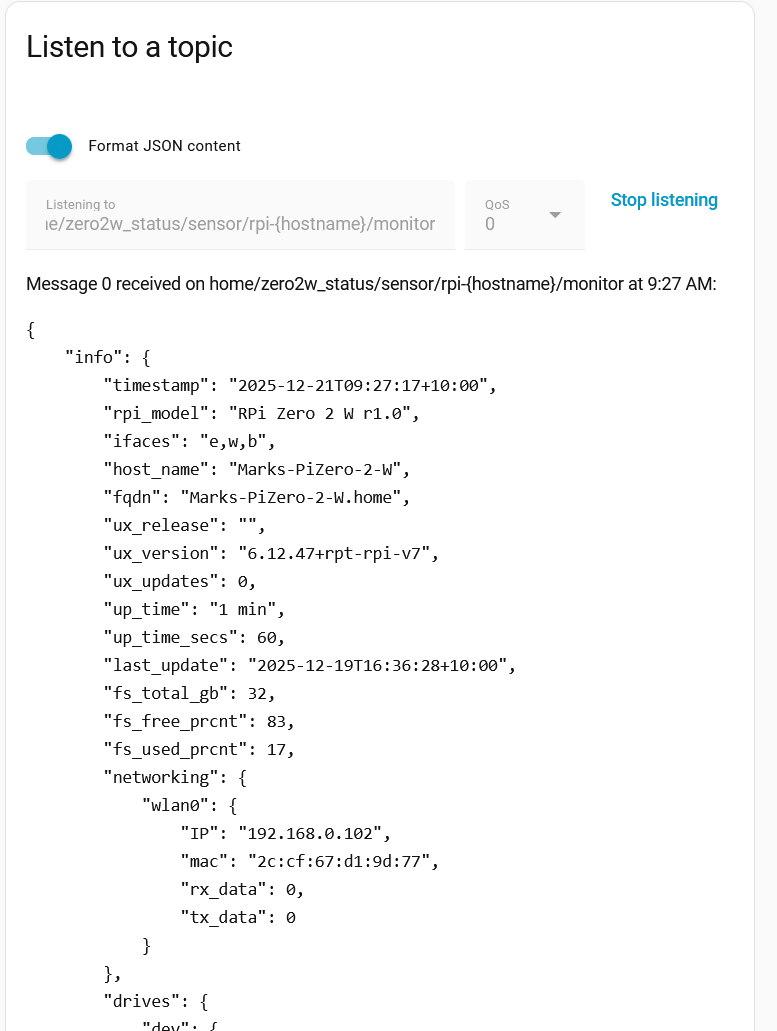
[2025-12-19 08:10:54] Publishing to MQTT topic "home/zero2w_status/sensor/rpi-{hostname}/monitor, Data:{"info": {"timestamp": "2025-12-19T08:10:53+10:00", "rpi_model": "RPi Zero 2 W r1.0", "ifaces": "e,w,b", "host_name": "Marks-PiZero-2-W", "fqdn": "Marks-PiZero-2-W.home", "ux_release": "", "ux_version": "6.12.47+rpt-rpi-v7", "ux_updates": 0, "up_time": "6 min", "up_time_secs": 360, "last_update": "2025-12-19T08:05:23+10:00", "fs_total_gb": 32, "fs_free_prcnt": 83, "fs_used_prcnt": 17, "networking": {"wlan0": {"IP": "192.168.0.102", "mac": "2c:cf:67:d1:9d:77", "rx_data": 19, "tx_data": 82}}, "drives": {"dev": {"size_gb": 0, "used_prcnt": 0, "device": "udev", "mount_pt": "/dev"}, "root": {"size_gb": 32, "used_prcnt": 17, "device": "/dev/mmcblk0p2", "mount_pt": "/"}}, "memory": {"size_mb": 426, "free_mb": 196, "size_swap": 425, "free_swap": 277}, "mem_used_prcnt": 53, "cpu": {"hardware": "BCM2835", "model": "ARMv7 Processor rev 4 (v7l)", "number_cores": 4, "bogo_mips": "153.60", "serial": "0000000096c5bc0a", "load_1min_prcnt": 0.5, "load_5min_prcnt": 8.5, "load_15min_prcnt": 5.8}, "throttle": ["throttled = 0x0", "Not throttled"], "temperature_c": 46.2, "temp_gpu_c": 46.2, "temp_cpu_c": 46.2, "reporter": "ISP-RPi-mqtt-daemon v1.8.5", "reporter_releases": "v1.8.5,v1.7.2,v1.7.3,v1.7.4,v1.8.3,v1.8.4", "report_interval": 5}}"

However when I set MQTT to listen to the topic “home/zero2w_status” I get nothing.

I assume I don’t have the topic correctly written in HA?

Enlightenment always appreciated!
Install MQTTExplorer (either stand-alone or the Home Assistant add-on).
Make sure the device is connecting to the same broker as Home Assistant.
The topic can be anything you want, as long as it’s the same used by the publisher and the subscriber.

1 Like

Have you come up against a string length limit?

1 Like

Troubleshooting MQTT? MQTT-Explorer can help you be successful!
If you have Add-ons available, try adding this Add-on repository to your Add-on list. GitHub - GollumDom/addon-repository.
With this you can see that the broker sees and likely find the bug.

1 Like

Thank you.

MQTT Explorer identified the issue as being the topic.

I had “home/zero2w_status” but the topic as built in the Pi System Monitor code is “home/zero2w_status/sensor/rpi-{hostname}/monitor”.

This makes sense as I could have multiple Pis transmitting data and the topic would need to be differentiated.

Cheers.

1 Like

Nothing is ever…simple…

So I can see the data for this the topic ok in MQTT Explorer and Mosquito MQTT/Setting/Listen to a topic no problem.

I added a sensor in the configuration.yml for “up_time” but can’t get a value.

I feel I have some basic error in the config file but I can’t see it.

Sorted.

As suspected the issue was me not understanding the sections with the json string.

Info section:
○ Up_time_secs = value_json.info.up_time_secs
○ Temperature_c = value_json.info.temperature_c
Networking section:
○ IP = value_json.info.networking.wlan0.IP
Drives section:
○ Size_gb = value_json.info.drives.root.size_gb
Memory section:
○ Free_mb = value_json.info.memory.free_mb | int where “| int” defines the value as an integer.
