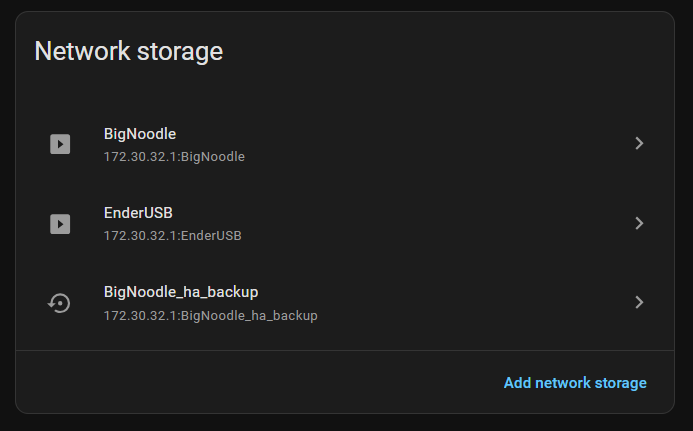
I tried it with my USB external DAS drive, but i didnt get it worked.
Any ideas?
[08:17:38] WARNING:   xfs — not available
s6-rc: info: service init-modules successfully started
s6-rc: info: service init-mount: starting
Added user _mountit_.
Configuration
[08:17:38] INFO:   mount_unlabeled:     true
[08:17:38] INFO:   automount_on_plugin: true
[08:17:38] INFO:   specific_label:      (any)
[08:17:38] INFO:   mount_location:      media
[08:17:39] INFO:   hdd_idle_seconds:    0
[08:17:39] INFO:   folder_mounts:
[08:17:39] INFO:     [0] sdb/immich → media
Scanning drives
[08:17:39] INFO:   NAME   LABEL          FSTYPE     SIZE TYPE
[08:17:39] INFO:   sda                            476.9G disk
[08:17:39] INFO:   ├─sda1 hassos-boot    vfat        32M part
[08:17:39] INFO:   ├─sda2                squashfs    24M part
[08:17:39] INFO:   ├─sda3                erofs      256M part
[08:17:39] INFO:   ├─sda4                squashfs    24M part
[08:17:39] INFO:   ├─sda5                erofs      256M part
[08:17:39] INFO:   ├─sda6                             8M part
[08:17:39] INFO:   ├─sda7 hassos-overlay ext4        96M part
[08:17:39] INFO:   └─sda8 hassos-data    ext4     476.3G part
[08:17:39] INFO:   sdb                              5.5T disk
[08:17:39] INFO:   zram0                              0B disk
[08:17:39] INFO:   zram1  hassos-var     ext4        32M disk
[08:17:39] INFO:   zram2  hassos-tmp     ext4        16M disk
[08:17:40] INFO:   No labeled drives found
[08:17:41] INFO:   Unlabeled: /dev/sda2 → unlabeled_sda2 [squashfs]
[08:17:41] INFO:   Unlabeled: /dev/sda3 → unlabeled_sda3 [erofs]
[08:17:41] INFO:   Unlabeled: /dev/sda4 → unlabeled_sda4 [squashfs]
[08:17:41] INFO:   Unlabeled: /dev/sda5 → unlabeled_sda5 [erofs]
Mounting
mount: /mnt/unlabeled_sda2: fsconfig system call failed: Filesystem uses "lzo" compression. This is not supported.
       dmesg(1) may have more information after failed mount system call.
[08:17:41] ERROR:   unlabeled_sda2 [squashfs] — mount failed
  unlabeled_sda3 [erofs] → /mnt/unlabeled_sda3
mount: /mnt/unlabeled_sda4: fsconfig system call failed: Filesystem uses "lzo" compression. This is not supported.
       dmesg(1) may have more information after failed mount system call.
[08:17:41] ERROR:   unlabeled_sda4 [squashfs] — mount failed
mount: /mnt/unlabeled_sda5: WARNING: source write-protected, mounted read-only.
  unlabeled_sda5 [erofs] → /mnt/unlabeled_sda5
Folder mounts
[08:17:41] ERROR:   sdb/immich — drive 'sdb' is not mounted, skipping
Ready — 2 drive(s), 0 folder mount(s)
It see’s the sdb. It is formatted with ext4, than i connected it to home assistant and see that. It sees the 5.5TB disk but for some reason no sdb1 partition or something?
Hello. I’m facing a problem.
So, I installed the app, enabled the “mount_unlabeled” option, and now they’re always mounted after booting.
Disabling “mount_unlabeled” or uninstalling the app doesn’t work. So, how do I unmount, or is there any option to unmount all?
I having trouble understanding/configuring this to work in my environment.
I was able to add the add-on no problem. It recognizes the external USB-C SSD but I don’t know how to mount /make specific subfolders to store data. I am trying to use this to:
Store backups from HAOS
Store all /media including Frigate files.
Can someone walk me through this? 1st time trying to do this with a locally connected drive.
It is great, now that I have it working. Thanks for creating it.
The issue I had was it failing to connect to the drive after almost every reboot of HA, although the hot-plug feature let it connect later. My work-around for this is simply to turn off it starting automatically and then use an automation to start it a minute after the rest of HA. (I don’t know if the delay needs to be as long as 1 minute, but that is adequate on my rpi5.)
Although I have not dug into it properly, it seems like the problem I had could be related to me having the Tailscale app installed to create a vpn thus maybe changing the ip address while MountIt is starting.
This is the only app that requires protection mode to be off. I am curious to see what the moderators and developers in HA land think of this app? If it works as outlined then this is something that many users have been crying out for.
Not knowing the developer and then allowing this level of access - I’m not sure - i would really like to see more of an indication from people much smarter than me about this.
This level of access is needed to achieve the goal of mounting the drive into the home assistants network drive section. I can make it work in protect mode enabled too, you’ll have to add the server IP (the hostname displayed in the addon’s page while it is running) and the directory by yourself. all the data that you’ll need will be printed in the logs.
This seems possible. If it works then I’ll add it into the next update.
The problem with frigate is that the recording DIR is default
/media/frigate
and that is not changeable for some kind of stupid reason.
The system needs a seperate ln command to make it work:
my usb drive is labeled ‘camrecord’. Mount-it mounts it as
/media/camrecord
so i need a seperate ln -s /media/camrecord /media/frigate
afterwords to make frigate record to the usb drive.
It would be nice of you would be able to change the name of mount in this addon.
Edit:
also, updating mount-it while running frigate gives this error:
Registering with HA (usage=media, server=172.30.32.1)
[09:22:11] INFO: Waiting for Samba on port 445…
smbd version 4.20.6 started.
Copyright Andrew Tridgell and the Samba Team 1992-2024
[09:22:13] ERROR: Got unexpected response from the API: Restarting camrecord did not succeed (systemd result: failed). Check host logs for errors from mount or systemd unit mnt-data-supervisor-mounts-camrecord.mount for details.
[09:22:13] WARNING: camrecord — attempt 1/3 failed, retrying…
[09:22:16] ERROR: Got unexpected response from the API: Restarting camrecord did not succeed (systemd result: failed). Check host logs for errors from mount or systemd unit mnt-data-supervisor-mounts-camrecord.mount for details.
[09:22:16] WARNING: camrecord — attempt 2/3 failed, retrying…
[09:22:19] ERROR: Got unexpected response from the API: Restarting camrecord did not succeed (systemd result: failed). Check host logs for errors from mount or systemd unit mnt-data-supervisor-mounts-camrecord.mount for details.
[09:22:19] WARNING: camrecord — attempt 3/3 failed, retrying…
[09:22:22] ERROR: camrecord — failed to register after 3 attempts
s6-rc: info: service ha-register successfully started
s6-rc: info: service drive-monitor: starting
s6-rc: info: service drive-monitor successfully started
s6-rc: info: service legacy-services: starting
you have to stop frigate before updating the plugin.
If you don’t you can get into the situation as i had: frigate recreates the media/frigate directory on your MAIN drive. (not the external/usb/mounted one)
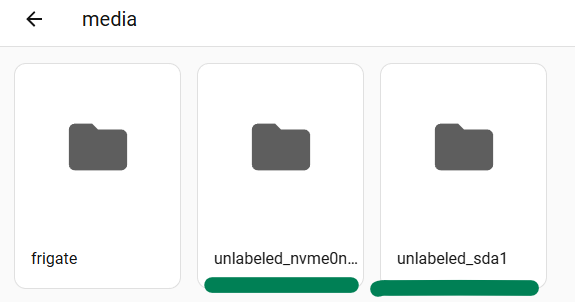
*** this is to Krtpore comment about the “extra” folders created for the unlabeled mount nvme**, just want to make sure this is safe to delete from command prompt
**
safe to delete?
may I ask what commands you used? rm?
Installed and enabled in info: start on boot and protection mode (off)
Here is what I have setup and what Im getting back:
Im trying to use the mount for a nextcloud server (expansion of space) Any help greatly appreciated.
My Add on config:
mount_unlabeled: false # tried with true and now have some extra folders that wonr go away
automount_on_plugin: true # tried with false as well
specific_label: NxtCldBKP
mount_location: share # tried with all 3 options
hdd_idle_seconds: 0
file_activity_detail: basic # havent tried with detailed just yet!
folder_mounts: []
Logs after starting:
 Add-on: Mount It
 Automatically detect and mount USB/SATA drives as Home Assistant network storage
-----------------------------------------------------------
 Add-on version: 1.3.2
 You are running the latest version of this add-on.
 System: Home Assistant OS 18.3  (amd64 / generic-x86-64)
 Home Assistant Core: 2026.9.4
 Home Assistant Supervisor: 2026.09.3
-----------------------------------------------------------
 Please, share the above information when looking for help
 or support in, e.g., GitHub, forums or the Discord chat.
-----------------------------------------------------------
s6-rc: info: service base-addon-banner successfully started
s6-rc: info: service fix-attrs: starting
s6-rc: info: service base-addon-log-level: starting
s6-rc: info: service fix-attrs successfully started
s6-rc: info: service base-addon-log-level successfully started
s6-rc: info: service legacy-cont-init: starting
s6-rc: info: service legacy-cont-init successfully started
s6-rc: info: service init-modules: starting
Loading filesystem modules
  ntfs3
  exfat
  btrfs
[11:37:06] WARNING:   xfs — not available
s6-rc: info: service init-modules successfully started
s6-rc: info: service init-mount: starting
Added user _mountit_.
Configuration
[11:37:06] INFO:   mount_unlabeled:     false
[11:37:06] INFO:   automount_on_plugin: true
[11:37:06] INFO:   specific_label:      NxtCldBKP
[11:37:06] INFO:   mount_location:      share
[11:37:06] INFO:   hdd_idle_seconds:    0
[11:37:06] INFO:   samba bind address:  172.30.32.1
[11:37:06] INFO:   file_activity_detail: basic
[11:37:06] INFO:   folder_mounts:       (none)
Scanning drives
[11:37:06] INFO:   NAME        LABEL          FSTYPE    SIZE TYPE
[11:37:06] INFO:   sda         NxtCldBKP      ext4      3.6T disk
[11:37:06] INFO:   zram0                                  0B disk
[11:37:06] INFO:   zram1       hassos-var     ext4       32M disk
[11:37:06] INFO:   zram2       hassos-tmp     ext4       16M disk
[11:37:06] INFO:   nvme0n1                              3.6T disk
[11:37:06] INFO:   ├─nvme0n1p1 hassos-boot    vfat       32M part
[11:37:06] INFO:   ├─nvme0n1p2                squashfs   24M part
[11:37:06] INFO:   ├─nvme0n1p3                erofs     256M part
[11:37:06] INFO:   ├─nvme0n1p4                squashfs   24M part
[11:37:06] INFO:   ├─nvme0n1p5                erofs     256M part
[11:37:06] INFO:   ├─nvme0n1p6                            8M part
[11:37:06] INFO:   ├─nvme0n1p7 hassos-overlay ext4       96M part
[11:37:06] INFO:   └─nvme0n1p8 hassos-data    ext4      3.6T part
[11:37:07] INFO:   No labeled drives found
[11:37:07] WARNING: No drives to mount
[11:37:07] WARNING: Ready — no drives or folder mounts configured
s6-rc: info: service init-mount successfully started
s6-rc: info: service smbd: starting
s6-rc: info: service hd-idle: starting
s6-rc: info: service hd-idle successfully started
s6-rc: info: service smbd successfully started
s6-rc: info: service ha-register: starting
[11:37:07] INFO: No drives to register
s6-rc: info: service ha-register successfully started
s6-rc: info: service drive-monitor: starting
s6-rc: info: service drive-monitor successfully started
s6-rc: info: service legacy-services: starting
smbd version 4.20.6 started.
Copyright Andrew Tridgell and the Samba Team 1992-2024
Hot-plug monitor active
s6-rc: info: service legacy-services successfully started