I need to move from the integrated MQTT broker to Mosquitto because the integrated one seems to start causing issues.
I have Mosquitto set up in a Docker Container on my NAS and it seems to be working fine.
In order to give me time to migrate everything in an organized manner, especially the 2 WeMos D1 Minis that run my garage door opener and the irrigation system (I have to dismount them to update the code in them, I thought about activating bridge mode in Mosquitto for a while.
I have read around quite a bit but the only topics I could find were on how to bridge SmartThings and ClouMQTT through Mosquitto.
Has anybody managed to successfully set up a bridge through Mosquitto using another, more generic MQTT Broker as the ‘source’?
I have looked at the man page for instructions using the bridge mode, but that’s way over my head. I only understand train station - as my fellow German HomeAssistant Adventurers would say.
It’s a known issue, even mentioned on the documentation
“There is an issue with the HBMQTT broker and the WebSocket connection that is causing a memory leak. If you experience this issue, consider using another broker like Mosquitto.”
My, admittedly naive, view was that the bridge (read: Mosquitto) would act as a MQTT client that ‘simply’ rebroadcasts everything from and to the broker it’s acting as a bridge for.
Guess it’s not that easy then.
Seems like I’ll have to get the ladder out for the ESP8266 in the garage and the coveralls for the one in the crawlspace under the house sooner than I thought.
Oh, I see. You’re configuring the Mosquitto broker, not the hbmqtt broker, to act as the bridge. Theoretically, that should work because, as you mentioned, it acts as a client so it’s no different from hbmqtt’s perspective.
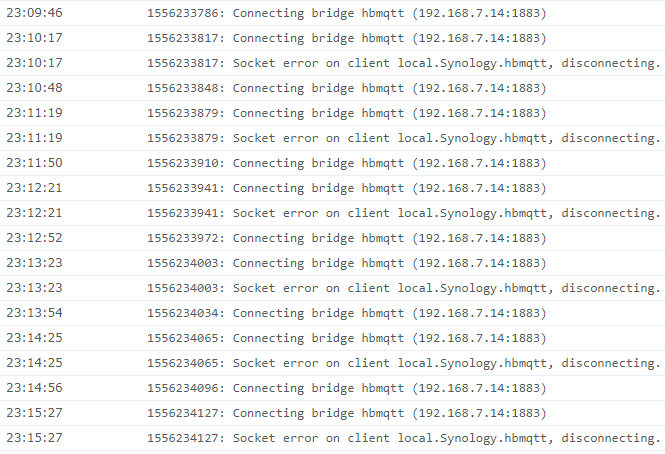
So that’s all fine and good but that stream of ‘Socket error on client local.Sunology.hbmqtt’ says otherwise.
Probably faster to haul the ladder out than find the cause of hbmqtt’s problem … that you intend to retire anyway.