I have finally managed (using a SLZB-MR1U) to get both Matter/Thread & Zigbee working on my HA setup. I can now virtualise the HA box, when I get around to it, away from my Odroid.
The problem I am running into is that I have a garage that is not attached to the house. This has a number of Zigbee devices in it - that seem to work well. The SLZB is in the main house. I have used a couple of Zigbee plugs (1 Garage, 1 House) as close as possible to each other to get the Zigbee signal across the gap and the Zigbee network in the garage seems stable. (devices don’t drop off)
Duplicating that setup for Thread seems less reliable. I have a -98 dBm and an LQI of zero on the link between buildings, so its working, but…
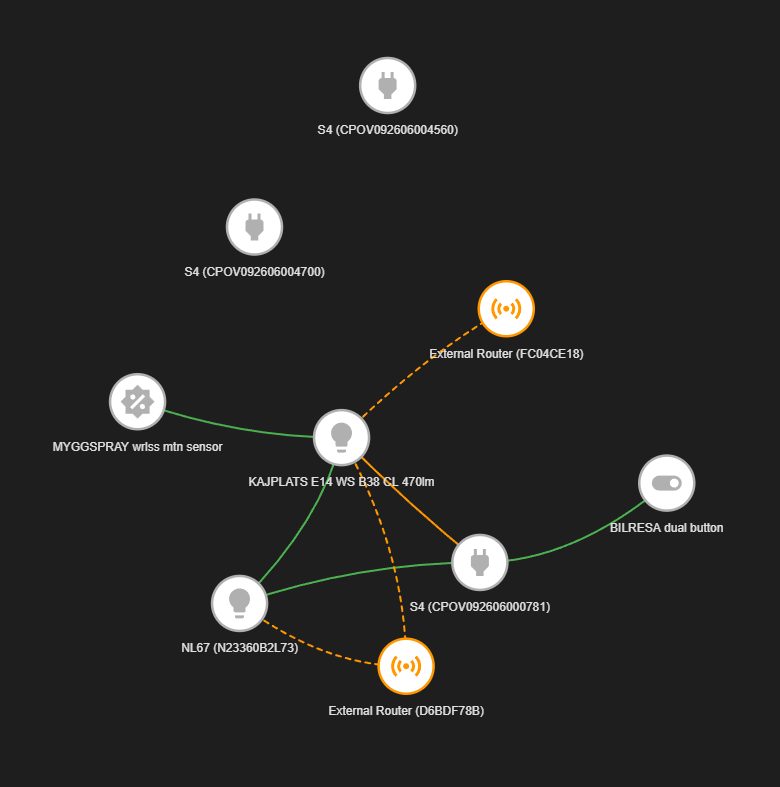
I am using a couple of Onvis Smart Plus S4UK devices to form the bridge. The visualisation shows as red - but the remote plug is currently controllable. I currently have no other Matter/Thread devices in the garage
Matter/Wifi is not an issue as I have ethernet between the buildings and a Wifi AP in the garage.
My thoughts are to deploy a second SLZB unit, probably a single arial unit, in the garage as a Matter/Thread router add to HA and hopefully fix the issue.
Is this possible / practical currently or if not now, are there plans for the future?
Or another way I haven’t thought of?
I don’t use Apple/Homekit stuff. Just HA with ZHA and Matter/Thread and I like to “keep it simple”
Hello!
Adding a second SLZB unit in your garage as a Thread border router is a practical way to stabilize Matter/Thread there. Unlike Zigbee, Thread struggles with ServiceChannel login weak cross‑building links, so giving the garage its own local router—especially since you already have Ethernet between buildings—avoids relying on a poor RF hop. This setup lets Home Assistant manage multiple border routers seamlessly, making your garage Thread network far more reliable.
I have ordered a second SLZB-MR1U which I shall probably run as a Zigbee Router cos its there (there seems to be no off switch for a radio) and give the second border router a try - and see what happens
Hi,
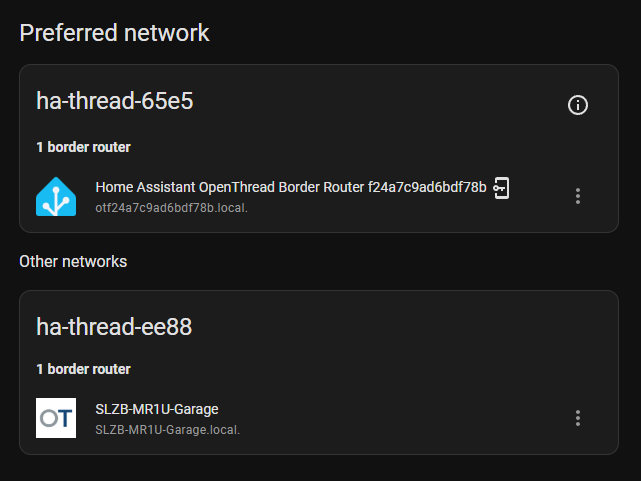
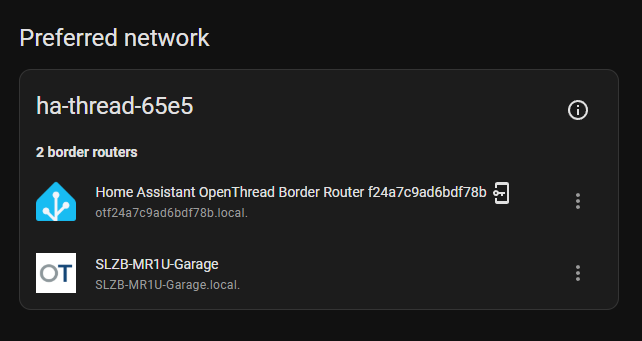
So - I have a second SLZB device. Its configured as a M/T devices on the first radio.
I don’t see a way of configuring it at the moment. The Open Thread Border Router only seems to accept a single device and I don’t appear to be able to add a second instance. Editing in YAML is just ignored
The two separate S4 devices are the two plugs in the garage, both of which are online & working. Only one of which was installed whilst the new OBR was in place in the garage (dunno which one though).
The one “External Router” ending in F78B corresponds to your first OTBR/SLZB, so likely the “External Router” ending in CE18 is likely your new SLZB-MR1U
Maybe try shutting down your OTBR AddOn, and see if Matter can still talk to the devices via the with the new SLZB still running.
The external routers were there before I setup the new SLZB - so I think they belong to someone else. At least thats how I understand it. The hex codes certainly mean nothing to me. Actually on checking (again) you are right - the f78b is my OTBR. But the other was there before I added the second SLZB. I wonder why the f78b shows as not connected / not part of this fabric
Shutting down the OTBR on HA, give it a few minutes and the various plugs seem to respond so I guess its actually working though the matter devices in the house are slow to respond (not unreasonable given the signal strength)
I think it works. It just as though the code behind the Thread Mesh isn’t as perhaps complete as it should be / will / may be in the future.
Update. After updating to the latest firmware the default Thread to Remote OTBR failed to come up - and I couldn’t fix this - nothing worked (that I tried)
After deleting this I added the device back as a Thread + OTBR (so the same mode that the second device was working as)
This is now back to working again, both SLZB-MR1U in the experimental Thread+OTBR mode. This currently works
After an update I sometimes have to restart openthread border router (settings - apps - open border router) but with latest firmware for SLZB M devices (v3.2.8) it was very easy to set up.
If you have Ethernet going to the garage, any Thread Border Router that bridges Thread to Ethernet will work. The border router can creat a local Thread network in the garage and will be linked via Eithernet to you existing network.
Remember that Thread is just an IP network, like WiFi or Ethernet.
Some have suggested an Ethernet-interfaced Thread radio, and then running the Thread Border router in the house. That could work too, but costs quite a bit more and the rest is the same: you have a TBR in the garage