Multiply value in template by 100 gives strange results

Heya,

i was annoyed by a RESTful sensor giving me strange readings. First idea was something might be wrong with the data. But it looked okay. The returned value was “0.554” and the template was quite simple:

value_template: "{{ quote * 100 | round(2) }}"

So my expectation would be the output to be “55.40%”. But instead i got this:

The quote is 55.400000000000006%.

So i played around with the value:

0.550 = 55.00000000000001
0.551 = 55.1
0.552 = 55.2
0.553 = 55.300000000000004
0.554 = 55.400000000000006
0.555 = 55.50000000000001
0.556 = 55.60000000000001
0.557 = 55.7
0.558 = 55.800000000000004
0.559 = 55.900000000000006

Even adding “| round(2)” after the multiplication didn’t change anything.

So me stupid or can someone explain whats going on?

I’m running Home Assistant 2022.2.6 on a Raspi within docker (official stable image).

In case you want to test it yourself, you can use this script in the Developer Tools Template renderer:

{% set my_test_json = {
  "quote": 0.559
} %}

The quote is {{ my_test_json.quote * 100 }}%.

Thanks and cheers!

Due to order of operations you are rounding the number 100. Add some parentheses:

value_template: "{{ ( quote * 100 ) | round(2) }}"

The tiny fractional value is epsilon error (the precision of your computer to do floating point math).

1 Like

Same issue here:


The math lib is bad, never encountered such error on any C code for all my (long) dev life.

There’s nothing wrong with using “round to even”. You can choose another method if you wish:

https://www.home-assistant.io/docs/configuration/templating/#numeric-functions-and-filters

It’s interesting that Python is not mentioned on that wiki page. Pretty sure it uses double precision too.

Python standard float variable type is double precision by default. But if I linked float explanation (that has the same deficiencies and positives but less precision) it would not line up with what OP is seeing.

Python as well as other languages using double precision for float are mentioned here: Single-precision floating-point format - Wikipedia

That’s not possible. I dev in C, C#, C++. All 3 have this “problem”…

Airquotes on problem because it’s not a problem. You just wrap whenever you want to display the number with a precision format.

Yeah, all languages that use floating point do. It’s the nature of floating point. Some math libraries round for you but rounding floating point to desired precision for displaying is a normal thing that we all probably do automatically and don’t even think about it.

Exactly, my point to @Manu3b is that he’s complaining about a “bad” math library when the comparison he used has the exact same issues.

Having used many languages, I personally like python or C#'s handling the best because of f/$ strings.

We should all move to using base 12.

1 Like

Base 12 is not the same as a double/float. double/floats, any other floating point number are all base 10, they just have more precision. The higher the bits, the higher the precision with a trade off of using more memory.

I thought it was a joke about superiority of base 12 over base 10 that is often used to claim imperial is better than metric :stuck_out_tongue:

It was a joke. (Base 12 has more factors so it won’t have as many epsilon errors).

And yes I know that’s faulty logic.

Oh god, that’s a whole other thing. I do like the benefit of using base 12 on paper because it’s smaller to write on a construction print.

Ah, crap, thanks. I totally forget about the parentheses :frowning: So its me stupid.

And thanks for the hint about the epsilon error!

Ok, my bad for the precision issue, in C, I got:

4.100000 - 6.000000 = -1.900000
4.0999999999999996 - 6.0000000000000000 = -1.9000000000000004 == -1.8999999999999999 ? 0

The good think is that printf rounds the result, and the comparison is correct, so it’s transparent.

And thanks for the round() link, the default “round-to-even” was my main surprise, I will use the downward/ceil one, which is more coherent with C math lib:
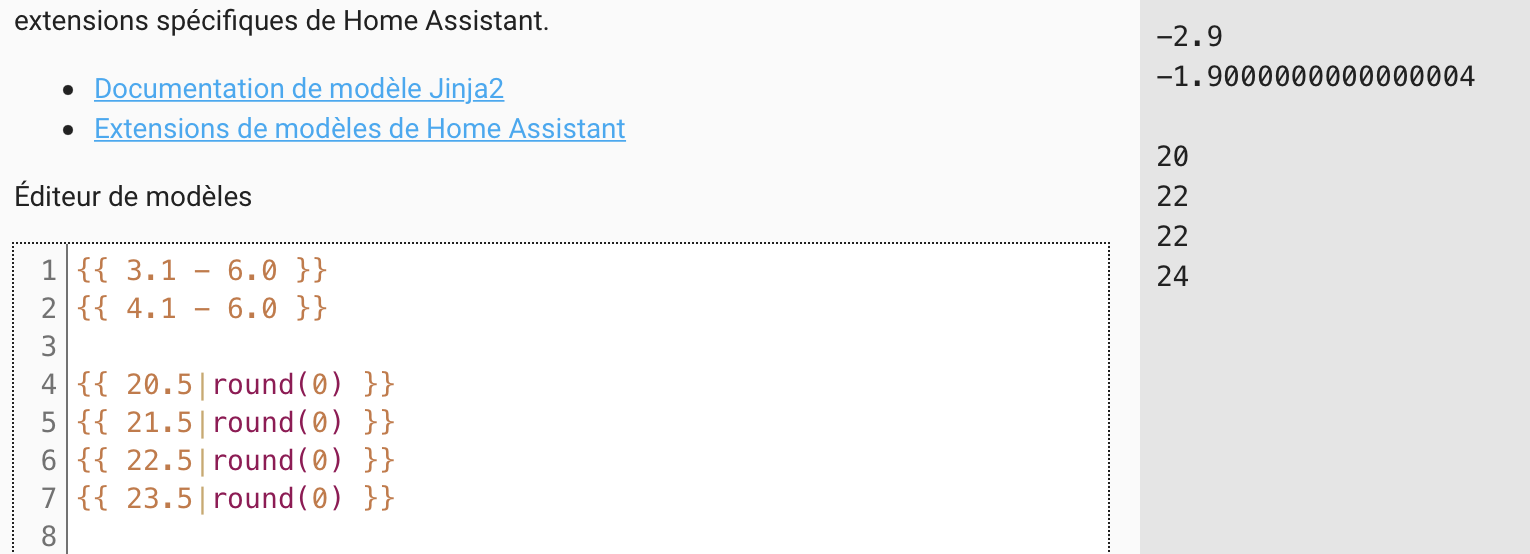
round(20.5000000000000000) = 21.0000000000000000
round(21.5000000000000000) = 22.0000000000000000
round(22.5000000000000000) = 23.0000000000000000