Multizone Thermostat v3: Smart PID, PWM & Geofencing (100% UI / No YAML)

Hi everyone! :waving_hand:

I wanted to share my new project with you: Multizone Thermostat.

The idea was born out of a personal need: current climate integrations often require complex YAML configurations. Initially, I created some custom automations to centralize my boiler while keeping the various zones independent, essentially trying to build a complete multi-room thermostat.
After doing some research, I tried a few of the most popular integrations out there, but none offered a 100% UI-based configuration. At that point, also thanks to some AI coding tools, I decided to turn the logic of my automations into a proper, native integration.

I delayed publishing this post a bit because the project initially started just to solve my specific use case, but I ended up getting carried away! Ultimately, I decided to evolve the system: from a simple valve aggregator into a smart and dynamic control system.

Here are the main features I introduced:

  1. Dynamic Autotuning (from Hysteresis → to silent PID)
    First off (and I noted this in the repo as well), I recycled the PID algorithms from some existing integrations, because it made no sense to reinvent a well-tested and solid mathematical foundation. However, the system was designed to eliminate the hassle of manually calculating PID parameters or having to run active, annoying autotuning processes. Instead, it uses a passive autotuning logic (typical of industrial systems): the system starts in Hysteresis mode, studies the room’s thermal dispersion in the background, and once it figures out the timings, it seamlessly and invisibly switches to the PID controller. You never have to touch the Kp, Ki, or Kd values!

  2. Integrated PWM Engine
    Also starting from solid open-source foundations, I integrated and adapted a PWM cycle management system to translate the PID percentage demands into perfect On/Off cycles for the boiler.

  3. Hierarchical Zones (Primary, Secondary, and Bypass)
    Thanks to some valuable user feedback, I evolved the concept of zone exclusion. You can now define:

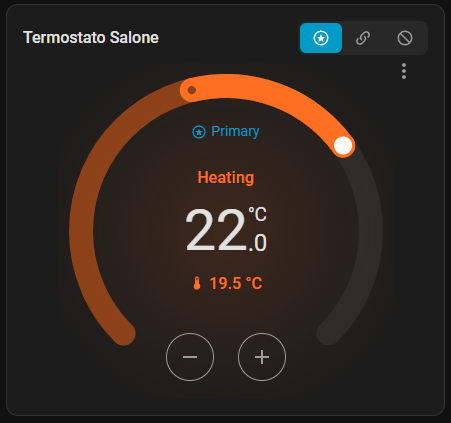
  • Primary Zones (e.g., the living room), which have the authority to trigger the boiler.
  • Secondary Zones (e.g., a small bathroom), which passively open their valves to “steal” heat only when the boiler has already been activated by a primary zone, allowing for massive gas savings.
  • Bypassed Zones, which are completely excluded.
  1. Robust Hardware Locks (Hard Locks)
    I added strict hardware locks (min_cycle_on and min_cycle_off) to protect the boiler relays from sudden spikes or manual tinkering, completely eliminating the risk of wear from short-cycling. It also includes a Summer Anti-seize feature that periodically opens the valves during the summer to prevent calcification.

  2. Global Presets and Geofencing (Zero-code)
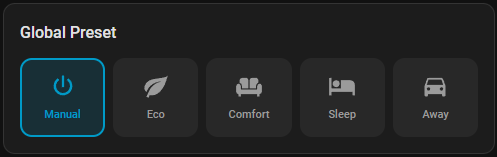
    The system dynamically memorizes the temperature and window status of every single room inside specific Presets (Comfort, Eco, Sleep, Away) without needing a single line of YAML. You can also enable a built-in system that automatically sets the night schedule or switches to “Away” mode when presence sensors detect an empty house.

  3. Lovelace Custom Cards and Auto-generated Dashboard
    The integration automatically registers 4 extremely easy-to-use custom Lovelace cards. What’s more, it leverages these cards to completely auto-generate a clean, intuitive climate dashboard.

The installation is fully compatible with HACS (just add it as a custom repository).

:link: GitHub Repository and full documentation: Multizone Thermostat on GitHub

(A special thanks to the creators of SmartThermostat and vindaalex/multizone-thermostat, whose fantastic open-source work inspired the core math of the PID and autotuning for this project).

I would be really glad to receive your feedback, suggestions, or bug reports if you decide to try it out. Enjoy!

1 Like

Looks interesting.
Please add a blue https://my.home-assistant.io/ link.

What i found/missed ar first try:

  • No way to search for the right switch by typing a letter of name/label/zone rather then scrollizg a huge list.
  • I have a room with 2 TRVs, which i cannot add both.
  • I see no way to connect a TRV and an external thermometer into a virtual device.
  • I dont use house presence, but a week schedule per zone, which is on in times i want comfort temp. There are 2 switches per room, one to force eco, the other to force comfort.
  • I need the primary/secondary zone mode dependant of heating mode → primary while comfort, secondary while eco.
  • i am not sure what the bypass mode is doing. Ignore it? Switch it off?

Hi vajdum, thanks a lot for checking it out and for the great feedback! I have added the blue HACS badge to the README, thanks for pointing that out. :wink:

Regarding your points, you raised some very interesting use cases. Here is what I think:

  1. Searchable drop-downs: You are absolutely right. I will release a minor update very soon to replace the current dropdown with an advanced EntitySelector, so you can easily type and filter the thermostat name.
  2. & 3. Multiple TRVs per room & External Sensors: The idea of being able to group multiple TRVs/thermostats under a single zone and using an external wall thermometer to override the built-in sensor is something I had actually considered at the beginning of the project, but it completely slipped my mind! I will immediately start evaluating an implementation plan to add these optional checkboxes in the Config Flow in the coming days (I actually plan to release these features, alongside Weather Compensation, by the end of this week!).
    As a “Bonus”, I think I will also expand this logic to the creation of Virtual Thermostats, allowing users to insert more than one actuator per room. For example, someone who owns two fan coils (controlled via Zigbee relays) or two motorized valves in the same room will find this extremely useful.
  3. Weekly Schedule: I will add this request to the list of future updates. Initially, we didn’t include it to keep the configuration lightweight, as there are already excellent third-party integrations in Home Assistant (like the Scheduler Component) that pair perfectly with our Presets. However, I will keep in mind the possibility of adding a native “Calendar” as an option in the future.
  4. Primary/Secondary dynamics in Presets: This feature is already implemented and works exactly as you requested! Our system saves the full state of every single thermostat for each Global Preset (Comfort, Eco, Sleep, Away), including its Mode (Primary/Secondary/Bypass). To make it work: activate the “Eco” preset from the global UI and set your zone to “Secondary”. Then activate “Comfort” and set it to “Primary”. From that moment on, the system will automatically remember and switch the modes when you change presets!
  5. Bypass Mode: Just to clarify, the Bypass mode simply excludes a zone completely from the system (its valve is left alone or shut off, and it doesn’t affect the boiler’s demand calculation). It’s designed for unused rooms or closets. If you don’t need it, you can simply ignore the switch!

Thanks again for the inputs, they are incredibly helpful for steering the project’s next steps!

Your welcome :slight_smile:
Regarding week plan, i already use schedulers (with advanced heating control blueprints, combined with an integration for weather compensated flow temp and an automation to switch the boiler on/off).

I dont know where to use a global presets. I need heating in morning and evening in the kitchen, the time inbetween in another room and in the living room from afternoon to night. On a calender event the living room heating will be skipped.

Hi! I can confirm that I’ve already updated the config_flow to include the search functionality.
​Regarding the scheduling logic you mentioned, after implementing weather compensation, my plan is to add OpenTherm support to manage both modulation and flow water temperature.
​As for the global presets management, there isn’t a dedicated setup screen to enter settings for each individual thermostat; instead, it directly saves the settings you apply to the thermostat itself. For instance, the easiest approach is to activate a preset on the auto-generated dashboard and adjust all the settings—such as temperature, primary/secondary activation, and bypass. The system will then automatically store all these settings for each thermostat and preset.
​For the example you described, you could easily manage it using the Night, Comfort, Eco, or Manual presets. You can set the Auto-Night time (an existing feature that automatically switches the system to Night preset mode) and use a very simple automation to handle the remaining time slots. This allows you to leverage the presets effectively, especially considering that every feature has an entity you can modify via automations.
​As for the rest, I’m not entirely sure if this fully covers what you were looking for.

I am used to manage temperatures per room.
Maybe i dont understand the ability of all this different presets :slight_smile: - just seen, presets are not yet finished.

How will heating on demand be handled?

Regarding opentherm, i have an old boiler.
i only can switch it on/off by simulating the signal for “need heat”.
I added sensors for flow/backflow temps.
I change flow temperature by setting it to 60°C on the boiler and a virtual thermostat using flow temperature and the heating switch to maintain the needed temperatur. This works unexpected well.

For flow temp calculation i use Shapes of Heating Curves · sokolovs/wda-sensor Wiki · GitHub but i dont like the curve going down to 0°C, i wanted something like 20°C so i need to change it by an automation to get my rooms warm with distinct outside temperatures.

I would like to use something that calculates the needed heating time, so a room is warm at the scheduled time. The room used only in the evening is the coldest one, especially when the sun is shining and flow temp is lower during day it needs heating hours before using to reach its temperature.

Hi! I’m at work this morning, but I’ll try to push some updates this afternoon.

Regarding the global presets, I’m not sure what you mean by “incomplete.” The feature has already been implemented and works smoothly; if you encounter any issues or bugs, please let me know so I can fix them.

Heating management (heating on demand) is handled through an aggregation system that calculates the overall heat demand percentage based on the primary rooms. On ON/OFF systems, this percentage is converted—via the PWM algorithm (derived from other integrations)—into a virtual modulation based on cycle times.

As for your boiler setup, I’m not entirely sure I fully grasped it, but it sounds like a traditional ON/OFF boiler where you added a sensor and/or virtual thermostat to manage the water temperature. It’s an interesting approach, but incorporating it natively might be tricky, as the main goal of this integration is to keep things simple and user-friendly, whereas your setup involves very specific hardware tinkering. Feel free to explain it in more detail, though!

Weather compensation will be built directly into the system and will act straight on the heat demand percentage.

Finally, regarding the pre-heating function you mentioned, could you elaborate a bit more on what you have in mind? From what I gather, you’re looking for an automated scheduling system that anticipates activation by compensating for heating times based on room thermodynamics. I can consider adding a sensor that exposes the estimated time required for the room to reach the target temperature. This should actually be fairly straightforward, as PID algorithms do precisely that (calculating heating and cooling dynamics). That way, you could handle it via automations using a simple calculation: Target Time - Required Time.

In the future, I plan to develop an external predictive AI system that handles all these compensations autonomously by analyzing home sensors and user habits, but that project is still a way off.

Regarding the global presets, I’m not sure what you mean by “incomplete.”

PHASE 2 — Architectural Evolution (In Progress)

  • Virtual Thermostats via UI: Automatic creation of climate entities from a temperature sensor and a simple switch (e.g., bare relays) without YAML.
  • Global Presets (Dynamic Memory): Presets (Manual / Eco / Comfort / Sleep / Away) act as “global scenes” with dynamic memory per individual zone.
    How do i use this?

With heating on demand i mean randomly used rooms → sort of presence per room using a switch.
I dont use person trackers and i dont think its useful to start heating on arrival.

You are right regarding my boiler. It could be managed by a room thermostate, but i dont have one (main room is the most warm one).
It would be nice if your integration could set the boiler climate temperature or provide a number entity i can use in an automation.

There are a lot of heating projects. I tried several of them, but i not yet found one i could use without glitches.

I cannot use some of them together, as most of them work by changing TRV temperatures → settings war.
They have no scheduling or no heat adaption or dont tell my boiler what to do.
The one calculating preheat time does it only for morning heating, but i need it for the cold room used in evenings too. Especially on not so cold sunny days heating stays off around warm hours, but the cold room facing west gets colder then its eco temperature and needs early heating start. Or the warm rooms get overheated (non-isolated pipes, cold room is the last one).

Comfort is 2°C over Eco (not used, not home, night).

I would like to get rid of my several different not so optimal automations and the need to adapt settings on changing weather. Why else i have a SMART home system :slight_smile:

Some of the tried ones:

Currently used with several added automations.
I can add several schedules per room like kitchen_normal, kitchen_holiday, kitchen xyz and i can switch between them by a global select using normal, holiday, xyz

Analytics only

Versatile Thermostat looks like it has evolved, i need to reevaluate it

Just found RoomMind, looks very interesting too

Regarding Presets, let me give you a practical example. Global Presets do not directly trigger the native presets of TRVs or target thermostats—those are completely ignored, as managing each room individually is quite inconvenient. Instead, Global Presets in this integration act as a “memory of settings.” I called them presets for convenience, but they are essentially saved blocks of configurations that can be recalled anytime.

For example, imagine you have 3 zones: Kitchen, Office, and Living Room.

  1. You select the Manual preset and set: Kitchen to 20°C (Primary), Office to 20°C (Secondary), and Living Room to 19.5°C (Primary).
  2. Then you switch to Eco mode and set: Kitchen to 19°C (Secondary), Office to Bypass, and Living Room to 19°C (Primary).

If you switch back to Manual, the integration will automatically restore the exact settings you dialed in earlier. Every modification made under a specific profile is stored dynamically in memory. Keep in mind that both the zone modes and the active presets are exposed as native entities.


Regarding Heating on Demand (activating a room via a switch or presence sensor): I actually considered adding an automatic entity selector in the Config Flow to switch a zone from Secondary/Bypass to Primary. However, I decided against it because it’s impossible to natively cover every user’s setup. Some users want to use presence sensors, others motion detectors, light switches, or even Frigate camera events.

To give complete freedom, I exposed the zone mode selector (Primary / Secondary / Bypass) directly on the thermostat card and as an entity in Home Assistant. This way, you can easily create a simple automation tailored to whatever sensor or switch you prefer.


Regarding your Boiler Control request: I need to check if the global heat demand value is already exposed. But if I understand correctly, rather than a percentage value (%), you need a temperature setpoint entity in degrees (°C), right? I can definitely add this—give me a few days to implement it!

As for External Temperature Sensors: I’m working on the best way to handle this. My initial override test crashed my dev environment, so I need a bit more time to refine the code. The same goes for grouping multiple TRVs/actuators under a single zone. As soon as these features are tested and stable, I will release the update.

A small favor: Could you open a Feature Request on GitHub detailing these specific needs? It helps me track everything systematically so nothing slips through the cracks! :sweat_smile:

I hope this “balanced” philosophy—providing a solid central core while leaving freedom via automations—fits your workflow well!

Hi,

Following up on my previous message, I wanted to give you a quick update on the current progress.

I can confirm that I am already working on integrating valve aggregation into a single zone, as well as adding the external sensor. However, this is taking a bit longer than expected because it requires a complete rewrite of the system architecture.

The new design will be based on a Master / Slave / Sub-slave structure, which will allow for hybrid aggregate zones combining TRVs and relay-based systems.

I will publish the release as soon as everything has been fully tested. In the meantime, I’ve also put together a new roadmap featuring all the upcoming features I plan to add.

Stay tuned for further updates!

[EDIT - MAJOR UPDATE V3 - PROMISES KEPT!]

Hi everyone! Thanks to your amazing feedback in this thread (special thanks to @vajdum for the great inputs), I’ve spent the last week completely rewriting the core of the integration. Version 3.5 is now live on GitHub.

What’s new in V3.5:

Multiple TRVs & External Sensors (Unified Zones): You can now group multiple TRVs or relays under a single room and assign a reliable external wall thermometer to it. The system will mathematically “hack/override” the inaccurate TRV internal sensors to match your actual room temperature.
Weather Compensation (Feed-Forward): The PID has been supercharged. Add an outdoor temperature sensor in the UI, and the integration will automatically predict the heat loss of your home, adjusting the heating power seamlessly without overshooting your room target!
The config flow has been rebuilt to use native HA Searchable Drop-downs for everything. Update via HACS and enjoy!

What’s next? We have also completely restructured our GitHub repository. You will now find a brand new Roadmap detailing our upcoming “Phase 5” releases, which will include Full OpenTherm Support and Advanced Self-Learning Algorithms for the climate curves. Once this next phase is completed, we will also release a comprehensive, deep-dive Documentation/Wiki explaining every single feature in detail.

Stay tuned, and keep the feedback coming!