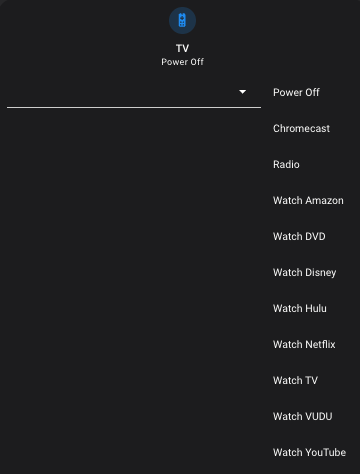
My mushroom select card has recently begun to display all of the select options in a visible list rather than in a drop-down menu. Any thoughts?
Refer to the official documentation. It might have something to do with the layout. I haven’t used this card, personally, but I would start with that.
It seems it’s not only this card, but also the mini media player.
Well… let’s take a step back. First and foremost, have you tried a hard cache flush and reload on your browser?
I have the same problem in the Home Assistant App (Apple iPhone). But when I open Home Assistant in Google Chrome on my MacBook it shows the normal behavior of the select-card.
When I open HA with Google Chrome on a PC with Ubuntu, the problem is back. On a Laptop-PC with MS-Windows11 and Microsoft Edge it’s also working as ususal.
Perhaps a small issue with some browser behavior ?
This problem seems to come and go. I had this issue a week ago, then it seems to have resolved itself. This morning I ran the update for the expander card, which requires a chache clear, and the problem returned.
I am having the same problem with Chrome browsers on different machines. Both Mushroom select and select list cards are not working properly (all list items displayed). Clearing the cache doesn’t help. Did anybody find a solution?
And it also happens on the Home Assistant app with iOS.
Not anymore on my HA-system since last week. After the lastest HA-core update and a restart.
Still seeing it on the app as well.
if you’re using chrome browser, hit f12 for developer console, put mouse over the reload icon, right click it, choose “Empty cache and hard reload”. Give that a shot and see if it helps.
Thanks. Still didn’t work. I get a javascript error in the console.
Uncaught (in promise) TypeError: Cannot read properties of undefined (reading 'map')
    at Object.getMenuItemValues (mushroom.js?hacstag=586363416302:554:2124)
    at e.layoutOptions (mushroom.js?hacstag=586363416302:452:4500)
    at e.init (mushroom.js?hacstag=586363416302:452:7907)
    at Wr.createFoundation (mushroom.js?hacstag=586363416302:264:304)
    at Wr.firstUpdated (mushroom.js?hacstag=586363416302:264:332)
    at Wr.firstUpdated (mushroom.js?hacstag=586363416302:269:942)
    at Wr.firstUpdated (mushroom.js?hacstag=586363416302:554:3471)
Hmmmmmm… I wonder if there’s a conflict with your select values…? This error suggests one of the values is not defined, or returning “none”, or returning a string instead of a list. Are you using a template in any of your values?
It’s pretty simple card configuration. The card was cpnfigured with the UI editor and no templates:
type: custom:mushroom-select-card
entity: input_select.battery_charging_priority
name: Charging Priority
icon: mdi:home-battery-outline
It’s not-so-much the card configuration, but the input_select entity directly. Do the options (values) show fine on a regular entity card? What are the options for the input_select entity?
Thanks. The options show up fine on a regular entity card. I don’t see anything special about the options (although one has a parenthesis). See attached image.
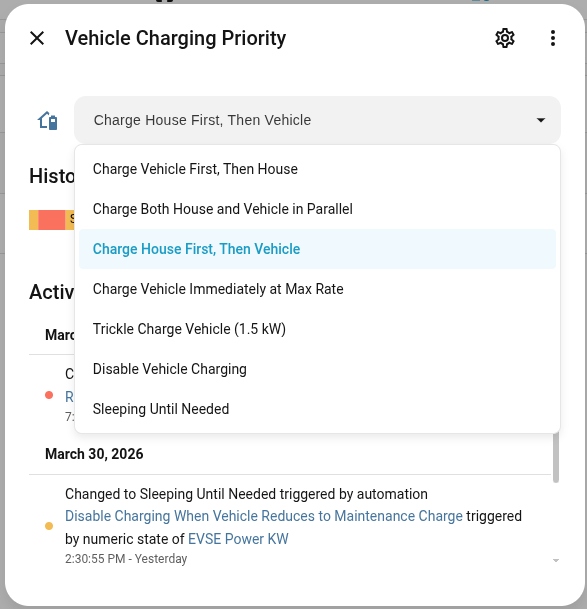
Very strange, there just might be a bug with this card. You’ve triple checked the spelling of the input_select entity in the card configuration? That’s the only other thing I’m thinking would give you that JS error
yes, the entity name is correct. And it is displaying the correct option list, just in a static non selectable form. Thanks anyway for trying.