My Garden Irrigation

You can also use my guide, but I suggest to proceed very carefully and check all steps.
I have the main dashboard as Lovelace and it works.

And a question to klogg, is there any way to reduce the minimum water time from 1 minute to let’s say 10 seconds?
Like I mentioned I have only a pump to water some plant pots, 1 minute means 1 liter, which is quite a lot, still perfect for a big pot for 1 week watering, but would be too much for small pots. Of course I could divide the quantity to multiple pots.

Are you on latest 0.113.2?
have you tried to delete cache from browser?

Well…
In the short term you can use testing mode which changes ALL times from minutes to seconds.

But that is not an answer for the long term :wink:

In theory it would be really easy to make this possible by cycle or by zone (after all, I already do it for testing mode). My problem as with lots of feature requests is that the UI is quite busy already and I don’t want to make it too overcrowded.

It is an idea with merit though. I will think about it…

As an aside, there were two reasons for keeping it to whole minutes. Firstly can you imagine a slider that allowed increments of a second for 60 minutes? That would be 3600 steps. Also I am not convinced that the timing in HA is accurate enough to confidently have a switch on for, say 10 seconds but that in itself isn’t a reason not to allow it. So long as the user is aware that there may accuracy issues.

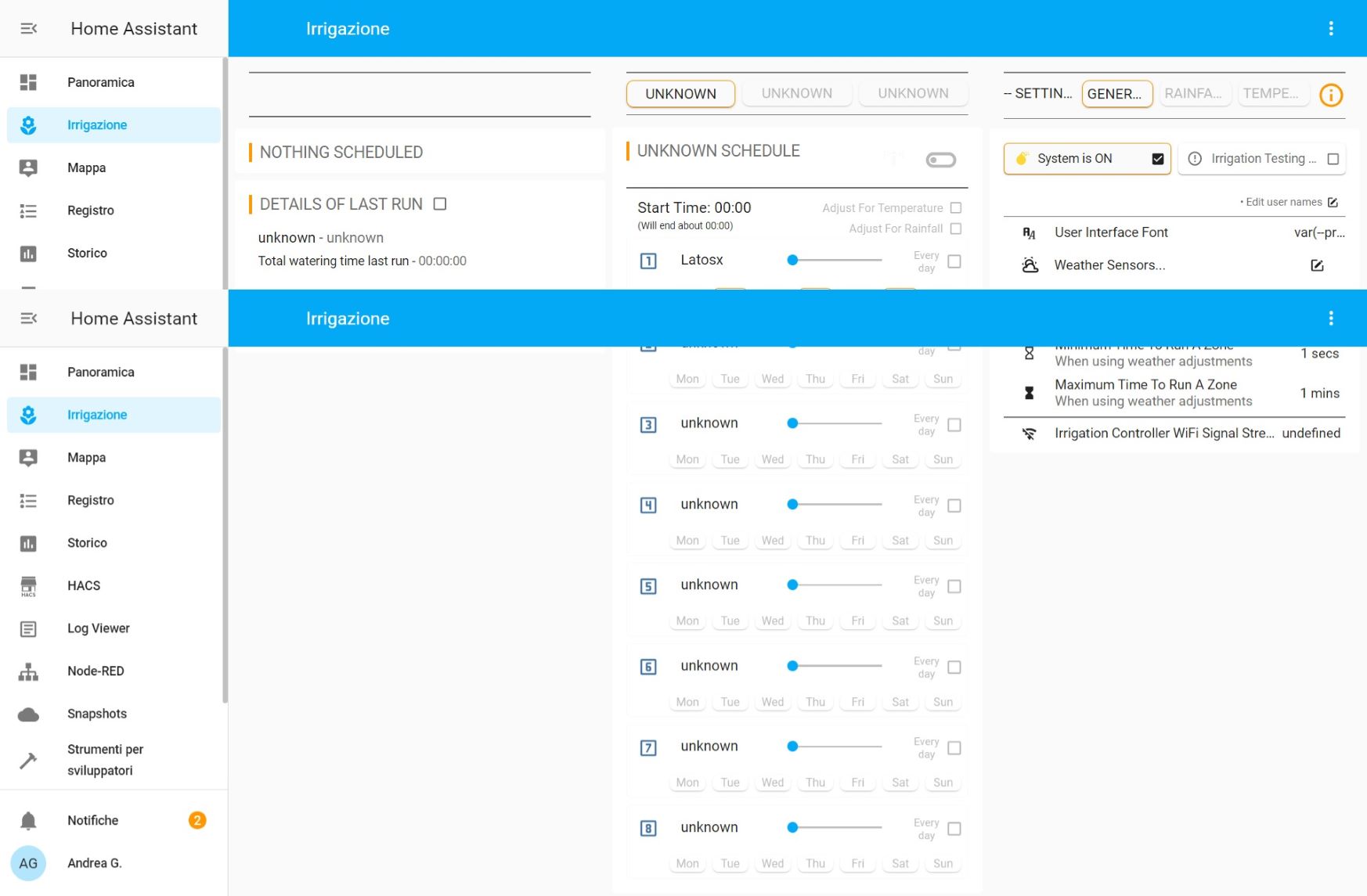
I am having problem with morning evening and manual buttons name missing they show unknown instead . Check the photo .
Any idea?

Also I have 12 solenoid valves in my garden if I understand correctly I can bind only one switch for every zone , so 8 is the max number of valves supported?

I cannot solve the problem with the given information as well.

But I can confirm, that the italian instructions are working fine on an up-to-date lovelace UI setup.

I had the same problem clearing the broswer cache solved it

Just click on [unknown] in the header [unknown schedule] and change the name to [morning].

1 Like

1)I saw there is a fork that could use more then 8 sprinklers.
I naively deleted the the lovelace and packages folder and changed with the ones coming from the fork but nothing is changed. Can someone help me changing version so I could use more than 8 sprinklers?

2)Also, more important,. I can start the sprinkler but I can’t stop it manually .The error I receive is
failed call to service script/irrigation_cancel_irrigation . not a valid value for dictionary value @ data['entity_id']
and the status is always " watering"
I found a guys with the same problem I tried to reload as he did without solving my issue.
If I run a cycle the valve close regularly .

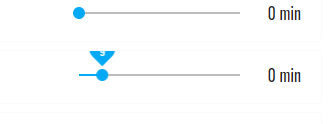
3)when I move the slider of irrigation time the number on the cursor is only partially visible
arrow

Hi @claustro, Here is my fork with an up to 16 zones branch https://github.com/athan71/HA-Irrigation-Version2/tree/16-zones
I can only confirm that it works with HA 112.x since i have downgrade my HA to 112.x last week to make it work, but I do have update my 16 zones branch with all the latest changes from Klogg and as i read, it should also work with HA 113.2. I just can’t confirm that.

1 Like

Hi,
1.clearing the browser cache did not work…
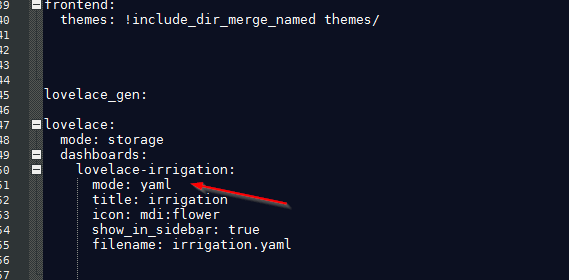
2. lovelace-irrigation is in yaml mode.

image

error messages

ButtonCardJSTemplateError: TypeError: Cannot read property ‘state’ of undefined in ‘return states[‘input_text.irrigation_ui_font_family’].state’
tap_action:
action: |
[[[
if (states[‘binary_sensor.irrigation_cycle_start_clash’].state == ‘on’)
return ‘call-service’;
else
return ‘none’;
]]]
service: browser_mod.popup
service_data:
title: :exclamation: CYCLE SCHEDULE CLASH
card:
type: markdown
content: >
#### WARNING! You have overlapping cycle schedules…

    {{ state_attr('binary_sensor.irrigation_cycle_start_clash',
    'clash_text') }}


    Please check and correct.
  style: |
    ha-card {
      border-radius: 0em 0em 1em 1em
    }
deviceID:
  - this
style:
  font-family: |
    [[[
      return states['input_text.irrigation_ui_font_family'].state
    ]]]
  font-size: 14px
  box-shadow: 0em 0em 0.5em
  border-radius: 1em
  opacity: 0.9

hold_action:
action: none
double_tap_action:
action: none
layout: vertical
size: 40%
color_type: icon
show_name: true
show_state: false
show_icon: false
show_units: true
show_label: true
show_entity_picture: false
show_live_stream: false
type: ‘custom:button-card’
entity: input_text.irrigation_current_status
triggers_update:

  • group.irrigation_group_cycle1_every_day

  • group.irrigation_group_cycle1_mon

  • group.irrigation_group_cycle1_tue

  • group.irrigation_group_cycle1_wed

  • group.irrigation_group_cycle1_thu

  • group.irrigation_group_cycle1_fri

  • group.irrigation_group_cycle1_sat

  • group.irrigation_group_cycle1_sun

  • group.irrigation_group_cycle2_every_day

  • group.irrigation_group_cycle2_mon

  • group.irrigation_group_cycle2_tue

  • group.irrigation_group_cycle2_wed

  • group.irrigation_group_cycle2_thu

  • group.irrigation_group_cycle2_fri

  • group.irrigation_group_cycle2_sat

  • group.irrigation_group_cycle2_sun
    name: |
    [[[
    if (states[‘input_boolean.irrigation_master_control_switch’].state == ‘off’)
    return ‘SYSTEM IS OFF’;
    else
    var today = new Date();
    var weekday = new Array(7);
    weekday[0] = “sun”;
    weekday[1] = “mon”;
    weekday[2] = “tue”;
    weekday[3] = “wed”;
    weekday[4] = “thu”;
    weekday[5] = “fri”;
    weekday[6] = “sat”;

    var day_today = weekday[today.getDay()];
    var day_tomorrow = weekday[(today.getDay() + 1) % 7];

    if (states[‘group.irrigation_group_cycle1_every_day’].state == ‘on’ ||
    states[‘group.irrigation_group_cycle1_’ + day_today].state == ‘on’)
    var cycle1_runs_today = true;
    else
    var cycle1_runs_today = false;

    if (states[‘group.irrigation_group_cycle2_every_day’].state == ‘on’ ||
    states[‘group.irrigation_group_cycle2_’ + day_today].state == ‘on’)
    var cycle2_runs_today = true;
    else
    var cycle2_runs_today = false;

    if (states[‘group.irrigation_group_cycle1_every_day’].state == ‘on’ ||
    states[‘group.irrigation_group_cycle1_’ + day_tomorrow].state == ‘on’)
    var cycle1_runs_tomorrow = true;
    else
    var cycle1_runs_tomorrow = false;

    if (states[‘group.irrigation_group_cycle2_every_day’].state == ‘on’ ||
    states[‘group.irrigation_group_cycle2_’ + day_tomorrow].state == ‘on’)
    var cycle2_runs_tomorrow = true;
    else
    var cycle2_runs_tomorrow = false;

    var time_now = states[‘sensor.time’].state;
    var cycle1_schedule_enabled = states[‘input_boolean.irrigation_cycle1_schedule_enabled’].state;
    var cycle2_schedule_enabled = states[‘input_boolean.irrigation_cycle2_schedule_enabled’].state;
    var cycle1_start_time = states[‘input_datetime.irrigation_cycle1_start_time’].state.substr(0, 5);
    var cycle2_start_time = states[‘input_datetime.irrigation_cycle2_start_time’].state.substr(0, 5);
    var cycle1_name = states[‘input_text.irrigation_cycle1_name’].state;
    var cycle2_name = states[‘input_text.irrigation_cycle2_name’].state;
    var cycle3_name = states[‘input_text.irrigation_cycle3_name’].state;

    var cycle1_running = states[‘input_boolean.irrigation_cycle1_running’].state;
    var cycle2_running = states[‘input_boolean.irrigation_cycle2_running’].state;
    var cycle3_running = states[‘input_boolean.irrigation_cycle3_running’].state;

    if (cycle1_running == ‘on’)
    return cycle1_name;
    else if (cycle2_running == ‘on’)
    return cycle2_name;
    else if (cycle3_running == ‘on’)
    return cycle3_name;
    else if (cycle1_schedule_enabled == ‘on’ && cycle1_runs_today && cycle1_start_time > time_now)
    return cycle1_name + ’ at ’ + cycle1_start_time;
    else if (cycle2_schedule_enabled == ‘on’ && cycle2_runs_today && cycle2_start_time > time_now)
    return cycle2_name + ’ at ’ + cycle2_start_time;
    else if (cycle1_schedule_enabled == ‘on’ && cycle1_runs_tomorrow)
    return 'Tomorrow at ’ + cycle1_start_time;
    else if (cycle2_schedule_enabled == ‘on’ && cycle2_runs_tomorrow)
    return 'Tomorrow at ’ + cycle2_start_time;
    else return ‘NOTHING SCHEDULED’;
    ]]]
    label: |
    [[[
    var cycle1_running = states[‘input_boolean.irrigation_cycle1_running’].state;
    var cycle2_running = states[‘input_boolean.irrigation_cycle2_running’].state;
    var cycle3_running = states[‘input_boolean.irrigation_cycle3_running’].state;

    if (cycle1_running == ‘on’)
    return 'RUNNING: ';
    else if (cycle2_running == ‘on’)
    return 'RUNNING: ';
    else if (cycle3_running == ‘on’)
    return 'RUNNING: ';
    else
    return 'NEXT RUN: ';
    ]]]
    styles:
    grid:

    • grid-template-areas: ‘“l n clash_icon warning”’
    • grid-template-columns: min-content min-content 10% 1fr
    • grid-template-rows: 1fr
      card:
    • font-family: |
      [[[
      return states[‘input_text.irrigation_ui_font_family’].state
      ]]]
    • background: none
    • box-shadow: none
    • padding: 0.3em 0em 0em 0.5em
      name:
    • justify-self: start
    • align-self: start
    • padding: 0em 0.5em
    • color: |
      [[[
      if (states[‘input_boolean.irrigation_master_control_switch’].state == ‘off’)
      return ‘rgb(255, 165, 0)’;
      else
      return ‘var(–secondary-text-color)’;
      ]]]
      label:
    • color: var(–primary-text-color)
    • justify-self: start
    • align-self: start
      custom_fields:
      clash_icon:
      • padding: 0em 0.5em
      • color: |
        [[[
        switch(states[‘binary_sensor.irrigation_cycle_start_clash’].state) {
        case ‘on’:
        return ‘rgb(255, 165, 0)’;
        case ‘off’:
        return ‘transparent’;
        }
        ]]]
        warning:
      • color: ‘rgb(255, 165, 0)’
      • justify-self: end
        custom_fields:
        clash_icon: |
        [[[
        return ‘’;
        ]]]
        warning: |
        [[[
        switch(states[‘input_boolean.irrigation_master_control_switch’].state) {
        case ‘off’:
        return ‘’;
        case ‘on’:
        if (states[‘input_boolean.irrigation_testing_mode’].state == ‘on’)
        return ‘(Testing Mode is On)’;
        }
        ]]]
        lock:
        enabled: false
        duration: 5
        unlock: tap
        default_color: var(–primary-text-color)
        color_off: var(–paper-item-icon-color)
        color_on: var(–paper-item-icon-active-color)

ButtonCardJSTemplateError: TypeError: Cannot read property ‘state’ of undefined in 'if (states[‘input_boolean.irrigation_cycle1_running’].state == ‘off’ && states[‘input_boolea…’
tap_action:
action: |
[[[
if (states[‘input_boolean.irrigation_cycle1_running’].state == ‘on’)
return ‘call-service’;
else if (states[‘input_boolean.irrigation_cycle2_running’].state == ‘on’)
return ‘call-service’;
else if (states[‘input_boolean.irrigation_cycle3_running’].state == ‘on’)
return ‘call-service’;
else
return ‘none’;
]]]
service: script.irrigation_cancel_irrigation
service_data:
cycle: |
[[[
if (states[‘input_boolean.irrigation_cycle1_running’].state == ‘on’)
return ‘cycle1’;
else if (states[‘input_boolean.irrigation_cycle2_running’].state == ‘on’)
return ‘cycle2’;
else if (states[‘input_boolean.irrigation_cycle3_running’].state == ‘on’)
return ‘cycle3’;
else
return ‘none’;
]]]
zone: |
[[[
if (states[‘timer.irrigation_zone1_timer’].state == ‘active’)
return ‘zone1’;
else if (states[‘timer.irrigation_zone2_timer’].state == ‘active’)
return ‘zone2’;
else if (states[‘timer.irrigation_zone3_timer’].state == ‘active’)
return ‘zone3’;
else if (states[‘timer.irrigation_zone4_timer’].state == ‘active’)
return ‘zone4’;
else if (states[‘timer.irrigation_zone5_timer’].state == ‘active’)
return ‘zone5’;
else if (states[‘timer.irrigation_zone6_timer’].state == ‘active’)
return ‘zone6’;
else if (states[‘timer.irrigation_zone7_timer’].state == ‘active’)
return ‘zone7’;
else if (states[‘timer.irrigation_zone8_timer’].state == ‘active’)
return ‘zone8’;
else
return ‘none’;
]]]
hold_action:
action: none
double_tap_action:
action: none
layout: vertical
size: 40%
color_type: icon
show_name: false
show_state: false
show_icon: true
show_units: true
show_label: false
show_entity_picture: false
show_live_stream: false
type: ‘custom:button-card’
icon: ‘mdi:stop-circle-outline’
styles:
card:
- background: none
- box-shadow: none
- width: 1.8em
- display: |
[[[
if (states[‘input_boolean.irrigation_cycle1_running’].state == ‘off’ &&
states[‘input_boolean.irrigation_cycle2_running’].state == ‘off’ &&
states[‘input_boolean.irrigation_cycle3_running’].state == ‘of’)
return ‘none’;
]]]
icon:
- color: |
[[[
if (states[‘input_boolean.irrigation_cycle1_running’].state == ‘on’)
return ‘red’;
else if (states[‘input_boolean.irrigation_cycle2_running’].state == ‘on’)
return ‘red’;
else if (states[‘input_boolean.irrigation_cycle3_running’].state == ‘on’)
return ‘red’;
else return ‘var(–primary-background-color)’;
]]]
- width: 1.8em
lock:
enabled: false
duration: 5
unlock: tap
default_color: var(–primary-text-color)
color_off: var(–paper-item-icon-color)
color_on: var(–paper-item-icon-active-color)

ButtonCardJSTemplateError: TypeError: Cannot read property ‘state’ of undefined in ‘if (states[‘input_boolean.irrigation_master_control_switch’].state == ‘off’) return ‘1.8em’; …’
tap_action:
action: toggle
hold_action:
action: none
double_tap_action:
action: none
layout: vertical
size: 40%
color_type: icon
show_name: false
show_state: false
show_icon: true
show_units: true
show_label: false
show_entity_picture: false
show_live_stream: false
type: ‘custom:button-card’
entity: input_boolean.irrigation_master_control_switch
icon: ‘mdi:toggle-switch-off-outline’
styles:
card:
- box-shadow: none
- background: none
- width: |
[[[
if (states[‘input_boolean.irrigation_master_control_switch’].state == ‘off’)
return ‘1.8em’;
else return ‘0em’;
]]]
icon:
- color: var(–text-color)
- width: 1.8em
lock:
enabled: false
duration: 5
unlock: tap
default_color: var(–primary-text-color)
color_off: var(–paper-item-icon-color)
color_on: var(–paper-item-icon-active-color)

Have you already configured your switches / valves correctly? I got the same error message when canceling manual watering when I hadn’t configured any switches.
After I configured the valves, canceling the manual irrigation works without an error message.

thank you very much perfect for my needs !
Seems to work flawlessly with 113.3 but I still have error stopping manual irrigation

@Athan is it ok if I link to your fork in the docs?

1 Like

thank you for you replay I configured all the switch but the error is still there :frowning:

Sure @klogg. No problem. Just keep in mind its a branch under the repository. If you use the same link that I give earlier, its all good

1 Like

nobody ???

Hello klogg and thanks for the answers.
Related to the testing mode, I want to report a bug.
With testing mode enabled, I put for every day 10 minutes so 10 seconds.
It worked for 1 day but yesterday it started and then it didn’t stop, I was lucky I was in the room so I stopped it manually.
I had a look at the logbook and it is possible that the switches become unavailable immediately after they where turned on, could this be a cause? Do the scripts only change the state from off to on and then on to off?
Can you force is some way that in the case that the switches become unavailable after on, then the script will retry to turn them off also after the timer has expired?
This could be like a safety feature, to not allow the switches to remain on in case of some unavailable hiccups.
Probably when watering the ground if there is no turn off the problem is not so serious, but for my pots as they have a hold on the bottom there is so much water they can take so more than 1 liter (1 minute) means they will overflow and then I will have water all over my living room floor.
P.S.: The history also works sporadically, so I think it may also be caused by some intermittent unavailable states which are not accounted in the scripts.

This is interesting.

I noticed by chance that my controller would sometimes become unavailable for a few seconds. I set up a notification for when it happened at it seems to be very rare, maybe once every two weeks. I did however begin to look at some kind failsafe for when that happens along the lines of what you suggest. i.e. before it starts or stops a switch, check the controller is available and if not wait, say, 10 seconds before timing out and turning off all switches.

I got distracted by other things though and never got it finished partly because I have a failsafe time built into my ESPHome code so that the switches cannot be on for a few seconds (currently hard coded to 10 but could be made user definable) longer than the timer.

I might revisit this idea but, and this was another reason I stopped, :wink: it will be very hard to test.

For your info the failsafe is done in garden_irrigation_run_a_cycle.yaml1

      #=== Set FAILSAFE time to 10 seconds longer than the zone runtime
      - service: input_number.set_value
        data_template:        
          entity_id: input_number.irrigation_failsafe_time_in_seconds
          value: >
            {{ duration | int + 10 }}

and used in ESPHome

sensor:
  #=== Failsafe time
  - platform: homeassistant
    id: failsafe_time
    name: ${friendly_name} Failsafe Time
    entity_id: input_number.irrigation_failsafe_time_in_seconds

switch:
  #=== Zone Relay 1
  - platform: gpio
    pin: 
      number: 21
      inverted: True
    name: Garden Irrigation Relay Zone1
    id: relay1
    restore_mode : ALWAYS_OFF
    interlock: &interlock_group [relay1, relay2, relay3, relay4, relay5, relay6, relay7, relay8]
    on_turn_on:
      - script.execute: failsafe
    on_turn_off:
      - script.stop: failsafe

#=== Scripts
script:

  #=== Set failsafe time converted to milliseconds
  - id: failsafe
    then:
      - delay: !lambda |-
          return id(failsafe_time).state * 1000;
      - switch.turn_off: relay1
      - switch.turn_off: relay2
      - switch.turn_off: relay3
      - switch.turn_off: relay4
      - switch.turn_off: relay5
      - switch.turn_off: relay6
      - switch.turn_off: relay7
      - switch.turn_off: relay8
1 Like

In this case, where actual damage can happen in case of failure, I would build in more safety nets.

Like Klogg has done in his ESPHOME; a timer which resets the outputs after the max duration has elapsed. Closer to the actual hardware, eliminating HAS and network issues.
It doesn’t safeguard against a controller lockup though.
Next thing could be a watchdog.

Since the ESPs are so cheap, I would install a second ESP in series (through a relay). One relay can be used for all zones. This ESP also gets the max duration parameter from this integration, so it doesn’t even need modification.

When I first wrote this, before it was released I had a Sonoff basic powering the whole system. Controller, relays and valves.

It was a total failsafe in that if it would cut power to the whole system in case of valves over running (using it’s internal PulseTime).

Maybe I should reinstate that idea?