I have created a script which leverages Frigate and its Home Assistant integration to get information about what is happening on cameras outside.
This sends the current camera image to an AI task (must use a vision capable model) along with information from Frigate on the count and activity of object types.
This enables asking Home Assistant questions like “Who is at my door?” or “I just heard a noise in the backyard, do you see anything?”
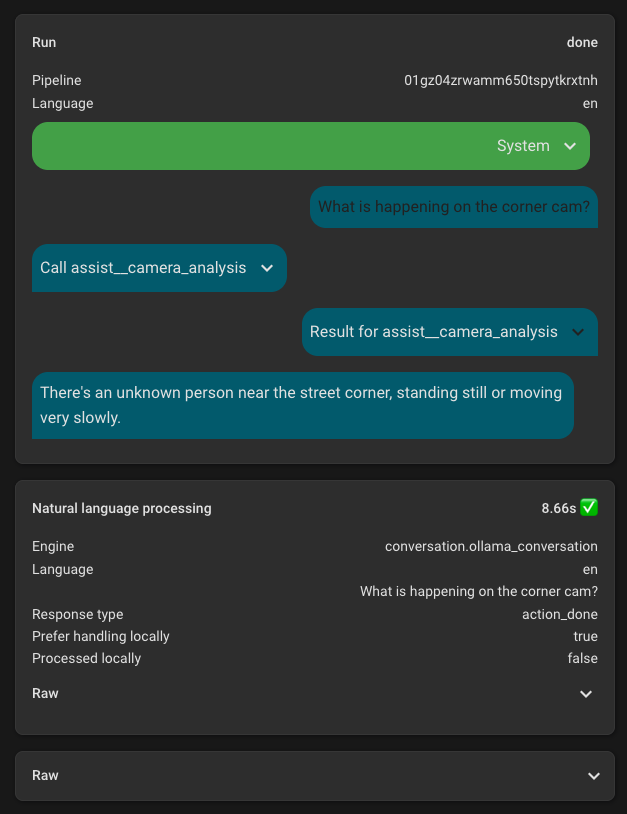
Note the question time will be longer as it has to run the vision analysis as well.
Camera Analysis Script
sequence:
  - variables:
      camera_snake_case: "{{ camera | lower | replace(' ', '_') }}"
      primary_objects: ['person', 'bear']
      secondary_objects: ['dog', 'cat', 'raccoon', 'squirrel', 'car', 'bicycle', 'rabbit']
      sensor_info_text: |
        # Information from AI NVR

        # Primary Objects

        {% for obj in primary_objects %}
          {% set sensor_id = 'sensor.' ~ camera_snake_case ~ '_' ~ obj ~ '_count' %}
          {% set sensor_state = states(sensor_id) %}
          {% if sensor_state is not none and sensor_state != 'unknown' and sensor_state != 'unavailable' %}
          {% set active_sensor_id = 'sensor.' ~ camera_snake_case ~ '_' ~ obj ~ '_active_count' %}
          {% set active_state = states(active_sensor_id) | default(0) %}
          - Count of {{ obj }}s: {{ sensor_state }} ({{ active_state }} of which are active).
          {% endif %}
        {% endfor %}

        {% set last_face = states('sensor.' ~ camera_snake_case ~ '_last_recognized_face') | default('') %}
        {% if last_face and last_face != 'unknown' and last_face != 'None' and last_face != '' %}
        - Name of recognized person: {{ last_face }}.
        {% endif %}

        # Secondary Objects

        {% for obj in secondary_objects %}
          {% set sensor_id = 'sensor.' ~ camera_snake_case ~ '_' ~ obj ~ '_count' %}
          {% set sensor_state = states(sensor_id) %}
          {% if sensor_state is not none and sensor_state != 'unknown' and sensor_state != 'unavailable' %}
          {% set active_sensor_id = 'sensor.' ~ camera_snake_case ~ '_' ~ obj ~ '_active_count' %}
          {% set active_state = states(active_sensor_id) | default(0) %}
          - Count of {{ obj }}s: {{ sensor_state }} ({{ active_state }} of which are active).
          {% endif %}
        {% endfor %}
      instructions_text: >
        {{ sensor_info_text }}

        # How to provide analysis

        ## General Guidelines

        The AI NVR sensor data above is authoritative and indicates the actual
        presence of objects in the camera view. Use these sensor counts as the
        definitive source of information about what is present.

        ## What to Report

        Report ONLY object types that have an active count greater than zero. Do
        not describe object types with zero active counts, even if the total count
        is greater than zero. Focus exclusively on actively moving or present
        objects.

        ## Response Format

        For each object type with active count greater than zero, provide a concise
        summary that includes:
        - What the object(s) is/are
        - Location in the frame (e.g., foreground, background, left side, center)
        - Activity or movement being engaged in
        - Any relevant identifying details (only if significant)

        Keep each object type description to 1-3 sentences maximum. Be concise and
        factual. Do not describe stationary objects, non-active objects, or provide
        exhaustive lists of every object visible.

        ## What to Exclude

        - Do not describe object types with zero active counts
        - Do not describe stationary or parked objects that are not active
        - Do not provide detailed lists of every object visible
        - Do not describe general scene elements or environmental details
        - Do not use headers, markdown formatting, or structured lists in the response

        ## When No Active Objects

        If all object types have zero active counts, simply state that no active
        objects are present in the frame.
  - action: ai_task.generate_data
    metadata: {}
    data:
      task_name: Camera Frame Analysis
      instructions: "{{ instructions_text | trim }}"
      attachments:
        media_content_id: media-source://camera/camera.{{ camera_snake_case }}
        media_content_type: application/vnd.apple.mpegurl
        metadata:
          title: Back Deck Cam
          thumbnail: /api/camera_proxy/camera.{{ camera_snake_case }}
          media_class: video
          navigateIds:
            - {}
            - media_content_type: app
              media_content_id: media-source://camera
      entity_id: ai_task.ollama_ai_task
    response_variable: analysis
  - variables:
      response:
        instructions: >
          # Camera Analysis Response Guidelines

          You have received camera analysis data from the vision model. Provide
          a concise, natural response to the user's question about the camera
          view.

          ## Response Format

          - Summarize the analysis in a conversational, natural way suitable for
          text-to-speech
          - Focus on answering the user's specific question (e.g., "who is at the
          door", "what's in the backyard", "is anyone outside")
          - Keep responses brief and to the point - typically 1-3 sentences
          - Only mention active objects and their relevant details
          - If no active objects are present, state that clearly
          - Do not repeat technical details or sensor counts unless directly
          relevant to the user's question
          - Use natural language - avoid repeating the analysis verbatim

          ## Example Response Style

          If analysis shows: "One person is visible in the foreground, standing
          near the front door and appears to be waiting."

          Good response: "There's one person at the front door waiting."

          Bad response: "Based on the camera analysis, there is one person
          visible in the foreground, standing near the front door and appears to
          be waiting."
        output: "{{ analysis.data }}"
  - stop: Returning activity on camera
    response_variable: response
fields:
  camera:
    selector:
      select:
        options:
          - Back Deck Cam
          - Back Gate Cam
          - Corner Cam
          - Front Cam
          - Front Door Cam
          - Side Cam
    required: true
alias: Camera Analysis
description: >-
  Analyzes camera feeds to identify active objects, people, and activity. Use
  this tool when users ask about what is happening outside, who is at the door,
  what is in the backyard, or any questions about activity visible on security
  cameras. Provides information about people, animals, vehicles, and other
  objects detected in the camera view.
icon: mdi:camera-metering-matrix