More so the size of the model is the full model or quantized/compressed version?
I specified the quants in the post above
thanks didnt see this

What model provider are you using and what is your config?
Model is GGML GPT-OSS:20B MXFP4, as suggested in OP.
I’m using local.ai as my backend (with llama.cpp as actual backend). Config there is only setting the context size. I added the completion template there and in local.ai’s chat it got rid of the harmony part, but in HA I havent managed that yet.
Config in HA is the system prompt in OP, for now only with the addition of answering in dutch/flemish.
I tried adding the same chat template in HA in the chate template arguments, but that didn’t have any effect.
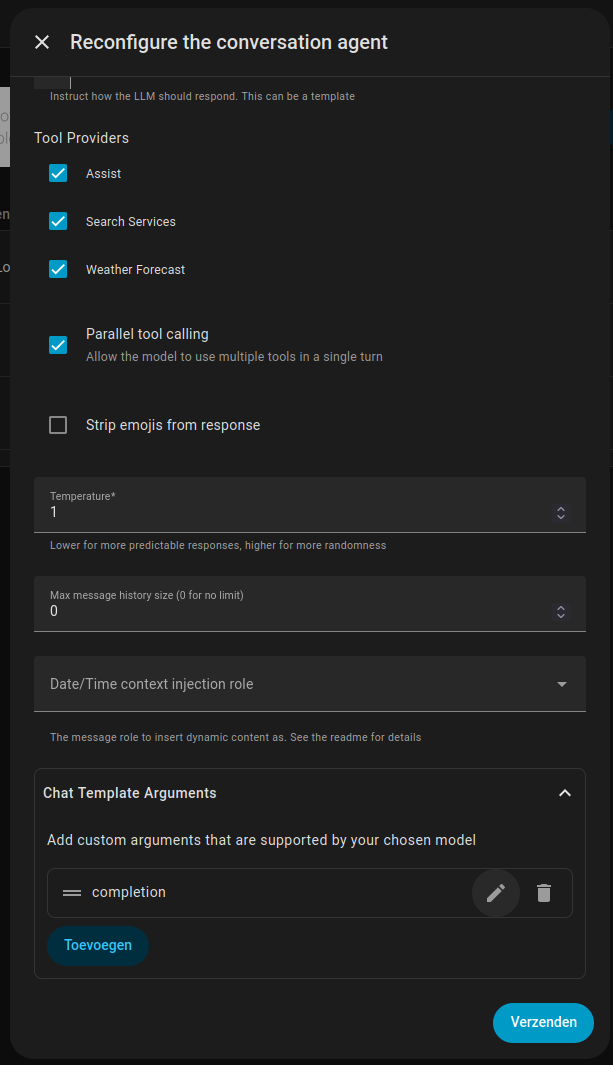
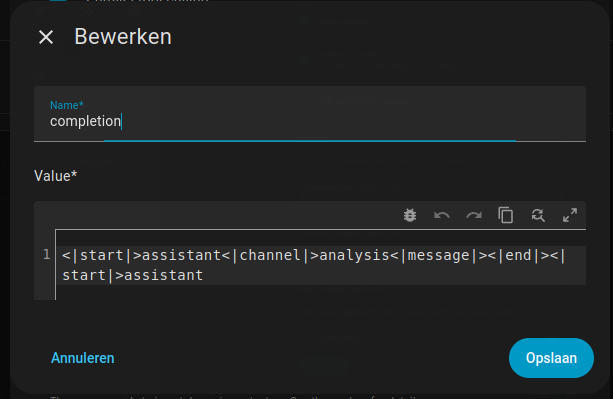
I don’t know with local.ai how you can set things. You likely want to set --jinja so it uses that format. You might be able to set that in the chat arguments too, need to check the api format for that.
local.ai’s config for the model looks like this:
backend: llama-cpp
description: Imported from huggingface://ggml-org/gpt-oss-20b-GGUF/gpt-oss-20b-mxfp4.gguf
function:
    grammar:
        disable: true
known_usecases:
    - chat
name: gpt-oss-20b-mxfp4.gguf
options:
    - use_jinja:true
parameters:
    model: gpt-oss-20b-mxfp4.gguf
template:
    use_tokenizer_template: true
    completion: "<|start|>assistant<|channel|>analysis<|message|><|end|><|start|>assistant"
context_size: 98304
not sure if it is literal or not, I have always just seen it as --jinja llama.cpp/tools/server/README.md at 4d828bd1ab52773ba9570cc008cf209eb4a8b2f5 · ggml-org/llama.cpp · GitHub
you might also want to double check the chat template compared to what the model uses, I pull my model from huggingface directly in llama.cpp
@cryznik - what openai integration have you settled with? Currently using local ai but wondering if to try out one of the forks of extended openai conversation…
I’ve also gotten Qwen 3.5 up and running (Q3_K_XL unsloth variant) - early days but seems to be working reasonably well thus far and the extra vram availability for larger context + parakeet / kokoro is helpful - I tried qwen 3 asr also but despite the headline latency benchmarks was surprisingly underwhelmed also!
Here is my initial config for llama.cpp (running on an rtx 4090):
docker run --name Pandora-Brain \
  --gpus '"device=0"' \
  -p 9900:9900 \
  -v ./llama.cpp/models:/models \
  -v ./llama.cpp/models/templates:/templates \
  local/llama.cpp:server-cuda \
  -m /models/unsloth/Qwen3.5-35B-A3B-GGUF/Qwen3.5-35B-A3B-UD-Q3_K_XL.gguf \
  --alias "Pandora" \
  -c 16384 \
  -n 1024 \
  -b 1024 \
  -e \
  -ngl 99 \
  --chat_template_kwargs '{"enable_thinking":false}' \
  --jinja \
  --mmproj /models/unsloth/Qwen3.5-35B-A3B-GGUF/mmproj-BF16.gguf \
  --chat-template-file /templates/Qwen35.jinja \
  --parallel 1 \
  --port 9900 \
  --host 0.0.0.0 \
  --flash-attn on \
  --top-k 20 \
  --top-p 0.8 \
  --temp 0.7 \
  --min-p 0 \
  --presence_penalty 1.5 \
  --repeat_penalty 1.0 \
  --cache-type-k q8_0 \
  --cache-type-v q8_0 \
  --rope-scaling linear
I use GitHub - skye-harris/hass_local_openai_llm: Home Assistant LLM integration for local OpenAI-compatible services (llamacpp, vllm, etc) · GitHub as it stays true to the way assist works while providing some helpful features such as the date / time injection
Thanks - am using the same then. Just was slightly uncertain if it may be overwriting some of the arguments per my docker configuration above (e.g. temperature appears as an option in the integration config)
The only one it writes is temp, which is just generally because you may want a different temp than other user cases.
Has anyone tried uses these as intercoms? I currently have a bunch of Echo dots and use them to call different rooms, whole house announcements, and general home assistant stuff.
You can give a command such as “announce in living room that dinner is ready” type thing, and it will handle that. Not quite sure if that is what you are referring to?
That would solve one of the use cases, yes. The other main one is more like a two way radio/intercom. On the Echos they call it drop in.
I don’t believe that is possible currently, at least not directly within home assistant
As of 2026.3 announcement yes, two subsequent targeted announcements from one room to another yes. Two way open intercom no.
One out of two currently isn’t bad. I’ll have to go back and read that part of the announcement again.
I’ve posted my own experience in another thread, but reading through this thread again I feel like I’m starting to understand some of the limits that I’m running into and realizing that even if I throw better hardware at my performance issues I still won’t be satisfied with the results without better optimizing the system as a whole. The real problem seems to be the size of my system with the number of devices that I want to expose. I’ve already created groups for most rooms and some larger areas to limit the number of lights, but I really would like to keep many of these entities available otherwise the utility of AI diminishes.
Here’s my performance with gpt-oss:20b which seems to be the best option for Home Assistant from an overall perspective
I’ve tried so many models by this point, and my benchmark is this prompt:
If {USER} is not home, turn off their lights
The smaller models will tell me that the user is away and that they’ve turned off their lights, but don’t actually make the tool call, which is why I’m interested in the gpt-oss:20b model. It behaves fairly predictably when more logical steps are required. I have a couple of machines I thought would be sufficient, but here’s my results
HW: M1 Max in a 14" MBP with llama.cpp,
Checkpoint 1:
prompt eval time = 3838.52 ms / 3686 tokens ( 1.04 ms per token, 960.27 tokens per second)
eval time = 5341.78 ms / 377 tokens ( 14.17 ms per token, 70.58 tokens per second)
total time = 9180.31 ms / 4063 tokens
Checkpoint 2:
prompt eval time = 3798.55 ms / 3064 tokens ( 1.24 ms per token, 806.62 tokens per second)
eval time = 2832.79 ms / 174 tokens ( 16.28 ms per token, 61.42 tokens per second)
total time = 6631.34 ms / 3238 tokens
HW: Ryzen AI 9 with HX370 with llama.cpp compiled with vulkan,
Checkpoint 1:
prompt eval time = 6454.34 ms / 3686 tokens ( 1.75 ms per token, 571.09 tokens per second)
eval time = 2705.18 ms / 88 tokens ( 30.74 ms per token, 32.53 tokens per second)
total time = 9159.52 ms / 3774 tokens
Checkpoint 2:
prompt eval time = 6382.05 ms / 3062 tokens ( 2.08 ms per token, 479.78 tokens per second)
eval time = 4805.62 ms / 152 tokens ( 31.62 ms per token, 31.63 tokens per second)
total time = 11187.67 ms / 3214 tokens
Checkpoint 3:
prompt eval time = 564.58 ms / 115 tokens ( 4.91 ms per token, 203.69 tokens per second)
eval time = 2424.04 ms / 78 tokens ( 31.08 ms per token, 32.18 tokens per second)
total time = 2988.61 ms / 193 tokens
A fun side note, I finally got the AMD NPU working, and it’s standalone performance (assuming it really was working) was about the same as the vulkan GPU performance.
Is my solution better hardware?
Yes, but not completely. If you look at the M1 Max MBP, it’s taking about half the time for prompt eval and half for token gen with gpt-oss:20b. Performance isn’t terrible, and it’s about twice as fast as my Ryzen AI 9 system.
It seems in this thread that an XTX 7900 or an RTX 3090 can exceed 3000 tokens/sec for prompt eval, but even with that my 6000+ number of prompt tokens for my 80ish exposed entities, that means at least 2 seconds for just that. Overall, I would still land in the 4-5 second response time, assuming my STT and TTS systems stay relatively fast. If I want to hit the 2 range for responses, I’m going to need significantly more tuning in addition to better hardware to hit that range.
It seems I really need to try to slot optimization to keep all the context loaded for the different assist devices, as well as work on limiting all the intents that get exposed for each device, which seems like the Custom Conversation app allows you to filter.
I also think I have either an M2 or M4 mac sitting in my office that I can try, but it’s really useful to understand that I really can’t expect the same results as others with half the number of exposed entities.
I guess what I’m saying, I’ve learned the hard way that wrangling large systems is a ton of work and you can’t just fumble your way into pleasant experience.