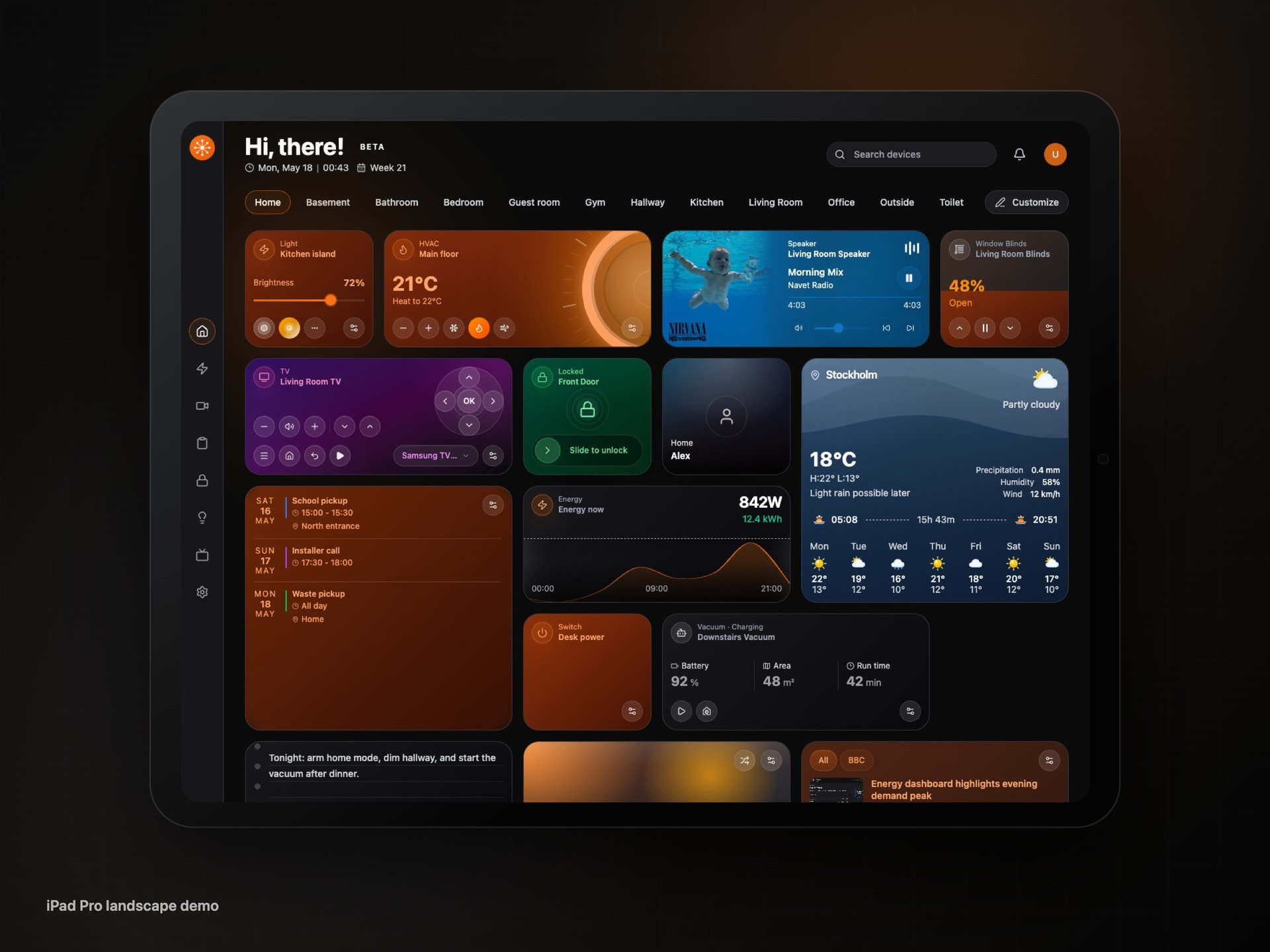
Navet: a smart home dashboard for wall panels, tablets, and phones

Hey,

I’m launching Navet , an open-source smart home dashboard for Home Assistant.

I built it because I wanted a dedicated control surface that felt good on wall panels, tablets, phones, and desktop screens.

Navet is focused on the devices and rooms you actually touch every day: lights, media, cameras, locks, energy, automations, weather, calendars, sensors, vacuums, RSS/news, notes, photos, maps, and custom dashboard widgets.

A few things it supports today:

  • Room-based home dashboard with editable cards
  • Energy, security, lighting, media, tasks, weather, calendar, people, sensors, and camera views
  • Home Assistant add-on install or standalone Docker deployment
  • PWA support for an app-like experience
  • Import/export for local dashboard configuration
  • Multi-language UI
  • Self-hosted design: your Home Assistant URL, token, entity state, and camera feeds stay in your environment

There’s also a public demo with fake data, so you can try it without connecting your own Home Assistant instance:

Demo: Navet - Smart Home Dashboard
GitHub: GitHub - awesomestvi/navet: Navet (Swedish for "the hub") is a modern, responsive smart home dashboard with intuitive editing and a frosted-glass UI inspired by iOS widgets. · GitHub

Current release is 0.1.1-beta.1, so this is a public beta. I’d especially appreciate feedback from people using tablets, wall panels, or shared family dashboards, since that’s the main use case I’m designing around.

If you try it, I’d love to know what feels useful, what’s missing, and where the setup or dashboard editing flow could be clearer.

9 Likes

Beautiful but laggy af. I've never seen anything as slow as this. Completely unusable. Only if you're a real masochist.

And the link to the demo site https://awesomestvi.github.io/navet/demo/ is DEAD. 404

1 Like

The link was updated but I couldn't edit the post

Laggy? on what device?

I haven't had that feedback before. I am surprised because Navet is optimised for low-energy devices. It also has a low energy setting to support them better.

Website: https://navet.app
Demo: Navet Demo
GitHub: GitHub - awesomestvi/navet: Navet is a provider-neutral smart home dashboard with intuitive editing, a polished touch-first UI, and support for Home Assistant, Homey, and openHAB. · GitHub

HA running on a N100 with 10% cpu. Client Lenovo T480s.
It takes MINUTES from click to click

It can't be.. I am running it on raspberry pi 5 effortlessly. We need to investigate this. Can you create a ticket at Issues · awesomestvi/navet · GitHub

Otherwise, can you tell me where are you running Navet? on Homeassistant add-on? or standalone docker?

are there errors in the console and what version you have in Navet > Settings > Project > About

There are some sensor entities cannot be recognized and cannot be found in navet. :joy:

Navet is opinionated by design, so some sensor entities are intentionally not shown automatically. The goal is to avoid filling the dashboard with every possible sensor and making the UI cluttered.

You can still add those entities manually using Add Card.

Improved sensor support is actively being worked on and should be available very soon.

Iam trying out navet at the moment on my ipad pro and i have to say it has so much potential.
Everything is there for me to use it on my wall panels, well almost.
Would love it if it was possible to use custom-cards and a bit more control how to place cards.

Still discovering new things so maybe it is already possible, but i like it alot.

Ps.it is smooth on my ipad, will try it later on my lenovo p13 to see if this is also a smooth experience.

1 Like

A question I keep returning to while working on Navet: how much should someone need to understand about Home Assistant before they can use the house?

My answer is: ideally, nothing about entities, services, cards, or the configuration behind them.

Home Assistant remains the source of truth. Navet focuses on the everyday layer: rooms, current state, and the actions people actually need. The same interaction model adapts from a wall panel to a phone instead of asking each household member to learn a different dashboard.

That means:

  • focused views for Lights, Climate, Energy, Security, and Media
  • multiple dashboards and device-specific layouts without rebuilding the basic interaction model
  • household chores and Home Assistant Assist when touch controls are not the right tool

This is not meant to replace Home Assistant’s administration interface or its flexibility. It is meant to make daily control require less explanation. Home Assistant is Navet’s deepest integration, and real-world entity coverage still varies between homes.

Where does your current dashboard still make a family member, guest, or housemate ask for help?

Demo: https://demo.navet.app/
Home Assistant install guide: Home Assistant | Navet

Disclosure: AI tools assisted with parts of the project; I review and verify what ships.

1 Like

Navet v0.17.7: community links fixed

The community links are fixed. You can join Discord through a permanent invite and find r/navet in Settings → About Navet.

Discord: Navet

Reddit: Reddit

Also in this release:

  • Chores update their next date immediately when completed or reopened, including long repeat intervals.
  • Docs clarify card entity IDs and how to enable missions and rewards.
  • Home Assistant garage doors, gates, doors and window covers appear in Security. Garage doors show clear states, and covers can use simple controls without percentages.

Full changelog: Release v0.17.7 · awesomestvi/navet · GitHub

Navet 0.18.0: expanded Home Assistant controls and new dashboard cards

Navet 0.18.0 is out. This release adds more everyday Home Assistant controls and improves chores and live updates.

If you’re new here, Navet is an open-source, local-first smart home dashboard for wall panels, tablets, desktops, and phones. Screenshots use sample data from the release demo and component previews.

What’s new:

  • More device controls: supported thermostat modes and humidity controls, plus dashboard cards for Home Assistant timers, counters, valves, and remotes.
  • Lists and helpers: manage Home Assistant shopping and to-do lists separately from routines and chores, and control supported household helpers.
  • Refresh and recovery: reload Home Assistant integrations from entities, including unavailable cards. Refresh room and entity metadata after external Home Assistant edits.

Chores that repeat after completion stay actionable until they’re finished. Each person’s interval restarts independently, and superseded scheduled chores move into missed history.

Device dialogs now have more consistent, accessible controls, and weather forecasts recover more reliably. This release also fixes stale provider state after reconnecting and missed openHAB live updates. The demo includes advanced controls, helpers, and cards to try.

About Navet now distinguishes local development builds from releases. Deployed Dev builds show their version, and published Dev builds keep their identity on loopback addresses too.

The new controls depend on what the connected device and integration support.

Try the demo: https://demo.navet.app/

Full release notes: Release v0.18.0 · navet-app/navet · GitHub

I’d like to hear how the new controls and chore scheduling work in your setup. If you hit a problem, please include your provider and installation method.