Need help creating automation that switches between light and dark themes

I’m trying unsuccessfully to create an automation that toggles between light and dark mode. I think I’m on the right track below. I’ve tried using syntax from the frontend documentation but still can’t get over the finish line.

-Thanks

Home Assistant frontend - Home Assistant

alias: Toggle Light / Dark Themes
description: ""
triggers:
  - trigger: state
    entity_id:
      - input_boolean.theme_toggle
    from:
      - "off"
    to:
      - "on"
conditions: []
actions:
  - action: frontend.set_theme
    data:
      name: dark-theme
mode: single

There are many ways to do this type of branching action logic. Here’s a basic option using trigger IDs and an If/Then action:

alias: Toggle Light / Dark Themes
description: ""
triggers:
  - id: "on"
    trigger: state
    entity_id:
      - input_boolean.theme_toggle
    from:
      - "off"
    to:
      - "on"
  - id: "off"
    trigger: state
    entity_id:
      - input_boolean.theme_toggle
    from:
      - "on"
    to:
      - "off"
conditions: []
actions:
  - if:
      - condition: trigger
        id: "on"
    then:
      - action: frontend.set_theme
        data:
          name: dark-theme
    else:
      - action: frontend.set_theme
        data:
          name: light-theme
mode: single

Keep in mind that this action only affects the default theme used by the frontend, it will not override user-selected themes or dark-light behavior. If you want the actions to work for you, you need make sure the Theme is set properly in your User Profile Settings.

The action you need to use relies on the setting in your actual browser too. If you want to make sure you always get the theme you want, define both the default and dark options in the action:

action: frontend.set_theme
data:
  name: light-theme
  name_dark: light-theme

Thank you!

For some reason the “Use default theme” drop down is disabled:

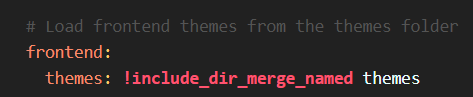
This is the only reference to themes in my configuration.yaml:

image

This looks like it should be working but it doesn’t. Any idea what I’m doing wrong?

-Thanks

alias: Toggle Light / Dark Themes
description: ""
triggers:
  - id: "on"
    trigger: state
    entity_id:
      - input_boolean.theme_toggle
    from:
      - "off"
    to:
      - "on"
  - id: "off"
    trigger: state
    entity_id:
      - input_boolean.theme_toggle
    from:
      - "on"
    to:
      - "off"
conditions: []
actions:
  - if:
      - condition: trigger
        id: "on"
    then:
      - action: frontend.set_theme
        data:
          name: dark-theme
    else:
      - action: frontend.set_theme
        data:
          name: light-theme
mode: single

Are there themes named “dark-theme” and “light-theme” in your themes directory?

IIRC, there’s a service created by Browser Mod that can switch between light and dark mode, but it’s been a while since I used that integration… so that may not be the case anymore.

1 Like

Yeah there is no way to change the built-in theme light/dark mode automatically. This has been requested repeatedly since it was introduced many years ago - and so far ignored.

You need to define your own dark and light themes to do this.

I don’t have a themes directory. I guess I should create one and add the light-theme and dark-theme to it?

-Thanks

Oh! Thanks for the info. I presume I need to create my own dark and light themes and add them to a themes folder as Didgeridrew said.

-Thanks

Well, I installed the darkish and Google Light Themes, but this is still not working. Not sure what is preventing it from working. Using the toggle switch or running the actions directly has no effect.

-Thanks

alias: Toggle Light / Dark Themes
description: ""
triggers:
  - id: "on"
    trigger: state
    entity_id:
      - input_boolean.theme_toggle
    from:
      - "off"
    to:
      - "on"
  - id: "off"
    trigger: state
    entity_id:
      - input_boolean.theme_toggle
    from:
      - "on"
    to:
      - "off"
conditions: []
actions:
  - if:
      - condition: trigger
        id: "on"
    then:
      - action: frontend.set_theme
        data:
          name: Google Light Theme
    else:
      - action: frontend.set_theme
        data:
          name: darkish
mode: single

Add a frontend.reload_themes action after the If/Then.

Shouldn’t need to do that. I don’t have to when I change the theme in my automation.

Pretty sure theme names have to be slugified. so:

name: google_light_theme

If I change the name to google_light_theme I get a “Name not found” error.

I tried adding one, then two, frontend.reload_themes, but still the themes are not changing. I read one article that says you have to specify a user. Does the automation below work for you? (Assuming you have the two themes installed).

-Thanks

alias: Toggle Light / Dark Themes
description: ""
triggers:
  - id: "on"
    trigger: state
    entity_id:
      - input_boolean.theme_toggle
    from:
      - "off"
    to:
      - "on"
  - id: "off"
    trigger: state
    entity_id:
      - input_boolean.theme_toggle
    from:
      - "on"
    to:
      - "off"
conditions: []
actions:
  - if:
      - condition: trigger
        id: "on"
    then:
      - action: frontend.set_theme
        data:
          name: Google Light Theme
          name_dark: Google Light Theme
      - action: frontend.reload_themes
        metadata: {}
        data: {}
    else:
      - action: frontend.set_theme
        data:
          name: darkish
          name_dark: darkish
      - action: frontend.reload_themes
        metadata: {}
        data: {}
mode: single

My themes are named day and night. I use an input select to track which theme is selected (and to easily change it if required):

Input select:

select_theme:
  name: Select Theme
  options:
  - Day
  - Night

Automations

- id: d5a5ea4d-b15c-44af-be3e-dc7b81f06d36
  alias: 'Select Theme'
  triggers:
  - trigger: state
    entity_id: input_select.select_theme
    not_to:
    - unknown
    - unavailable
  actions:
    action: frontend.set_theme
    data:
      name: "{{ states('input_select.select_theme')|lower }}"

- id: 77c7bd23-41c5-492c-959c-a31f09527e24
  alias: 'Set Dark Theme At Sunset'
  triggers:
  - trigger: sun
    event: sunset
  actions:
  - action: input_select.select_option
    data:
      entity_id: input_select.select_theme
      option: Night

- id: dca6a184-dd5b-4b2f-954d-8edf117c8dd0
  alias: 'Set Light Theme At Sunrise'
  triggers:
  - trigger: sun
    event: sunrise
  actions:
  - action: input_select.select_option
    data:
      entity_id: input_select.select_theme
      option: Day

Both your previous automation without reloads and just name defined and the one with reloads and definitions for both name and name_dark work for me.

Have you double checked that the setting in your user profile is set to use the default theme? Also try setting the mode to Light.

Have you double checked the settings in the actual browser you are using? For me, using Firefox, it seems to work fine with any of the three settings, but that may not be the case with other browsers.
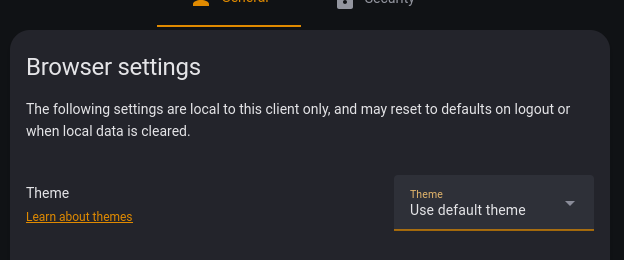
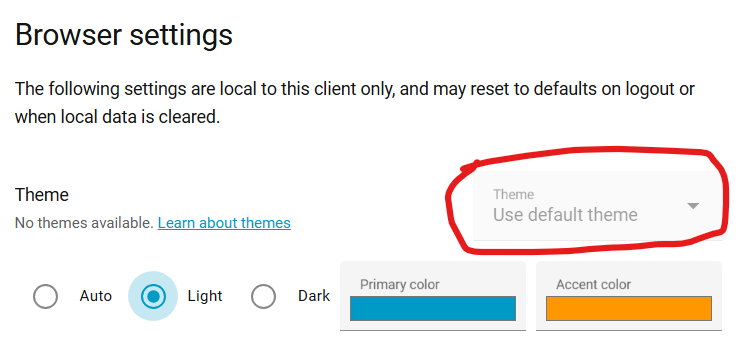
That was it! I didn’t have my default user profile set to use the default theme. Thanks again for all your help.