Hey everyone. I’m new to HA and I’ve been stuck on this issue for a minute, but I’m trying to override the gap property that is being added to my sections in dashboards. I’m using ‘stack-in-cards’ to order these together, and from what I have read in their repo this isn’t where the gap is coming from. I am also using card_mod to do css styling in my cards.
This image shows the gaps that are automatically added between cards in a section that I am trying to remove.
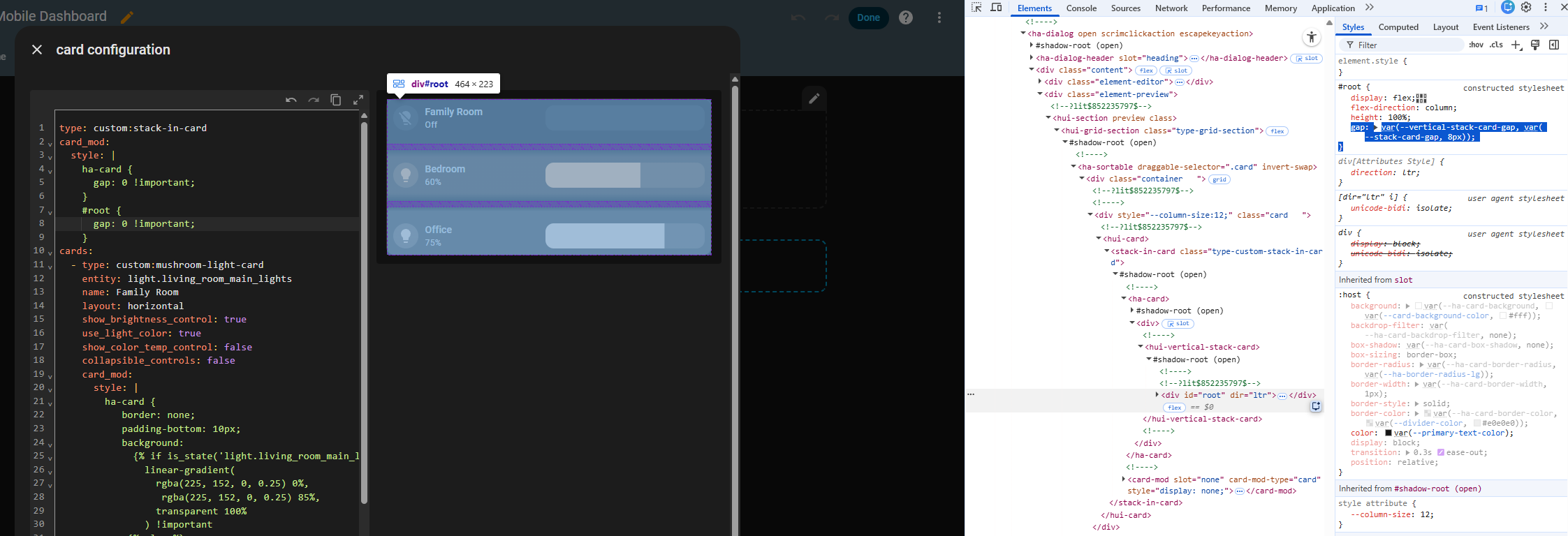
I’ve tried using card_mod to add styles directly to the card like shown below. I’ve tried attaching to ‘ha-card’, as well as ‘#root’ since that is the ID where these styles are coming from.
type: custom:stack-in-card
card_mod:
  style: |
    ha-card {
      gap: 0 !important;
      vertical-stack-card-gap: 0 !important;
      horizontal-stack-card-gap: 0 !important;
    }
cards:
  - type: custom:mushroom-light-card
    entity: light.living_room_main_lights
    name: Family Room
 ...
I’ve also tried applying these to a theme and using that theme to the dashboard this is in. (screen shot was taken before adding ‘row-gap: 0’ and ‘column-gap: 0’)
# Loads default set of integrations. Do not remove.
default_config:

# Load frontend themes from the themes folder
frontend:
  themes:
    my_theme:
      vertical-stack-card-gap: 0.1px
      horizontal-stack-card-gap: 0.1px
      stack-card-gap: 0.1px
      gap: 0px
      row-gap: 0px
      column-gap: 0px
automation: !include automations.yaml
script: !include scripts.yaml
scene: !include scenes.yaml
And through all of the ways to try and do this, I keep getting the same result where the vars aren’t found to set this gap (vertical-stack-card-gap, horizontal-stack-card-gap, stack-card-gap, row-gap, column-gap, gap), so then the ‘gap’ is defaulted to 8px.
I’m not sure where else to do. The closes thread to my question was this one which is what gave me the idea to try and use themes. I have been restarting my HA server (the quick load for reloading configurations) and been refreshing my page and clearing my browser’s cache between changes. I just can’t figure out how to override rules that are set on this root element. My end goal may not be for the ‘gap’ to be 0, but I’d like to figure out how to modify the properties here so I can control my layout more.
Thanks!