I am relatively new to Home Assistant and do not have much background in CSS or Jinja. I have a custom energy dashboard where I am listing out energy sources and consumption and I want to make the header bigger and more prominent (e.g., bold). I have card-mod installed and have been able to get the font color changed, but I can’t see to figure out how to make the font larger and bold. I have tried multiple exmples found in various forums and chatgpt, but still no luck.
The item I’m trying to make larger and bold is the “Total Energy Sources - Today” and “Total Energy Consumed - Today” headers.
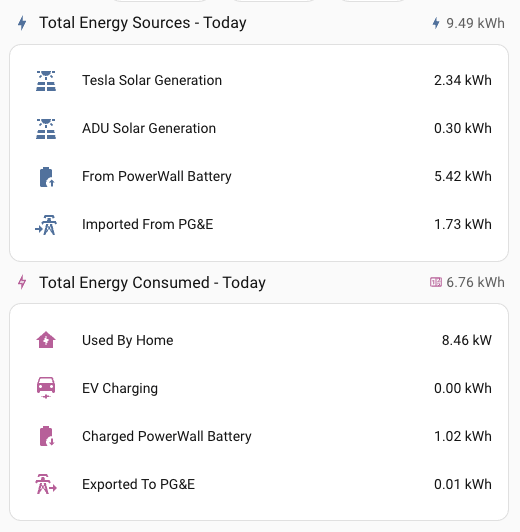
Here is my yaml code:
type: vertical-stack
cards:
  - type: heading
    icon: mdi:lightning-bolt
    heading: Total Energy Sources - Today
    heading_style: title
    badges:
      - type: entity
        entity: sensor.total_energy_sources
    card_mod:
      style: |
        :host {
          --card-mod-icon-color: #44739E;
        }
  - type: entities
    entities:
      - entity: sensor.my_house_solar_generated
        icon: mdi:solar-power-variant
        name: Tesla Solar Generation
      - entity: sensor.adu_solar_panel_total_energy_today
        icon: mdi:solar-power-variant
        name: ADU Solar Generation
      - entity: sensor.my_house_battery_discharged
        name: From PowerWall Battery
        icon: mdi:battery-arrow-up
      - entity: sensor.my_house_grid_imported
        name: Imported From PG&E
  - type: heading
    icon: mdi:lightning-bolt-outline
    heading: Total Energy Consumed - Today
    heading_style: title
    badges:
      - type: entity
        entity: sensor.total_consumption_energy_today
    card_mod:
      style: |
        :host {
          --card-mod-icon-color: #C6579A;
        }
  - type: entities
    entities:
      - entity: sensor.net_home_energy_used
        icon: mdi:home-lightning-bolt
        name: Used By Home
      - entity: sensor.ev_charging_energy_used_today
        name: EV Charging
      - entity: sensor.my_house_battery_charged
        icon: mdi:battery-arrow-down
        name: Charged PowerWall Battery
      - entity: sensor.my_house_grid_exported
        name: Exported To PG&E
    card_mod:
      style: |
        :host {
          --card-mod-icon-color: #C6579A;
        }