Need help with extend_paper_buttons_row

Hi everyone!
i’m very new to HA, and currently working on automating my roller shutters
To tighten the views a little bit, i am experimenting with paper-button rows, but failing hard…
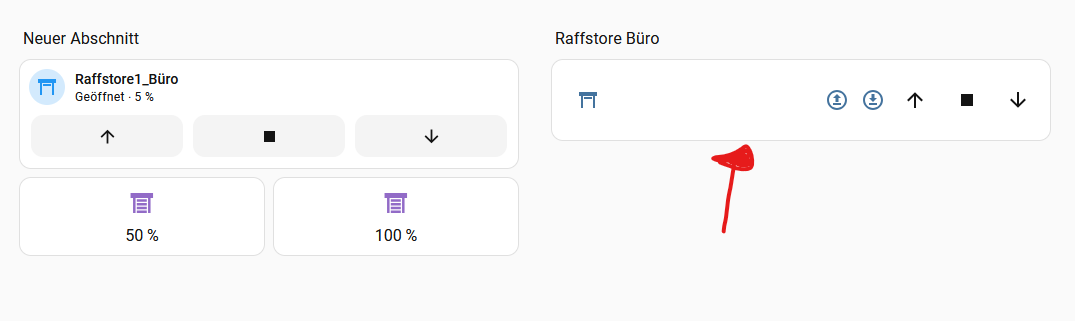
I want to go from seperate controls (on the left) to a cleaner look which does not require so much space (on the right):

  • The up and down Arrow with circle should control the tilt position (half open / open)

If i press the button, i am getting the following:

“Die Aktion cover/set_cover_tilt_position konnte nicht ausgeführt werden. required key not provided @ data[‘tilt_position’]”

The code:

type: entities
entities:
  - entity: cover.raffstore1_buro
    name: " "
    extend_paper_buttons_row:
      buttons:
        - icon: mdi:upload-circle-outline
          tap_action:
            action: call-service
            service: cover.set_cover_tilt_position
            data:
              tilt_position: 100
            target:
              entity_id: cover.raffstore1_buro
        - icon: mdi:download-circle-outline
          tap_action:
            action: call-service
            service: cover.set_cover_tilt_position
            data:
              tilt_position: 50
          target:
            entity_id: cover.raffstore1_buro

The very same is already working with the two buttons:

type: horizontal-stack
cards:
  - show_name: true
    show_icon: true
    type: button
    entity: cover.raffstore1_buro
    tap_action:
      action: call-service
      service: cover.set_cover_tilt_position
      data:
        tilt_position: 50
      target:
        entity_id: cover.raffstore1_buro
    name: 50 %
    icon_height: 30px
    icon: mdi:window-shutter
  - show_name: true
    show_icon: true
    type: button
    entity: cover.raffstore1_buro
    tap_action:
      action: call-service
      service: cover.set_cover_tilt_position
      data:
        tilt_position: 100
      target:
        entity_id: cover.raffstore1_buro
    name: 100 %
    icon_height: 30px
    icon: mdi:window-shutter

Any help is appreciated! Many thanks! Mike

… which are standard buttons.

Are you sure that this custom “extend_paper_buttons_row” thing (which seems to be a custom “paper-buttons-row” does support this format?
Try this:

    tap_action:
      action: call-service
      service: cover.set_cover_tilt_position
      service_data:
        tilt_position: 50
        entity: cover.raffstore1_buro

Thank you! Small change with huge impact :slight_smile:

One more thing, maybe someone can help too:

I want to show the current position and the current tilt position as text.
On an entity card, its attribute: current_position or attribute: current_tilt_position

How to display one attribute, and if possible both?
I tried to put it in here, but without success.

type: entities
entities:
  - entity: cover.raffstore1_buro
    **attribute: current_position**
    extend_paper_buttons_row:
      buttons:
        - icon: mdi:upload-circle-outline
          tap_action:
            action: call-service
            service: cover.set_cover_tilt_position
            service_data:
              tilt_position: 100
              entity_id: cover.raffstore1_buro
        - icon: mdi:download-circle-outline
          tap_action:
            action: call-service
            service: cover.set_cover_tilt_position
            service_data:
              tilt_position: 50
              entity_id: cover.raffstore1_buro

Sorry for my “maybe” stupid question…

Thanks,
Mike

I am not sure that this card can show values along with buttons.
(not using the card).
But I may suggest an alternative - a stock Heading card which can display values & icons/buttons.
The Heading card is supposed to be used on a “Sections” view layout, but it may be used on any layout INSIDE a standard Entities card:

type: entities
entities:
  - type: custom:hui-element
    row_type: heading
    .... place settings for the Heading card

Why I suggest to consider this way - because in this case the Heading card will have a padding/border & will be displayed consistently with other rows,

You can display one attribute, e.g.:

type: entities
entities:
  - entity: cover.raffstore1_buro
    secondary_info: position
    OR
    secondary_info: tilt-position

(I have no idea why they used some made up names instead of attributes)

You can also display some text near these extended buttons, e.g.:

    extend_paper_buttons_row:
      buttons:
        - icon: mdi:upload-circle-outline
          name: "{{ state_attr('cover.raffstore1_buro','current_position') }}"

Thank you both!
Both work, and that’s a good starting point. I can see I need to learn YAML :slightly_smiling_face:
I still need to think about which design I like best and find most appealing and what other options there are.
1 Like