Need some Apple TV magic

I’ve had an Apple TV (ATV) integrated into my HA for many years. My setup is ATV → AV Processor → TV. I do not use ARC for two reasons. First, my TV doesn’t always pass through everything, and I have a very high end ATMOS processor that I want to use directly. Second, I have multiple sources and TV is not near my audio gear. Using the processor as the HDMI switcher means shorter wires.

Rather than a universal remote, I used HA to notice state changes and control my whole system with only the ATV remote. Simply watch for the ATV to change from Off → Idle or On. Then turn on the processor and the TV. When ATV goes to Off, turn off the TV and the processor. Unfortunately, Apple changed the behavior so the ATV never turns off. It stays Idle.

I then switched to using CEC to turn everything on since I now had no state change. For off, I had to add some automation to watch for the TV going off to shut off the processor. For some reason, the ATV would turn on the processor with CEC, but it would not turn it off. CEC is flaky, and this setup was nowhere near as stable as my previous method.

A couple of weeks back, Apple made another change. The ATV now declares “I am the Captain now!”, and it changes the audio settings on the TV whenever I turn it on. This results in the TV speakers being active along with the processor. They are not synced, so it sounds horrible. Groan…

Anyone know a way I can figure out that the power button on the ATV remote is pressed? I’d rather not get a universal remote. The family and I prefer the simple Apple Remote. My backup plan it to get a Shelly button just for power. Right now, the family doesn’t like having to break out their phones just to turn on the system.

Note, when I setup the ATV integration, I get two devices: media_player.basement_atv and remote.basement_atv. Remote is only on or off. Unfortunately, it now stays “On” all the time since the ATV just goes idle.

I’m very technical, so I’m not against writing some code if necessary.
ChatGPT says I am out of luck. Bummer.

Short answer: There is currently no reliable way for Home Assistant to directly detect that the physical Apple TV remote’s power button was pressed (including via official integrations or custom code), because of how Apple’s protocols and Home Assistant’s Apple TV support work. What you can do are workarounds based on state inference or external signals — but none will capture the button press event itself.


Why Direct Detection Isn’t Possible

  1. Apple TV Integration Doesn’t Expose Button Events
  • The built-in Apple TV integration in Home Assistant exposes a media player entity and a remote entity with commands you can send (e.g., navigation, play/pause), but it does not emit events for button presses from the physical remote back into Home Assistant. There is no documented event stream for remote buttons in the Apple TV integration that HA automations can subscribe to. Home Assistant
  1. State Reporting Limitations
  • Apple TV reports its status (idle, paused, playing, etc.) to Home Assistant, but this status does not reliably change immediately on a remote power button press due to changes Apple made recently. Instead of transitioning to a recognizable “off” or “standby” state, it may go to idle or remain unchanged for a period before Home Assistant reflects it. This behavior has been reported as a disruption and is a known issue with the integration. GitHub+1
  1. No Built-in Event for Button Press
  • Unlike HomeKit Controller triggers (which can fire events like homekit_tv_remote_key_pressed for compatible HomeKit TV accessories), the standard Apple TV integration in Home Assistant does not generate events for remote button presses. HomeKit Controller’s event triggers apply only if the device/remote is exposed via HomeKit and if that integration supports the specific remote event — which Apple TV itself does not currently provide in a consumable way for this purpose. Home Assistant

What Home Assistant version are you using? The ATV integration was recently updated in core in the last few months and the status of the ATV now reflects off, idle, and playing (maybe paused is a state too, I can’t remember.)

FWIW I have my HA to the latest core update and my ATV installed with the latest firmware.

I have the latest 11.x version. As I said though, the state never goes to off anymore. It stays at idle, and that is Apple’s doing. Effectively, the ATV is more like a phone now. It is never off. It’s idle with video active or not active.

My processor has full tcp access, so I thought about using the presence of a signal on the HDMI input. Unfortunately, that is one sensor not made available in my processor.

But what about your Home Assistant core version? Are you using the latest - 2025.12.2? As you can see in the screenshot below at the bottom, my Apple TV is currently “off”. While Apple may have made changes and the device does stay in a state of being on, the HA developers also made changes to reflect an accurate status of the Apple TV device.

Sorry, typo. I am using 2025.12.2.

This is not the behavior I see. If I use the ATV remote to turn it “off”, the ATV status remains idle for a long time. If I use HA to turn it off, then the status does actually go to off. However, the whole point of my question was to be able to use the ATV remote. In that case, the status remains idle until something plays or a long time passes.

Note, this is a purposeful change made by Apple.

Have you tried holding the off button for extended period of time to suspend the AppleTV? I don’t have my AppleTV remote anymore to test but I have read that holding suspends the AppleTV. I created a Home Theater Dashboard and I send the Suspend command to my AppleTV when I am done watching movies and the status of my AppleTV is off.

Yes, holding the power button for an extended press is the only way to suspend or turn off the ATV.

I’m using Harmony to control ATV, and I have off.
image

Not using the remote from ATV, but apparently there is off no doubt… at least Harmony can turn off the atv just fine and the media_player.atv would read off.

Furthermore, I did a quick template sensor, so that the sensor would say off when off, and would say what is running when playing.

template:
  - sensor:
      - name: "ATV"
        unique_id: atv_playing
        state: >
          {% if is_state ('media_player.atv', 'playing') %}
            {{ state_attr('media_player.atv', 'app_name') }}
          {% elif is_state ('media_player.atv', 'paused') %}
            {{ state_attr('media_player.atv', 'app_name') }}
          {% else %}
            {{ states('media_player.atv')}}
          {% endif %}
        attributes:
          data_source: "media_player.atv"

Ok, now I’m wondering if I’m nuts. When I was attempting to change back away from CEC, I spent several hours working with this. ChatGPT was helpful. I was working through code, CEC traps, lots of combinations, and my ATV never once went to off unless I unplugged it or used remote.theater_atv to turn it off. It was always idle. ChatGPT and the web confirmed that was expected behavior.

Last night, however, HA now shows off, and I can get my automations working again. Maybe things work differently when CEC is enabled on the ATV, and it takes a while to clear out? I know there was more than one occasion back when I was first setting up CEC where I had to shutdown and unplug everything, including HDMI, to get CEC to fully reset. Like I said, CEC tends to be flaky.

Nothing updated as far as I can tell. Hey, it’s a Christmas miracle! :slight_smile:

The only offs you see are me physically unplugging things.

It works again, so I cancelled my order for a SofaBaton X2 for now. May get it anyway just to play with the MQTT and HA integration it has. It will open up some interesting options, but I’m good for now.

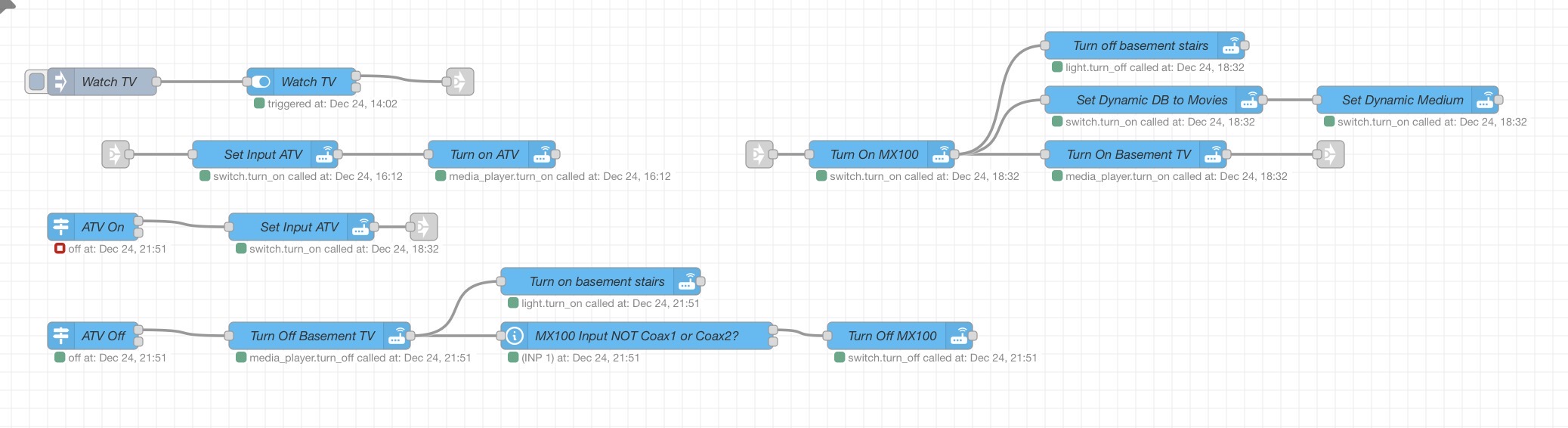
Here’s small snippet of my theater automations. I’ve used NodeRed going back 8-9 years ago when I started this HA journey. Back then NR was a lot easier for me to work with, and I haven’t bothered to swap everything over. I now have a mix of both.

Thank you all!

Merry Christmas and Happy New Year! My kids are young adults now, so we’re still waiting for them to wake up.

Dave

Glad you got it resolved. Sorry, this is a bit off the topic but do your HA logs show the Apple TV frequently disconnecting and re-connecting?

2025-12-25 07:40:00.315 WARNING (MainThread) [homeassistant.components.apple_tv] Connection lost to Apple TV "Apple TV Family Room"
2025-12-25 07:40:09.601 WARNING (MainThread) [homeassistant.components.apple_tv] Connection was re-established to device "Apple TV Family Room"
2025-12-25 07:40:51.538 WARNING (MainThread) [homeassistant.components.apple_tv] Connection lost to Apple TV "Apple TV Family Room"
2025-12-25 07:40:58.778 WARNING (MainThread) [homeassistant.components.apple_tv] Connection was re-established to device "Apple TV Family Room"
2025-12-25 07:41:38.708 WARNING (MainThread) [homeassistant.components.apple_tv] Connection lost to Apple TV "Apple TV Family Room"
2025-12-25 07:41:47.009 WARNING (MainThread) [homeassistant.components.apple_tv] Connection was re-established to device "Apple TV Family Room"

I now have my automations disable the integration when not using the Apple TV (don’t use it but once or twice a week).

I have never seen any of my ATVs disconnect. That said, all my stream devices are hard wired. That usually makes connections much more stable.

Mine is hard-wired, too. I think I have a weird device. For some reason it drops off the network and stops responding to pings and then comes back in a minute or two. That makes it close its HA connection and then restart. So, toggling the integration has been my workaround for now.

Yes mine wound go offline.

You probably can see it going offline in the graph I posted yesterday… so a couple of times during the span of 24 hours, for that particular day.