I think I got rid of mine, but mine was only work on battery, as soon as you plugged in the power supply it would shutdown. I initially had a look at the board and it didn’t seem to have anything noticeable damaged.
Bugger, may have been fixable if it worked off battery, even if it meant bypassing the onboard regulator with a different one and a couple of wires…
Yeah, im planning to do a somewhat complete overhaul of the integration (and ditch the YAML and move towards being compliant with the modern HA standards)
Ness support are next to useless with providing info regarding updates to the ASCII protocol, as it seems to people who originally designed and knew how it worked, have moved on
Happy to support testing if I can, I still have the D8 though, been a solid performer for me. Only just replaced the original NESS gel battery this year actually.
Odd that I am getting this error…I have only recently installed a IP232 on a D16x (board is v9.0) and HA is on latest…I can see there was meant to be code changes however I am getting the exact same issues as stated in:
ARM Away works with ARM appearing, but Arm Home flashing arming and then changes to DISAMRED in HA (even though panel is armed correctly as home mode).
Is there any way I can check my code in HA or any other suggestions?
It’s very odd, I would say you could try run the nessclient python library directly via its CLI on your computer, and take a log output of the IP232 messages
I have successfully installed the NESS Alarm integration and it is all working fine, manually.
Now I want to create an automation that is triggered by the opening of my garage door, which then turns the garage lights on and disarms the NESS Alarm.
This is the yaml code (from the GUI) for that automation, so far:
- id: '1752292416595'
  alias: Opening garage door disarms alarm and turns lights on
  description: ''
  triggers:
  - trigger: state
    entity_id:
    - sensor.garage_door_controller_door_status
    from: closed
    to: between
    for:
      hours: 0
      minutes: 0
      seconds: 1
  conditions: []
  actions:
  - action: alarm_control_panel.alarm_disarm
    metadata: {}
    data: {}
    target:
      entity_id: alarm_control_panel.alarm_panel
  - type: turn_on
    device_id: 29da1b3ce820ab54f9dfbc1cee41b70d
    entity_id: 4faad4c4c0e0f4283a894c355ecf763a
    domain: switch
  mode: single
The automation partially works in that it turns the garage lights on when the garage door starts to open, but it doesn’t disarm the NESS Alarm.
Could someone please suggest what I am missing, or what I have done wrong, with the NESS Alarm disarm code?
I think the bug lies here, try debug it by running that YAML in the action/service debugger. I think you’re missing the (dis)arming code in data.
Yes, that was the missing piece - the disarm code.
It all works fine now, thank you … 
Hi all
Great to see that I’m not the only one who is using this!
I have an issue, only a small one; I would like to be able to assign a room to each sensor, but I get this message:
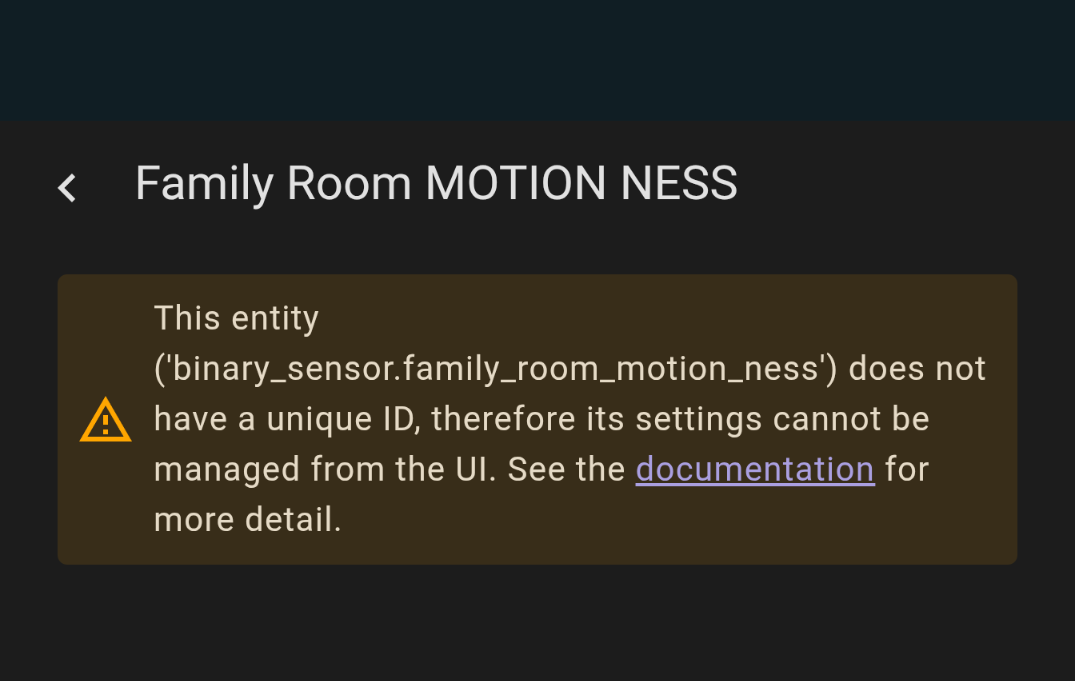
Does there happen to be a fix for this? Not a big deal of there isn’t one, I’m still able to create automations etc in the GUI, it would just make things tidier if I could place each sensor in the room it resides.
Also, I have one particular motion sensor that doesn’t always report movement. Looking at the actual sensor, the little light comes on to say that it has picked up motion, but it doesn’t always show in Home Assistant, despite being set up to check every second. This is how I have it setup in yaml:
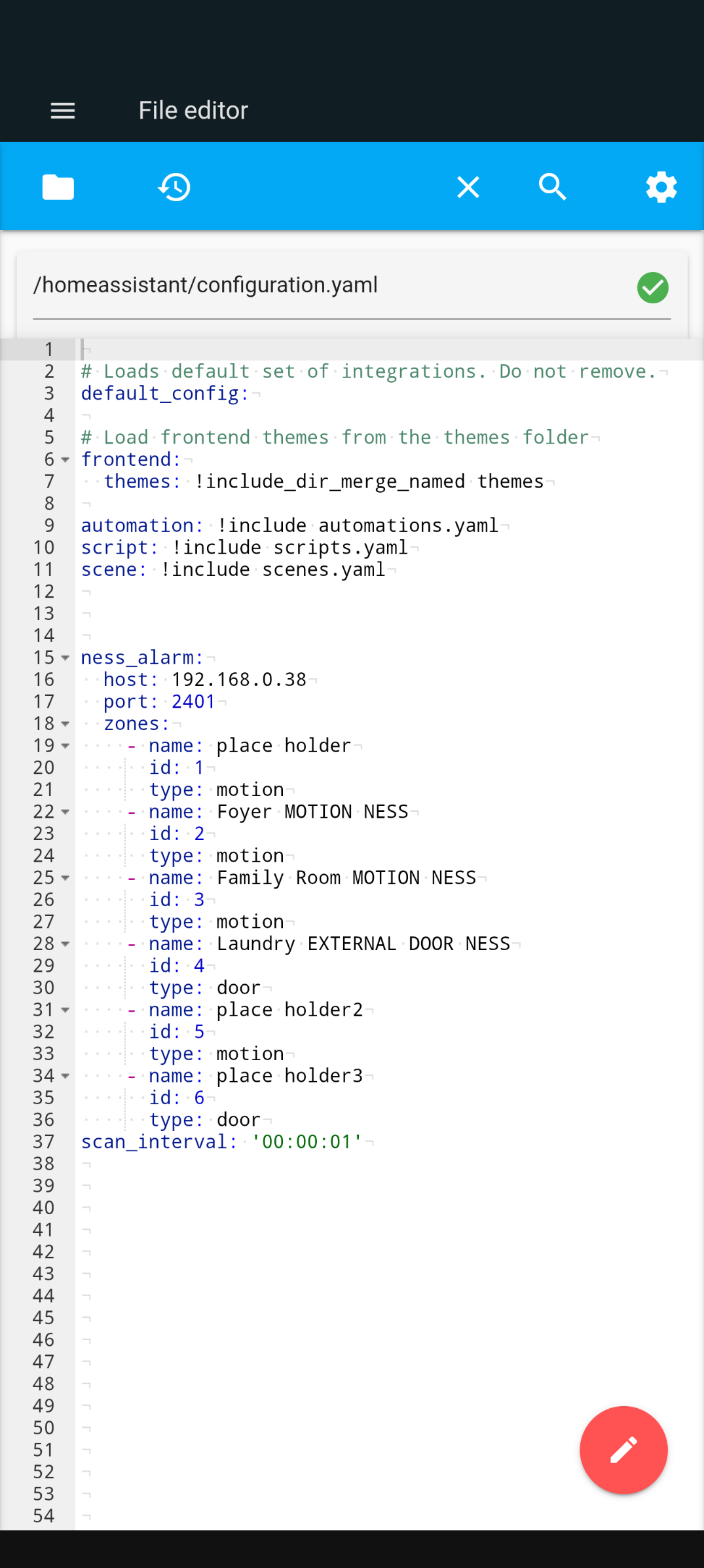
Cheers
Dean
I am building a new home and it has a new NESS Alarm in it
Im awaiting confirmation, but I think its a D8
The installer is trying to sell me the Ethernet Bridge which I think is a couple of hundred
I do have some novice level experience with ESP’s, in particular I have some PoE powered ESP32 laying around
Is there a robust solution here, I don’t really want to tinker too much just something that will work reliably and not require too much
mental energy 
OPTION 1
NESS Ethernet Bridge
- Does this work natively with HA?
- is it reliable?
- What Integration is available here
- Is it local based, or cloud only?
Opt 2
Ness Corporation. IP232 MODULE
- Which integration is required here?
- Assume this is largely the same as the ESP option?
Opt 3
ESP with various cable / adapters
- What is required for this? Which firmware would i put on the ESP32, Which pins do i wire the programming cable to?
- Is there working code available for the D8
- For a clean connection it seems getting a programming cable and assumingly chopping the COM port end and wiring to the ESP32 is the way to go? What pins would I use?
Which programming cable, I see there are to
NESS 450-246
https://www.ebay.com.au/itm/196317915544
or the
NESS450-185
https://www.ebay.com.au/itm/197134681967
ESP32 should defenitely be possible, and in all likelihood very little code required - and was my oringal plan. But then with the work done here and relative low cost of a genereic RS232 to IP module, I just went down that path. Same device still seems to be around. e.g here on Amazon: USR-TCP232-302 RS232 Serial to RJ45 Ethernet Adapter Ip Converter/Device Server : Amazon.com.au: Computers
(As for which serial cable - not sure which one of those it would be. Pin-outs have been discussed somewhere here from memory if you want to DIY)
I do have one of these laying around too, would this be better
Rail-Mount Serial Server, RS232/485/422 to RJ45 Ethernet Module, TCP/IP to serial, POE Function Optional | RS232/485/422 TO POE ETH (B)
Yeh same diff I reckon.
I have just recently successfully completed this exercise with a D8x and it works robustly and reliably.
I used a USR-TCP232-302 RS232 to TCP IP converter which you can get on AliExpress for around AU$30 including shipping. I powered the USR-TCP232-302 (5 v in) via a buck converter from the D8x alarm panel (12 v out), so I didn’t need to use the power adapter.
I used the NESS 450-246 cable from Radio Parts (with the 4-pin white plug), but had to replace the RS232 female connector with a male RS232 plug and swap the blue and white wires over to the male plug (white to pin 2, blue to pin 3).
There is a NESS Alarm integration that is easy to setup and use and I already have a couple of automations working with it … 
This has been buried in time on this thread. Probably the cheapest option, especially if you are happy to report to HA via wifi. I have made two of these setups. Both have been running with no intervention for five years now.
Basically it takes serial in/out and sends it to HA like it’s come via Ethernet.
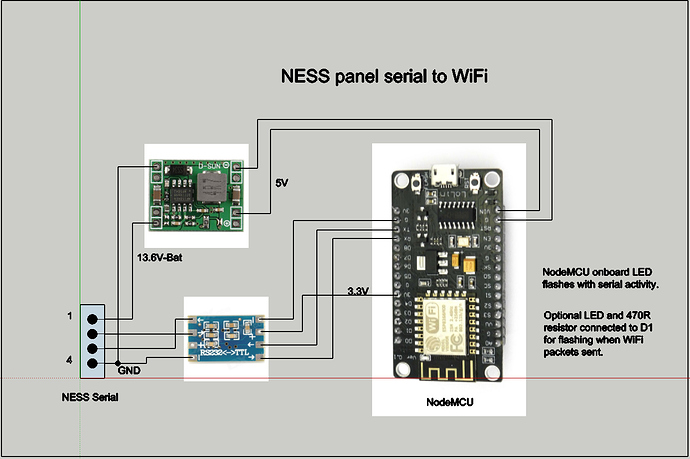
1 Like
Hey!
My post 7 posts up, did anyone read it and notice any issue that would cause the delay in motion reporting? Or can suggest any changes that could speed said reporting?
cheers!
thanks everyone
Also, which cable do i buy in the links i posted? one looks to be a 3 wire and the other a 4 wire
thanks
That’s if you are planning to use the USR-TCP232-302 RS232 to TCP IP converter. Your D8x PCB should have a 4-pin RS232 socket on it.
My alarm is OOS at the moment, so can’t give much advice. If it was me, I would check if the alarm outputs anything differently (message-wise and timing wise) for that zone vs one of the ones that works; just to isolate if it is alarm, or serial converter, or Home Assistant …
1 Like