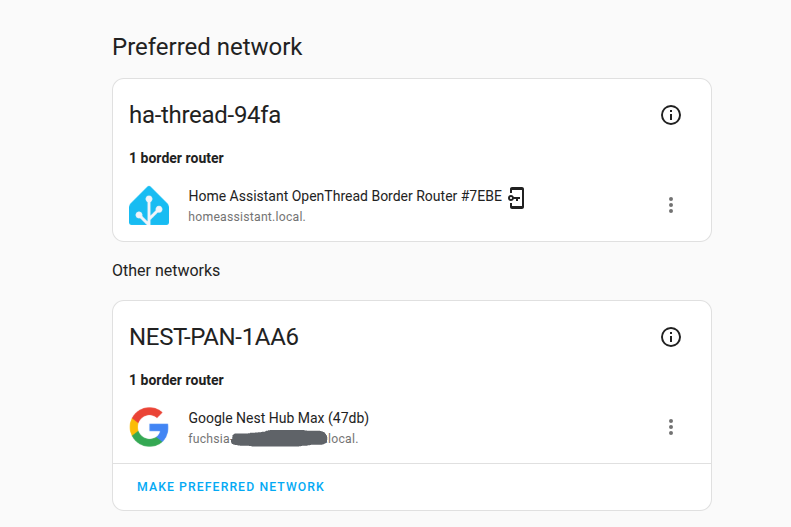
I’ve recently been having problems with a Nest Hub Max dropping off my wifi network… am working on a fix for this. But I was surprised to find that all my thread/matter lights disconnect when the Nest Hub Max is disconnected (or turned off). This is despite the fact that the OTBR on my SkyConnect device is set as the preferred network and that I paired all my lights with that Sky Connect network
If I delete the NEST_PAN-1AA6 network from HA (delete becomes an option when the Nest Hub is powered off), my lights all disconnect and remain that way despite restarting HA and power cycling the lights.
I’m hoping for some advice - so I can avoid the laborious task of repairing every single light with SkyConnect’s network. And concerned that even if I do, the Nest Hub will take over or interfere again.
I had the next hub max sharing the same credentials as my ZBT-2 dongle on home assistant. This was causing (it appeared) the devices associated with it to work very slowly. Switching off the hub max increased speed dramatically of operations of the ikea matter over thread plugs.
switching it on and everything slowed down again.
So i went about resetting the hub max and recreating an entirly new network and resetting all devices to work on this. All with the nest hub switched off. Took hours!
Now when i switch the hub back on the hub shows as a seperate network under home assistant. However it still slows down the operation of the plugs !
Sorry for taking a while to respond and unfortunately I have only a vague memory of how I fixed my problem. I think I re-paired all devices with my SkyConnect. But pretty sure that things improved most significantly when I separated my thread and ZigBee channels.
Hi,
Yes i found that putting everything on another thread network, changing the channel and repairing everything all while the hub was off seemed to solve the problem.