New Integration: Home Maintenance – Track Recurring Tasks in Home Assistant

Hi everyone! :wave:

I’m excited to introduce a brand-new custom integration for Home Assistant: Home Maintenance.

This integration is designed to help you stay on top of recurring home maintenance tasks—things like changing air filters, testing smoke detectors, or watering plants—right from within Home Assistant.


:toolbox: Features

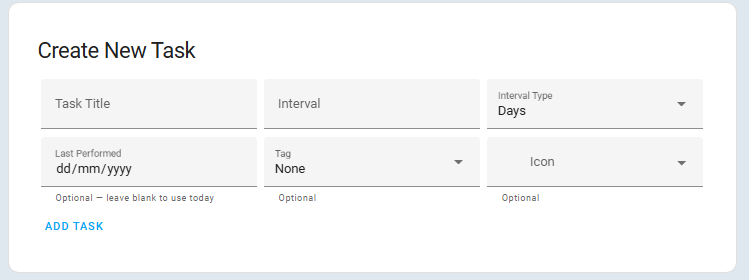
  • Define tasks with a title, interval (days/weeks/months), and last performed date
  • Each task appears as a binary sensor that’s on when the task is due
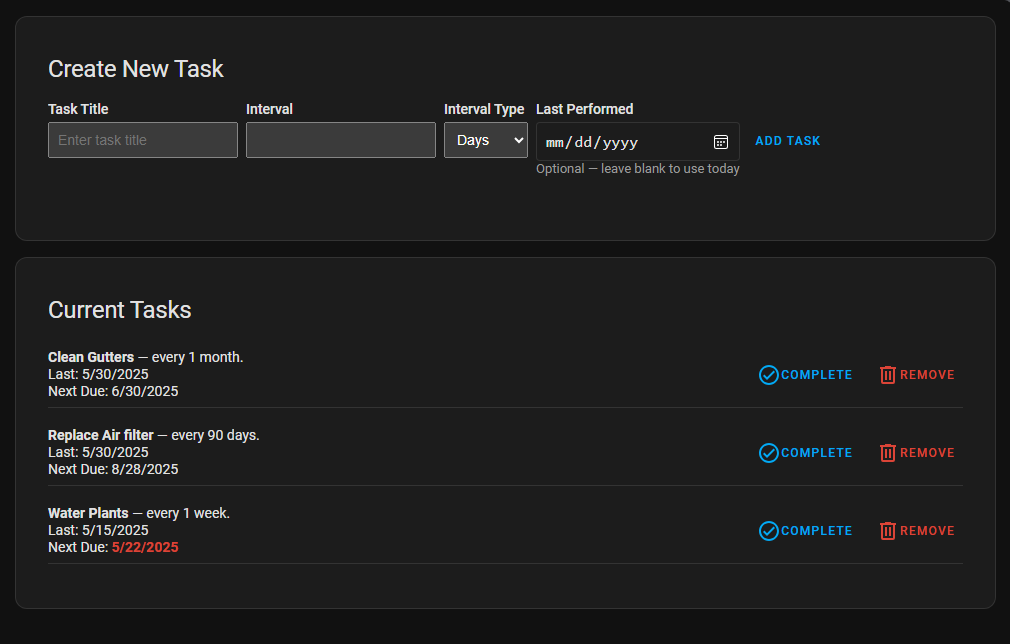
  • View and manage tasks from a simple built-in UI panel
  • Mark tasks complete and have them auto-reset based on the defined interval
  • Data is stored in Home Assistant’s native .storage system—no YAML required
  • Fully supports automations, Lovelace cards, and notifications

:inbox_tray: Installation (via HACS)

  1. Open HACS > Integrations
  2. Click the three-dot menu > Custom repositories
  3. Add the repository URL:
    https://github.com/TJPoorman/home_maintenance
    Category: Integration
  4. Install Home Maintenance from the HACS integrations list
  5. Restart Home Assistant
  6. Add the integration under Settings > Devices & Services

:camera_flash: Screenshots


:speech_balloon: Feedback & Contributions

This is my first custom integration and I’d love your feedback. Bug reports, suggestions, or contributions are all welcome on GitHub.

Let me know what kinds of task reminders you’d like to automate! :hammer_and_wrench::sparkles:

:link: GitHub: GitHub - TJPoorman/home_maintenance: Custom integration for Home Assistant to track repeating tasks

30 Likes

HA needed this so much!

Im giving it a try!

Thank you!

1 Like


I didnt see anything to manage TAGs, is it possible?

Looks like that’s a bug likely introduced with fixing the screen refresh issue. I’ll open a bug and take a look

This is fixed in the latest version

I really like this. In your github read.me you have a nice looking table with the task info displayed. Is this possible to do with a card on the dashboard? Right now, I can only see the task if I go through the left side bar.

This table?

correct, the above table

That’s just markdown for github, but you can get something like that using auto entities and flex table (both in HACS)

type: custom:auto-entities
filter:
  include:
  - options: {}
    integration: home_maintenance
card:
  type: custom:flex-table-card
  title: Auto Entities Example
  clickable: true
  sort_by: next_due+
  columns:
  - data: friendly_name
    name: Task
  - data: state
    name: State
  - data: interval_value,interval_type
    name: Interval
  - data: last_performed
    name: Last Done
    modify: "(([y, m, d]) => `${m}/${d}/${y}`)(x.split('T')[0].split('-'))"
  - data: next_due
    name: Next Due
    modify: "(([y, m, d]) => `${m}/${d}/${y}`)(x.split('T')[0].split('-'))"
1 Like

This awesome! Thank you so much! Great job

Thanks a lot for creating this integration and also your quick responses on my feature request on Github! :slight_smile: I am currently rebuilding our chores dashboard to use your integration!

I saw that the Tag feature should have been fixed in a previous release, but I has never really disappeared for me and also still present in the latest release:

When you select the dropdown it just shows “Loading…” and never retrieves the tag list?

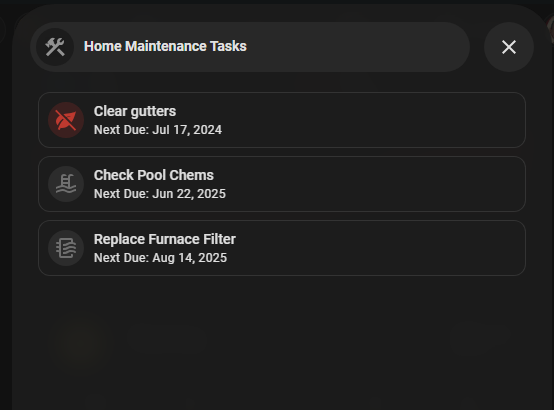
For those that are interested, here is another way to display these tasks in the UI. I’m using just a mushroom template card to show if there are any tasks due and on click it opens a Bubble card popup that shows all the tasks and any that are due are at the top.

image

This does require some HACS cards:

  • auto-entities
  • card_mod
  • layout-card
  • Bubble Card
  • Mushroom

Popup card yaml

type: vertical-stack
cards:
  - type: custom:bubble-card
    card_type: pop-up
    hash: "#maintenance"
    name: Home Maintenance Tasks
    icon: mdi:hammer-wrench
    show_header: true
    button_type: name
    show_icon: true
  - type: custom:auto-entities
    card:
      type: custom:layout-card
      layout_type: masonry
    card_param: cards
    filter:
      template: >
        {% set ents =
        expand(device_entities('2aa7d42bd6e08ff7467eca649523d63d'))
          | selectattr('entity_id', 'match', 'binary_sensor\\..*')
          | sort(reverse=false, attribute='name')
          | sort(reverse=false, attribute='attributes.next_due')
          | sort(reverse=true, attribute='state') %}
        [
          {% for e in ents %}
            {
              "type": "custom:mushroom-template-card",
              "entity": "{{ e.entity_id }}",
              "primary": "{{ e.name }}",
              "secondary": "Next Due: {{ as_datetime(e.attributes.next_due).strftime('%b %d, %Y') if e.attributes.next_due else 'Unknown' }}",
              "icon": "{{ e.attributes.icon }}",
              "icon_color": "{{ 'red' if e.state == 'on' }}",
              "tap_action": {
                "action": "call-service",
                "service": "home_maintenance.reset_last_performed",
                "service_data": {
                  "entity_id": "{{ e.entity_id }}"
                },
                "confirmation": {
                  "text": "Are you sure you want to mark this task as done?"
                }
              },
              "card_mod": {
                "style": "{{ 'mushroom-shape-icon { animation: pulse 1s infinite; } @keyframes pulse { 0% { transform: scale(1); opacity: 1; } 50% { transform: scale(1.2); opacity: 0.6; } 100% { transform: scale(1); opacity: 1; } }' if e.state == 'on' else '' }}"
              }
            }{% if not loop.last %},{% endif %}
          {% endfor %}
        ]

Mushroom button yaml

type: custom:mushroom-template-card
primary: Home Tasks
secondary: |-
  {% set device_id = '2aa7d42bd6e08ff7467eca649523d63d' %}
  {% set sensors = device_entities(device_id) 
    | select('match', 'binary_sensor\\..*') 
    | list %}
  {% set total = sensors | count %}
  {% set active = sensors 
    | map('states') 
    | select('equalto', 'on') 
    | list 
    | count %}
  {{ active }} of {{ total }}
icon: |-
  {% set device_id = '2aa7d42bd6e08ff7467eca649523d63d' %}
  {% if (device_entities(device_id)
    | map('states') 
    | select('equalto', 'on') 
    | list 
    | count) > 0 %}
    mdi:home-alert
  {% else %}
    mdi:home
  {% endif %}
tap_action:
  action: navigate
  navigation_path: "#maintenance"
icon_color: |-
  {% set device_id = '2aa7d42bd6e08ff7467eca649523d63d' %}
  {% if (device_entities(device_id)
    | map('states') 
    | select('equalto', 'on') 
    | list 
    | count) > 0 %}
    red
  {% endif %}

2 Likes

Nope, never shows anything nor an option to add something

I’ve created a similar setup with a mushroom template card and auto-entities to only show task that are upcoming in the next 7 days.

This used the Easy Time library (GitHub - Petro31/easy-time-jinja: Easy Time calculations for Home Assistant templates) to show the relative time differences

Result:

Code:

type: custom:auto-entities
filter:
  include:
    - integration: home_maintenance
      options:
        type: custom:mushroom-template-card
        primary: "{{ state_attr(entity, 'friendly_name') }}"
        secondary: >-
          {% from 'easy_time.jinja' import custom_relative_time %}  
          {% if state_attr(entity,"next_due")|as_datetime < today_at("23:59") and state_attr(entity,"next_due")|as_datetime > today_at("00:00")%} 
            {{ state_attr(entity,"next_due") }}
          {% else %}
            {{ custom_relative_time(state_attr(entity,"next_due"),'day','nl') }}
          {% endif %}
        icon: "{{ state_attr(entity, 'icon') }}"
        icon_color: >-
          {% if state_attr(entity,"next_due")|as_datetime < (now() + timedelta(days=1)) %} red  
          {% elif state_attr(entity,"next_due")|as_datetime < (now() + timedelta(days=3)) %} orange
          {% elif state_attr(entity,"next_due")|as_datetime < (now() + timedelta(days=7)) %} green  
          {% else %} dark-grey  
          {% endif %}
        badge_icon: |-
          {% if state_attr(entity,"next_due")|as_datetime < now() %}
          mdi:alert
          {% endif %}
        badge_color: |-
          {% if state_attr(entity,"next_due")|as_datetime < now() %}
          red
          {% endif %}
        tap_action:
          action: perform-action
          perform_action: home_maintenance.reset_last_performed
          data:
            entity_id: this.entity_id
        card_mod:
          style: |
            ha-card { 
              {% if state_attr(config.entity,"next_due")|as_datetime < (now() + timedelta(days=1)) %}
                background: rgba(244, 67, 54, 0.2); 
              {% elif state_attr(config.entity,"next_due")|as_datetime < (now() + timedelta(days=3)) %}
                background: rgba(255, 152, 0, 0.2);
              {% elif state_attr(config.entity,"next_due")|as_datetime < (now() + timedelta(days=7)) %}
                #background: rgba(76, 175, 80, 0.1);
              {% endif %}
            } 
  exclude:
    - options: {}
      attributes:
        next_due: < -7d ago
sort:
  method: attribute
  attribute: next_due
card:
  square: false
  type: grid
  columns: 2
  title: Home Maintenance
show_empty: true
card_param: cards
2 Likes

If it shows nothing that means it completed loading the tags.
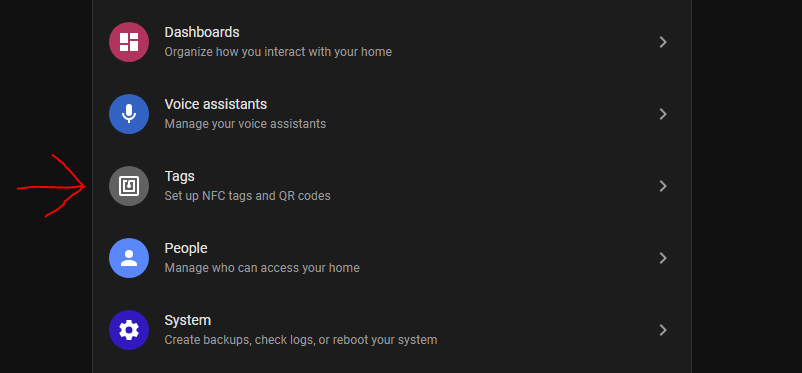
To be clear this is for NFC tags to associate the scanning of the tag with marking it complete. Not labels or category and there isn’t an option to add them from this UI that has to be done in the HA config.

Ahh yes then it makes perfect sense, since I do not use this.
Could not find any reference of it in the documentation of your integration. Maybe good to note that this if for NFC tags.

Great idea and work, thanks for sharing it with the HA community !

As I expect (at least my) list to grow large, I have some potential suggestions for improving the tasks control panel:

  1. Display dates with HA locale format rather than fixed US format mm/dd/yyyy, which is likely as confusing for Europeans as dd/mm/yyyy is for you :slight_smile:
  2. Allow sorting tasks by due date or by name (at present they seem sorted by creation date, which is less helpful imho to find a task in the list) .
  3. Maybe even a search box to filter the list by part of name.

Template cards for displaying task entities can of course address all the above, but I feel this would also be helpful the integration’s control panel, as it remains the place to manage all tasks.

2 Likes

Thank you for the feedback!
I can definitely look at using the locale for display instead of static format.
I’m already looking at possibly using the HA table style display for showing the tasks which would allow for filtering and sorting same as in the HA config screens.

1 Like

Just installed it. Love it so far!!