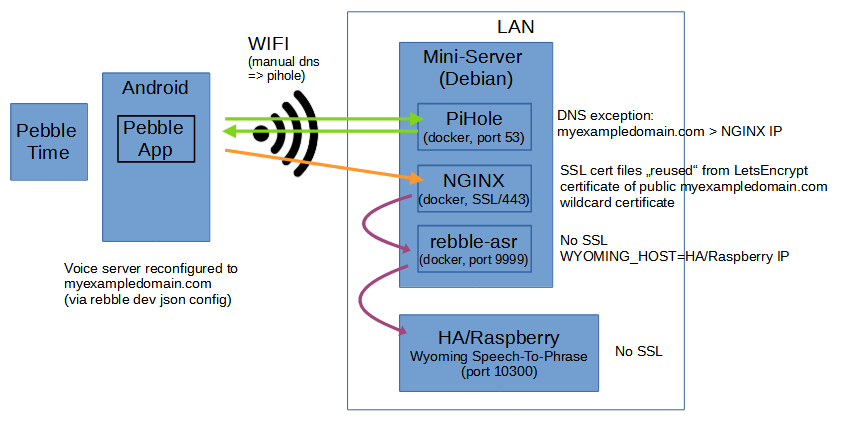
If I configure a separate local wyoming server within the rebble-asr config (using “WYOMING_HOST=your_wyoming_host”), do you know if that server URL/address in turn also needs to be behind ssl?
Communication between rebble-asr and Wyoming is just like between Home Assistant and Wyoming - it doesn’t require SSL to work properly. The SSL requirement only applies when your phone communicates with the rebble-asr server using the endpoint you configured in the JSON.
And additionally: i wasnt able to figure out how to use lets encrypt for a purely internal/LAN server. Do you have a go-to resource that explains things a bit by any chance? Thanks in advance for sharing 
For my setup, I use a real public-facing address which allows me to obtain a legitimate SSL certificate. If you want to keep everything local-only (and use a VPN when away from home), you’d likely need to work with self-signed certificates and configure your phone to trust them. I chose to avoid that complexity by using a public endpoint.
My specific setup uses Cloudflare and their tunnel service. I run the cloudflared docker container which handles all traffic to my internal services. I have a domain with a wildcard DNS entry (something like *.random.example.net) that directs traffic to my letsencrypt docker container. This approach makes the service harder to discover, as I use something like pebble-stt.random.example.net for the rebble-asr endpoint. Someone would need to guess this specific hostname to find my instance - it’s not true security, but it does add a layer of obscurity. My letsencrypt docker container is configured to use Cloudflare as the DNS provider, which allows me to generate a wildcard SSL certificate for *.random.example.net, making it easy to add site-conf files to NGINX for exposing services under this wildcard.
For local resolution, my network uses Pi-hole as DNS, and Pi-hole is configured to locally resolve all requests to my example.net domain. This ensures that if my internet connection goes down, requests still reach my letsencrypt docker container because I have *.random.example.net set to point directly to the container’s LAN IP. When I’m away from home, requests route through Cloudflare to reach the public endpoint.
I should mention - not to dissuade you from setting this up yourself, but for others reading who might prefer a simpler solution - that Rebble offers a subscription for $6/month that includes their ASR service. Even though I self-host, I still pay for Rebble because they’re doing amazing work keeping these watches functional. Plus, the subscription gives you faster timeline sync, which is helpful if you automate timeline pins (by the way, I created node-red-pebble-timeline (node) - Node-RED to facilitate this).
I plan to do a more in-depth write up on my website about how to handle all of this and will share that here when I get around to it. I hope that answers all of your questions though.