Hi @remuslazar
Thanks so much for coming up with an alternative to the built in nissan_leaf integration which now seems to have died a permanent death with the latest API change (June 2025) that is not just a case of tweaking the API URL… 
I’ve managed to migrate my dashboard and automations across to your integration - mostly, as there is not a one to one correspondence of entities and attributes but have found a problem and have a few questions.
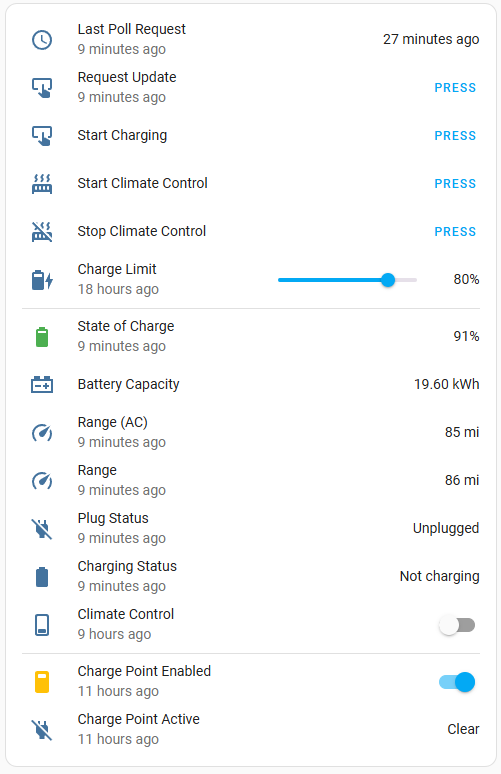
I use it partly as a way to implement a charge limiter, this will give some idea:
This is backed by half a dozen automations, which integrate with both the Nissan API via the integration, and Shelly Plus one which controls the ChargePoint…
To achieve this an automation waits for the car to be plugged in and the chargepoint to activate for more than 5 seconds, it then waits 30 seconds, triggers an API poll via the leaf integration, waits 3 minutes and triggers another poll to ensure that up to date SoC is received from the car as well as Charging status.
Another automation checks the reported SoC every 10 minutes when the charge point is active and the API reports the car is charging, once the SoC is greater than the target it switches off the charge point.
For this to work the poll interval while charging is set to 10 minutes and poll interval when not charging to 3 hours - same as I had with the old integration.
However poll interval while charging does not actually seem to be working - in testing yesterday the car charged for 2 hours with the initial poll triggered by plugging in the car succeeding, but no further data was polled for over 2 hours by which time the car had passed the charge limit and reached 100%.
However manually clicking the Request update button did return up to date results within a few minutes. Are there any known problems with the poll interval while charging configuration option ?
I suppose I could just manually trigger polling via an automation every 10 minutes when the criteria are met (car reports charging and charge point reports active) but I thought I’d reach out first to see if this is a known bug.
A couple of related questions:
The old integration had an attribute which indicated the next anticipated polling time based on the polling interval configuration and whether the car was currently charging or not, and this was quite useful for diagnostics. There doesn’t seem to be an equivalent here ?
Also, I’m not entirely sure what the purpose of the “update fetch interval” setting is ? The wording suggests this queries the API for information that will (hopefully) not trigger a query to the car, but how does this benefit if previous data is already cached from the last full poll - it seems redundant ?
The old integration did not have this setting, only full polling (to the car) intervals for not charging and charging cases, and of course manual polling.
Setting this update fetch interval to a short period of time makes it nearly impossible to use another app like the Nissan app as it forces all other apps to be logged out every time it polls - so I’ve just set it to be the same as the “not charging” period - 3 hours.