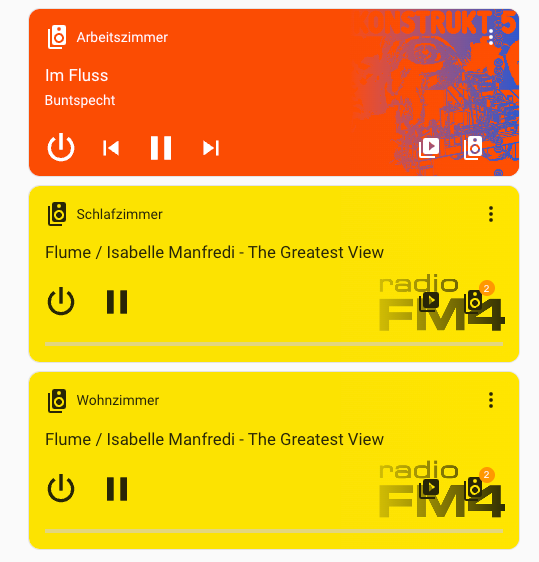
I tried to overcome the limitations of the existing Teufel Raumfeld Integrations and have developed a new one, following a different approach. Does anyone want to help beta-testing it?
Highlights:
Simple and stable: Only shows one media player entity for each Teufel Device
Fast: Low footprint on the Raumfeld device, fast reaction time
Solid integration of Spotify Connect next to Raumfeld native playback.
Supports Multiroom: Grouping of devices in Homeassistant
Tested well with Raumfeld mode in TuneIn, Spotify Connect, Chromecast Playback
Solid support for MusicAssistant.
How it works:
It is based on node-raumkernel which is a battle tested library to interact with Raumfeld. Raumkernel is wrapped in an addon.
The integration talks to the Raumkernel Addon instead of to the speakers directly.
There is logic built in which handles Raumfeld specifics, such as Zones, Direct Playback, Spotify Connect, …
Hi there,
works wonderful and it was very easy to integrate my Raumfeld Teufel ONE S and Teufel ONE M. I can control the Multiroom setup. I can access my favourite/last played radio stations in the different folders, so this function works too. I added the two devices with the mediacontrol template to my dashboard and was yery happy with the outcome.
Three minor points of criticism or areas for improvement, alongside an otherwise great integration:
It would be great if you could add a multiroom group consisting of several devices as a single card in the dashboard.
A tool for adjusting the volume of each multiroom device at a single glance, like in the mobile app, would be really great. Or maybe I just haven’t found it yet.
The progress bar of the track/title always starts around the 3-minute mark in my case and jumps tracks/titles if I set it to a different time.
Hi Uli,
just found your Raumfeld integration and wanted to test it.
Maybe a silly question but where do I configure the Raumfeld host(s) to connect to?
I see the following message in the AddOn Log:
[2026-01-15T20:54:37.135Z] [RK] [WARN ] [DeviceManager] Raumfeld host not found
When trying to manually connect to the WebSocket port (localhost:3000) I get
“Upgrade Required”
You can configure it in the Addon-Settings of the Teufel Raumfeld (Raumkernel Addon). Im stuck at the same spot though:
Did the bundled install via HACS integration, worked fine so far.
Entered the credentials for the Host ((assuming it’s the Raumfeld that has to be entered here.
Looking at the log of the addon (here in Silly Verbose Mode) everything seems to be fine:
[22:25:03] INFO: Service restart after closing
s6-rc: info: service legacy-services successfully stopped
s6-rc: info: service legacy-cont-init: stopping
s6-rc: info: service legacy-cont-init successfully stopped
s6-rc: info: service fix-attrs: stopping
s6-rc: info: service fix-attrs successfully stopped
s6-rc: info: service s6rc-oneshot-runner: stopping
s6-rc: info: service s6rc-oneshot-runner successfully stopped
s6-rc: info: service s6rc-oneshot-runner: starting
s6-rc: info: service s6rc-oneshot-runner successfully started
s6-rc: info: service fix-attrs: starting
s6-rc: info: service fix-attrs successfully started
s6-rc: info: service legacy-cont-init: starting
s6-rc: info: service legacy-cont-init successfully started
s6-rc: info: service legacy-services: starting
services-up: info: copying legacy longrun raumkernel (no readiness notification)
[23:25:06] INFO: Starting Raumkernel...
s6-rc: info: service legacy-services successfully started
IntegrationManager: Integration already up to date (v1.2.11)
[2026-01-20T22:25:07.839Z] Startup: addon=1.2.11 node-raumkernel=1.2.25 integration=1.2.11
[2026-01-20T22:25:07.839Z] WebSocket server started on port 3000
[2026-01-20T22:25:07.961Z] [RK] [INFO ] [Raumkernel] Found raumfeld host on: 192.168.77.110
[2026-01-20T22:25:08.032Z] [Registry] Could not find room for member UDN: uuid:38cc6612-569b-4e90-84fe-c5c5706d93ec
[2026-01-20T22:25:08.032Z] [Registry] Could not find room for member UDN: uuid:5d3343d2-e416-4004-9ba9-c266192034c2
[2026-01-20T22:25:08.049Z] [RK] [INFO ] [DeviceManager] Virtual media renderer added: AZJ Fenster (uuid:2328c49f-ae9f-421e-a1fb-60859c5873e4)
[2026-01-20T22:25:08.049Z] [Registry] Could not find room for member UDN: uuid:38cc6612-569b-4e90-84fe-c5c5706d93ec
[2026-01-20T22:25:08.050Z] [Registry] Could not find room for member UDN: uuid:5d3343d2-e416-4004-9ba9-c266192034c2
[2026-01-20T22:25:08.063Z] [RK] [INFO ] [DeviceManager] Virtual media renderer added: AZJ One M (uuid:b38ed300-ce3e-4e4a-83c1-b02d9652bbe6)
[2026-01-20T22:25:08.063Z] [Registry] Could not find room for member UDN: uuid:38cc6612-569b-4e90-84fe-c5c5706d93ec
[2026-01-20T22:25:08.064Z] [Registry] Could not find room for member UDN: uuid:5d3343d2-e416-4004-9ba9-c266192034c2
[2026-01-20T22:25:08.070Z] [RK] [INFO ] [DeviceManager] Raumfeld Media renderer added: Speaker AZJ One M (uuid:7ee42056-d022-4f0e-a790-2fd59f156821)
[2026-01-20T22:25:08.080Z] [RK] [INFO ] [DeviceManager] Raumfeld media server added: Raumfeld MediaServer (uuid:6659dfa9-e1b8-4084-9abc-afc2473b4bd8)
[2026-01-20T22:25:08.080Z] [Registry] System ready: true
[2026-01-20T22:25:08.080Z] [Registry] Added: AZJ One M (room: uuid:5d3343d2-e416-4004-9ba9-c266192034c2, renderer: uuid:7ee42056-d022-4f0e-a790-2fd59f156821)
[2026-01-20T22:25:08.086Z] [RK] [INFO ] [DeviceManager] Raumfeld Media renderer added: Speaker AZJ Fenster (uuid:342ca725-7ba7-4f66-b047-f6087691c127)
[2026-01-20T22:25:08.110Z] [Registry] Added: AZJ Fenster (room: uuid:38cc6612-569b-4e90-84fe-c5c5706d93ec, renderer: uuid:342ca725-7ba7-4f66-b047-f6087691c127)
When I try to browse my library in a mediaplayer card, the search panel suddenly closes.
HA Logs show:
Protokolldetails (WARNUNG)
Dieser Fehler stammt von einer benutzerdefinierten Integration

Logger: custom_components.teufel_raumfeld_raumkernel.api
Quelle: custom_components/teufel_raumfeld_raumkernel/api.py:66
Integration: Teufel Raumfeld (Raumkernel Addon) ([Dokumentation](https://github.com/ulilicht/ha-raumkernel), [Probleme](https://github.com/ulilicht/ha-raumkernel/issues))
Erstmals aufgetreten: 23:25:55 (1 Vorkommnis)
Zuletzt protokolliert: 23:25:55
Failed to connect to Teufel Raumfeld (Raumkernel Addon) at ws://192.168.77.110:3000: Cannot connect to host 192.168.77.110:3000 ssl:default [Connect call failed ('192.168.77.110', 3000)]. Retrying in 5s...
Trying a telnet to …77.110:3000 tells me no open port there. Same if I use localhost, just to be sure.
I have two Raumfeld speakers connected in HA, both are Teufel Raumfeld One M (3rd Gen).
Speakers work when used in app, double checked host IP there. Speakers are updated to 19.3 firmware
Any hint on how this can be fixed? What am I missing?
Regarding 3, Track Tiles / Seek behavior: I noticed that as well. Did you try version 1.2.11 already? I added a small fix for that. The problem will however not be solved completely. It now should on seek jumpt to the right position, but the seek status is still not synced back from Raumfeld in real time. The reason for it is that the only way I could figure out to solve this would be to frequently ask the Raumfeld devices about the current position, and I don’t want to overload them…
Regarding 1: Do you change groups in this case or do grouped devices stay connected in your setup? I originally decided against that, as Homeassistant cards would disappear again if a group is dissolved.
Regarding 2: Currently if you adjust the volume of a group in HA to a certain point (e.g. 14) all devices will jump to volume 14. I haven’t figured out a HA native way of increasing multiple devices by x instead of setting them to a certain position.
*Edit: * Sending the media_player.volume_up action to one of the grouped devices does what you want. So you could add two buttons “Volume Up” / “Volume Down”, both would increase the volume proportinally. Target needs to be one group member of the raumfeld group, it will set it for both.
Usually the Raumfeld host should be automatically be discoverd.
Which setup are you using? Did you install the Homeassistant addon within Homeassistant OS? Are there any network restrictions or any VPN in use?
Does your Teufel Raumfeld App discover the host automatically or do you need to set the IP of the host there yourself as well?
Edit: @jvo if this continues to fail, you can try version 1.2.12. In this version you can set the IP address of your Raumfeld host device manually in the Addon settings.
You need to enter the URL and Port of the addon. If you installed on HA, localhost and 3000 is fine. If you installed through docker on a separate server, it will need that url and port.
The logic is:
Integration → points to addon (usually localhost:3000)
addon → points to Raumfeld Host (auto-discovered - might fail in restricted networks, can be set manually since v1.2.12)
Thanks alot, this made it much clearer. Seems indeed as if it has been a problem with the auto-discover. The log was made while I had entered its IP into the integration, but I tried localhost as well and the error was the same.
Your newest update fixed it to me, thank you very much for the fast response, and besides that, for the addon itself. Looks promising on the first glance. I’m still quite new to HA, so I’m still confusing entities, devices, addons, integrations and stuff from time to time…
Regarding my network:
No special stuff between the devices, no VPN or firewalls. Can’t remember if the app discovered the host by itself, installed it quite some time ago. I remember I had to do the installation multiple times back then tilll they fixed some bugs in the firmware, so I guess at least auto discovery worked, since my raumfeld-host had no fixed ip until I installed Home Assistant.