Ive been playing with HA for a few days now, and I would like to begin exploring writing my own yaml automation files…
I’ve been banging my head against the wall on a problem to which I can’t figure out… So I’m going to begin with some very basic questions and hopefully work my way through this with your help…
Running HAOS on a Pi 3b+
MQTT, ZigBee2MQTT, Tasmota and File editor loaded into HA
Attached Sonoff Zigbee 3.0 USB dongle plus
a mix of Sonoff 31 Zigbee smartplug, Sonoff S31 WiFi smartplug and Sonoff Temp sensor
All of the hardware works controlled manually via the HA UI in MQTT and Zigbee2MQTT
I can get the smartplugs to turn on/off at set times when I create an automation via the HA Create automation UI.
What I would like to do is write some automation manually and load that into HA. I’ve created a folder with File editor labeled myautomation, and I created a blank file call it test1.
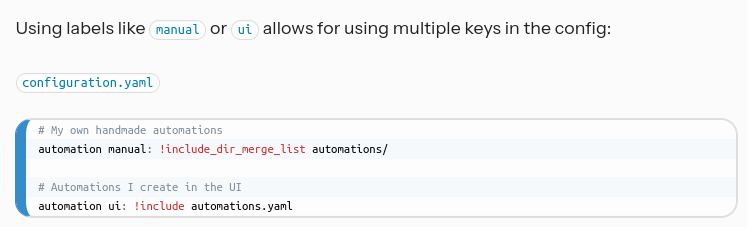
From what I’ve read… for HA to read my manually created automation file, the configuration.yaml needed to be modified with the following line added:
automation: !include_dir_merge_list myautomations/
I still have the original automation line in the config file so it looks like this:
automation: !include automations.yaml
automation: !include_dir_merge_list myautomations/
Thanks for that bit of info… So here is the problem I’m bang my head against…
I’m trying to get HA to let me continue using the automation UI and allow me to drop my own files in for automation…
Since I’m pretty new at the yaml code syntax and formatting… I’ve been making small bits of automation in the UI and either examine them with File editor, or via CLI and nano…
I’ll copy the UI generated code to my text editor, play around with it and dump it into the myautomation directory… the problem Im running into and maybe it’s me, and I am not understanding HA fully work…
With the extra line in the config yaml file, shouldn’t I be able to see my test1.yaml show up in Settings > Automation & scenes ?
There are a few possible reasons why you aren’t seeing your automations.
Any time you add or edit a configuration file, you need to restart HA for the changes to be incorporated.
Because of small syntax differences between what is used in the “Edit in YAML” option in the UI editor, automations.yaml, and files using the different merge methods; you can’t always just copy/paste config directly from one to the other.
Be aware, that even when your manual automations are visible in the list in Automation settings, they are not editable through the UI unless you migrate them back to automations.yaml.
If you are new to HA and you aren’t already well-versed in YAML, I think your time would be better spent by focusing on learning how to build automations just using the UI Automation editor, instead of taking a deep dive into splitting your config. Splitting your config is not required, and really doesn’t teach you much about the YAML used day-to-day in HA.
If you are adamant that you need your config split, I would suggest using Packages. I find this method to be more flexible than the other options, with the added benefit that all your configurations will match the syntax used in the examples that are shown in the docs.
Yeah… I pretty much got the restart covered… and the spacing covered as well… I’ve been using VS code editor and configured it for 2 space tabbing
I’ve been reading the HA documentation, but unfortunately I’m more of a hands-on visual type learner… but I can’t do that until I can figure out the reason I can’t get HA to process my manually written code… even when I comment out the automation include line to process the automation.yaml file, and just leave the include_dir_merge_list nothing pops up anywhere, Nothing even show up in the Developer tool > States… it’s like the system just doesn’t see or register myautomation directory
How else to learn some YAML discipline without diving in? Yes he will start with 90% failures, but as he learns the strict idiosyncrasies of YAML syntax, he will be at 50% like most of us.
I’ve never used include_dir_merge_list for automations. But I learned automations pre-GUI. (My deep dive into YAML).
YAML is a widely used protocol for configuration files, so any docs you find may not apply to Home Assistant.
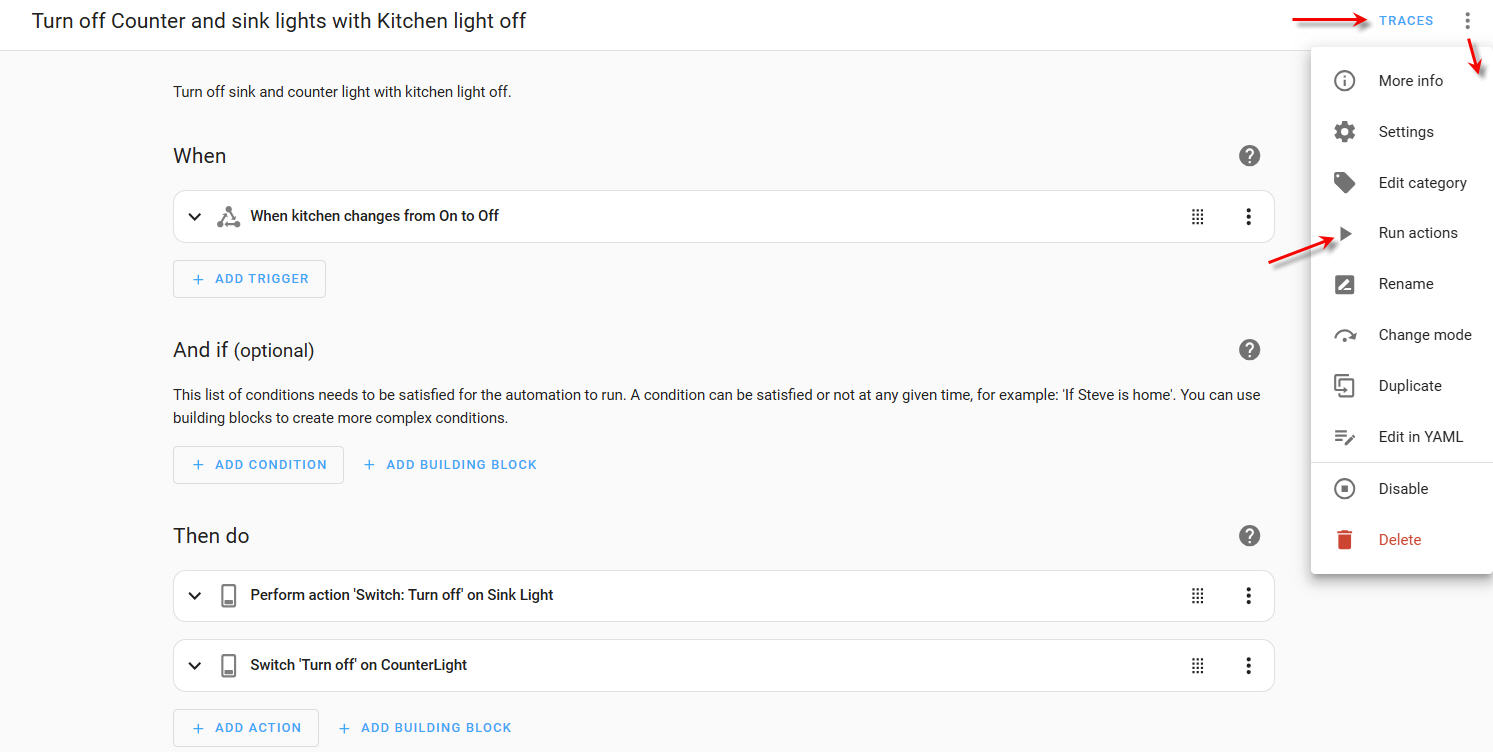
Find an automation you want to modify (or copy) and click on the three-dot menu “edit in yaml”. Copy this code. (YAML isn’t code, but it’s called code everywhere). Back out of this automation. Then “create automation”, “create new automation”, go straight to the three-dot menu and “edit in YAML”. Replace everything with the YAML configuration that you copied. Make your changes, experiment, and when done make sure you save the new automation with a unique name. Now you can run the actions and look at the trace to figure out where it stopped.
Then you can come back here for assistance. We will want to see the YAML configuration (use code tags </>), and maybe a screenshot of the trace would help.
In my opinion, editing automations via YAML, is far from an ideal starting point for beginners. I’d suggest starting with a user YAML controlled dashboard first.
reYes I did… I did a side by side comparison of the two lines, added the automation manual: automation ui: to my file saved, went to Developer tool > YAML > Check configuration… that replied Ok, did a Automation check… that came back Green as well, did a HA Restart, checked both the Settings > Automations & scenes, my test1.yaml wasn’t visible, and lastly I looked in Developer tools > States to see if it showed up there as unavailable, or off… the test1.yaml just wasn’t to be found… at least by me so far
So just to confirm: using the UI you see those automations, but not the ones created via YAML?
Yes, that’s the crazy thing… I create the automation in the UI, it works… and it’s something very simple… at 3:00 turn smartplug on, Mon-Sum, delay 1hr Turn the plug off…
All I did was take that code from automation.yaml, changed the -id: to something, pasted it back in to a file with File editor, save and check the config and automation in Developer tools, and restart the system… nada
Thanks for that bit of advice I’ll give it a look see… I don’t mind playing around with the YAML language and filing as long as I’m learning how the thing works…
I like using the automation UI to start with a small simple automation and examine the code to se how it works and to use it for reference against the doc… and build on that,… again I’m more of a hands on visual learning type
I saw that CloudBees webpage during my search to learn more about the yaml language… I’m still parsing through the article… and I was looking for… not sure what the correct term would be but some sort of emulator to where I could write out the code, and step through it line by line to catch my coding error… but apparently that’s not exactly how yaml works???
I’m surprised no one else has mentioned this, but I would suggest you look at ‘packages’ as opposed to just trying to create stand-alone automation files.
There is no real benefit in trying to include automations by stand alone files, since you can edit the YAML via the UI.
This may sound daft but if you want to edit or add automations in yaml, why not just click the 3 dots in ui editor? This will give you a check of your yaml when you try to save it, rather than messing about trying to fix a HA instance that won’t start because you made a mistake.
It seems a bit daft to mess about with all this?
You could even just add your yaml to the automations.yaml file.
“A” file? Which file? I don’t grok.
While automations.yaml is editable, it is strongly NOT recommended because one little mistake can disable all of your automations. (If you can fix the mistake, everything is back). Or revert to a saved copy of the automations.yaml file.
Note- I don’t use VSCode Editor. I run the Samba Share on my Home Assistant which exposes your config folder as a shared folder that you can open in the File Explorer. I use Notepad++ on my PC. In YAML, avoid tabs as they will throw an error.
I avoid editing automations.yaml but it is handy when an entity changes names and I can easily do a global search and replace in automations.yaml to fix it. (Note, many of my ESPHome devices are DIY and if I make changes to the configuration YAML file and re-flash the device, all the entities acquire a _2 suffix.)
As I said before, start by creating a simple automation using the UI editor. Then copy the YAML configuration. Create a new automation and immediately switch to the YAML editor. Paste your saved configuration and modify a few parameters. When you save it, Home Assistant will lint the YAML and alert you to any syntax issues.
This is the way.
To edit automations in YAML.
Yeah this is where I’m at. You’re trying to take on way too much op and confusing the issue
To learn HA yaml in automations flip back and forth in the editor. When you’re creating multi path and looping automation successfully THEN try to break out into yaml. You’re trying to learn how to do a split config. Deal with the idiosyncratic behavior of HA yaml v UI.and three other things all at the same time and any of the three eat a beginners lunch.
Pick a problem. Learn the automation language first. (op you literally picked two or three of the most advanced HA concepts and slammed the together at once. Which do you want to learn first.)
you already have a directory called myautomations. in that folder add a file called test.yaml.
then in you configuration.yaml file add the following lines (you should already have the first line. if not then you need to add it also so you can keep the UI created automations):
see if the automation exists in your dev tools states tab.
watch to see your switch turn on & off ever minute
hopefully…
OH and there’s nothing wrong at all with learning yaml as a beginner. that’s how the users who have been around a long time did it since there was no UI editor back in the day. If it as hard as others make it then HA wouldn’t exist.