No access to the data of my Kiwigrid after update

Hi there!
I’ve fetched the data of my solarsystem with a kiwigrid Ampere-IQ (EKD) where I could just go on home-IP/REST/items but after a recent update I had to sign in with a password so my the requests of my home assistant were denied. I’ve tried to give the password inform of a parameter to go with the request but before you can type in any password you need to accept/decline a cookie banner so this didnt work. Also I’ve tried it with a python script which worked kind of but only on my laptop so that wasnt an option either. But the weird thing is that you can go on homeIP/REST/items after being logged in on the kiwigrid on a diffrent tab but as soon as I close the browser youll have to type it in again. Any Ideas how to resolve that issue with in my home assistant?

Previously I have been able to get the required data with the following pass without authentification but after the recent update from Ampere-IQ (EKD) you get redirected to an GUI where youll have to type in a password

this is the URL which worked but now only after the log in in the same browser
http://192.168.178.xx/rest/items/sajhybrid_battery_94_HST2103J2306E04770_battery_stateOfCharge

Hi,

I had the same issue with my set up.
The way the logging and authorisation works is that when you login, a request to http://<iq-box-ip>/auth/login is send with the password and some other fields in the body (you can look that up via the dev tools of your browser).
As a response you get a cookie with a kiwisessionid. If you send the cookie with the request for something in /rest/items/<method> you will get the response as before.

I solved it with a python script where I first do the login and then request the fields I want with the session cookie.

I hope that helps.

Hi,
could you please explain in detail how you implemented that for a beginner?
I integrated the EKD Kiwigrid via configurstion.yaml as a sensor. Now I have no idea of how to implement your solution.

Yeah, I would also like to know how you managed that to implement in detail!

Hey,

sure I can do that. But know I am not an expert either, so my solution might be more complicated than it has to be.

I am using the GitHub - AlexxIT/PythonScriptsPro at v1.0.4 integration through HACS for the python scripts (if it is about how to install an extension with HACS, there are much better tutorials out there then I could give so I will skip that part here)

This integration give the option to use a python script as a sensor just like you did with the rest sensor in your configuration.yaml. That would then look something like this:

  - platform: python_script
    file: <relative_path_to_script_from_configuration.yaml>/script.py
    name: Solar
    unique_id: solar
    scan_interval: 15

For the path, if you place the python script right beside the configuration.yaml it would just be the script name.

My python script looks like this:

import re
import requests

cookie_name = "kiwisessionid"

url = "http://<ip-of-the-iq-smartbox>"
payload = {
    "username": "installer",
    "url": "/",
    "password": "<your-pw>",
    "submit": "Login"
}

auth = requests.post(url + "/auth/login", data=payload)
session_id = auth.cookies[cookie_name]

cookies = { cookie_name: session_id }

response = requests.get(
    url + "<rest-method-for-value0>",
    cookies=cookies)
value0 = response.json()['state']

response = requests.get(
    url + "<rest-method-for-value1>",
    cookies=cookies)
value1 = response.json()['state']

values = {
    "value0": value0,
    "value1": value1,
    # add more values if you want
}

# I am using this to remove any units like Watt(W) from the response to just have a number
cleaned_values = {k: re.sub('([^\\d.-]+)', '',v) for k, v in values.items()}

self.attributes = cleaned_values

If you don’t want to write your password and the IP in plain text in the script you can pass them through as secrets as well. It would be better practice to do that.

This script saves the values as attributes of an entity and not as the state. You can transform those back into their own entities by using a template sensor.

template:
      sensor:
            - name: Value0
              unique_id: value0
              unit_of_measurement: "W"
              device_class: power
              state_class: measurement
              availability: >-
                  {{
                    not state_attr('sensor.solar', 'value0') == None
                  }}
              state: >
                  {% set value = state_attr('sensor.solar', 'value0') | float %}
      
                  {{ value }}

This is the part I am not sure about if there is a better solution, converting attributes to their own entities with states. But it is working.
You can give the attributes proper names in the python script and use them in the template sensors.

As a hint, if you change anything in the python script, you will have to restart home assistant. Reloading the yaml configuration is not enough, because the script is compiled at start up.

I hope this helps. If you have any questions, just feel free to ask.
1 Like

I ve actually found an better solution:
If you get the data of the “kiwisessionid” Cookie manually once you can just give it as a parameter with your request that will look something like this:

headers:
Cookie: kiwisessionid=“Cookie Value”

To my knowlage the cookie only become invalid after not beong used for a certain time or if its active for 400 days (which is standard)

Hi. I am getting same error. I have followed the steps you guys told. but still not getting success. Please help! Thanks in advance

Code in config.yaml
sensor:

  • platform: python_script
    file: /config/script.py
    name: Solar
    unique_id: solar
    scan_interval: 15

Code in script.py

import re
import requests

cookie_name = “64KGPqQ3YRJxxxxxxxxFSg” # I got the cookie value from below browser dev tool.

url = “http://192.168.188.75
payload = {
“username”: “”,
“url”: “/”,
“password”: “xavnhloe”,
“submit”: “Login”
}

auth = requests.post(url + “/auth/login”, data=payload)
session_id = auth.cookies[cookie_name]

cookies = { cookie_name: session_id }

response = requests.get(
url + “”,
cookies=cookies)
value0 = response.json()[‘state’]

response = requests.get(
url + “”,
cookies=cookies)
value1 = response.json()[‘state’]

values = {
“value0”: value0,
“value1”: value1,
# add more values if you want
}

cleaned_values = {k: re.sub(‘([^\d.-]+)’, ‘’,v) for k, v in values.items()}

self.attributes = cleaned_values

@DieserSustus @Dracsos Any help would be highly appreciated. I would love share any other information needed.

It’s annoying, that EKD can’t follow any standard.

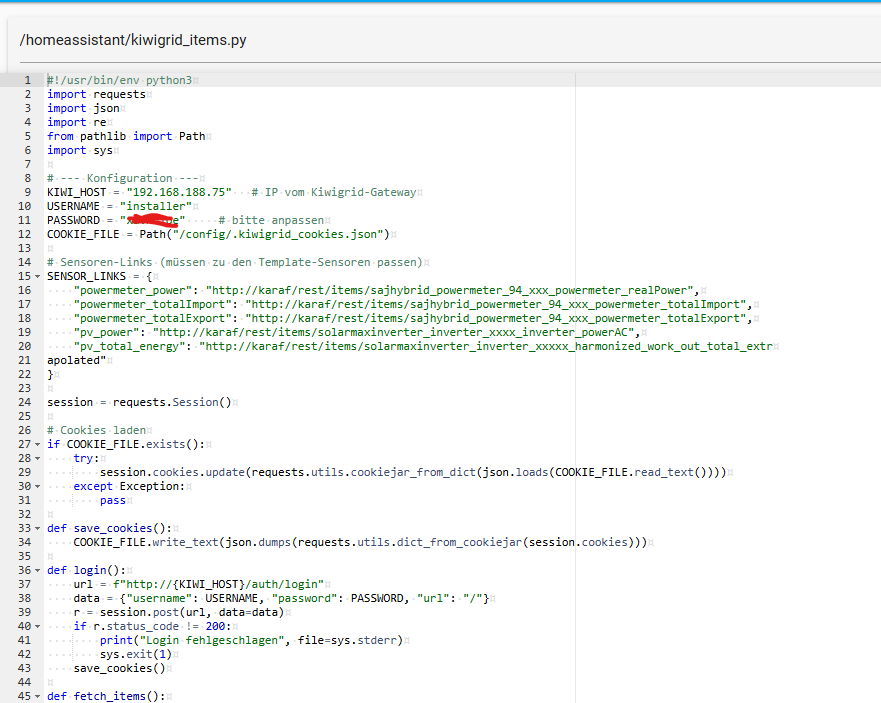
I helped myself writing a little python script placed under /config.

#!/usr/bin/env python3
import requests
import json
import re
from pathlib import Path
import sys

# --- Konfiguration ---
KIWI_HOST = "xx.xx.xx.xx"   # IP vom Kiwigrid-Gateway
USERNAME = "installer"
PASSWORD = "changeme"     # bitte anpassen
COOKIE_FILE = Path("/config/.kiwigrid_cookies.json")

# Sensoren-Links (müssen zu den Template-Sensoren passen)
SENSOR_LINKS = {
    "powermeter_power": "http://karaf/rest/items/sajhybrid_powermeter_94_xxx_powermeter_realPower",
    "powermeter_totalImport": "http://karaf/rest/items/sajhybrid_powermeter_94_xxx_powermeter_totalImport",
    "powermeter_totalExport": "http://karaf/rest/items/sajhybrid_powermeter_94_xxx_powermeter_totalExport",
    "pv_power": "http://karaf/rest/items/solarmaxinverter_inverter_xxxx_inverter_powerAC",
    "pv_total_energy": "http://karaf/rest/items/solarmaxinverter_inverter_xxxxx_harmonized_work_out_total_extr
apolated"
}

session = requests.Session()

# Cookies laden
if COOKIE_FILE.exists():
    try:
        session.cookies.update(requests.utils.cookiejar_from_dict(json.loads(COOKIE_FILE.read_text())))
    except Exception:
        pass

def save_cookies():
    COOKIE_FILE.write_text(json.dumps(requests.utils.dict_from_cookiejar(session.cookies)))

def login():
    url = f"http://{KIWI_HOST}/auth/login"
    data = {"username": USERNAME, "password": PASSWORD, "url": "/"}
    r = session.post(url, data=data)
    if r.status_code != 200:
        print("Login fehlgeschlagen", file=sys.stderr)
        sys.exit(1)
    save_cookies()

def fetch_items():
    url = f"http://{KIWI_HOST}/rest/items"
    r = session.get(url)
    if r.headers.get("Content-Type", "").startswith("text/html"):
        login()
        r = session.get(url)
    r.raise_for_status()
    return r.json()

def get_sensor_values(items):
    out = {}
    for name, link in SENSOR_LINKS.items():
        for item in items:
            if item.get("link") == link:
                state = item.get("state", "").strip()
                # nur Zahlen, Punkt, Minus behalten
                state_clean = re.sub(r"[^0-9eE\+\-\.]", "", state)
                try:
                    if "total" in name or "energy" in name:
                        # Ws → kWh
                        out[name] = round(float(state_clean) / 3600000, 2)
                    else:
                        # Power bleibt in W
                        out[name] = float(state_clean)
                except:
                    out[name] = state_clean
                break
    return out

if __name__ == "__main__":
    data = fetch_items()
    values = get_sensor_values(data)
    # Gib die Werte direkt aus, getrennt durch Kommas (Name=Wert)
    print(",".join(f"{k}={v}" for k,v in values.items()))

Running the script should show something like that:

home:/config# ./kiwigrid_items.py 
powermeter_power=-21.0,powermeter_totalImport=143.12,powermeter_totalExport=2068.25,pv_power=525.0,pv_total_energy=6636.6

I run the script every 5 seconds. The CSV data is parsed in template sensors.

Add in configuration.yaml

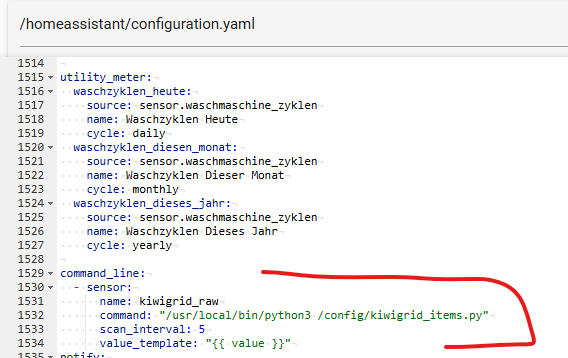
command_line:
  - sensor:
      name: kiwigrid_raw
      command: "/usr/local/bin/python3 /config/kiwigrid_items.py"
      scan_interval: 5
      value_template: "{{ value }}"

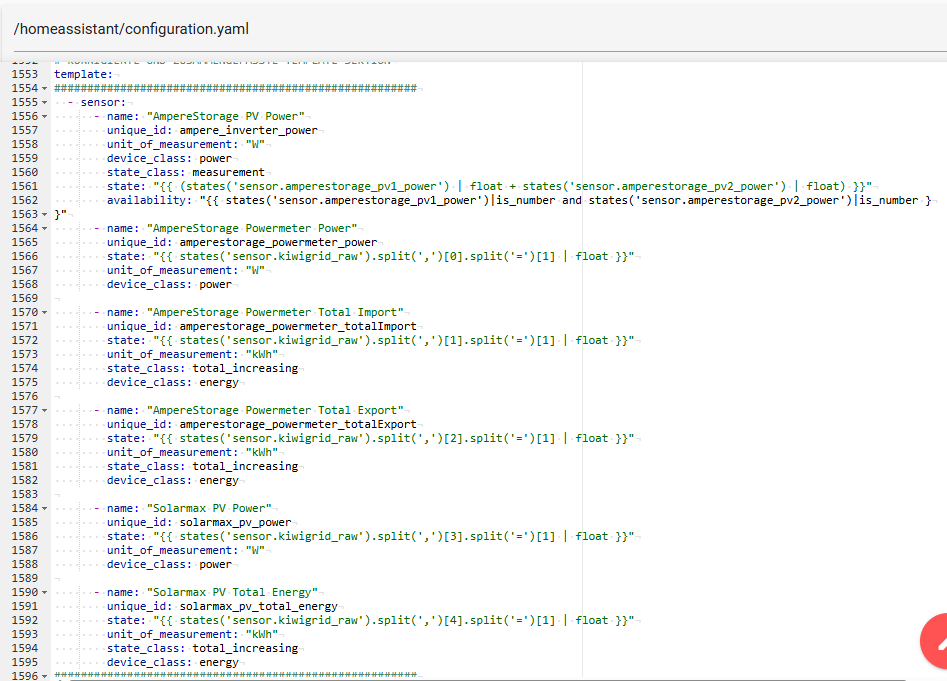
template:
  - sensor:
      - name: "AmpereStorage PV Power"
        unique_id: ampere_inverter_power
        unit_of_measurement: "W"
        device_class: power
        state_class: measurement
        state: "{{ (states('sensor.amperestorage_pv1_power') | float + states('sensor.amperestorage_pv2_power') | float) }}"
        availability: "{{ states('sensor.amperestorage_pv1_power')|is_number and states('sensor.amperestorage_pv2_power')|is_number }
}"
      - name: "AmpereStorage Powermeter Power"
        unique_id: amperestorage_powermeter_power
        state: "{{ states('sensor.kiwigrid_raw').split(',')[0].split('=')[1] | float }}"
        unit_of_measurement: "W"
        device_class: power

      - name: "AmpereStorage Powermeter Total Import"
        unique_id: amperestorage_powermeter_totalImport
        state: "{{ states('sensor.kiwigrid_raw').split(',')[1].split('=')[1] | float }}"
        unit_of_measurement: "kWh"
        state_class: total_increasing
        device_class: energy

      - name: "AmpereStorage Powermeter Total Export"
        unique_id: amperestorage_powermeter_totalExport
        state: "{{ states('sensor.kiwigrid_raw').split(',')[2].split('=')[1] | float }}"
        unit_of_measurement: "kWh"
        state_class: total_increasing
        device_class: energy

      - name: "Solarmax PV Power"
        unique_id: solarmax_pv_power
        state: "{{ states('sensor.kiwigrid_raw').split(',')[3].split('=')[1] | float }}"
        unit_of_measurement: "W"
        device_class: power

      - name: "Solarmax PV Total Energy"
        unique_id: solarmax_pv_total_energy
        state: "{{ states('sensor.kiwigrid_raw').split(',')[4].split('=')[1] | float }}"
        unit_of_measurement: "kWh"
        state_class: total_increasing
        device_class: energy

Ein dickes Dankeschön an herbe

1 Like

Maybe this is helpful for someone:

I just added the “headers” line and now its working again :slight_smile:
Just replace YOUR_IP and YOUR_SESSION_ID
See my example below:

- resource: "http://YOUR_IP/rest/items/kiwigrid_location_standard_harmonized_power_consumed"
  headers: {cookie: kiwisessionid=YOUR_SESSION_ID}
  scan_interval: 2
  sensor:
    - name: "PV Eigenverbrauch Haus"
      value_template: "{{ value_json.state.split('|')[1].split(' ')[0] |round(0) }}"
      unit_of_measurement: "W"
      device_class: power
      state_class: measurement

Thanks, this did the trick for me and my sensor are showing values again!

Nevertheless, it seems like they are showing the wrong values, as my EKD App ist showing different ones…

Update: Stopped working after 3 days…

@marcel1188 thankyou for the code. It helped me but it stopped after three days as @tommygun mentioned. Thanks again.
Please guide how can we solve this ?

Thano you for your reply sir. I apology because i am noob, What i have copied that code into "/config/kiwigrid_items.py".
IP: As per my gateway, Username: As there is no username while logging locally so have put "USERNAME = "installer" " and also with "USERNAME = "" ", Password as mine. I have also copied the code in “configuration.yaml” file as below,

command_line:
  - sensor:
      name: kiwigrid_raw
      command: "/usr/local/bin/python3 /config/kiwigrid_items.py"
      scan_interval: 5
      value_template: "{{ value }}"

template:
  - sensor:
      - name: "AmpereStorage PV Power"
        unique_id: ampere_inverter_power
        unit_of_measurement: "W"
        device_class: power
        state_class: measurement
        state: "{{ (states('sensor.amperestorage_pv1_power') | float + states('sensor.amperestorage_pv2_power') | float) }}"
        availability: "{{ states('sensor.amperestorage_pv1_power')|is_number and states('sensor.amperestorage_pv2_power')|is_number }
}"
      - name: "AmpereStorage Powermeter Power"
        unique_id: amperestorage_powermeter_power
        state: "{{ states('sensor.kiwigrid_raw').split(',')[0].split('=')[1] | float }}"
        unit_of_measurement: "W"
        device_class: power

      - name: "AmpereStorage Powermeter Total Import"
        unique_id: amperestorage_powermeter_totalImport
        state: "{{ states('sensor.kiwigrid_raw').split(',')[1].split('=')[1] | float }}"
        unit_of_measurement: "kWh"
        state_class: total_increasing
        device_class: energy

      - name: "AmpereStorage Powermeter Total Export"
        unique_id: amperestorage_powermeter_totalExport
        state: "{{ states('sensor.kiwigrid_raw').split(',')[2].split('=')[1] | float }}"
        unit_of_measurement: "kWh"
        state_class: total_increasing
        device_class: energy

      - name: "Solarmax PV Power"
        unique_id: solarmax_pv_power
        state: "{{ states('sensor.kiwigrid_raw').split(',')[3].split('=')[1] | float }}"
        unit_of_measurement: "W"
        device_class: power

      - name: "Solarmax PV Total Energy"
        unique_id: solarmax_pv_total_energy
        state: "{{ states('sensor.kiwigrid_raw').split(',')[4].split('=')[1] | float }}"
        unit_of_measurement: "kWh"
        state_class: total_increasing
        device_class: energy

After that i have restarted Home Assistant to try it. but it’s still not working. I have also attached picture for the reference as well. Please do guide me if did anything wrong in it.


Sorry for the late replay.

First of all, does the script itself runs well?

Test from terminal.

home:/config# ./kiwigrid_items.py 
powermeter_power=-21.0,powermeter_totalImport=143.12,powermeter_totalExport=2068.25,pv_power=525.0,pv_total_energy=6636.6

Do you see the raw value sensor? Check Entwicklungswerkzeuge->Zustände

Ah, I see that you you didn’t corrected the sensor links:

SENSOR_LINKS = {
    "powermeter_power": "http://karaf/rest/items/sajhybrid_powermeter_94_xxx_powermeter_realPower",
    "powermeter_totalImport": "http://karaf/rest/items/sajhybrid_powermeter_94_xxx_powermeter_totalImport",
    "powermeter_totalExport": "http://karaf/rest/items/sajhybrid_powermeter_94_xxx_powermeter_totalExport",
    "pv_power": "http://karaf/rest/items/solarmaxinverter_inverter_xxxx_inverter_powerAC",
    "pv_total_energy": "http://karaf/rest/items/solarmaxinverter_inverter_xxxxx_harmonized_work_out_total_extr
apolated"
}

I replaces my serial numbers with XXX

To finde the correct urls.

Login to your kiwigrid box. http://ip_of_kiwirig.
After login run http://ip_of_kiwigrid/rest/items

This dumps all available data und urls

Thanks a lot for all because i am also a Noob but i got it to work :slight_smile: My biggest issue was the folder as i had a folder config below config and hence it did not work. I had to put the python script into same folder as for configuration.yaml. Then i was also struggeling with the shell and therefore i put the following in the configuration.yaml: shell_command: kiwigrid_test: /usr/local/bin/python3 /config/kiwigrid_items.py and then i could use that under developer tools as actions. It helped me returning the error when it did not run. Now when it runs, it does return the values. I have already integregated the % of the battery, but i would like to also put how much is going to and released by the battery for the energy dashboard. Anyone an idee, how do find it and also define the sensor. For the battery %, i used the following: python: `

 "battery_soc": "http://karaf/rest/items/sajhybrid_battery_94_HSR2103J2344E29234_battery_stateOfCharge"

and in the configuration.yaml, i did:

name: "AmpereStorage Batterieladung"
        unique_id: amperestorage_battery_soc
        state: "{{ states('sensor.kiwigrid_raw').split(',')[-1].split('=')[1] | float(0) }}"
        unit_of_measurement: "%"
        device_class: battery
        state_class: measurement`

Hallo und gutes neues Jahr 2026.
ich habe die kiwigrid_items.py wie hier angegeben eingerichtet.
Wenn ich nun versuche sie im Terminal zu starten, erhalte ich immer: permission denied ! ich kann aber mit meinen zugangsdaten die rest item öffnen.
bitte was mache ich falsch.

Danke