Node-Red HA Boolean States Broken?

Node-RED add-on version: 21.0.3
Home Assistant websocket version: 0.80.3

I have an issue that I think started just when I updated the websocket version from within Node-RED. Here’s the problem:

I have several Input Booleans that I’ve been using within Node-RED for many months, but today they have stopped working properly. Suddenly all of them are always outputting “False” from State Nodes, Trigger Nodes, and Current State nodes. I started to review their configurations, and I’m familiar with the recent changes regarding setting the output type. I have tried setting “as boolean” in the Output Properties, but this doesn’t work. The output is always False.

The node documentation states: “Boolean will be converted to true based on if the string is equal by default to (y|yes|true|on|home|open ).” So, based on this, I would expect input booleans with state of “on” to be converted to True, but this doesn’t happen.

The only way I can get a valid output is to set the Output Property to “String.” The problem is that I have many conditionals in my flows that check for boolean states (True or False) and not string states “On” or “Off.” I will have to modify a bunch of my nodes to accommodate this change.

Is this really the correct behaviour going forward, or is there something wrong here?

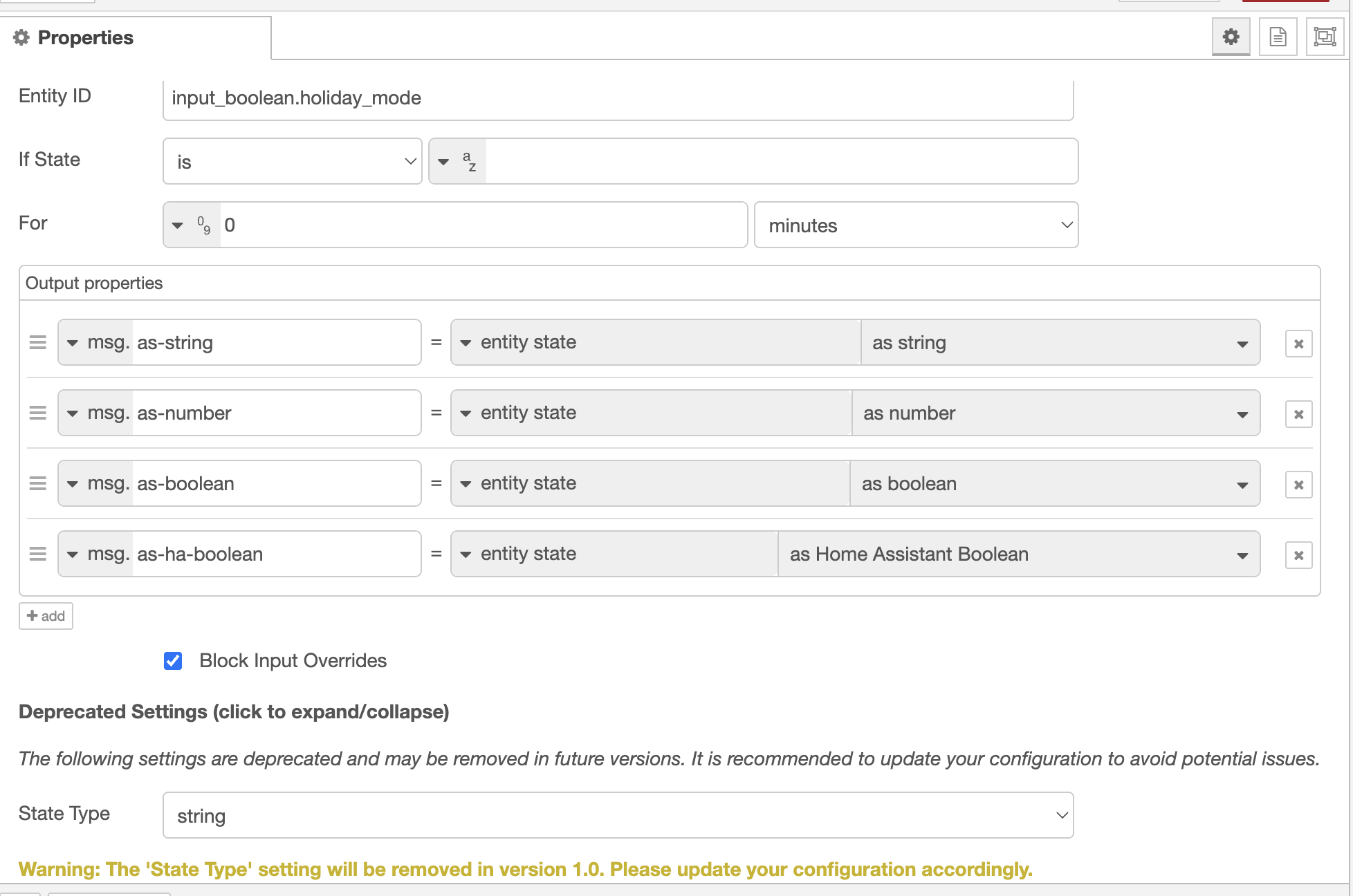
The Output Properties permits setting a property to entity state with a sub-option for

  • as String
  • as Number
  • as Boolean
  • as Home Assistant Boolean

You probably need the as Home Assistant Boolean which will test the entity state value against the HA Boolean “true” array [“y”, “yes”, “true”, “on”, “home”, “open”]. The option as Boolean uses a standard programming language truthy test for true, which is why “on” will always return false.

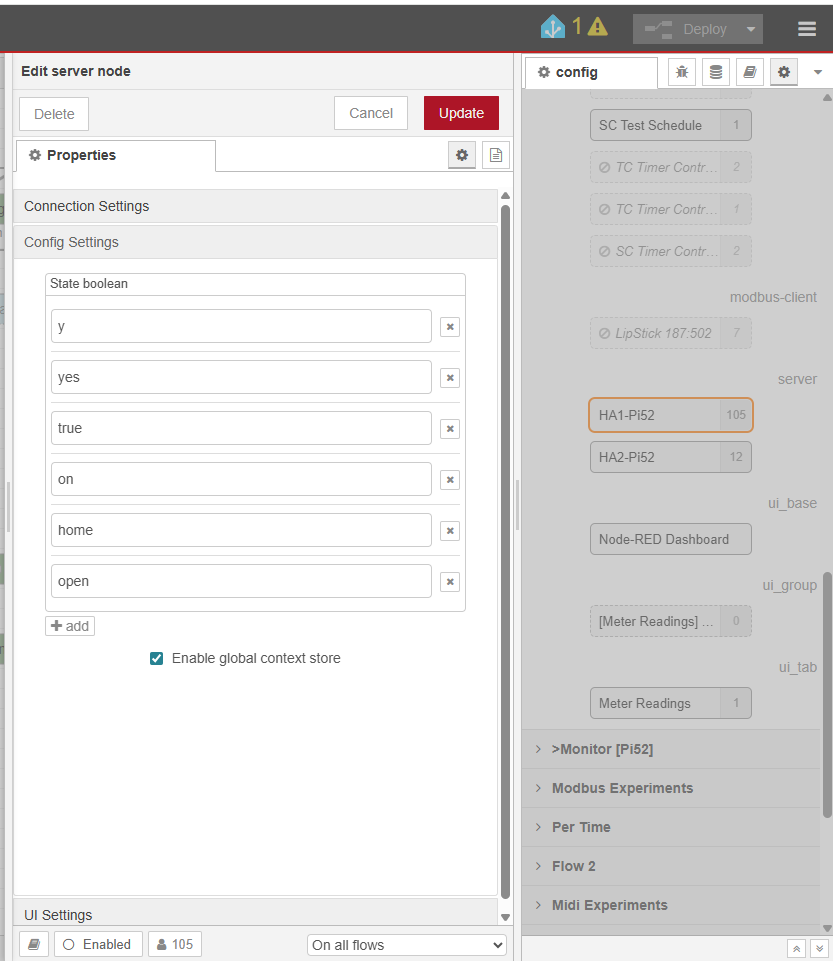
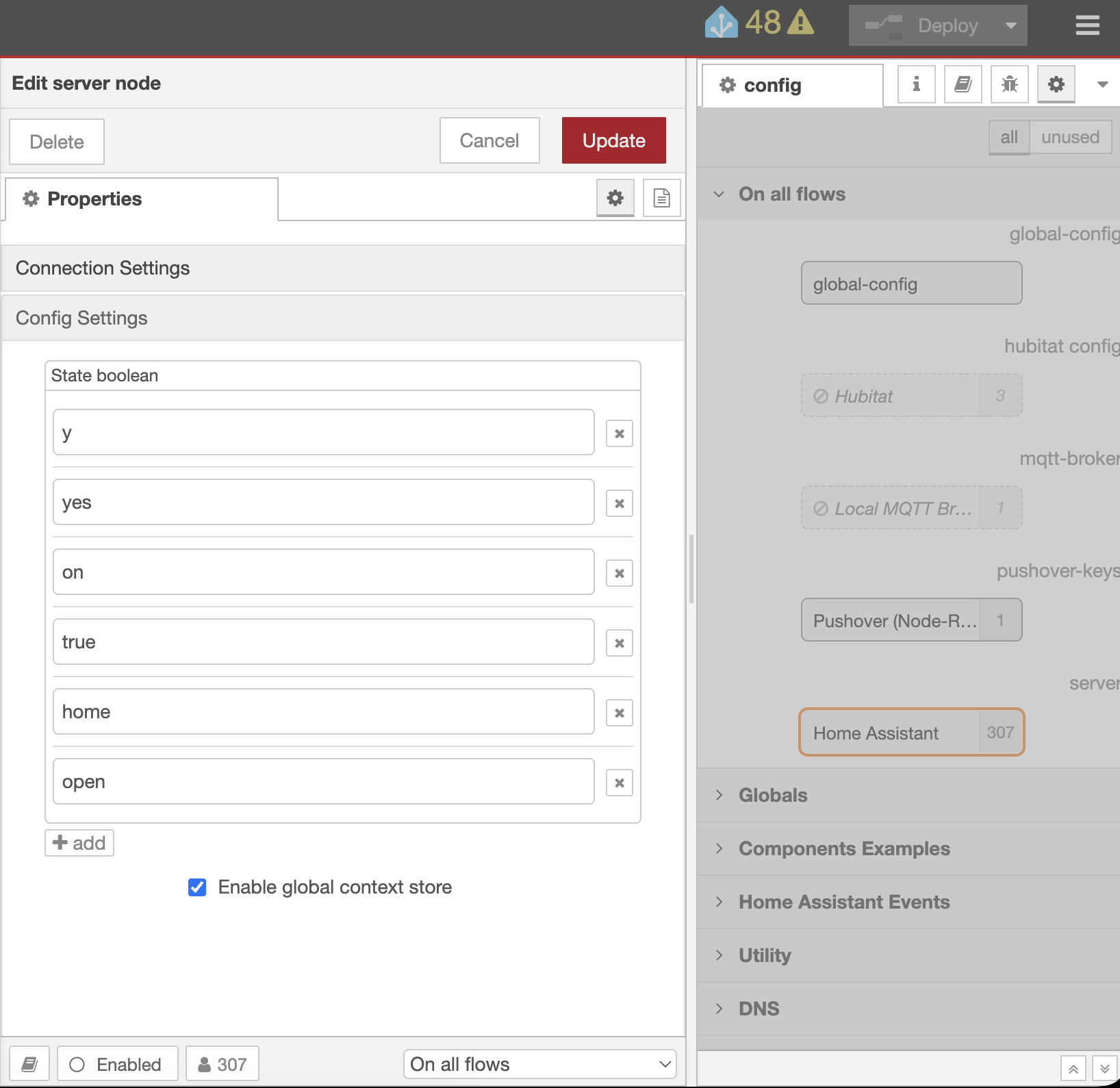
Worth checking your websocket HA server configuration node, and the config settings tab, that your ‘state boolean’ values are set correctly. This is now a list.

Aha!! I wasn’t familiar with (or forgot about) this setting. Just checked now and mine is completely empty. Should it be populated by default?

As at v 0.80.3 it looks something like this

The state casting test, applied at the output property generation, uses the inclusive in test against a list [array] of the items.

I really thought you had identified the fix for me, but unfortunately I’m still getting the same :frowning: I added all those options, and tried both “as boolean” and “as Home Assistant Boolean”
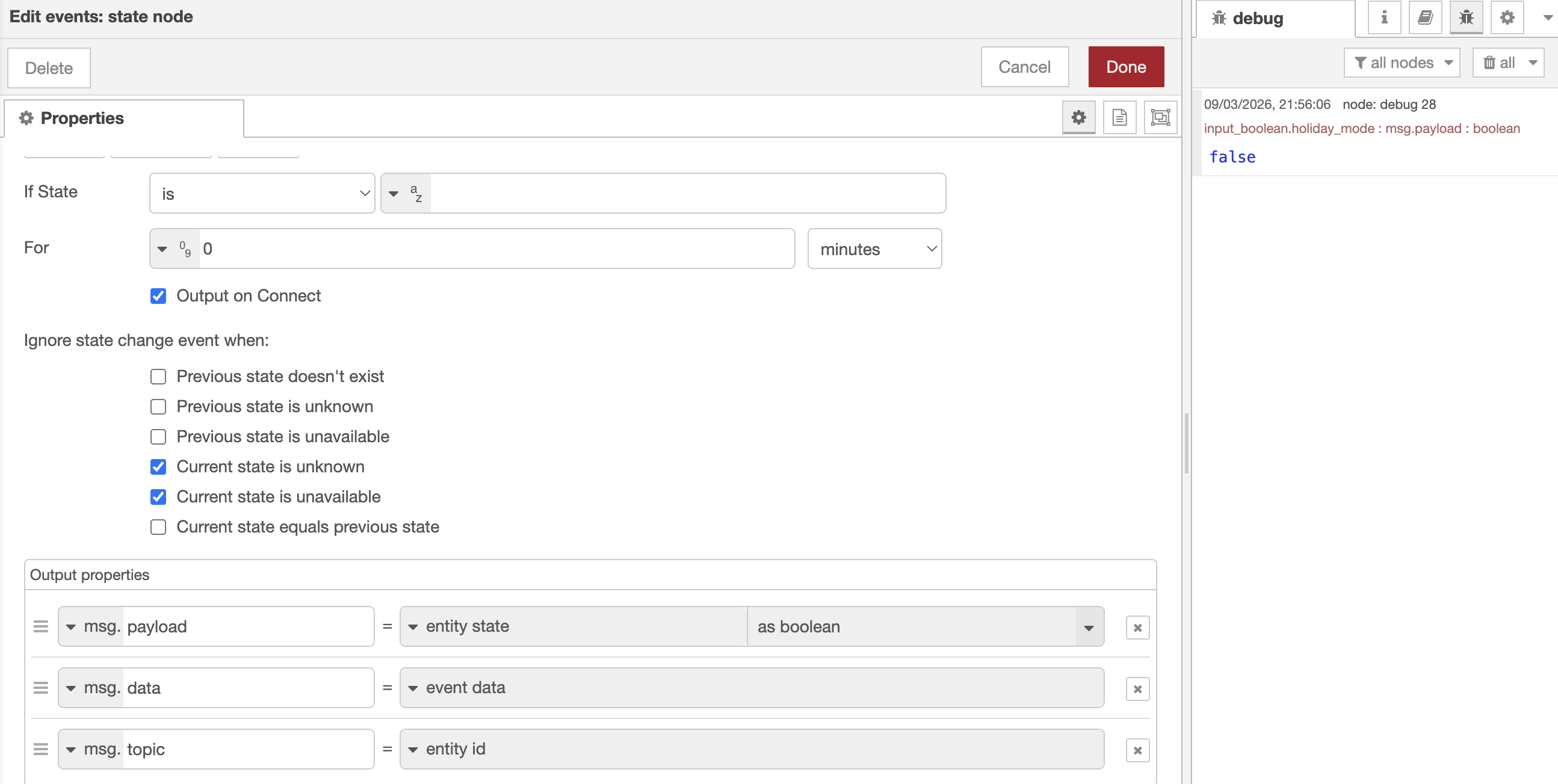
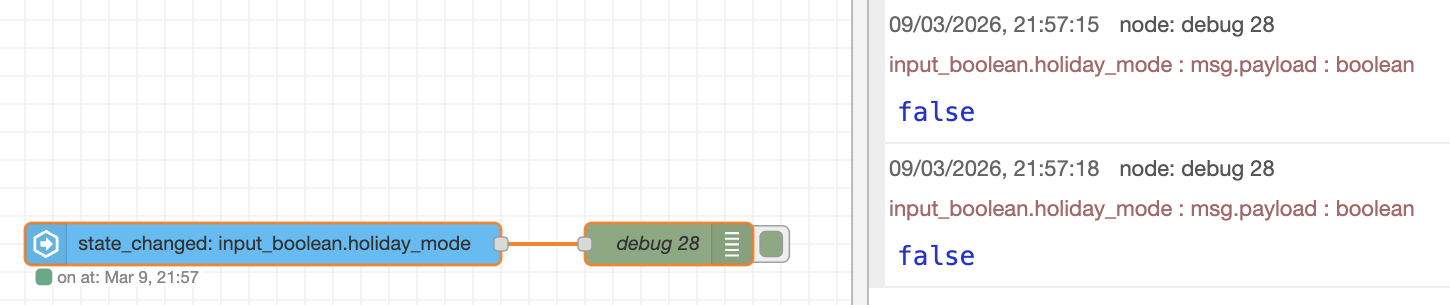
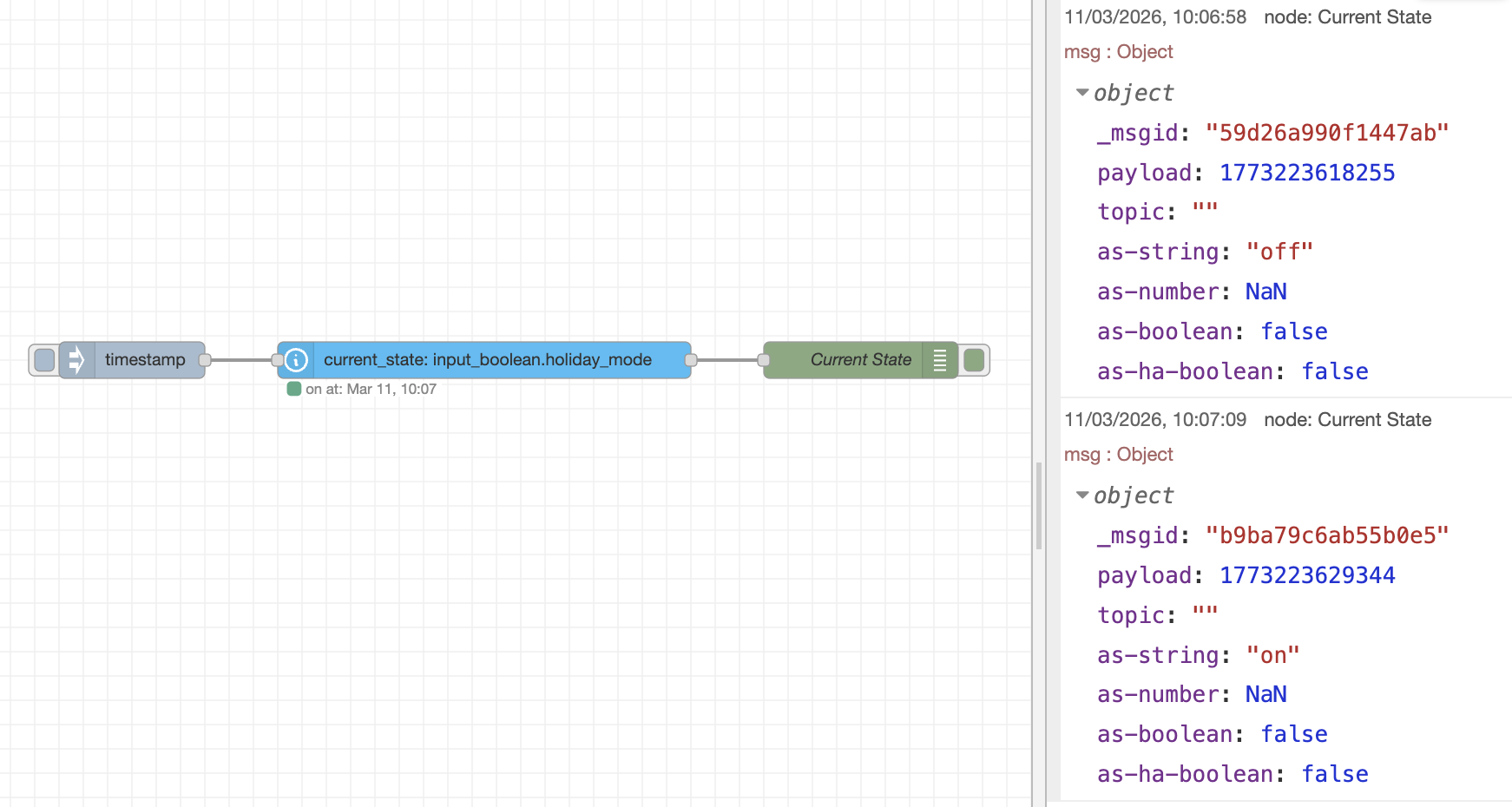
Screenshots of the config and debug showing the payload always “false”:

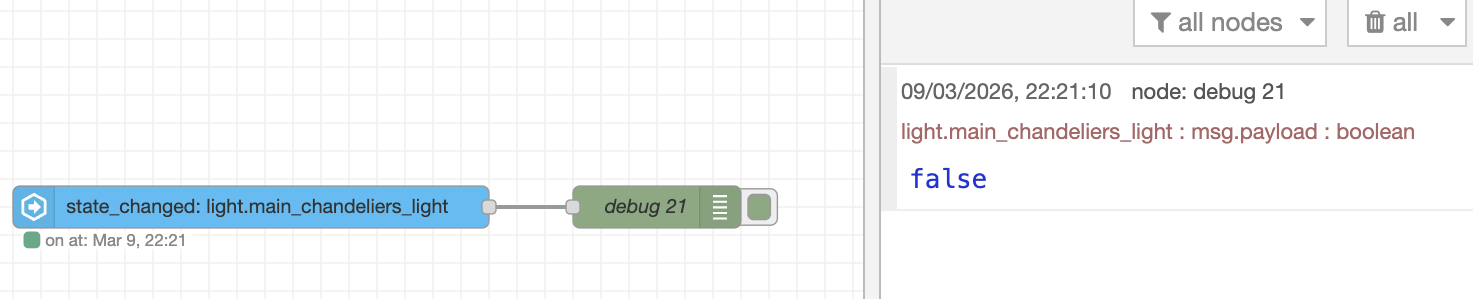
Actually, I just discovered that this isn’t limited to input boolenas. I’ve just tested this with a light entity, and found the same thing. I used to be able to output the light status as a boolean, but now I can only get it to work as a string:

That looks rather like a boolean false and not a string “false”.

On my test NR instance, running HA WebSocket v 0.80.3, it is working as expected.

An input_boolean (switch) as the subject of a Current State node, with the (deprecated) State Type as “string” thus leaving the entity state as string. Output property state casting, here set using all four options.

The switch at top is “off”, and at bottom “on”.

as String does nothing, so the state is “off” and “on”
as Number returns NaN as “off” and “on” are not valid numbers
as Boolean returns false since “off” and “on” are not valid boolean
as Home Assistant Boolean returns false and true, as expected

It works. Check your configuration node (and make sure you only have one configuration node). Restart Node-RED (in case this is only picked up at start up). Also, since you have updated “stuff”, have you updated the Node-RED Companion integration as well?

Since you are using as Boolean, I thought it worth while checking what happens if you leave the (deprecated) State Type to boolean to cast the entity state up front, then try using the Output Properties state casting…

The state is cast first, to boolean false or true and replaces “off” and “on” throughout the node, so that the output state casting now has to cast from a boolean rather than a string.

as String does nothing (it is a null-cast) so returns the pre-cast boolean values
as Number now correctly converts the boolean false to 0 and true to 1
as Boolean now casts false to false and true to true, which is rather a non-event but hey it works
as Home Assistant Boolean now returns false since true and false are not in the HA Boolean casting array. The HA Boolean casting array (list) holds string values that represent true, and while “true” can be added, true cannot.

So - everything has to be up to date, the HA Boolean list [array] has to be complete, the (deprecated) State Type has to be string and output casting has to be as Home Assistant Boolean and it should work.

Or, just leave the (deprecated) State Type to boolean and output casting as as String which does nothing and thus leaves the output property as a correctly HA cast boolean value.

I’d like to start by saying you so much for taking the time to do such thorough testing for me. I hadn’t thought about outputting the four different states types from a single node. That was a great idea, and really makes it clear what’s happening. Unfortunately, it does seem to show that something’s not working correctly in my system.

First of all, I believe I have everything up to date. My HA Websocket is at v0.80.3 and I’m using v21.0.3 of the Node-RED App (add-on). You asked if I had updated the Companion integration as well. Do you mean the one in HACS? I’m not actually using that integration, as I never thought I needed the optional functionality that it provides. I installed it just now, just to see if it helped, but it didn’t.

I believe I have my Configuration Node set up correctly, and I only have one instance of it:

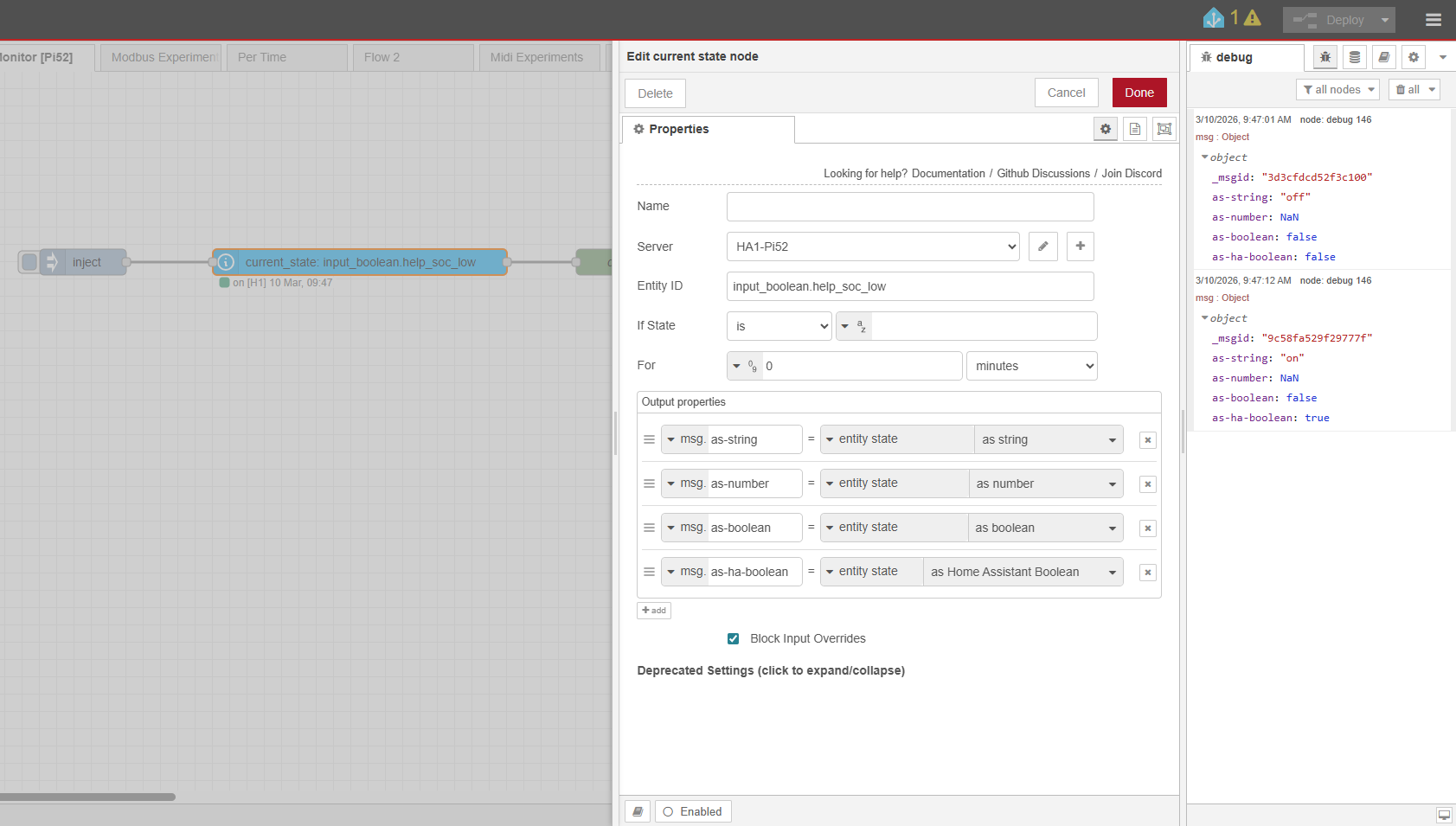
Here’s the result of running the same test as you did:

The above was with the deprecated State Type as “string,” and I have the switch as “off” on the top and “on” at the bottom. You can see that both boolean output types are always false.

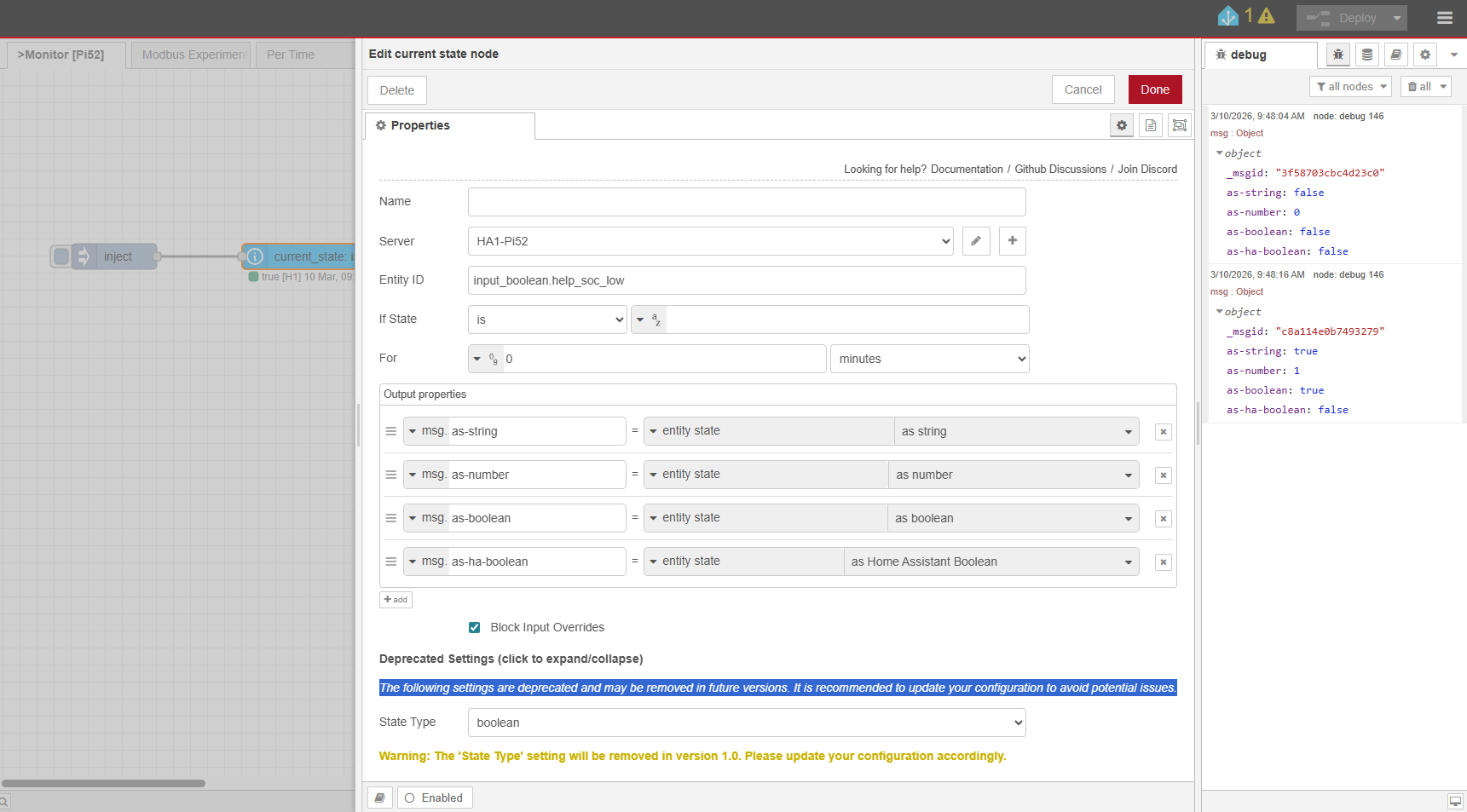
I ran the same test with the State Type set to “boolean”:

and you can see that all outputs are still false including the “as string” output now.

I think your testing has shown that my system is clearly not behaving as expected. I’m thinking I might just have to try a re-install of Node-RED, unless you have any other suggestions for me first.

Thanks again, Geoff!!

The Node RED Companion (integration) that sits inside HA is used by the HA WebSocket ‘entity’ nodes. These are used to create and update entities from NR in HA. I assumed that your issues were with Current state and Event: state nodes, which I am fairly sure don’t need the Companion, but I was covering all bases just to be on the safe side. An ‘out of date’ NR Companion can cause all kinds of strange issue.

From your test: the Current State node is working OK, with the input_boolean entity state being returned as “on” and “off”, and the node status clearly shows this. Also, using the State Type (deprecated) as “string” the entity state is held as a string, and is being output “as-string” as a string, and correctly as “on” and “off”.

The bit that is not working is the state-casting using “as Home Assistant Boolean”. This should match “on” and return true.

When you set the State Type (deprecated) to “boolean”, this should use the same ‘Home Assistant Boolean’ test [as it always has done] to return false for “off” and true for “on”, but it is not.

This does appear to be a bug, and was raised in the issues log last November.

Kermit has not directly responded to this, and I assume that it is all wrapped up in his ongoing rewrite of the nodes conditional testing.

At the moment the HA Boolean state casting is working for me [both at the old State Type and the newer output properties], so I can’t replicate your issue. The first point to look at would be the Boolean “true” list in the configuration node. I am suspicious that you said this was empty when you first looked, but if you have added the entries correctly then it should work.

Well, we could go on for a long time poking about to try and find what is going on here, but for the moment I guess that it is a bug, and one that impacts only a few users, so probably best to work around it for now and wait for later updates.

The HA Boolean state casting, in the code, pulls in the array from the configuration node and uses this to perform a basic “is in” operation. I don’t know how to perform this ‘array lookup’ independently, which is what I would next do to check that a) the array is there and b) the nodes can read it. If that works, but the state-casting does not, then the issue lies with the actual test is in <ha boolean array>

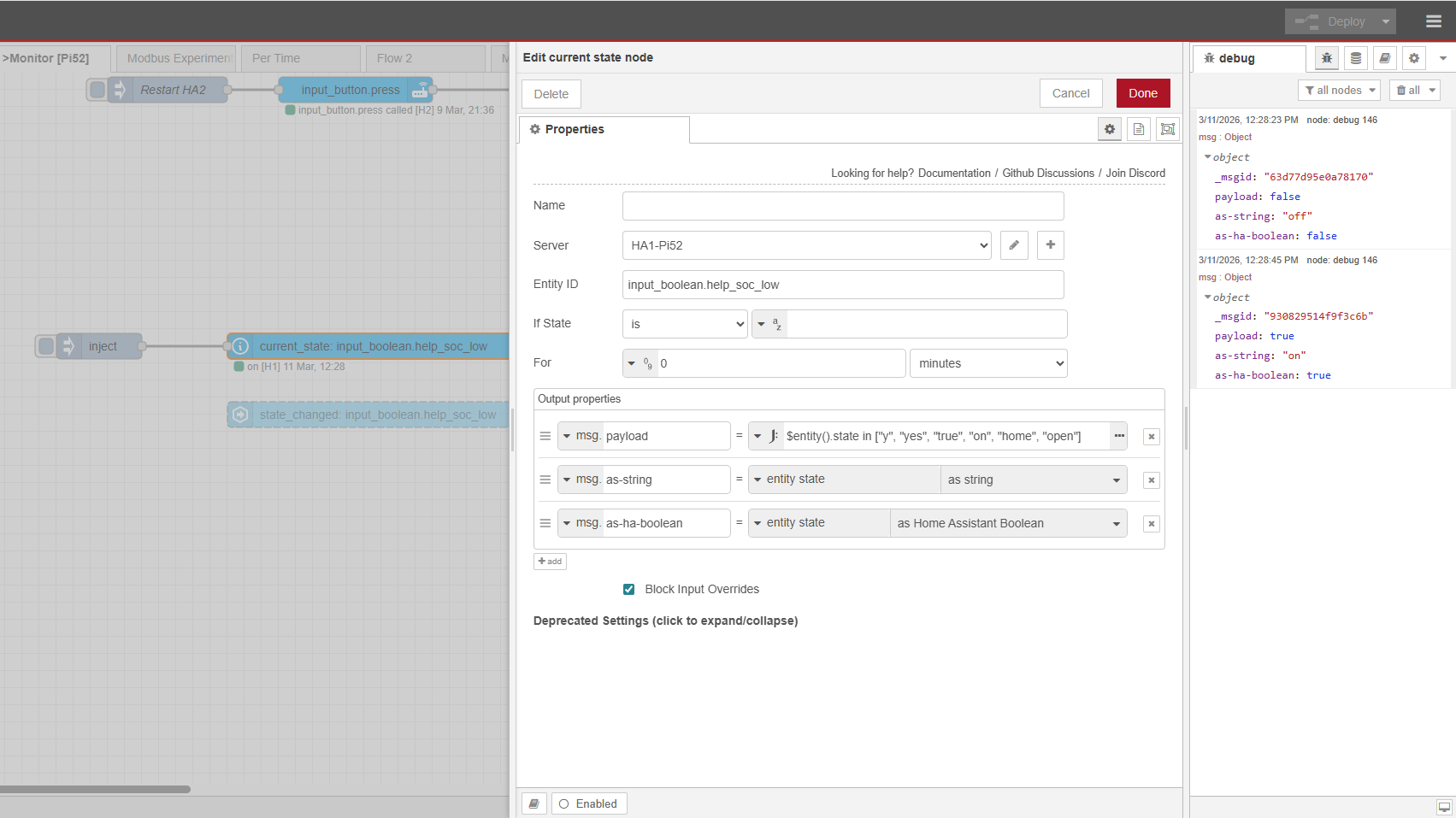
As a work-around, it is very easy to perform the state casting bit yourself. The only pain here is the work required to update several nodes, but that is probably far easier than messing about re-installing Node-RED.

There are several ways to do this, but basically we can use the JSONata J: expression

$entity().state in ["y", "yes", "true", "on", "home", "open"]

to test for inclusion in the HA Boolean ‘true’ list [array] directly. This returns true if the entity state (as a string) matches one of the array entries. Returns false otherwise.

We can, of course, just use $entity().state = "on", but if you are going to have to paste this into several nodes, then the in operator test is more generalist, and will work for any HA “boolean” type, such as “open” and “home” without having to work out which one this particular node is looking at.

Tested and working for me. If it does not work for you, then there is something really odd going on!

The advantage to a work-around, rather than changing Switch node conditionals to test for “on” in place of true is that it is easier to revert when the problem goes away. It is a matter of personal choice.

You could also use

$entity().state in $globalContext("haboolean")

which performs the test against a Global Context variable, which can be very easily set using a simple Change node writing “haboolean” as a JSON array.

It does indeed look like my issue is the same as in that bug report. I think I will take your advice and wait for a fix rather than bother re-installing NR. One of the workarounds will have to do for now :slight_smile: Thank you so much, once again!

Try changing a value in the server config node. Then deploy and see if that resolves the issue.

Hi Kermit. Thanks for taking the time to weigh in. I assume you mean to try changing one of “Sate boolean” config settings? I’ve just tried that, but it didn’t fix the problem. I tried changing one of the values, and also deleting the “on” value and then adding it again, re-deploying each time.