Just getting around to playing with my NSPanel and first job is to update firmware. It took several goes at this as it seemed to only upgrade to the next one each time, so many steps involved.
However it is now on 4.1.5, but I see everywhere mention that 4.2 has been released months ago, then 4.3 and a brief message flashed up that 4.4 was available. Should my NSPanel not be wanting to update? Why is it stuck on 4.1.5 and seems to be saying that is the latest?
Once that’s sorted I’ll be putting HA on it to run a special dashboard I’m configuring.
My personal experience with the latest releases hasn’t been great. I’m not sure whether it’s due to the beta firmware or the panel itself. I use the HA Companion App, and it keeps disconnecting, which kind of crushes the idea of having a live dashboard on the wall.
I’m going to try the Fully Kiosk Browser, but I’m lowering my expectations to limit the disappointment.
I’ve received a reply back from Sonoff stating that 4.1.5 is the latest actual release, despite many announcements I have seen stating that 4.2 has been ‘officially’ released and no mention of it still being beta. Something so hard to actually discover I was forced to contact them directly to ask the question.
I am also using the Companion app on the NSPanel and it seems to run for a couple of days and then I notice it’s back to some information screen about the app which I suspect means it has crashed, or maybe simply disconnected as you say.
This is extremely disappointing as the NSPanels are to be used as ‘always on’ control panels which need to run 24/7, forever. They are to replace a couple of old iPhones I was using (not with HA though) and although being always connected destroys the batteries in an annoyingly short time and other irritations like OS updates and some other nonsense getting in the way, at least they did keep running and never simply crashed the app.
Is the problem due to the HA Companion app or the NSPanel itself? Hard to figure which is the real problem.
Since the panels are all locked to a single dashboard, I too am interested in trying Fully Kiosk Browser so if you do try it, please let us know here how it performed.
A new problem just arose yesterday. The screen displayed an error saying that Fdroid had crashed which was a surprise as I thought it was simply an app repository, but yes of course there is an app involved in accessing the repository. So another link in the fragile chain.
Worse the error message took up the screen with a keyboard below enabling the user (me) to type in some comments about the crash and, er…
Nothing else. With the comments typed, Return simply added a return in the text field and no way to continue the process, send the comment and get back to a normal screen. No way to cancel, no way to do anything.
After messing with this for a while, the only solution was to pull the plug and restart the NSPanel.
That is all on top of the fact that the NSP only runs for a couple of days before the HA app loses connection or crashes or whatever it does that requires it to be restarted.
So this smooth experience of the native Android HA app on the NSPanel Pro 120 is, apart from being glacially slow, something that can be experienced only for a mere couple of days before something crashes or hangs or whatever.
Maybe an updated HA companion app would help, but to be honest I doubt it. Maybe Fully Kiosk will be the solution. Hmm.
To say this is disappointing is putting it mildly.
how you make it work with the official version of 4.4.0 + the jailbreak of seaky?
when you instal within seaky you lose the official connection to ewelink app
Hi, if you’re struggling with NSPanel Pro’s stability and slow HA experience, try knoop7/Ava.
Optimized for 4-inch touchscreens plug and play. Turns your NSPanel Pro into a rock-solid HA satellite with native ESPHome auto-discovery, Zigbee + BLE gateway, local voice assistant, floating overlays, intercom, and a powerful Mod system. No buggy firmware, no subscription.
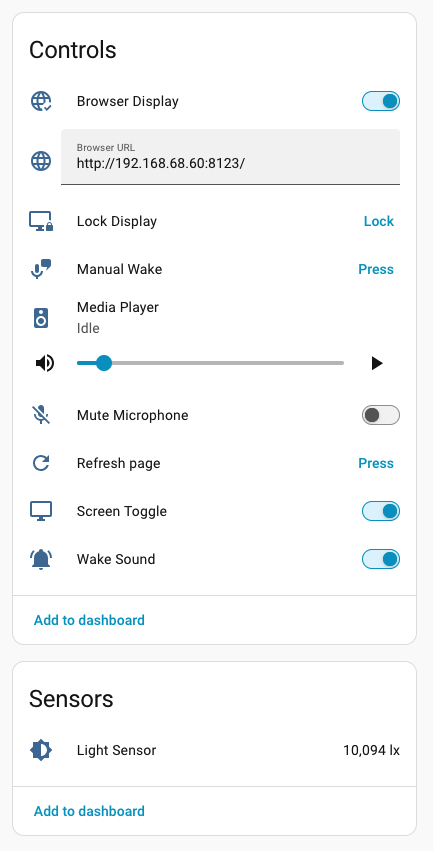
TL;DR: I took a leap of faith and switched from seaky to knoop7/ava. After some tweaking I would say there is no way I will switch back. (Continued below image)
The dashboards are much snappier; configuration is less complicated; full integration in Home Assistant. I added an automation in HA to turn the browser (=dashboard) back on if it crashes.
The BT Proxy apparently works as well. I have it on but have not physically checked if it really works. The wake word throws no errors, but it does not wake up the assistant either. This may be because of the very restraint resources of the NSPanel Pro?
Seaky has become really unstable recently, maybe because I have not updated the Home Assistant Companion app on the panel for a while. Ava just works. Ava is set to self update, but it seems that is asking too much from the NSPanel as well, as the download counter gets stuck on 0%. A quick adb install updates Ava. My panels were on firmware 1.7.0 IIRC, and Webview on 109 (?). Gecko webview does install via adb (not via the Ava interface) but does not render the dashboards properly, so I switched to Webview 129 from apkmirror. I don’t think I see a difference between 109 and 129, but I have not tested extensively.