The Oclean X Ultra 20 is a smart toothbrush with an ESP32-S3 and a small screen inside. Out of the box it only talks to Oclean’s app and cloud. I decompiled the stock firmware, worked out how the screens, modes, motor, LEDs, charging and sleep logic behave, and re-implemented them as open-source ESP-IDF firmware. The aim is that the handle behaves like the stock brush. On top of that it adds Wi-Fi, a local web UI, OTA updates and MQTT with Home Assistant auto-discovery. Once it is installed there is no cloud, no account and no app (the install itself still needs Oclean’s app once and Oclean’s update server, see the bottom): the brush only talks to devices on your LAN, apart from a time lookup at pool.ntp.org, which it needs for the clock and the daily counters.
What I have confirmed on my own brush so far, as read from its own status API: it boots and runs, composes the stock screens from the brush’s own pictures, detects the charger and enables charging, reads the battery gauge and the IMU temperature, gets answers from the touch controller and the force sensor, and wakes from deep sleep. What I still have to judge by actually using it: the look of each screen, the LED patterns and how the motor runs in each mode. A complete brushing session, the button and the touch swipes are not on the confirmed list either. Voice clips and the motion-based zone tracking are not ported.
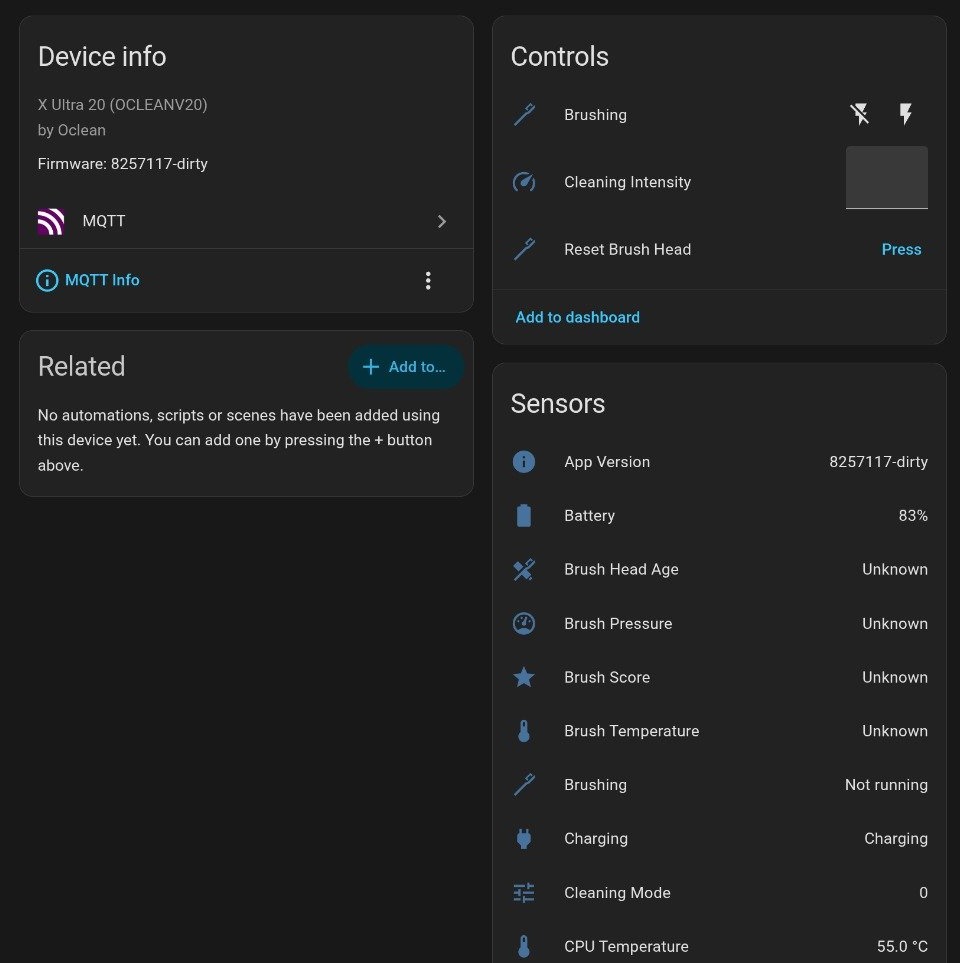
The device page in HA (screenshot from an earlier build; the current entity list is below).
Warning: unofficial and experimental. Not affiliated with or endorsed by Oclean. Tested on one brush (mine), and the current build was flashed on 2 October 2026 and had been running for less than two hours when I wrote this. The first install is an advanced job that voids the warranty and can brick the brush with no easy recovery, because there is no accessible serial port. The firmware also takes over charging of the lithium battery, and my brush runs warm on the charger with it: after about 100 minutes docked, the motion sensor read about 70 °C and the CPU 72 °C. The only over-temperature cut-off blocks charging above 72 °C on that motion sensor (and allows it again below 67 °C), so it was about 2 °C away from tripping, and it has never actually been triggered. I haven’t measured what the stock firmware reads in the same situation, and nothing measures the battery cell itself. If the sensor gives no reading, charging simply stays on. Watch the Brush Temperature value while a freshly flashed brush charges, and don’t leave it docked unattended. Details are under “Status, install and risks” at the bottom. The code is GPL-3.0 and comes with no warranty.
Home Assistant
Status of the HA side: MQTT discovery and the entities were seen working in Home Assistant on an earlier build. The screenshot above is from that build, so it still shows a Reset Brush Head button and a Brush Head Age sensor that are gone now, and it lacks the Cleaning Mode number. For the current build, nothing in this section has been run against a broker or Home Assistant yet: MQTT is still switched off on my brush. The entity list and entity_ids, the behaviour described below (sleep and unavailable timing, what reaches HA before the brush sleeps, how the controls react) and the example automations are all taken from the firmware source, so treat them as a starting point and expect to adjust.
What you need
- An MQTT broker (the Mosquitto broker app, formerly add-on, is the easiest) and the MQTT integration in HA, with the default discovery prefix
homeassistant. - A broker login for the brush. With the Mosquitto app, a dedicated HA user works.
- The brush on your Wi-Fi (2.4 GHz, WPA2 or better). Give it a DHCP reservation, because it has no mDNS name.
Pointing the brush at the broker
- Put the brush on its charger (it never sleeps there) and open its web UI at
http://<brush-ip>/. If it has no Wi-Fi credentials, or can’t connect for about a minute, it opens an open access point calledoclean-setup. Join it and browse tohttp://192.168.4.1(there is no captive portal). - Go to Settings → MQTT / Home Assistant. Tick MQTT enabled and enter the broker host, port
1883, username and password. Leave Base topic (oclean), HA discovery prefix (homeassistant) and Device name (Oclean X Ultra) alone; the entity_ids in the examples below are derived from that device name. Leave TLS unticked: there is no way to give the brush a CA certificate yet, so treat it as not working and use plain MQTT on your LAN. - Optionally lower Publish interval from 30 s to about 10 s for quicker reactions (I haven’t tested very short intervals; don’t go above 30 s). Set the time zone on the same page, because the daily counters use it. The brush gets the time from
pool.ntp.org; if it can’t reach that, the clock is never set and the daily counters never reset. - Click Save. It applies right away, without a reboot, and a device called Oclean X Ultra appears under Settings → Devices & services → MQTT.
What shows up
One device with 34 sensors / binary sensors and 3 controls, no YAML needed:
- Brushing: Brushing, Paused, Cleaning Mode, Intensity, Session Elapsed, Session Length, Brush Score
- Daily totals kept by the brush: Sessions Today, Brushed Today (not reliable on a brush that lives on the charger, see the dashboard example below)
- Power: Battery (%), Battery Voltage, Charging, Power State (
charging/full/battery) - Controls: a Brushing switch, a Cleaning Mode number (0–5) and a Cleaning Intensity number (1–5)
- Extras and diagnostics: Brush Pressure, Brush Temperature, Screen, Screen Off, Touch Lock, firmware version, uptime, heap, CPU temperature, Wi-Fi details
All entities with entity_ids
These are the entity_ids you get with the default device name “Oclean X Ultra”. HA derives them the first time it discovers the brush, so check yours on the device page.
Controls. None of them report state back, so HA shows what it last sent. The real values are in the sensors.
| entity_id | What it does |
|---|---|
switch.oclean_x_ultra_brushing |
ON starts a session or resumes a paused one. Refused on the charger (same as the button) and at 0 % battery. OFF stops the session. |
number.oclean_x_ultra_cleaning_mode |
0–5. Ignored while a session is running. |
number.oclean_x_ultra_cleaning_intensity |
1–5. Only used by mode 5. |
Brush
| entity_id | Notes |
|---|---|
binary_sensor.oclean_x_ultra_brushing |
The motor is running in a session. Turns off during a pause. |
binary_sensor.oclean_x_ultra_paused |
Session paused (a button press pauses it; a paused session ends after 30 s). |
sensor.oclean_x_ultra_cleaning_mode |
0–5, see the mode list below |
sensor.oclean_x_ultra_intensity |
1–5 |
sensor.oclean_x_ultra_session_elapsed |
s, current or last session. Back to 0 after each wake from sleep. |
sensor.oclean_x_ultra_session_length |
s, planned length. Back to 0 after each wake from sleep. |
sensor.oclean_x_ultra_brush_score |
0–100, last session. Survives sleep. Based on time only (see below). |
sensor.oclean_x_ultra_sessions_today |
Only sessions of 15 s or more count. Not reliable on a docked brush (see the dashboard example). |
sensor.oclean_x_ultra_brushed_today |
s. Same caveat as Sessions Today. |
sensor.oclean_x_ultra_brush_pressure |
Force sensor reading, no unit |
sensor.oclean_x_ultra_brush_temperature |
°C, IMU temperature |
sensor.oclean_x_ultra_screen |
Id of the current stock screen |
binary_sensor.oclean_x_ultra_screen_off |
On during the screen-off stage before deep sleep. Stays off on the charger. |
binary_sensor.oclean_x_ultra_touch_lock |
Shown inverted, see known quirks |
Power
| entity_id | Notes |
|---|---|
sensor.oclean_x_ultra_battery |
%, the stock gauge’s estimate. Doesn’t change during a session. |
sensor.oclean_x_ultra_battery_voltage |
mV |
sensor.oclean_x_ultra_power_state |
charging / full / battery. Use this to tell whether the brush is on the charger. |
binary_sensor.oclean_x_ultra_charging |
On only while actually charging; off again once full. |
Diagnostics (all sensor.oclean_x_ultra_…): firmware_version, app_version, esp_idf_version, uptime, last_reset_reason, cpu_temperature, free_heap, min_free_heap, largest_free_block, task_count, flash_size, wi_fi_rssi, wi_fi_ssid, wi_fi_channel, ip_address, mac_address.
Modes: 1 = 120 s · 2 = 180 s · 3 = 120 s, gentle · 4 = 150 s · 5 = 2×150 s with intensity 1–5 (the factory default) · 0 = the phone-app profile (falls back to 5 if there isn’t one). I don’t know Oclean’s names for them; on the brush they only exist as pictures.
How it behaves (read this before writing automations)
The brush keeps the stock power behaviour, and that decides what you can do from HA:
- On the charger it never sleeps. It is always online and publishes at every interval; only the backlight times out. That is the only place where it stays online for HA, but it also runs warm there (see the warning at the top), so I can’t yet recommend leaving it docked all the time.
- Off the charger it deep-sleeps about a minute after you last used it (screen off after about 36 s, deep sleep about 30 s later; roughly 40–60 s after a session ends). Wi-Fi is off while it sleeps. It wakes on the button, a pick-up or the charger, and MQTT is back roughly 10–15 s later (my estimate from the code, not measured).
- It doesn’t go offline cleanly. The entities only turn unavailable when the broker’s keep-alive runs out and it publishes the last will, about 3 minutes after the brush fell asleep with Mosquitto. Until then HA shows the last values. If the brush wakes again inside those 3 minutes, the entities flip to unavailable and straight back when it reconnects (the broker publishes the old connection’s last will at that moment). Ignore
unavailable/unknownin your triggers, as example 1 does. - State is sampled, not pushed. The brush sends one JSON message when it connects and then one per publish interval, never on a change. Start and stop show up to one interval late. At the default interval the end of a session (brushing off, score, daily totals) still reaches HA before the brush sleeps.
- Commands only reach an awake brush. Anything sent while it sleeps is lost, and HA can’t wake it. Starting a session is refused on the charger, like the button, so the Brushing switch only works in the short window when the brush is off the charger and awake. Mode changes do work on the charger.
- The controls are optimistic (no state topic yet). Use
binary_sensor.oclean_x_ultra_brushingand the Cleaning Mode / Intensity sensors for the real state.
In practice it is good for session logging, reminders, battery and charger notifications, and setting the mode while the brush is docked. It is not useful for starting the brush remotely.
Example automations
These use the default entity_ids and the current automation syntax (HA 2024.10 or later). I wrote them from the firmware source and have not run them against the brush yet, so expect to adjust. Paste each one into a new automation (Settings → Automations & scenes → Create automation → Create new automation → ⋮ → Edit in YAML) and replace notify.mobile_app_your_phone with your own notify action.
1. Log each session: notification and last-brushed time
This triggers when Sessions Today goes up rather than on the Brushing sensor, because Brushing also turns off during a pause. It only fires for real sessions (15 s or more), and it still fires when a session started and ended between two updates. Create a Date and time helper input_datetime.last_brushed first.
alias: "Toothbrush: session logged"
triggers:
  - trigger: state
    entity_id: sensor.oclean_x_ultra_sessions_today
    not_from: ["unavailable", "unknown"]
    not_to: ["unavailable", "unknown"]
conditions:
  - condition: template
    value_template: >-
      {{ trigger.to_state.state | int(0) > trigger.from_state.state | int(0) }}
actions:
  # let the other values from the same update arrive
  - delay: "00:00:02"
  - action: input_datetime.set_datetime
    target:
      entity_id: input_datetime.last_brushed
    data:
      timestamp: "{{ now().timestamp() }}"
  - action: notify.mobile_app_your_phone
    data:
      title: Teeth brushed
      message: >-
        {{ states('sensor.oclean_x_ultra_session_elapsed') }} s,
        score {{ states('sensor.oclean_x_ultra_brush_score') }}.
        {% if states('sensor.oclean_x_ultra_battery') | int(100) < 20 %}
        Battery is low, put it on the charger.
        {% endif %}
2. Evening reminder if nobody has brushed
This only depends on the helper from example 1, so it works while the brush is asleep and unavailable.
alias: "Toothbrush: evening reminder"
triggers:
  - trigger: time
    at: "21:30:00"
conditions:
  - condition: template
    value_template: >-
      {{ state_attr('input_datetime.last_brushed', 'timestamp') | float(0)
         < as_timestamp(today_at('18:00')) }}
actions:
  - action: notify.mobile_app_your_phone
    data:
      message: No brushing logged since 18:00.
3. Brush not back on the charger
For people who keep the brush docked. On the charger it never sleeps, so if it has been unavailable for 30 minutes it is off the charger (or out of Wi-Fi range, or flat, or the broker is down). The 30-minute timer does not survive a Home Assistant restart: if HA restarts while the brush is away, you get no notification for that absence.
alias: "Toothbrush: not back on the charger"
triggers:
  - trigger: state
    entity_id: sensor.oclean_x_ultra_power_state
    to: "unavailable"
    for: "00:30:00"
actions:
  - action: notify.mobile_app_your_phone
    data:
      message: The toothbrush has been off its charger for a while.
4. Morning / evening mode while docked
The brush accepts mode changes on the charger and keeps the mode for the next session. A command sent to a sleeping brush is lost, so this also runs whenever the brush comes back onto the charger, and the condition skips it while the brush is away.
alias: "Toothbrush: morning / evening mode"
triggers:
  - trigger: time
    at: ["05:00:00", "17:00:00"]
  - trigger: state
    entity_id: sensor.oclean_x_ultra_power_state
    to: ["charging", "full"]
conditions:
  - condition: state
    entity_id: sensor.oclean_x_ultra_power_state
    state: ["charging", "full"]
actions:
  - action: number.set_value
    target:
      entity_id: number.oclean_x_ultra_cleaning_mode
    data:
      # 05:00-17:00: mode 1 (120 s), otherwise mode 2 (180 s)
      value: "{{ 1 if 5 <= now().hour < 17 else 2 }}"
If the automatic morning/evening mode was switched on in the Oclean app before you flashed, the brush keeps picking mode 1 or 2 by itself and will override this.
Dashboard: brushing time today, calculated in HA
The brush’s own Sessions Today / Brushed Today work like stock: they only check for a new day when the brush wakes from screen-off or deep sleep. A brush that lives on the charger never does that while docked, so its first session after midnight is added to yesterday’s totals, and those totals are either cleared at the next wake (taking that session with them) or keep growing if the brush goes straight back on the charger. They also never reset if the brush can’t reach pool.ntp.org, because the clock is then never set. On a docked brush, ignore these two sensors and count in HA instead.
The resolution is the publish interval. The sensor reports hours (two minutes is 0.03 h); because of the unique_id you can switch it to minutes in the entity’s settings. You can also create the same sensor in the UI under Settings → Devices & services → Helpers → History stats.
# configuration.yaml
sensor:
  - platform: history_stats
    name: Toothbrush time today
    unique_id: toothbrush_time_today
    entity_id: binary_sensor.oclean_x_ultra_brushing
    state: "on"
    type: time
    start: "{{ today_at() }}"
    end: "{{ now() }}"
Put it in a tile or entities card with input_datetime.last_brushed, sensor.oclean_x_ultra_brush_score, sensor.oclean_x_ultra_battery and sensor.oclean_x_ultra_power_state. Brush Score has a state class, so a Statistics graph card works for it too.
Another idea for a docked brush: turn on the bathroom light or pause the music when Power State goes from charging / full to battery. The brush is already online then, so it reacts within one publish interval.
Raw MQTT topics (Node-RED etc.)
xxxxxx is derived from the brush’s MAC address.
- State:
oclean/oclean_xxxxxx/state. One JSON object with every value; booleans are"ON"/"OFF". Not retained. - Availability:
oclean/oclean_xxxxxx/availability.online/offline, retained, also the last will. - Commands:
oclean/oclean_xxxxxx/cmd/brushing(ON/OFF),…/cmd/mode(0–5),…/cmd/strength(1–5)
Never publish retained messages to the cmd topics. A retained brushing ON would start the motor every time the brush wakes off the charger.
Known quirks on the HA side
- The switch and the two numbers are optimistic. The switch does not flip back when a session ends, and it shows ON even if the start was refused.
- Touch Lock uses the
lockdevice class with the polarity reversed, so HA shows Unlocked while the touch lock is on. - Brush Score is elapsed time ÷ programme length, because the motion-based zone tracking isn’t ported. In the default 2×150 s mode, brushing for 2 minutes scores 40.
- Sessions Today and Brushed Today are not reliable on a brush that lives on the charger, and they never reset if the brush can’t reach an NTP server (see the dashboard example).
- State messages are not retained. After an HA restart the values are Unknown until the brush publishes again.
- Battery, Brush Score and Brush Temperature show Unknown when the brush has no value, for example before the first session.
- Nothing is queued. If Wi-Fi or the broker is down while the brush is awake, HA doesn’t see that session.
- There is no “last brushed” timestamp entity, so keep that in HA (example 1).
- All diagnostics land under “Sensors” because there is no entity category yet. Wi-Fi SSID, IP and MAC address are among them; disable those if you don’t want them in your recorder.
- The device page has no “Visit” link to the web UI.
On the brush itself
- Ported from the stock firmware, aiming for the same behaviour on the handle (see Status below for what is confirmed on hardware and what is not): the stock screens (drawn from the pictures already in the brush’s flash; they are not in the repo), touch swipes, button actions, six modes with the stock motor waveforms, zone cue and auto-stop, pressure handling, LEDs, battery gauge, charging and sleep/wake.
- Web UI on the brush: a live dashboard, a Brush tab (start/stop, mode, intensity, hardware diagnostics), settings, firmware update over Wi-Fi, and a live log, which helps because there is no accessible serial port.
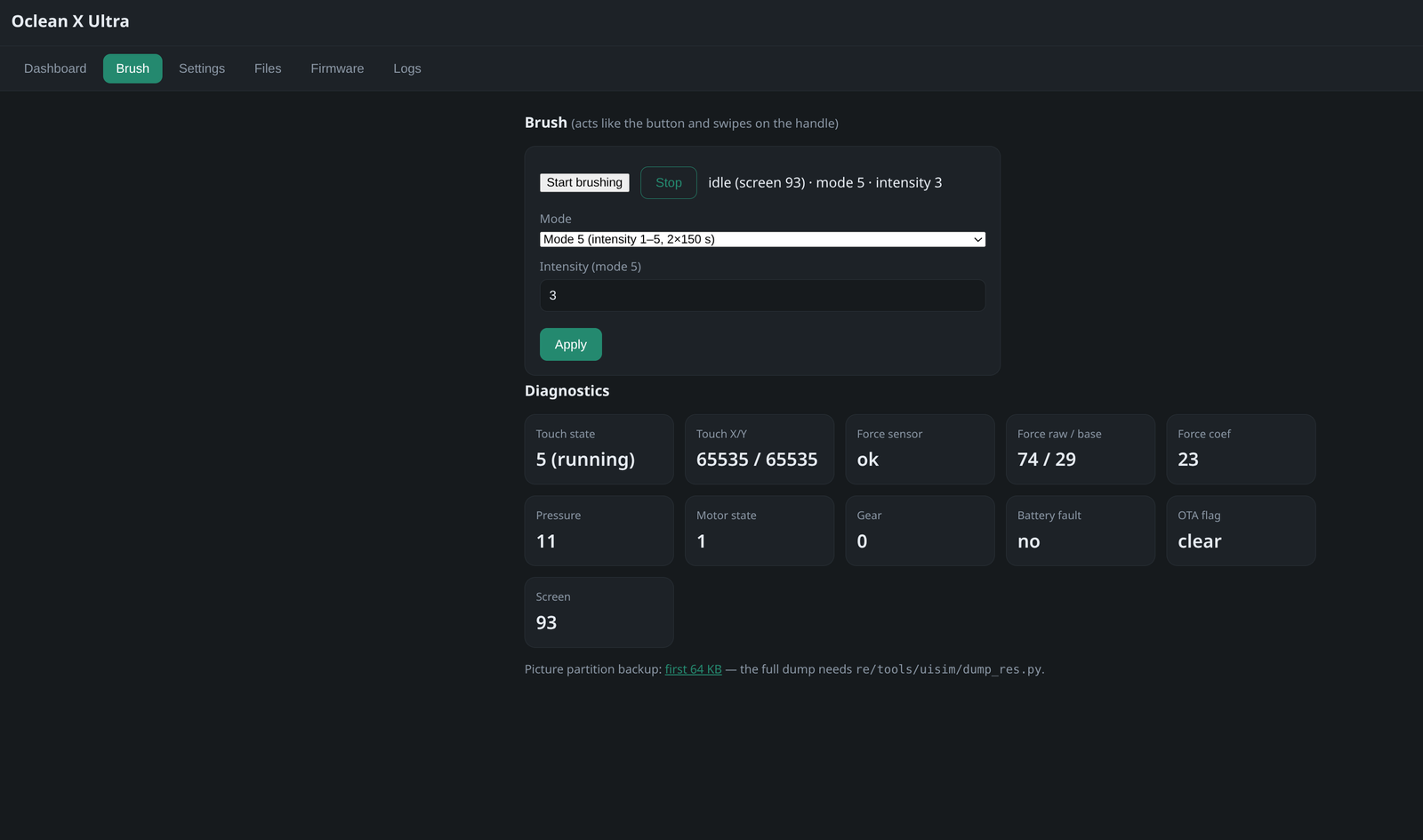
The Brush tab of the built-in web UI.
Status, install and risks
- Tested on one brush (mine), X Ultra 20 only, and the current build had run for less than two hours when I wrote this. Other units, hardware revisions and Oclean models are unproven. What is and isn’t confirmed is listed at the top.
- The first install is the hard part. There is no installer and no prebuilt binary: you build the image with ESP-IDF v5.1.1, then intercept the stock firmware’s cloud update check on your LAN (a man-in-the-middle from a Linux machine with root) and serve your image instead. You only do it once. The stock brush must already be on your Wi-Fi, which means setting it up once with Oclean’s app, and the method only works while Oclean’s update server still answers.
- Get a genuine stock
ota.binonto your disk and check it before you rely on a way back. It is the only way back to stock and the repo does not include one. The scripts don’t save one for you: on a brush that is already up to date, the download URL (otaFilePath) only appears incaptures/flash.logduring the same run that installs the custom image. Download that URL yourself and check the file withflash/espimg.py verify. If you are not prepared to end up without a verified stock image, don’t install. - Never flash the partition table or a merged full image over UART: that overwrites the brush’s screen pictures, and you can’t get them back.
- No authentication on the web UI, the
oclean-setupaccess point or Bluetooth. Keep it on a trusted network or IoT VLAN. - Not ported: voice clips, the IMU zone tracker (hence the time-based score), the Oclean cloud, and the factory / shop-demo modes. The Oclean phone app is not supported: there is a minimal Bluetooth service with the stock UUIDs, but I haven’t tested the app against it.
First install, later updates and going back to stock
The firmware goes on through the brush’s own update mechanism: you intercept the stock firmware’s cloud update check on your LAN and serve the custom image in its place, so the brush writes it through its own update path — nothing is flashed over UART and the partition table is left alone. The full method and the scripts I used are in flash/: a transparent mitmproxy plus ARP spoofing that rewrites the update handshake. Where those READMEs and this post differ on risk, go by this post. A root-free Bluetooth route is written up in the repo as well, but it has never been tried on a device.
Prerequisites beyond the Linux-with-root host: the stock brush has to be on your Wi-Fi already, which means setting it up once with Oclean’s app, and it has to sit on its charger with more than 20 % battery. The method only works as long as Oclean’s update server still answers the brush’s update check. “No cloud, no account, no app” describes the brush once the custom firmware runs, not how it gets there.
Later updates are a file upload in the web UI’s Firmware tab. To go back to stock, upload a genuine stock ota.bin in the same tab. I have not tried that from the current build. The repo does not include one (it is Oclean’s firmware), so make sure you have a copy before you install the custom firmware — for example by saving the image Oclean’s update server offers your brush while you are intercepting the update check. That does not happen by itself: a brush that is already up to date is offered no download. On my brush the server only named an image after the same request change the install uses, and that image was an older stock version (0.0.1.1) than the one the brush was running (0.0.1.6), so check that you really hold a complete stock image before you flash. Be careful what you upload in that tab: an image that is not a build of this project doesn’t even have the (untested) crash-loop guard described below, so a file that passes the image check but doesn’t run on this brush can leave it unrecoverable without opening it.
Crash-loop safety net (not tested on the brush)
The stock bootloader doesn’t roll back, so the firmware has its own crash-loop guard. If the firmware crashes or hits the watchdog within its first minute three boots in a row, the fourth boot is meant to come up in a safe mode without the brush logic (Wi-Fi, web UI and MQTT only) so you can upload a fix. If safe mode itself then keeps crashing, the eighth boot in a row switches to the other OTA slot, which holds the previous firmware, provided that slot still has a valid image. This path has only been checked by reading the code: it can’t run in the emulator, and I have not triggered it on the brush. It also only catches crash loops. A build that hangs, goes straight back to sleep or mishandles the hardware is not caught. Don’t count on it.
Security details
The web UI and its API have no login, the oclean-setup access point is open, and Bluetooth needs no pairing. Anyone on your network can start the brush, change its settings or flash firmware. So can anyone within radio range while the brush is awake: an unauthenticated Bluetooth command wipes the saved Wi-Fi and MQTT settings, after which the brush restarts with the open oclean-setup access point and the full web UI, firmware upload included (that access point also comes up by itself when your Wi-Fi has been unreachable for about a minute). Passwords you enter through that access point are sent unencrypted. Keep it on a trusted network or IoT VLAN (allow NTP out, see above), give it its own MQTT user, never expose it to the internet, and don’t use it where you don’t trust the people nearby.
If you’d rather keep the stock firmware, there are Bluetooth-based Oclean projects on this forum, an ESPHome component and a custom integration installed through HACS, that read the brush from outside. This one is different: it runs on the brush.
I’d welcome feedback on the HA side, such as entity naming or what you’d want published the moment it changes, and I’d like to hear from anyone else with an X Ultra 20.