mannebk
August 3, 2026, 5:51pm
1
yea basically the topic.
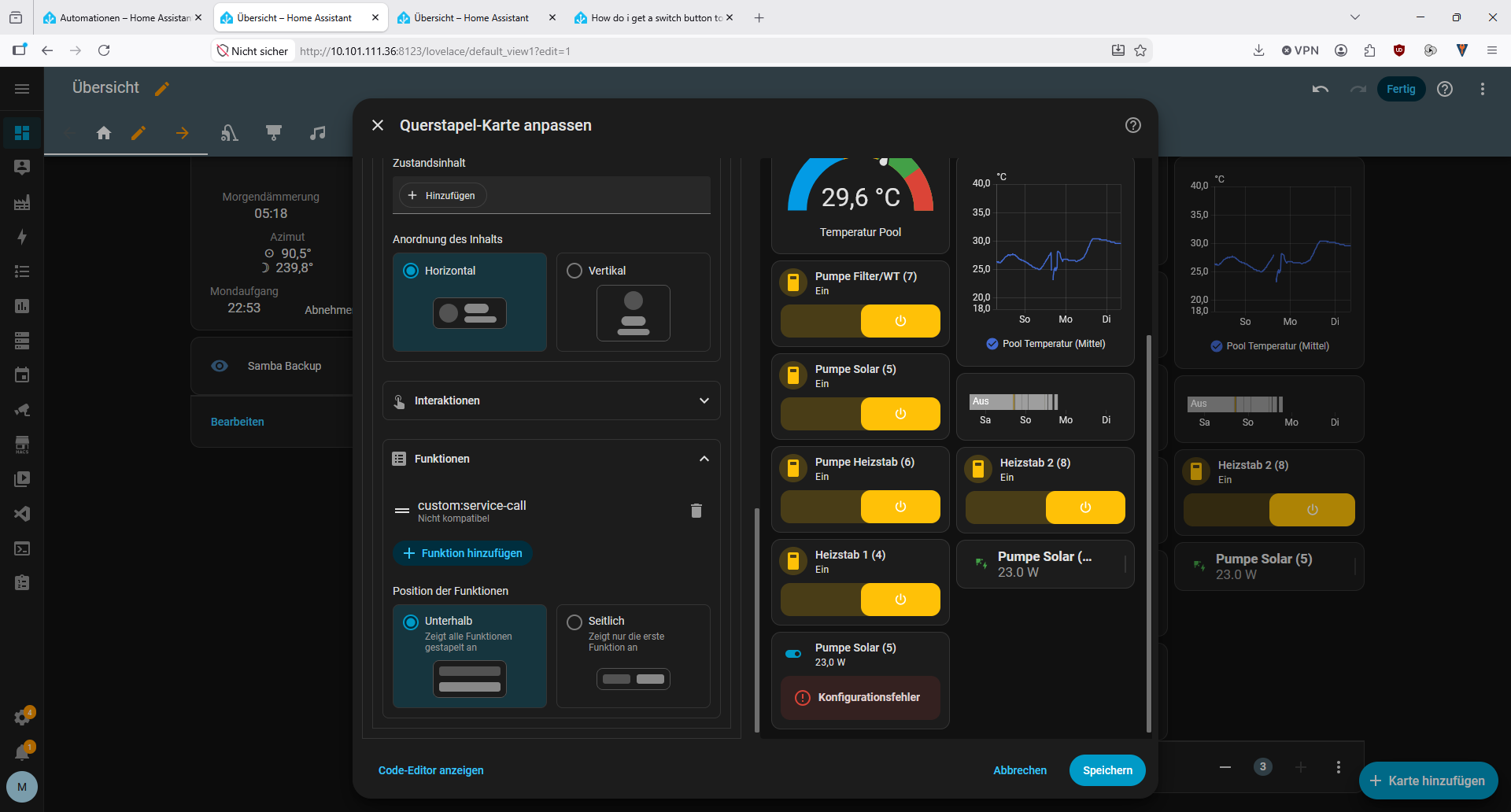
i try to have my pool equipment in HA. mainly the pumps.
So i have a button to switch them.
what i want on long press is that my dashboard opens up the histogram for power consumption of that switch. (for the pool pump (5) the entity would be sensor.steckdose_12_25_05_leistung)
i tried all i know myself, then asked gemini, chatgpt… used the stock switch card, the button card, the mushroom card, and i am staring at a all around failure to make it happen…
where am i going wrong?
type: horizontal-stack
cards:
  - type: vertical-stack
    cards:
      - type: tile
        entity: automation.bk_pool_heizung
        name: "Pool Pumpe automatisch starten aktiv:"
        vertical: false
        features:
          - type: toggle
        features_position: bottom
      - type: tile
        entity: switch.steckdose_12_25_03
        name: Pool-Pumpe (3)
        vertical: false
        features:
          - type: toggle
        features_position: bottom
      - type: gauge
        entity: sensor.tz3218_7fiyo3kv_ts000f_temperatur
        needle: true
        severity:
          green: 29
          yellow: 26
          red: 32
        min: 20
        max: 35
        name: Temperatur Pool
      - type: tile
        entity: switch.steckdose_12_25_07
        name: Pumpe Filter/WT (7)
        vertical: false
        features:
          - type: toggle
        features_position: bottom
      - type: tile
        entity: switch.steckdose_12_25_05
        name: Pumpe Solar (5)
        vertical: false
        features:
          - type: toggle
        features_position: bottom
      - type: tile
        entity: switch.steckdose_12_25_06
        name: Pumpe Heizstab (6)
        vertical: false
        features:
          - type: toggle
        features_position: bottom
      - type: tile
        entity: switch.steckdose_12_25_04
        name: Heizstab 1 (4)
        vertical: false
        features:
          - type: toggle
        features_position: bottom
  - type: vertical-stack
    cards:
      - type: statistics-graph
        entities:
          - entity: sensor.ws2900_v2_01_10_solar_radiation
            name: Sonneneinstrahlung
        days_to_show: 3
        period: 5minute
        chart_type: line
        stat_types:
          - mean
        hide_legend: false
        logarithmic_scale: false
        fit_y_data: false
      - type: statistics-graph
        entities:
          - entity: sensor.tz3218_7fiyo3kv_ts000f_temperatur
            name: Pool Temperatur
        days_to_show: 3
        period: 5minute
        chart_type: line
        stat_types:
          - mean
        hide_legend: false
        logarithmic_scale: false
        min_y_axis: 18
        max_y_axis: 40
        fit_y_data: false
      - type: history-graph
        entities:
          - entity: switch.steckdose_8_24_8_schalter
        hours_to_show: 90
        show_names: false
      - type: tile
        entity: switch.steckdose_12_25_08
        name: Heizstab 2 (8)
        vertical: false
        features:
          - type: toggle
        features_position: bottom
      - type: custom:button-card
        entity: switch.steckdose_12_25_05
        name: Pumpe Solar (5)
        icon: mdi:solar-power
        show_state: false
        show_label: true
        label: |
          [[[
            return states['sensor.steckdose_12_25_05_leistung'].state + " W";
          ]]]
        tap_action:
          action: more-info
          entity: sensor.steckdose_12_25_05_leistung
        custom_fields:
          power:
            card:
              type: custom:button-card
              entity: switch.steckdose_12_25_05
              icon: mdi:power
              show_name: false
              show_state: false
              color_type: icon
              tap_action:
                action: toggle
        styles:
          grid:
            - grid-template-areas: "\"i n power\" \"i l power\""
            - grid-template-columns: 42px 1fr 42px
            - grid-template-rows: min-content min-content
          card:
            - padding: 10px
          icon:
            - color: |
                [[[
                  return entity.state == "on"
                    ? "var(--success-color)"
                    : "var(--state-icon-color)";
                ]]]
          name:
            - justify-self: start
            - font-weight: bold
          label:
            - justify-self: start
            - color: var(--secondary-text-color)
          custom_fields:
            power:
              - justify-self: end
              - align-self: center
One option would be to use the Custom Card Features :
type: tile
icon: mdi:toggle-switch
features_position: bottom
name: Pumpe Solar (5)
entity: sensor.steckdose_12_25_05_leistung
color: primary
hide_state: true
features:
  - type: custom:service-call
    entries:
      - type: toggle
        entity_id: switch.steckdose_12_25_05
        icon: mdi:power
        tap_action:
          action: toggle
          target:
            entity_id: switch.steckdose_12_25_05
          data: {}
        autofill_entity_id: false
hold_action:
  action: more-info
tap_action:
  action: none
mannebk
August 4, 2026, 6:34am
3
Thanks, I’ve tried that, and my up to date HA reports the custom service call to be not compatible with the entity sensor…
I did run into that specific issue quite a few times…
return entity.state == "on" needs an additional = to start
          icon:
            - color: |
                [[[
                  return entity.state === "on"
                    ? "var(--success-color)"
                    : "var(--state-icon-color)";
                ]]]
One way is to create a seperate dashboard and navigate to it with something like this
hold_action:
  action: navigate
  navigation_path: /pool/solar-power
mannebk
August 4, 2026, 8:10pm
6
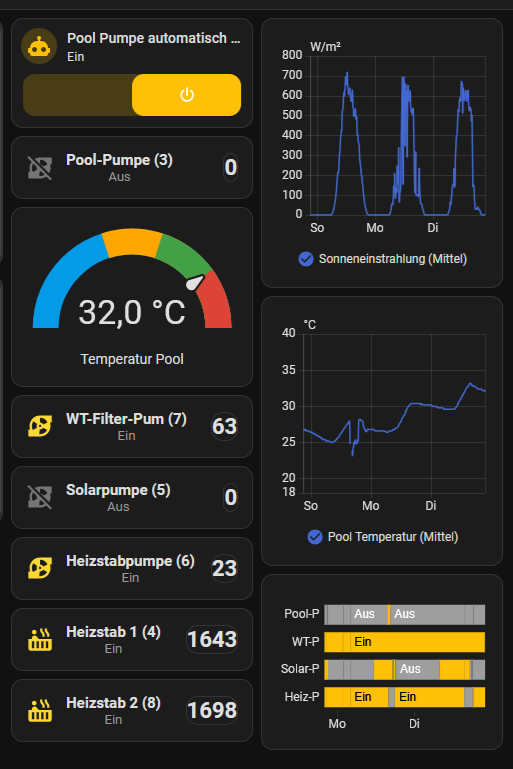
After a lot of finagling I pretty much got it to look the way I wanted, and also behave the way I wanted: If i tap left, it switches the entity, if i tap right, it shows the moreInfo consumption card.
this is all due to me adding an other heat exchanger to my pool and house circuit. currently I switch everything with nous A1Z smart zigbee sockets, hence the nameing (socket_date-of-purchase_running-number (for warranty reasons, my batch of A1Z have proven to be very unreliable if tasked above 50% of rated load (16A) or switching magnetic valves). In the future I will upgrade to a DIN rail distribution and add 63A Smart Breakers for DIN rail to hook everything up.
Since I have both kinds of solar, i “waste” my over electric capacity into heating water, including pool. if the forcast projects that I don’t have overcapacity from my roof, then i use a heat pump to heat it. besides that, i always have a 6m² hot water CPC vacuum collector on the roof too, that also feeds the pool if my hot water tank is all heated up.
thats how my pool monitoring and control panel looks:
and thats the code for it:
type: horizontal-stack
cards:
- type: vertical-stack
cards:
- type: tile
entity: automation.bk_pool_heizung
name: "Pool Pumpe automatisch starten aktiv:"
vertical: false
features:
- type: toggle
features_position: bottom
- type: custom:button-card
entity: switch.steckdose_12_25_03
show_name: false
show_icon: false
show_state: false
styles:
grid:
- grid-template-areas: "\"left power\""
- grid-template-columns: 1fr 90px
card:
- padding: 14px
- border-radius: 12px
custom_fields:
left:
- justify-self: start
- align-self: center
power:
- justify-self: end
- align-self: center
custom_fields:
left: |
[[[
const on = entity.state === "on";
return `
<div style="display:flex;align-items:center;gap:12px;">
<ha-icon
icon="${on ? 'mdi:pump' : 'mdi:pump-off'}"
style="color:${on ? '#fdd835' : '#757575'};width:28px;height:28px;">
</ha-icon>
<div>
<div style="font-size:15px;font-weight:600;">Pool-Pumpe (3)</div>
<div style="font-size:13px;color:var(--secondary-text-color);">
${on ? "Ein" : "Aus"}
</div>
</div>
</div>
`;
]]]
power:
card:
type: custom:button-card
entity: sensor.steckdose_12_25_03_leistung
show_icon: false
show_name: false
show_state: true
state_display: |
[[[
const state = states['sensor.steckdose_12_25_03_leistung'].state;
const value = Number(state);
if (state === 'unknown' || state === 'unavailable') {
return 'Offline';
}
return Number.isFinite(value) ? Math.round(value) + '' : 'Offline';
]]]
tap_action:
action: more-info
styles:
card:
- background: none
- box-shadow: none
- padding: 0
state:
- font-size: 22px
- font-weight: bold
tap_action:
action: toggle
- type: gauge
entity: sensor.tz3218_7fiyo3kv_ts000f_temperatur
needle: true
severity:
green: 29
yellow: 26
red: 32
min: 20
max: 35
name: Temperatur Pool
- type: custom:button-card
entity: switch.steckdose_12_25_07
show_name: false
show_icon: false
show_state: false
styles:
grid:
- grid-template-areas: "\"left power\""
- grid-template-columns: 1fr 90px
card:
- padding: 14px
- border-radius: 12px
custom_fields:
left:
- justify-self: start
- align-self: center
power:
- justify-self: end
- align-self: center
custom_fields:
left: |
[[[
const on = entity.state === "on";
return `
<div style="display:flex;align-items:center;gap:12px;">
<ha-icon
icon="${on ? 'mdi:pump' : 'mdi:pump-off'}"
style="color:${on ? '#fdd835' : '#757575'};width:28px;height:28px;">
</ha-icon>
<div>
<div style="font-size:15px;font-weight:600;">WT-Filter-Pum (7)</div>
<div style="font-size:13px;color:var(--secondary-text-color);">
${on ? "Ein" : "Aus"}
</div>
</div>
</div>
`;
]]]
power:
card:
type: custom:button-card
entity: sensor.steckdose_12_25_07_leistung
show_icon: false
show_name: false
show_state: true
state_display: |
[[[
const state = states['sensor.steckdose_12_25_07_leistung'].state;
const value = Number(state);
if (state === 'unknown' || state === 'unavailable') {
return 'Offline';
}
return Number.isFinite(value) ? Math.round(value) + '' : 'Offline';
]]]
tap_action:
action: more-info
styles:
card:
- background: none
- box-shadow: none
- padding: 0
state:
- font-size: 22px
- font-weight: bold
tap_action:
action: toggle
- type: custom:button-card
entity: switch.steckdose_12_25_05
show_name: false
show_icon: false
show_state: false
styles:
grid:
- grid-template-areas: "\"left power\""
- grid-template-columns: 1fr 90px
card:
- padding: 14px
- border-radius: 12px
custom_fields:
left:
- justify-self: start
- align-self: center
power:
- justify-self: end
- align-self: center
custom_fields:
left: |
[[[
const on = entity.state === "on";
return `
<div style="display:flex;align-items:center;gap:12px;">
<ha-icon
icon="${on ? 'mdi:pump' : 'mdi:pump-off'}"
style="color:${on ? '#fdd835' : '#757575'};width:28px;height:28px;">
</ha-icon>
<div>
<div style="font-size:15px;font-weight:600;">Solarpumpe (5)</div>
<div style="font-size:13px;color:var(--secondary-text-color);">
${on ? "Ein" : "Aus"}
</div>
</div>
</div>
`;
]]]
power:
card:
type: custom:button-card
entity: sensor.steckdose_12_25_05_leistung
show_icon: false
show_name: false
show_state: true
state_display: |
[[[
const state = states['sensor.steckdose_12_25_05_leistung'].state;
const value = Number(state);
if (state === 'unknown' || state === 'unavailable') {
return 'Offline';
}
return Number.isFinite(value) ? Math.round(value) + '' : 'Offline';
]]]
tap_action:
action: more-info
styles:
card:
- background: none
- box-shadow: none
- padding: 0
state:
- font-size: 22px
- font-weight: bold
tap_action:
action: toggle
- type: custom:button-card
entity: switch.steckdose_12_25_06
show_name: false
show_icon: false
show_state: false
styles:
grid:
- grid-template-areas: "\"left power\""
- grid-template-columns: 1fr 90px
card:
- padding: 14px
- border-radius: 12px
custom_fields:
left:
- justify-self: start
- align-self: center
power:
- justify-self: end
- align-self: center
custom_fields:
left: |
[[[
const on = entity.state === "on";
return `
<div style="display:flex;align-items:center;gap:12px;">
<ha-icon
icon="${on ? 'mdi:pump' : 'mdi:pump-off'}"
style="color:${on ? '#fdd835' : '#757575'};width:28px;height:28px;">
</ha-icon>
<div>
<div style="font-size:15px;font-weight:600;">Heizstabpumpe (6)</div>
<div style="font-size:13px;color:var(--secondary-text-color);">
${on ? "Ein" : "Aus"}
</div>
</div>
</div>
`;
]]]
power:
card:
type: custom:button-card
entity: sensor.steckdose_12_25_06_leistung
show_icon: false
show_name: false
show_state: true
state_display: |
[[[
const state = states['sensor.steckdose_12_25_06_leistung'].state;
const value = Number(state);
if (state === 'unknown' || state === 'unavailable') {
return 'Offline';
}
return Number.isFinite(value) ? Math.round(value) + '' : 'Offline';
]]]
tap_action:
action: more-info
styles:
card:
- background: none
- box-shadow: none
- padding: 0
state:
- font-size: 22px
- font-weight: bold
tap_action:
action: toggle
- type: custom:button-card
entity: switch.steckdose_12_25_04
show_name: false
show_icon: false
show_state: false
styles:
grid:
- grid-template-areas: "\"left power\""
- grid-template-columns: 1fr 90px
card:
- padding: 14px
- border-radius: 12px
custom_fields:
left:
- justify-self: start
- align-self: center
power:
- justify-self: end
- align-self: center
custom_fields:
left: |
[[[
const on = entity.state === "on";
return `
<div style="display:flex;align-items:center;gap:12px;">
<ha-icon
icon="${on ? 'mdi:hot-tub' : 'mdi:heating-coil'}"
style="color:${on ? '#fdd835' : '#757575'};width:28px;height:28px;">
</ha-icon>
<div>
<div style="font-size:15px;font-weight:600;">Heizstab 1 (4)</div>
<div style="font-size:13px;color:var(--secondary-text-color);">
${on ? "Ein" : "Aus"}
</div>
</div>
</div>
`;
]]]
power:
card:
type: custom:button-card
entity: sensor.steckdose_12_25_04_leistung
show_icon: false
show_name: false
show_state: true
state_display: |
[[[
const state = states['sensor.steckdose_12_25_04_leistung'].state;
const value = Number(state);
if (state === 'unknown' || state === 'unavailable') {
return 'Offline';
}
return Number.isFinite(value) ? Math.round(value) + '' : 'Offline';
]]]
tap_action:
action: more-info
styles:
card:
- background: none
- box-shadow: none
- padding: 0
state:
- font-size: 22px
- font-weight: bold
tap_action:
action: toggle
- type: custom:button-card
entity: switch.steckdose_12_25_08
show_name: false
show_icon: false
show_state: false
styles:
grid:
- grid-template-areas: "\"left power\""
- grid-template-columns: 1fr 90px
card:
- padding: 14px
- border-radius: 12px
custom_fields:
left:
- justify-self: start
- align-self: center
power:
- justify-self: end
- align-self: center
custom_fields:
left: |
[[[
const on = entity.state === "on";
return `
<div style="display:flex;align-items:center;gap:12px;">
<ha-icon
icon="${on ? 'mdi:hot-tub' : 'mdi:heating-coil'}"
style="color:${on ? '#fdd835' : '#757575'};width:28px;height:28px;">
</ha-icon>
<div>
<div style="font-size:15px;font-weight:600;">Heizstab 2 (8)</div>
<div style="font-size:13px;color:var(--secondary-text-color);">
${on ? "Ein" : "Aus"}
</div>
</div>
</div>
`;
]]]
power:
card:
type: custom:button-card
entity: sensor.steckdose_12_25_08_leistung
show_icon: false
show_name: false
show_state: true
state_display: |
[[[
const state = states['sensor.steckdose_12_25_08_leistung'].state;
const value = Number(state);
if (state === 'unknown' || state === 'unavailable') {
return 'Offline';
}
return Number.isFinite(value) ? Math.round(value) + '' : 'Offline';
]]]
tap_action:
action: more-info
styles:
card:
- background: none
- box-shadow: none
- padding: 0
state:
- font-size: 22px
- font-weight: bold
tap_action:
action: toggle
- type: vertical-stack
cards:
- type: statistics-graph
entities:
- entity: sensor.ws2900_v2_01_10_solar_radiation
name: Sonneneinstrahlung
days_to_show: 3
period: 5minute
chart_type: line
stat_types:
- mean
hide_legend: false
logarithmic_scale: false
fit_y_data: false
- type: statistics-graph
entities:
- entity: sensor.tz3218_7fiyo3kv_ts000f_temperatur
name: Pool Temperatur
days_to_show: 3
period: 5minute
chart_type: line
stat_types:
- mean
hide_legend: false
logarithmic_scale: false
min_y_axis: 18
max_y_axis: 40
fit_y_data: false
- type: history-graph
entities:
- entity: switch.steckdose_12_25_03
name: Pool-P
- entity: switch.steckdose_12_25_07
name: WT-P
- entity: switch.steckdose_12_25_05
name: Solar-P
- entity: switch.steckdose_12_25_06
name: Heiz-P
hours_to_show: 50
show_names: true