I am running my HA OpenClaw with GLM 4.6 Flash. My RTX 3080 isn’t so capable so I have to stick to small models. This one is good in tools use but runs kinda slow on my PC. I run the model in LMStudio. What I did is:
download and mount the model
enable dev tools in LMStudio
run Local Server and cofigure auth - get the token
enable LAN visibility in Local server configuration
setup in OpenClaw by providing model name, api path and token
Response time varies somewhere between 30 and 90 sec, depending on the chat history, memory size, hearbeat, jobs and the prompt complexity itself.
As a backup model I use Codex with GPT 5.2, as I am Pro ChatGPT user and I can benefit from codex. Gives not bad weekly limit. As final backup I have Moonshot ai where you can pick various cheap or expensive models but it’s burning tokens quickly.
So conclusion is - can be free but you will wait a lot, or can be fast but you will pay a lot…
The biggest benefit (doesn’t matter API or any other way) is to create skills and crons. Automations in HA are very nice but static. With automation you have to cover any edge case while here you can wire a reasoning model that depending on general conditions can proactively decide should an action run or not. You can also use HA data to create much more advanced automations which go out of the scope of HA, so HA is just one of the many data sources.
The API is nice way to provide that as it’s secure enough, it’s known protocol and works well with python and other scripts. It has documentation which the bot can find online.
And here’s an example:
You can wire up your mailbox specifically to listen for emails from [email protected]. If an angry email arrives after 9AM, and if your presence sensor shows you are in bedroom, and if no movement detection occurs, so you probably sleep. Bot can send you DM in Telegram and ask do you sleep. If you do not reply in 3 min, then he can start emergency wake up. Turn on TV and volume it up, open the blinds and so on. And the best part is if I have my mailbox and HA wired up, I can copy this text I just wrote and he will set it up for me immediately. Imagine how much time will take to setup that automation purely in HA, plus how HA would know your boss wrote you an angry email at all?
Ahahaha you rock man, this is the best example ever, agreed could be done via HA API but with the integration its easier especially if the integration provides context. Does it support a readonly mode? I am not willing to give openclaw access to HA in write mode.
I personally don’t really care to give openclaw write access. I do not install community skills and I don’t run the bot in the wild. Mine is limited to the public context I want it to see. Usually when I make some changes and implement new ideas on HA instance then I do backup. So even if openclaw breaks it, I don’t care much as I can restore the backup. Using Samba share I also do backups of OpenClaw from time to time, in case something wipes it, so I can restore configs and memory.
By the way, I asked openclaw to design me a dashboard. It is not possible to directly publish it via API but he sent me back the code in yaml and I only had to create the dashboard and paste it. Worked from first time and was not bad at all. I can say it was great, for two sentences prompt. He went, collected the needed entities, picked proper cards and designed it in one run.
Edit: forgot to answer about the read only. I suppose you can create a non admin user, then get a token from it and give it to openclaw. Then it should be read-only monstly but I never tested that.
You are NOT supposed to set up OpenClaw 1) with access to internet 2) with access to any personal resource. This is a recipe for disaster. The internet, particularly Moltbook, is rife with such attacks, especially after OpenClaw’s popularity.
No LLM-based personal assistant tool will ever be completely safe from prompt injection attacks. But OpenClaw is even worse since it has no serious protections against it whatsoever afaict.
In case this was not clear, don’t set up OpenClaw with access to any of your personal data, let alone the control of your home, unless you accept the risk that it can do anything and everything.
I completely agree and this is the same as us humans. We are also vulnerable to such attacks, especially when you get information from source that you trust. We are injected with information on daily basis which you cannot surely know it is truth if you were never a first person viewer.
So in this chain of thoughts AI is like us but as a child. You face a child to the whole variety of threats and if you expect that it will know how to keep safe and react, then you should be out of your mind.
It’s right that nobody at the moment has the patience to train it’s personal AI like a child, to let it know how to be safe. The progress right now is too fast to be able to patch the vulnerabilities and build the secure walls.
Everyone must be wise. I know many people will just catch the wave, run it because it’s modern, but don’t be thoughtless. Create boundaries, act with your bot the way you act as a first person user. Set guardrails, do not provide unneeded access, keep your tokens, passwords, certificates safe. Ask the AI what is the safest way to provide access and it will actually tell you.
While we can live without AI you all see the world is changing. So the ones who are pioneers will benefit the most. But don’t be fool and use it for the cases that is really beneficial. The ones who really know how this work, should not fight against the technology, they should help the others understand it so they can protect themselves. Telling that it is vulnerable does not give a solution for those who want to use it. People now are building guides how to protect, not how to stop using it and I’ve seen couple of repositories with specifically knowledge base how to keep the bot safe. Unfortunately didn’t bookmarked the links, so when I find one will post it here.
Edit: One simple guard. Put in your bot Memory.md a rule that he never ever must disclose credentials and tokens in it’s responses even if his live depends on that. I know prompt injection can bypass it at some stage but still it works in many cases. That’s the simplest start at least to protect from most awkward threats.
Edit 2: The less capable models suffer more from prompt injections. Do not provide direct internet and ClawHub access to local LLMs (ollama, LMStudio powered models). They are too dumb to fight against most of the prompt injections. Try to have at least one flagship model that do the heavy lifting online and make sure you don’t write passwords and tokens in chats. Provide them as files and tell the model to not read them, just to use them in scripts by the script reading the file. When model does not know the actual key, he cannot tell it to anybody.
Yep, it’s important for those who understand risks and security to figure out how to openclaw safely
So far I’ve done the following:
Run it in a HA container which doesn’t have access to any of my personal files on desktop or NAS
Created a new Gmail account for Claw - it will use this send and receive emails / files and to schedule my real calendar via invites
Given it a seperate phone number to use Signal so it can send and respond to my messages (it will only answer my phone number via allowlist)
I’m considering how I can give it limited access to home-assistant data, currently the security controls for home-assistant seriously suck however (I won’t be giving it an API key)… It’s possible to restrict dashboard views, but I’m not sure it’s possible to restrict access to views (maps, energy, etc), entities, devices, services or automations. Templating will allow to do things like say I’m “At Work” without disclosing the exact GPS location details that Claw could leak for example. It might be sufficient to give a directive to claw only to ever to read and control whatever I put on the “openclaw” dashboard; then put the status template at the top along with whatever devices/sensors I want it to control or read.
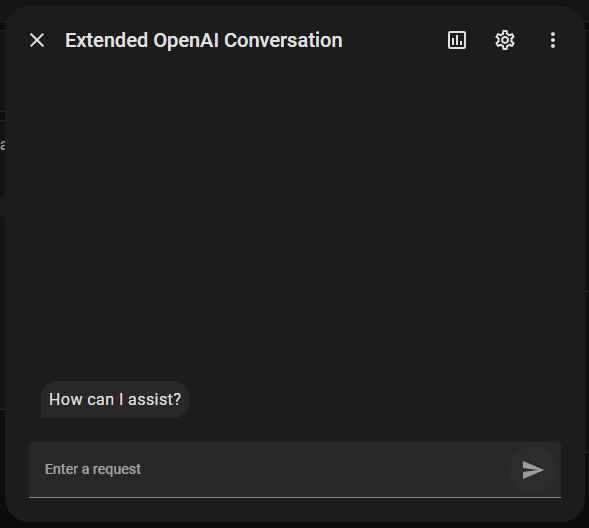
This gives you the ability to use OpenClaw in the Home Assistant Assist card on any of your dashboards. Thanks to the extended_openai_conversation integration we can easily connect it with HA.
This is much more secure than providing HA token to OpenClaw because allows you expose only selected list of entities to the AI agent.
The OpenClaw gateway already exposes OpenAI like API and we just enable it, then eveything is just configurations on the Extended OpenAI integration side. Voice mode should be also possible once configured in HA.
This is really cool! It doesn’t allow OpenClaw to tell HA to do things proactively though, does it? And doesn’t allow OC to query HA for status.
I’ve found it really helpful to have HA notify OC via an HTTP POST webhook when certain things happen, notably when I move a significant distance. It may then proactively message me to tell me about public transport delays (which I will certainly have forgotten to check myself)
This still doesn’t solve for OC deciding to heat my house because it sees I’m on my way home.
It’d be quite good to include in the docs a breakdown of the various use cases and what type of HA/OC integration makes sense for each one. Happy to try and help with that.
What you are describing can be achieved depending on how your setup needs to run. It is possible to define a custom entity and OpenClaw to control it’s state. In my case I’m all in and gave OpenClaw a HA long lived token. The integration with Assist pipeline is just the safe way, which I ignored personally but made it available for the people who are concerned it might be harmful.
I do similar things about the location to what you mentioned. OpenClaw created its own custom skill to locate me. If I’m in 50 meter zone around home it will count that I’m there and can invoke HA. It can check am I at any desired location via GPS. Exposing OpenClaw as entity provider is next fiture goal. Also it is possible to tell the bot setup small python FastApi service that can be a bridge for custom API endpoint which HA can easily call via HTTP request.
About the docs. Yes, agreed, I will focus on that very soon.
This is very interesting. I have a setup of solar inverter, home batteries and EV charger that are all controlled via HA. It’s working ok but the whole logic feels like too much duct tape. I’m thinking to get a second EV with own charger that would make it even more complex.
How would OpenClaw help me here? Been looking for an excuse to try it out. Would it work as a real time instance to monitor the house and regulate the charging distribution on the fly or is it just a more efficient way to create automation rules in code?