Hi,
This morning I encountered a connection issue between the module and my switch. I was wondering if there’s an option that allows the module to automatically reboot when the connection fails. Ideally, the reboot would occur only once, and if the connection still can’t be established afterward, the system would trigger the safety temperature setting (I’m not sure of the exact name of this option, as I currently don’t have access to the web interface).
Hello everyone, yet another user of diyless gateway to connect viessman 050W boiler to home assistant.
Boiler does not respond to the gateway connected to it. (timeout) I suspect the problem is I’m unable to change boiler option C7 (d.7) to 14 (OpenTherm) for some reason. It’s stuck on option 2. Have you seen such behaviour ever?
Also, can you confirm for me: which software should I flash on wemos d1 mini to use with this integration?
last question: I have seen in viCare app on android - gas consuption data from my boiler. Is this data available within opentherm?
Hello,
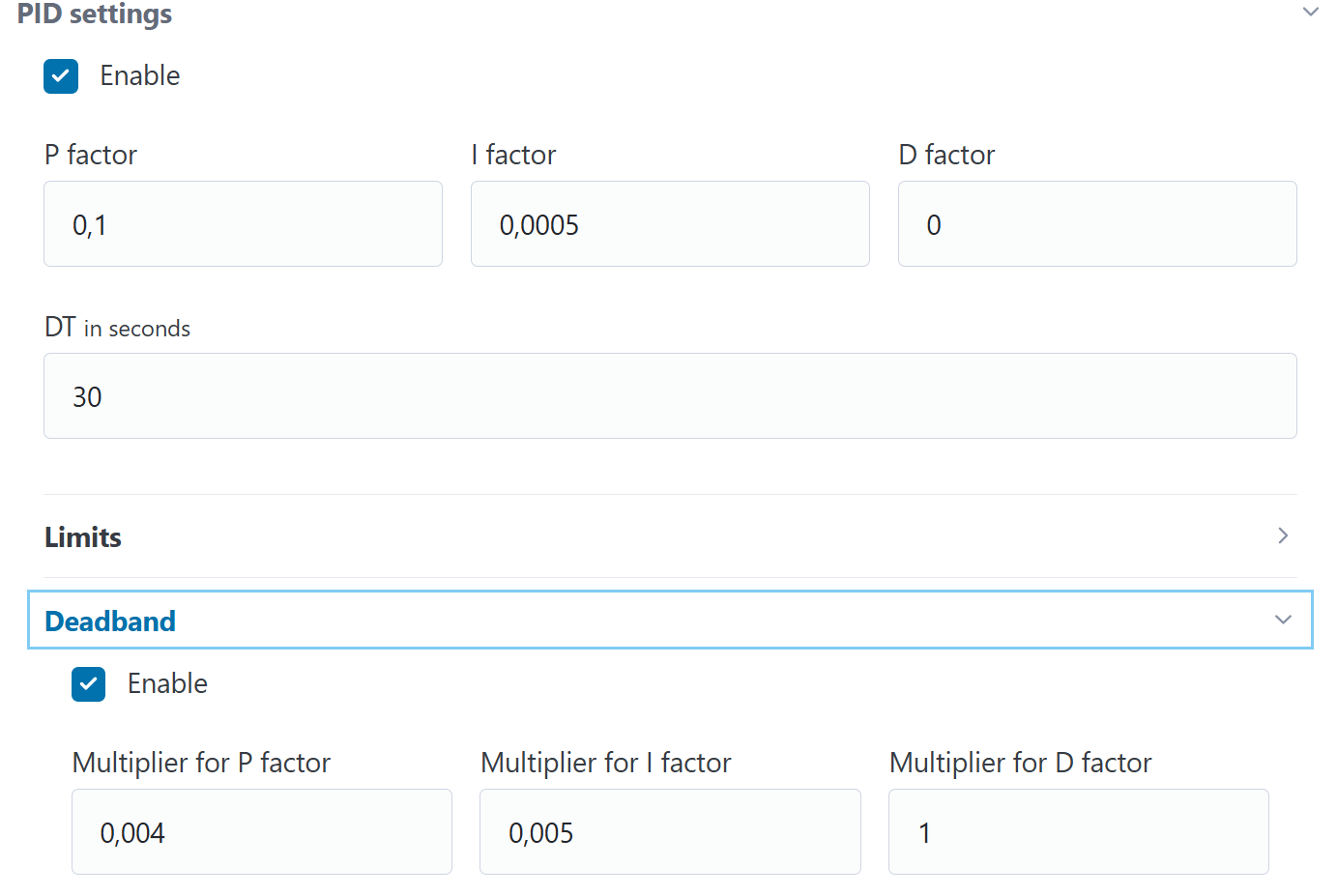
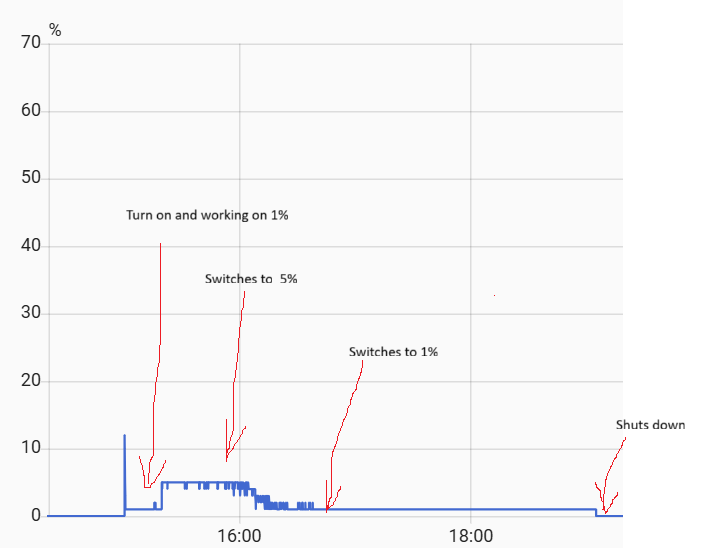
Maybe somebody could point me to a solution. In may case everything is working fine. However I would like to set my boiler to heat on minimum modulation setting. But it seems impossible because even when on very low values on equtherm mode settings, does not allow to get heating lower than 5% initially. So it is heating at 5% in the beginning then when close to set temperature, it switches to 1% - only then,. Is there any way to make the boiler to stay longer on 1% ?
Bredy,
That`s not it. The profile looks like below. I understand first 1%. The boiler is being preheated. I can set it in the boiler menu to that the boiler to work with minimal setting first ~20 min after starting. Then it should allow to control by the OpenTherm,and I believe 5% is coming from OTGateway, then when it reaches some kind of set temperature (medium or indoor) it is going on minimum 1% as I would like it to be running form beginning.
Did you manage to connect to the boiler? I have the same one and am struggling with the connection without success (Wemos D1 Mini + Ihor Melnyk adapter).
Home Assistant 2025.12.1 is giving me this warning:
2025-12-06 18:35:36.416 WARNING (MainThread) [homeassistant.components.mqtt.entity] The configuration for entity climate.opentherm_heating uses the deprecated option object_id to set the default entity id. Replace the "object_id": "opentherm_heating" option with "default_entity_id": "climate.opentherm_heating" in your published discovery configuration to fix this issue, or contact the maintainer of the integration that published this config to fix this. This will stop working in Home Assistant Core 2026.4
Any chance you might want to replace the deprecated object_id in the next update?
Already fixed. You can compile the firmware from source or wait for a new version.
@pyromana firmware has an automatic reconnection to wifi. If this doesn’t work for you, the problem is most often with the router.
@woobie726 for Wemos D1 Mini (ESP8266) you need to flash:
OTA FW: firmware_d1_mini_*.bin
Factory FW: firmware_d1_mini_*.factory.bin
Filesystem: filesystem_d1_mini_*.bin
Detailed documentation is available here.
OpenTherm doesn’t have an ID to get the gas consumption, but you can roughly calculate it from the current modulation level.
@fitos firmware doesn’t control burner modulation; the boiler does. We can only limit the maximum modulation level. And this level can’t be lower than the boiler’s allowed level (see OpenTherm diag on the Dashboard page).
@woobie726@gelu22 check the correct GPIO in OpenTherm Settings on the Settings page
I want to use this software to control the DIYLESS opentherm gateway. The goal is to keep using the already installed De Dietrich opentherm thermostat and log the opentherm data to home assistant. I would also be interested in overwritting the thermostat requests to the boiler from home assistant.
According to this post by @LazyDev sucho function is not implemented. Is it still like this or is it now supported?
I have been using this OTG in combination with a bunch of home assistant automations and a self designed learning model for about 9 months now and I love it! Thanks for the great job!
I have some suggestions to improve of the UX of the UI of the OTG and I hope you may consider it.
The ‘very little’ issue to consider is:
The landing page is currently the network setting page. The ‘action’ buttons are only available in this page. For me, if I navigate to the web front-end of the OTG, I almost always want to see the controls. If I’m there and want to change something, I need to click back to the first page to access the button.
What do you think of:
Make the buttons available in a ‘simple’ click-to-open hamburger menu on top left (menu offers after open: Dashboard, Settings, Upgrade, Restart). Bring Sensor Settings and Network Settings as extra foldables under Settings (Network Settings could preferably be the first foldable). I’d then add Network Status and System Status as two separate foldable under the dashboard (als here Network Settings could preferably be the first foldable and may also be open by default).
We’ll then have only three pages:
Dashboard: the landing page, which also has some Status foldables under the controls: Network, System, States, Sensors and OpenTherm Diagnostics.
hi there
I see in the compatibility list (Compatibility · Laxilef/OTGateway Wiki · GitHub) that both LUNA Duo-tec E 24 and Duo-tec Compact 24 are supported…
My question is: would the 28 kW model will work too? I guess that they are almost the same machine
TIA
The excel file equitherm_calc.xlsx is work even with the new 1.6.0 version or is new? Is it possible to have a better documentation for equitherm and PID value. Thanks
Please advise. I have two internal sensors connected via BLE. OTG averages these temperatures. Is it possible to set it up somewhere and modify the code so that it takes into account the lowest temperature? Thank you
You could better implement those logics in Home Assistant. That’s the place where Home specific heating logic should reside. It’s also much easier to implement the logic using home assistant automations rather than C code.
Yes, I know about the possibility to adjust the temperature calculation in Home Assistant. But I want the ESP to be independent of HA and the network. Therefore, I would need advice on how to adjust the source code.