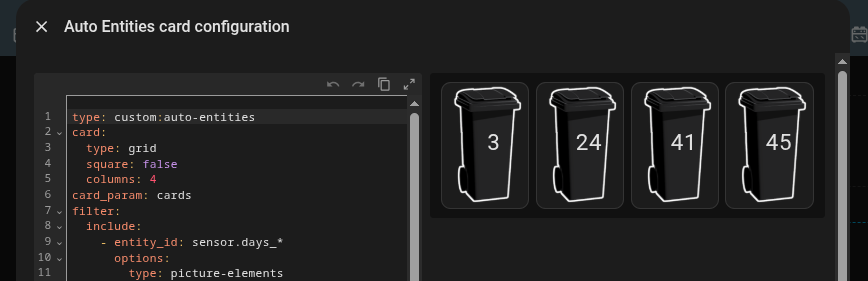
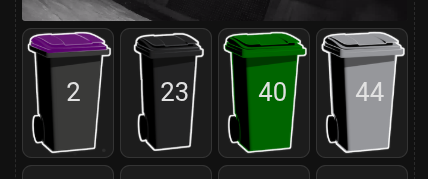
Ordered by state, picture-element cards in a grid?

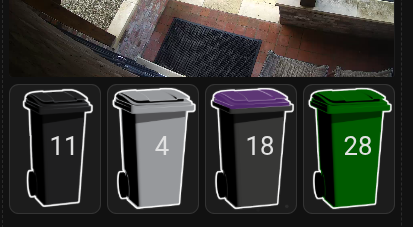
Hi, I’m looking for a way to order these bins (which show the number of days till collection and hence me going to put each one out in time - I missed the monthly green bin today!) so that the most imminent is on the left, that is ordered left to right by days to collection.

Any ideas?

I’ve had a look at various related posts here to see how to do that with “auto-entities” and grid but unable to get it work.
I’m using “grid” for the formatting, “conditional” for if the bins are within a fixed time window (was thinking 2 weeks, but put in 31 days to see all the bins for troubleshooting purposes) and “picture-elements”.

This is the code that produces the part of the dashboard in the screenshot.

square: true
type: grid
cards:
  - type: conditional
    conditions:
      - condition: numeric_state
        entity: sensor.days_domestic_waste
        below: 31
    card:
      type: picture-elements
      elements:
        - type: state-label
          style:
            left: 60%
            top: 50%
            transform: translate(-50%, -50%) scale(2.3, 2.3)
          entity: sensor.days_domestic_waste
      image:
        media_content_id: media-source://image_upload/7b183dcde9f192b791c1eb25bd27feb5
        media_content_type: image/png
        metadata:
          title: domestic-waste-bin.png
          thumbnail: /api/image/serve/7b183dcde9f192b791c1eb25bd27feb5/256x256
          media_class: image
          navigateIds:
            - {}
            - media_content_type: app
              media_content_id: media-source://image_upload
  - type: conditional
    conditions:
      - condition: numeric_state
        entity: sensor.days_recycling
        below: 31
    card:
      type: picture-elements
      elements:
        - type: state-label
          style:
            left: 60%
            top: 50%
            transform: translate(-50%, -50%) scale(2.3, 2.3)
          entity: sensor.days_recycling
      image:
        media_content_id: media-source://image_upload/b4c0d3bbdb376cf94adf226d631e62cd
        media_content_type: image/png
        metadata:
          title: mixed-recycling-bass.png
          thumbnail: /api/image/serve/b4c0d3bbdb376cf94adf226d631e62cd/256x256
          media_class: image
          navigateIds:
            - {}
            - media_content_type: app
              media_content_id: media-source://image_upload
  - type: conditional
    conditions:
      - condition: numeric_state
        entity: sensor.days_paper_waste
        below: 31
    card:
      type: picture-elements
      elements:
        - type: state-label
          style:
            left: 60%
            top: 50%
            transform: translate(-50%, -50%) scale(2.3, 2.3)
          entity: sensor.days_paper_waste
      image:
        media_content_id: media-source://image_upload/6bacae886c0aef780ddd15a6fff7c864
        media_content_type: image/png
        metadata:
          title: paper-and-card-bin.png
          thumbnail: /api/image/serve/6bacae886c0aef780ddd15a6fff7c864/256x256
          media_class: image
          navigateIds:
            - {}
            - media_content_type: app
              media_content_id: media-source://image_upload
  - type: conditional
    conditions:
      - condition: numeric_state
        entity: sensor.days_green_waste
        below: 31
    card:
      type: picture-elements
      elements:
        - type: state-label
          style:
            left: 60%
            top: 50%
            transform: translate(-50%, -50%) scale(2.3, 2.3)
          entity: sensor.days_green_waste
      image:
        media_content_id: media-source://image_upload/daf1a0495a7fa3c6c979750b4f9fc99c
        media_content_type: image/png
        metadata:
          title: green-waste-bin.png
          thumbnail: /api/image/serve/daf1a0495a7fa3c6c979750b4f9fc99c/256x256
          media_class: image
          navigateIds:
            - {}
            - media_content_type: app
              media_content_id: media-source://image_upload
grid_options:
  columns: full
  rows: 3
columns: 4

The Flex Cells Card has column sorting capability:

1 Like

I use a State-Switch card for something similar.

Auto-entities card.

I tried this @Ildar_Gabdullin but couldn’t get it working, because I don’t understand how to do it with different meta data (entity, state, image)

The simplest as a starting point:

type: custom:auto-entities
card:
  type: grid
  square: false
  columns: 4
card_param: cards
filter:
  include:
    - entity_id: input_number.test_level_*
      options:
        type: picture-elements
        elements:
          - type: state-label
            style:
              left: 50%
              top: 50%
            entity: this.entity_id
        image: /local/images/test/lightgreen.jpg

Just use your pattern for entities.

(+ sorting can be added if needed - check the “sort” option in Docs for auto-entities)

But since you need entity-dependent image - that example will not satisfy all you requirements, so will you have to learn more advanced stuff - the “template” option of auto-entities.
But 1st learn THIS simple example. Otherwise, if I provide the ready code for the more advanced case, you will not learn.

P.s. Do not bother about that

        media_content_id: media-source://image_upload/daf1a0495a7fa3c6c979750b4f9fc99c
        media_content_type: image/png
        ... etc

lines, they are not needed for you, just play with “image: some.jpg” case.

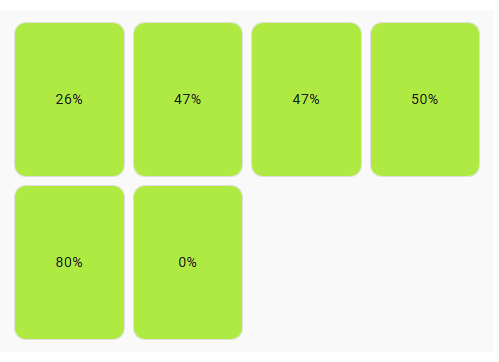
P.S. Note that since I got 6 entities for the specified “input_number.test_level_*” pattern, there are 6 cells in the grid. In your case you need to provide a pattern for 4 entities.

1 Like

Thank you very much for this comprehensive answer!

Come back when you’ll be ready for more advanced stuff - the mentioned “template” option. (also, “eval_js” or how it is called can be used as well - but as I suggested learn things step by step)

I’ve got it working fine, thanks, with your example @Ildar_Gabdullin and necessary adjustment. Now I’ll look at the template option.

As a variant:

type: custom:auto-entities
card:
  type: grid
  square: false
  columns: 4
card_param: cards
filter:
  template: |-
    {% set LEVELS = [
      'test_level_1',
      'test_level_2',
      'test_level_3',
      'test_level_4'
      ] -%}
    {%- set IMAGES = {
      'test_level_1': 'orange',
      'test_level_2': 'lightgreen',
      'test_level_3': 'blue',
      'test_level_4': 'white'
    } -%}
    {%- set ENTITIES = LEVELS
      |map('regex_replace','^', 'input_number.')
      |list
    -%}
    {%- for ENTITY in states.input_number
      |selectattr('entity_id','in',ENTITIES)
      |sort(attribute='state') -%}
      {{
        {
          'type': 'picture-elements',
          'elements': [
            {
              'type': 'state-label',
              'entity': ENTITY.entity_id,
              'style': {'left': '50%', 'top': '50%'},
            }
          ],
          'image': '/local/images/test/' + IMAGES[ENTITY.entity_id.split('.')[1]] + '.jpg'
        }
      }},
    {%- endfor %}

where IMAGES must contain names of your jpg files, LEVELS must be replaced with names of your 4 sensors.
Also, set a proper path for 'image' option & change a domain from “input_number” to “sensor”.
And note that all images must be of same size (at least of same aspect ratio).

P.S. Probably some jinja guru will reduce the code to 1 line…

Thanks for taking the time to help. After a few hours of trial and error, I finally managed it by customising the 4 waste bin entities by adding an individual image URL to each as an attribute, sorting a list and looping it in a template…

In my customize.yaml

#
# IMAGES
#
sensor.days_domestic_waste:
  entity_picture: /local/media/domestic-waste-bin-small.png
sensor.days_recycling:
  entity_picture: /local/media/mixed-recycling-bin-small.png
sensor.days_paper_waste:
  entity_picture: /local/media/paper-and-card-bin-small.png
sensor.days_green_waste:
  entity_picture: /local/media/green-waste-bin-small.png

In the card

type: custom:auto-entities
card:
  type: grid
  square: false
  columns: 4
card_param: cards
filter:
  template: >
    {% for state in states.sensor | selectattr('entity_id', 'search', 'days_') |
    sort(attribute='state') -%}
      {{
        {
          'type': 'picture-elements',
          'image': state.attributes.entity_picture,
          'elements': [
            {
              'type': 'state-label',
              'entity': state.entity_id,
              'style': {'top': '40%', 'left': '45%', 'transform': 'scale(2.3, 2.3)'}
            }
          ]
        }
      }},
    {%- endfor %}

Even better & more effective.

This may give you false matches, suggest to set smth more strict.
(imagine you got another unrelated entity one day containing “days_”)
You can even set these custom attributes & not depend on particular entity names:

sensor.days_domestic_waste:
  entity_picture: /local/media/domestic-waste-bin-small.png
  purpose: trash_management ----for all 4 sensors
Then a filter like

states.sensor
|selectattr('attribute.purpose','defined')
|selectattr('attribute.purpose','eq','trash_management')

(also check if any glitches are seen in case of a different viewport)

I couldn’t get that to work, after adding the common attribute as shown, but maybe others can. For now, I’ll keep “days_” for the bins. Thanks again.