The firmware version of HERU has seen breaking changes, with no clear warning/information from Östberg before upgrading. So bear this in mind when upgrading.
The integration requires at least firmware 1.09i to be installed. The highest confirmed working version is 1.14. If you have installed a more recent version, and can confirm that it works with the HERU integration, please comment below.
I am also using the integration (v.1.0.6) and running the latest firmware (1.14, July 2024) on a Heru 160s. It is working great except for “Current heat/cold recovery power” which is always stuck at 99.9999999885%. I have created an issue over on github.
@magicus What is needed to get this to work? Some sort of WiFi dongel or connect thing on the Heru?
Will be swapping my 40+ year old FTX to a Heru or Systemair in the coming months.
Was using Airiana on a Rpi2 with a rs232-hat in my old house. Can recommend that for everyone with a Systemair.
For my setup, I have an ethernet cable connecting to the Heru. However, since this is installed in my attic and I did not want to put wiring all way up, I bought a multi-function WiFi extender which has an ethernet port. This links up over WiFi with my router.
This works, but unfortunately it is a bit shaky. Apparently the range extender I bought was not the best quality, and it needs to be restarted every now and then, which is a bit tricky since it is in the attic. So a recommendation is to do your research and make sure you buy a high-quality connection. Or put ethernet all the way, it’s probably the best.
I personally solved this by adding a simple power-measuring plug that feeds power to the unit. The power consumption pattern of the Heru unit is very peculiar. For normal operation, with sensor.ftx_current_heat_cold_recovery_power at 100% and sensor.ftx_current_heating_power at 0%, it stays steady at 133 W.
But if I enable the heater, it starts consuming more. But this consumtion is not steady, but pulsed like on 1 kW for a second, then off for four seconds, etc, and the more power requested, the longer the pulses stay on. This confuses a lot of power-measuring.
I guess I could do some more precise measurements and it might help create a mapping of the values reported by the unit to actual wattage numbers. But then again, it will ever only remain an approximation.
Hi there, do you mind to share a power consumption measurement device, which brand and type do you use? Meanwhile I officially asked Heru to expose it via modbus. Will see what they will answer for such a request…
Sure, it is a AEON Labs ZW075, Z-Wave JS Config DB Browser. I picked that one since I have a well-established ZWave network, and it is generally much more stable than the Zigbee mesh, and I did not want to have to go up to the attic to restart the plug.
But I believe any power measuring plug would do. For most of the rest of the devices I monitor, I use a cheap Tuya TS011F clone, available for < 100 SEK from chinese web shops. They usually work just fine.
Also, IKEA seems to have finally released Inspelning. Since all other Ikea Zigbee devices have been excellent, that’d probably be my choice if I were to buy something now.
Hi,
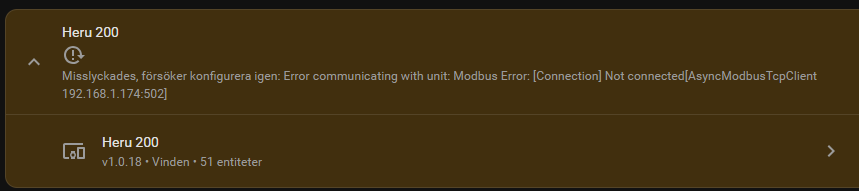
I keep getting this message. When I restart my switch it works for a few days then I get this error. It might not be the integration but maybe someone can point me in a good direction to solve it.
You will probably find nobody responded to the post by @jerker74 as it was a screen shot rather than a cut and paste in forum formatted </> readable format, so we couldn’t even plug it into Google translate to decipher the message from a non-English screen shot.
‘Unifi’ triggers a reaction from me as they appear to have additional config requirements for certain functionality.
Post your error log items, suitably formatted, and the versions of firmware, etc currently installed and you may get assistance.