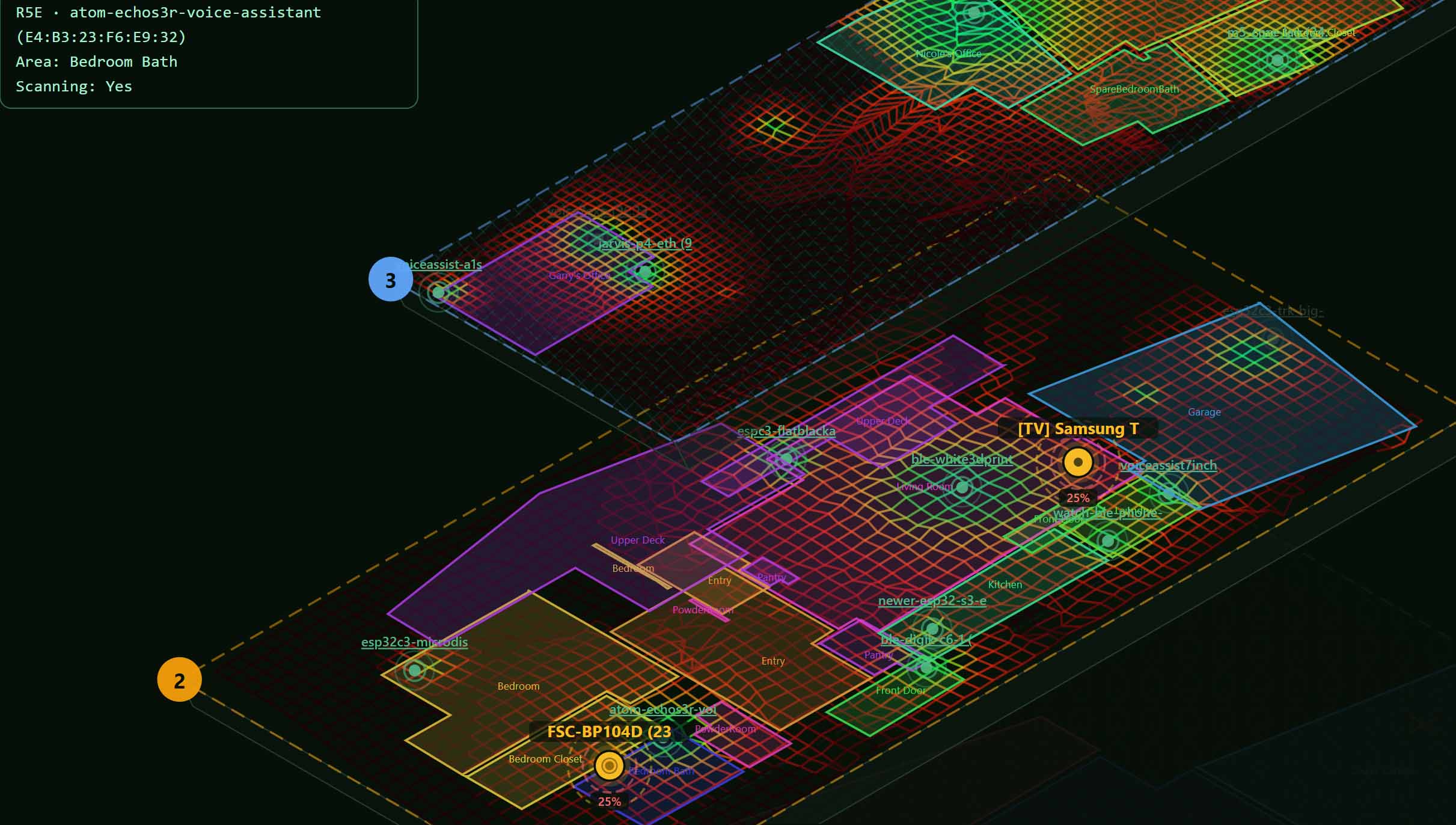
PadSpan HA — Room-level BLE presence tracking with floor plans, 3D maps, and calibration — exiting alpha March 2026

Hey everyone,

I’ve been building PadSpan HA — a custom integration that turns your existing Bluetooth scanners into a full room-level presence tracking system — and it’s coming out of alpha in March 2026.

This started as a personal project because I wanted more than just “home” or “away.” I wanted to know which room my phone was in, see it on a floor plan, and get alerts when my kids’ trackers moved between rooms. Nothing out there did all of that, so I built it.

What’s in the alpha right now

  • Room-level BLE tracking with 5-second updates (not just home/away)
  • Upload floor plans and draw room boundary polygons right in the UI
  • 3D multi-floor isometric maps with live object positions
  • Walk-around calibration system — k-NN fingerprint matching + path-loss model fitting
  • Follow mode — pick any tag, watch it move room to room with an animated map
  • Email alerts when a tracked device changes rooms
  • 21 dedicated views (Basic mode for simplicity, Advanced for power users)
  • Full HA entities — area sensors, distance sensors, device trackers, binary sensors
  • Works with ESPresense, Bermuda proxies, or any HA Bluetooth proxy
  • Sample mode — explore every feature with synthetic data before plugging in hardware
  • 11 languages (EN, ES, FR, DE, IT, PT, NL, ZH, JA, KO, RU)
  • Standalone phone-friendly calibration panel for walk-around data collection
  • Per-scanner signal quality metrics, WiFi SSID/IP display
  • Built-in Training Hub with guided walkthroughs

What’s coming for the beta

More details soon — but think tighter HA dashboard integration, automation blueprints, and some things I’m not ready to talk about yet.

Try the alpha now

  1. HACS → Custom repositories → add gbroeckling/padspanHA (Integration)
  2. Install PadSpan HA → Restart HA
  3. Settings → Devices & Services → Add Integration → PadSpan HA

Feedback and bug reports welcome — drop them here or open an issue on GitHub.


GitHub: GitHub - gbroeckling/padspanHA: The most comprehensive BLE room-presence tracking system for Home Assistant — room-level tracking, 3D floor plans, calibration, follow mode, 21 views · GitHub

More coming in March.

7 Likes

Looks promising. I will try it out next week

This is exciting!

I’ve been working on an ESPresense-companion deployment for about a month now. It’s been a challenge. Positional accuracy and stability hasn’t been great. Stationary devices tend to float through walls. I was about ready to go back to traditional nearest node location tracking.

I’ve been looking into UWB and AoA based solutions. What I’ve found so far is still experimental. But the hardware is there, it’s reasonably priced, and it doesn’t terribly difficult to integrate.

Do you have any thoughts on supporting UWB or AoA for increased location accuracy and stability? Or using mmWave/PIR for presence detection, combined with BT RSSI for occupancy detection?

1 Like

This is very intriguing, but I would really love to be able to export this onto a seperate box to do all of the processing. I would love if it could be installed via docker elsewhere and just connect to HA via API.

Also, I would love to be able to disable the sample data and mode. Once I get started there is no need and it keeps going back to it.

Sorry for the slow reply — heads-down on the accuracy work. What you’re describing (stationary devices drifting through walls) is exactly what the last two months went into: v0.21 shipped an accuracy overhaul with observation quality gates and a rebuilt fingerprint pipeline, and stationary drift specifically is much better than the alpha you’d have seen in Feb. Might be worth a try before you invest in new hardware.

On UWB/AoA: not on the near-term roadmap. PadSpan is deliberately built around hardware people already have (ESPresense, Bermuda proxies, any HA Bluetooth proxy) — that’s the whole pitch. That said, the calibration/fingerprint layer doesn’t especially care where a distance estimate comes from, so if UWB gear matures into something HA-friendly, it’s a plausible future input. mmWave/PIR fusion for occupancy-vs-presence is the more likely nearer-term direction since HA already has those entities.

There’s a demo video and comparison table at padspan.traks.ca if you want to see current state before installing.

@forlornlawngnome Both good asks.

Sample mode coming back after you’ve set up real data: that shouldn’t happen — it’s meant to get out of your way once real scanners are configured. I’ll dig into it; if you can open a GitHub issue with what triggers it reappearing (restart? update? specific view?), that’d speed it up.

Standalone Docker with an HA API connection: I hear the motivation (keep the processing load off the HA box). Right now PadSpan is a native integration and the processing lives in HA — a split deployment is a bigger architectural lift, so I won’t promise it, but it’s noted for the beta planning. Curious what hardware you’re running HA on that’s feeling the load — that helps me judge how much this matters.

Quick status for anyone following: the March timeline slipped — the alpha feedback pushed me to fix accuracy fundamentals first. v0.21 is out with the accuracy overhaul (presence bug fixes, observation quality gates, fingerprint v2). Demo video and feature comparison now at padspan.traks.ca. Beta scope announcement coming once the current line stabilizes.

I am running on a pi5 16gb with nvme. Best guess for the performance issues is it’s how ha handles cpu, padspan was eating the one core and it was the same one ha wanted for tasks, so everything slowed way down (dashboard loading etc). The second I disabled the integration everything worked fine.

What I then did was a second ha instance and shared my esphome proxies with it. Huge pita and stressed the proxies but it worked ish. I needed better proxies though, it wasn’t seeing a lot that were nearby and before I can do that I need to fix my 2.4ghz wavelength in my house, so for now this is paused while I get all that sorted!

@forlornlawngnome Your two complaints are both fixed as of tonight. Thanks for the details, the Pi 5 report especially was exactly what I needed.

Sample mode coming back (fixed in v0.21.9): found it. Several UI actions (following a device, some settings saves) were echoing the panel’s in-memory data mode back to the server, and that value defaults to sample until settings finish loading. So clicking anything in that window silently flipped a live install back to sample mode. Those saves no longer touch data mode at all. No GitHub issue needed.

The core contention (v0.21.10): what you hit is single-core saturation. The presence math was running inside HA’s event loop, so while PadSpan computed, HA’s dashboard starved. There is now a CPU mode dropdown in Settings > Presence:

  • Shared: old behavior, fastest updates
  • Single core: the smoothing pipeline runs on a background worker capped at about one core, HA stays responsive
  • Dedicated core: same, plus the worker pins itself to its own core (Linux, so HAOS/container qualify)
    On your Pi 5 I would start with Single core. It applies on the next poll cycle, no restart. This should also make the second-HA-instance workaround unnecessary: one instance, one core for PadSpan, three left for HA.

Both are pre-releases right now. In HACS enable “show beta versions” (or redownload and pick v0.21.10 explicitly) to get them. If the Pi still struggles in Single core mode, tell me. The Docker split idea stays on the list, but I would rather know if this gets you there first.

Quick status for anyone still following this thread: v0.37.0 is out, and it is a stable release rather than a pre-release.

It has been quiet here since v0.21 in early August, and there is a reason more of you did not hear about the releases in between. The update check built into the integration was still reporting v0.21.13 as the latest stable right up until this week, so if you are on the stable channel, HA has been quietly telling you that you were current since August 4. That one is mine. It is fixed, and cutting a release now publishes the version manifest as part of the process, so it cannot drift like that again.

What changed since v0.21, roughly in the order that probably matters to you:

Multi floor actually works now. The floor list never reached the positioning code, so a multi storey house was being scored as a single storey. The panel looked right the whole time because it reads the HA floor registry live, which is exactly why this survived as long as it did. Floors with no level set were also stacking in creation order, so an alphabetical registry could stack a house in the wrong order.

Geometry moved off the picture. Rooms, scanners, walls and lights are stored in metres in their own model now, instead of as coordinates on the floor plan image you uploaded. Re-crop or replace a plan and nothing moves.

Scanners carry a real mounting height and floors carry a real elevation, so a cross floor decision finally has something to separate storeys by. Walls are RF barriers with an attenuation value rather than decoration.

Auto calibration writes fingerprints from stationary beacons, which means less walking around the house with a phone in your hand.

RSSI Vector Capture (Settings > Features, off by default) records what every scanner heard for every tracked device, poll by poll, with a Mark room button to stamp ground truth as you walk. Export the session as jsonl and replay that same walk against different settings instead of walking it again.

There is also an opt in usage report, off by default, counts and version numbers only. It exists because I develop this against one house, and the configurations that break it are the ones that only exist in yours.

Release and full changelog:

If you tried PadSpan earlier this year and gave up on it because it put people on the wrong floor, this is the release worth a second look. I would far rather hear that it is still wrong than not hear.