Hello,
for some time I was looking for a integration of timekpr-nExT [ Timekpr-nExT README ] in home assistant to control the time of my kids on the Ubuntu computers. Because loging in ssh and editing the config file of timekpr is burdensome and my wife would not even give it a try.
so i have developped a set of scripts on the ubuntu devices that are called by ssh via home assistant.
since I’m not an expert nor a developper, I have used AI to help me coding, I’m sharing my work here so it can be reused and improved !
I have developped 3 scripts that control timekpr:
- Add 15min: the script take the current authorised period and add it 15min
- Remove 15min: the script take the current authorised period and remove it 15min
- Reset to default: set back the default allowed time
Scripts
these scripts are to be installed in /usr/local/bin
GIVE 15min Stackable
#!/bin/bash
# add_15min_stackable.sh
# Add 15 minutes to the end of today's allowed hours (stackable, clean output)

USER="$1"
if [[ -z "$USER" ]]; then
  echo "Usage: $0 <username>"
  exit 1
fi

LOGFILE="/tmp/tkpra_ha.log"
exec > >(tee -a "$LOGFILE") 2>&1
echo "=== $(date) === STARTED by $(whoami) === give_15min_stackable"


PATH=/usr/local/sbin:/usr/local/bin:/usr/sbin:/usr/bin:/sbin:/bin
TKPRA=/usr/bin/timekpra

ts() { date '+%Y-%m-%d %H:%M:%S'; }

echo "=== $(ts) ==="
echo "User: $USER"

DOW=$(date +%u)
NOW_MINUTES=$(( 10#$(date +%H) * 60 + 10#$(date +%M) ))

CONFIG_LINE=$(sudo "$TKPRA" --userinfo "$USER" | grep -E "ALLOWED_HOURS_${DOW}:")
RAW_ALLOWED=$(echo "$CONFIG_LINE" | cut -d':' -f2 | xargs)

# If RAW_ALLOWED is not empty, always treat it as a list
if [[ -n "$RAW_ALLOWED" ]]; then
  IFS=';' read -r -a HOURS <<< "$RAW_ALLOWED"
else
  HOURS=()
fi

echo "now minutes: $NOW_MINUTES"
echo "Config line: $CONFIG_LINE"
echo "Existing allowed hours (raw): $RAW_ALLOWED"

# --- Parse into half-open absolute-minute intervals ---
interval_starts=()
interval_ends=()

IFS=';' read -r -a segs <<< "$RAW_ALLOWED"
for seg in "${segs[@]}"; do
  [[ -z "$seg" ]] && continue
  if [[ "$seg" =~ ^([0-9]+)$ ]]; then
    h=${BASH_REMATCH[1]}
    interval_starts+=($((h*60)))
    interval_ends+=($(((h+1)*60)))
  elif [[ "$seg" =~ ^([0-9]+)\[([0-9]+)-([0-9]+)\]$ ]]; then
    h=${BASH_REMATCH[1]}
    a=${BASH_REMATCH[2]}
    b=${BASH_REMATCH[3]}
    s=$((h*60 + a))
    e=$((h*60 + b))
    (( s < h*60 )) && s=$((h*60))
    (( e > (h+1)*60 )) && e=$(((h+1)*60))
    if (( e > s )); then
      interval_starts+=($s)
      interval_ends+=($e)
    fi
  fi
done

if (( ${#interval_starts[@]} == 0 )); then
  echo "No intervals found; cannot add."

# --- check if the current time is inside an allowed window
# --- if inside = 0 => we are not inside an allowed window, if inside = 1, we are insider an allowed window
inside=0
for i in "${!interval_starts[@]}"; do
  s=${interval_starts[$i]}
  e=${interval_ends[$i]}
  if (( NOW_MINUTES >= s && NOW_MINUTES < e )); then
    inside=1
    idx=$i
    break
  fi
done


# --- Add 15 minutes at the very end ---
TO_ADD=15
if (( inside == 1 )); then
  # --- if inside an allowed window
  # --- add 15 min at the end of the current window
  echo "Current time is inside an allowed interval: ${interval_starts[$idx]}–${interval_ends[$idx]}"

  # Find the full contiguous block starting from idx
  block_start=${interval_starts[$idx]}
  block_end=${interval_ends[$idx]}

  # Extend forward to include adjacent intervals
  for (( i=idx+1; i<${#interval_starts[@]}; i++ )); do
    if (( interval_starts[i] <= block_end )); then
      # Merge this interval into the block
      (( interval_ends[i] > block_end )) && block_end=${interval_ends[i]}
    else
      break
    fi
  done

  # Extend the block by 15 minutes
  new_block_end=$(( block_end + TO_ADD ))
  (( new_block_end > 1440 )) && new_block_end=1440

  # Remove all intervals that were part of the block
  new_starts=()
  new_ends=()
  for (( i=0; i<${#interval_starts[@]}; i++)); do
    if (( interval_starts[i] < block_start || interval_starts[i]  > block_end )); then
      new_starts+=(${interval_starts[i]})
      new_ends+=(${interval_ends[i]})
    fi
  done

  # Add the extended block
  new_starts+=($block_start)
  new_ends+=($new_block_end)

# Replace original arrays
  interval_starts=("${new_starts[@]}")
  interval_ends=("${new_ends[@]}")

#  new_e=$(( interval_ends[$idx] + TO_ADD ))
#  (( new_e > 1440 )) && new_e=1440
#  interval_ends[$idx]=$new_e
else
  # --- if outside of the allowed window
  # --- create a new window of 15min from now
  echo "Current time is outside allowed hours — adding new 15-minute window"
  new_s=$NOW_MINUTES
  new_e=$(( NOW_MINUTES + TO_ADD ))
  (( new_e > 1440 )) && new_e=1440
  interval_starts+=($new_s)
  interval_ends+=($new_e)
fi


#idx=$(( ${#interval_starts[@]} - 1 ))
#s=${interval_starts[$idx]}
#e=${interval_ends[$idx]}
#
#new_e=$(( e + TO_ADD ))
## Cap to 24h = 1440 minutes
#(( new_e > 1440 )) && new_e=1440
#
## If it overflows into next hour, allow clean carry-over
#interval_ends[$idx]=$new_e

# --- Rebuild clean textual segments ---
parts=()
for i in "${!interval_starts[@]}"; do
  s=${interval_starts[$i]}
  e=${interval_ends[$i]}
  (( e <= s )) && continue

  cur=$s
  while (( cur < e )); do
    h=$(( cur / 60 ))
    m_start=$(( cur % 60 ))
    hour_end=$(( (h+1)*60 ))
    seg_end=$(( e < hour_end ? e : hour_end ))
    m_end=$(( seg_end - h*60 ))

    if (( m_start == 0 && m_end == 60 )); then
      parts+=("$h")
    else
      parts+=("$h[$m_start-$m_end]")
    fi
    cur=$seg_end
  done
done

if (( ${#parts[@]} == 0 )); then
  FINAL=""
else
  IFS=';'; FINAL="${parts[*]}"; unset IFS
fi

echo "Final allowed hours for today: ${FINAL:-<none>}"
echo "Running: sudo $TKPRA --setallowedhours \"$USER\" \"$DOW\" \"$FINAL\""

sudo "$TKPRA" --setallowedhours "$USER" "$DOW" "$FINAL"

echo "--- Verification ---"
sudo "$TKPRA" --userinfo "$USER" | grep -E "ALLOWED_HOURS_${DOW}:"
echo "=== done ==="
REMOVE 15min Stackable
#!/bin/bash
# remove_15min_stackable.sh
# Remove 15 minutes from the end of today's allowed hours (stackable, clean output)

USER="$1"
if [[ -z "$USER" ]]; then
  echo "Usage: $0 <username>"
  exit 1
fi

LOGFILE="/tmp/tkpra_ha.log"
exec > >(tee -a "$LOGFILE") 2>&1
echo "=== $(date) === STARTED by $(whoami) === remove_15min_stackable"

# Optional: set PATH and absolute path to timekpra for HA/Lovelace context
PATH=/usr/local/sbin:/usr/local/bin:/usr/sbin:/usr/bin:/sbin:/bin
TKPRA=/usr/bin/timekpra

ts() { date '+%Y-%m-%d %H:%M:%S'; }

echo "=== $(ts) ==="
echo "User: $USER"

# Today (1=Mon .. 7=Sun)
DOW=$(date +%u)

# Read allowed hours for today
CONFIG_LINE=$(sudo "$TKPRA" --userinfo "$USER" | grep -E "ALLOWED_HOURS_${DOW}:")
RAW_ALLOWED=$(echo "$CONFIG_LINE" | cut -d':' -f2 | xargs)
# If RAW_ALLOWED is not empty, always treat it as a list
if [[ -n "$RAW_ALLOWED" ]]; then
  IFS=';' read -r -a HOURS <<< "$RAW_ALLOWED"
else
  HOURS=()
fi

echo "Config line: $CONFIG_LINE"
echo "Existing allowed hours (raw): $RAW_ALLOWED"

# Parse into half-open absolute-minute intervals [start, end)
# - "H"        => [H*60, (H+1)*60)
# - "H[a-b]"   => [H*60+a, H*60+b)  (note: b may be 60)
interval_starts=()
interval_ends=()

IFS=';' read -r -a segs <<< "$RAW_ALLOWED"
for seg in "${segs[@]}"; do
  [[ -z "$seg" ]] && continue
  if [[ "$seg" =~ ^([0-9]+)$ ]]; then
    h=${BASH_REMATCH[1]}
    s=$((h*60))
    e=$(((h+1)*60))
    interval_starts+=("$s")
    interval_ends+=("$e")
  elif [[ "$seg" =~ ^([0-9]+)\[([0-9]+)-([0-9]+)\]$ ]]; then
    h=${BASH_REMATCH[1]}
    a=${BASH_REMATCH[2]}
    b=${BASH_REMATCH[3]}           # end is exclusive
    s=$((h*60 + a))
    e=$((h*60 + b))
    # sanity: clamp to hour bounds
    (( s < h*60 )) && s=$((h*60))
    (( e > (h+1)*60 )) && e=$(((h+1)*60))
    if (( e > s )); then
      interval_starts+=("$s")
      interval_ends+=("$e")
    fi
  fi
done

# If nothing parsed, nothing to do
if (( ${#interval_starts[@]} == 0 )); then
  echo "No intervals found; nothing to remove."
  exit 0
fi

# Remove 15 minutes from the very end (spill into previous intervals if needed)
TO_REMOVE=15
idx=$(( ${#interval_starts[@]} - 1 ))

while (( TO_REMOVE > 0 && idx >= 0 )); do
  s=${interval_starts[$idx]}
  e=${interval_ends[$idx]}

  len=$(( e - s ))           # half-open length
  if (( len <= 0 )); then
    # drop empty/invalid
    unset 'interval_starts[idx]' 'interval_ends[idx]'
    # re-pack arrays
    interval_starts=("${interval_starts[@]}")
    interval_ends=("${interval_ends[@]}")
    ((idx--))
    continue
  fi

  if (( TO_REMOVE >= len )); then
    # remove whole interval
    TO_REMOVE=$(( TO_REMOVE - len ))
    unset 'interval_starts[idx]' 'interval_ends[idx]'
    interval_starts=("${interval_starts[@]}")
    interval_ends=("${interval_ends[@]}")
    ((idx--))
  else
    # trim the end
    e=$(( e - TO_REMOVE ))
    TO_REMOVE=0
    interval_ends[$idx]=$e
  fi
done

# Rebuild clean textual segments from half-open intervals
parts=()
for i in "${!interval_starts[@]}"; do
  s=${interval_starts[$i]}
  e=${interval_ends[$i]}
  (( e <= s )) && continue

  cur=$s
  while (( cur < e )); do
    h=$(( cur / 60 ))
    m_start=$(( cur % 60 ))
    hour_end=$(( (h+1)*60 ))
    seg_end=$(( e < hour_end ? e : hour_end ))      # end (exclusive) within this hour
    m_end=$(( seg_end - h*60 ))                     # 1..60

    if (( m_start == 0 && m_end == 60 )); then
      parts+=("$h")
    else
      parts+=("$h[$m_start-$m_end]")
    fi
    cur=$seg_end
  done
done

# Join with ';'
if (( ${#parts[@]} == 0 )); then
  FINAL=""   # No allowed hours left today
else
  IFS=';'; FINAL="${parts[*]}"; unset IFS
fi

echo "Final allowed hours for today: ${FINAL:-<none>}"
echo "Running: sudo $TKPRA --setallowedhours \"$USER\" \"$DOW\" \"$FINAL\""

sudo "$TKPRA" --setallowedhours "$USER" "$DOW" "$FINAL"

echo "--- Verification ---"
"sudo $TKPRA" --userinfo "$USER" | grep -E "ALLOWED_HOURS_${DOW}[[:space:]]*:"
echo "=== done ==="
RESET to default
default time in the family is no time during weekday
18h-20h on Fridays and Saturdays
18h-19h30 on Sundays
#!/bin/bash
# reset_default_hours.sh
# Reset Timekpr-nExT allowed hours to defaults

set -euo pipefail

USER="$1"

echo "=== $(date) ==="
echo "User: $USER"

# Define defaults
for day in {1..7}; do
    if [[ $day -ge 1 && $day -le 4 ]]; then
        HOURS="1[0-1]"
    elif [[ $day -eq 5 || $day -eq 6 ]]; then
        HOURS="18;19"
    else # Sunday (7)
        HOURS="18;19[0-30]"
    fi

    echo "Setting day $day to: $HOURS"
    if ! sudo timekpra --setallowedhours "$USER" "$day" "$HOURS"; then
        echo "ERROR updating configuration for day $day"
    fi
done

echo "--- Verification ---"
sudo timekpra --getuserrestrictions "$USER" | grep ALLOWED_HOURS_

echo "=== done ==="
Users configuration
Now we have the scripts, we need to call them from Home Assitant using ssh.
for this I have created new user homeassistant in my Ubuntu machine.
The homeassistant user shall have the rights to run timekpra without being prompted the root password. For this run the command sudo visudo
add the following line at the bottom of the file
homeassistant ALL=(ALL) NOPASSWD: /usr/bin/timekpra
You can verify with using the command below
sudo -l -U homeassistant

User homeassistant may run the following commands on XXXXX:
    (ALL : ALL) ALL
    (ALL) NOPASSWD: /usr/bin/timekpra
I have also created the public and private key for this user and shared with between Home Assistant and the Ubuntu machine, so the homeassistant user can call the scripts on the machine without login.
the public keys are stored here in Home Assistant: /root/config/.ssh
Home Assistant Configuration
then in Home Assistant configuration.yaml I have added the following shell commands:
shell_command:
  give_15min_kid1: "ssh -i /config/.ssh/kid1computer -o StrictHostKeyChecking=no [email protected] 'bash /usr/local/bin/give_15min_stackable.sh kid1'"
  remove_15min_kid1: "ssh -i /config/.ssh/kid1computer -o StrictHostKeyChecking=no [email protected] 'bash /usr/local/bin/remove_15min_stackable.sh kid1'"
  reset_kid1_schedule: "ssh -i /config/.ssh/kid1computer -o StrictHostKeyChecking=no [email protected] 'bash /usr/local/bin/reset_default_hours.sh kid1'"
Monitoring
I’m very eager to improve this section
The goal is to display the period where the computer is authorized or not.
For this I have created another scripts that reports the minutes that are allowed and a sensor is collecting this information.
Script
the script is installed in the Ubuntu device in /usr/local/bin
#!/bin/bash
# get_allowed_minutes_json.sh
# Outputs allowed and forbidden minutes for today in JSON format

USER="$1"
TKPRA="/usr/bin/timekpra"

if [[ -z "$USER" ]]; then
  echo "Usage: $0 <username>"
  exit 1
fi

DOW=$(date +%u)
CONFIG_LINE=$(sudo "$TKPRA" --userinfo "$USER" | grep -E "ALLOWED_HOURS_${DOW}:")
RAW_ALLOWED=$(echo "$CONFIG_LINE" | cut -d':' -f2 | xargs)

interval_starts=()
interval_ends=()

IFS=';' read -r -a segs <<< "$RAW_ALLOWED"
for seg in "${segs[@]}"; do
  [[ -z "$seg" ]] && continue
  if [[ "$seg" =~ ^([0-9]+)$ ]]; then
    h=${BASH_REMATCH[1]}
    interval_starts+=($((h*60)))
    interval_ends+=($(((h+1)*60)))
  elif [[ "$seg" =~ ^([0-9]+)\[([0-9]+)-([0-9]+)\]$ ]]; then
    h=${BASH_REMATCH[1]}
    a=${BASH_REMATCH[2]}
    b=${BASH_REMATCH[3]}
    s=$((h*60 + a))
    e=$((h*60 + b))
    (( s < h*60 )) && s=$((h*60))
    (( e > (h+1)*60 )) && e=$(((h+1)*60))
    if (( e > s )); then
      interval_starts+=($s)
      interval_ends+=($e)
    fi
  fi
done

# Build minute-level map
allowed_minutes=()
for (( i=0; i<1440; i++ )); do
  allowed=0
  for j in "${!interval_starts[@]}"; do
    s=${interval_starts[$j]}
    e=${interval_ends[$j]}
    if (( i >= s && i < e )); then
      allowed=1
      break
    fi
  done
  if (( allowed == 1 )); then
    allowed_minutes+=($i)
  fi
done

# Forbidden minutes = all others
forbidden_minutes=()
for (( i=0; i<1440; i++ )); do
  if [[ ! " ${allowed_minutes[*]} " =~ " $i " ]]; then
    forbidden_minutes+=($i)
  fi
done

# Output JSON
echo -n "{"
echo -n "\"allowed_minutes\": [$(IFS=,; echo "${allowed_minutes[*]}")], "
echo -n "\"forbidden_minutes\": [$(IFS=,; echo "${forbidden_minutes[*]}")]"
echo "}"
Home Assistant Sensor
here is the configuration to be added in configuration.yaml of Home Assistant
command_line:
  - sensor:
      name: Kid1 Allowed Minutes
      command: >-
        ssh -i /config/.ssh/kid1computer -o StrictHostKeyChecking=no [email protected]
        'bash /usr/local/bin/get_allowed_minutes_json.sh kid1'
      scan_interval: 60
      value_template: "{{ value_json.allowed_minutes | length }}"
      json_attributes:
        - allowed_minutes
        - forbidden_minutes
Home Assistant Lovelace card
here is the card that I use
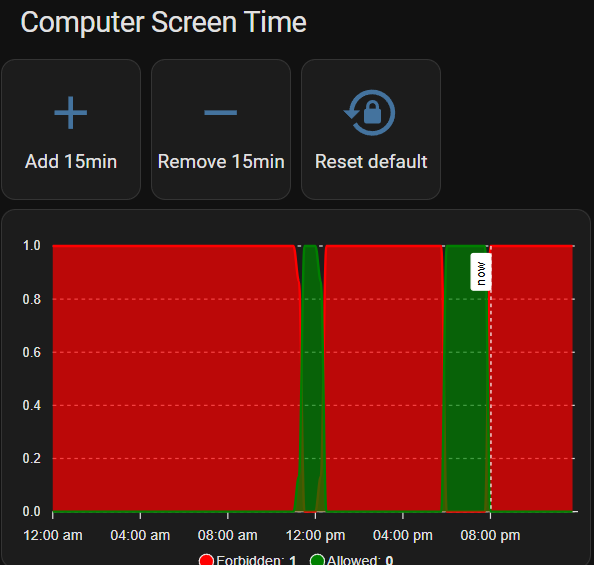
and here is the configuration for the card.
The card is conditional on the user ( I don’t want the kid to be able to grant himself more time.
I use a APEX chart (Looking for a better solution) that is refreshed every minutes
type: vertical-stack
cards:
  - type: conditional
    conditions:
      - condition: user
        users:
          - 821a7949f7b140728e506b019e976f56
          - b1148df5120e491da8d17d6e35ecbf46
          - 821a7949f7b140728e506b019e976f56
          - 821a7949f7b140728e506b019e976f56
          - 821a7949f7b140728e506b019e976f56
          - 821a7949f7b140728e506b019e976f56
          - 821a7949f7b140728e506b019e976f56
    card:
      square: true
      type: grid
      cards:
        - show_name: true
          show_icon: true
          type: button
          name: Add 15min
          icon: mdi:plus
          tap_action:
            action: perform-action
            perform_action: shell_command.give_15min_kid1
            target: {}
        - show_name: true
          show_icon: true
          type: button
          name: Remove 15min
          icon: mdi:minus
          tap_action:
            action: perform-action
            perform_action: shell_command.remove_15min_kid1
            target: {}
        - show_name: true
          show_icon: true
          type: button
          name: Reset default
          icon: mdi:lock-reset
          tap_action:
            action: perform-action
            perform_action: shell_command.reset_kid1_schedule
            target: {}
      columns: 4
  - type: custom:apexcharts-card
    header:
      title: KId1 Access Today
    graph_span: 24h
    card_mod:
      style: |
        ha-card {
          height: 300px;
        }
    span:
      start: day
    now:
      show: true
      color: '#FFFFFF'
      label: now
    series:
      - entity: sensor.kid1_allowed_minutes
        type: area
        name: Forbidden
        color: red
        stroke_width: 2
        data_generator: |
          const data = [];
          const forbidden = entity.attributes.forbidden_minutes || [];
          const today = new Date().toISOString().split('T')[0];
          for (let block = 0; block < 96; block++) {
            const startMinute = block * 15;
            const blockMinutes = Array.from({length: 15}, (_, i) => startMinute + i);
            const count = blockMinutes.filter(m => forbidden.includes(m)).length;
            const hour = Math.floor(startMinute / 60).toString().padStart(2, '0');
            const minute = (startMinute % 60).toString().padStart(2, '0');
            const time = `${today}T${hour}:${minute}:00`;
            data.push({ x: time, y: count / 15 });
          }
          return data;
      - entity: sensor.daniel_allowed_minutes
        type: area
        name: Allowed
        color: green
        stroke_width: 2
        data_generator: |
          const data = [];
          const allowed = entity.attributes.allowed_minutes || [];
          const today = new Date().toISOString().split('T')[0];
          for (let block = 0; block < 96; block++) {
            const startMinute = block * 15;
            const blockMinutes = Array.from({length: 15}, (_, i) => startMinute + i);
            const count = blockMinutes.filter(m => allowed.includes(m)).length;
            const hour = Math.floor(startMinute / 60).toString().padStart(2, '0');
            const minute = (startMinute % 60).toString().padStart(2, '0');
            const time = `${today}T${hour}:${minute}:00`;
            data.push({ x: time, y: count / 15 });
          }
          return data;
title: Computer Screen Time