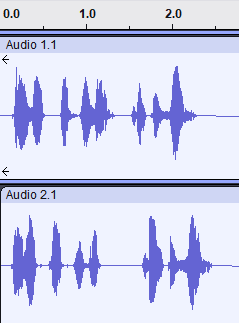
I am using the Wyoming integration with Piper to create local TTS messages.
As voice I am using the Dutch Piper voice nl_BE-nathalie-medium.
In the Piper add-on configuration I have these settings:
- Speaker: 0
- Length scale: 1.285
- Noise scale: 0.667
- Speaking cadence: 0.333
This produces a nice, most of the time naturally sounding voice, which I like a lot.
To be clear: I am only using TTS, and no AI, Assist or wakewords or so.
However, since I did the update of the Piper add-on from version 1.6.4 to version 2.1.1 it seems like the pause between sentences has become shorter.
It is a small difference, but makes the speech less natural for my taste. It sounds like the pause between sentences is now identical to the pause between words.
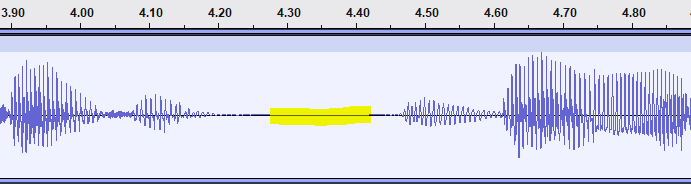
I opened the same TTS recording for both the old and new version of Piper in Audacity, and this clearly shows that between each sentence a short silence period has disappeared:
Version 1.6.4:
Version 2.1.1:
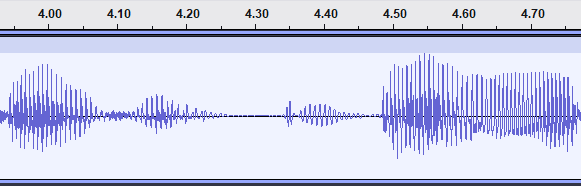
It is just 0.15 seconds of silence, but that is enough to make it less natural.
On the Piper GitHub page there is some info about some command-line options, including --sentence-silence, and I also found this GitHub post: Adding pause or break between sentences or paragraphs · Issue #492 · rhasspy/piper · GitHub which mentions this option, and a break option as well.
But I have no idea how to set this in the Piper configuration, and as far as I know, it is not possible to manually add pauses between sentences, like for instance something like this:
Sentence number one. < --sentence-silence 2 > Sentence number two.
Sentence number one. < break /> Sentence number two.
Is there anything I can do to lengthen the pauses between Piper TTS sentences?